Tutorial Video Maker
Whether you are filming makeup routines, cooking recipes, or tech guides, Edimakor's tutorial video maker streamlines your workflow. With auto-captions, clear text annotations, AI voiceovers and more, you can explain everything perfectly.


Explore Core Features of Edimakor Tutorial Video Maker
AI-Generated Step-by-Step Tutorial Script
Enter a tutorial topic or objective, and the AI will quickly generate a clear, structured tutorial script for you. Follow the script step by step to guide viewers—making tutorial video creation easier and saving hours of planning time.
Record Your Screen and Highlight Key Actions
Capture software demos and on-screen instructions with Edimakor's built-in free screen recorder. Use real-time drawing tools, highlights and zoom effects to pinpoint specific details. Guide viewers through each step more clearly.
Lifelike AI Avatars and Voices for Tutorial Videos
Skip the complex camera setup. Select a suitable digital avatar and natural AI voice, then simply paste your script to generate a narrated video. Deliver engaging instructional videos with perfect audio-visual quality. No need to record yourself.
Generate and Translate Subtitles Automatically
Ensure your audience never misses a single instruction. Automatically generate accurate captions for your tutorial video, and translate them into multiple languages with one click. Share your valuable knowledge globally.
How to Make Tutorial Videos With Edimakor
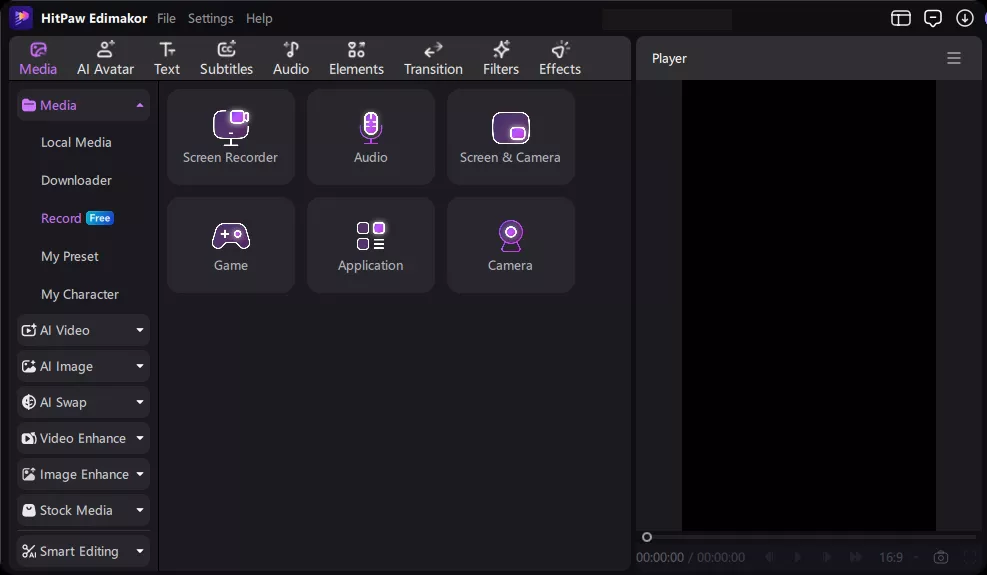
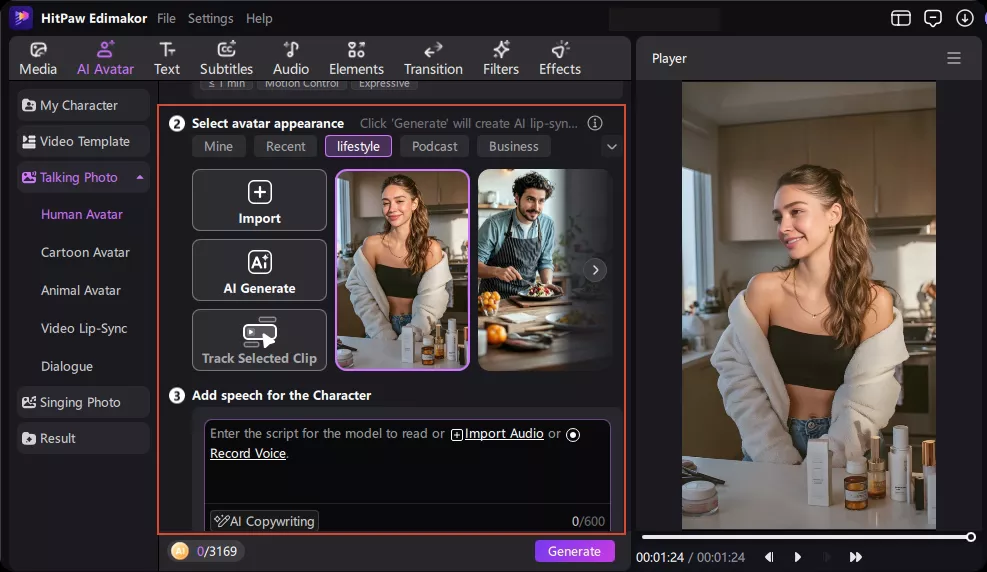
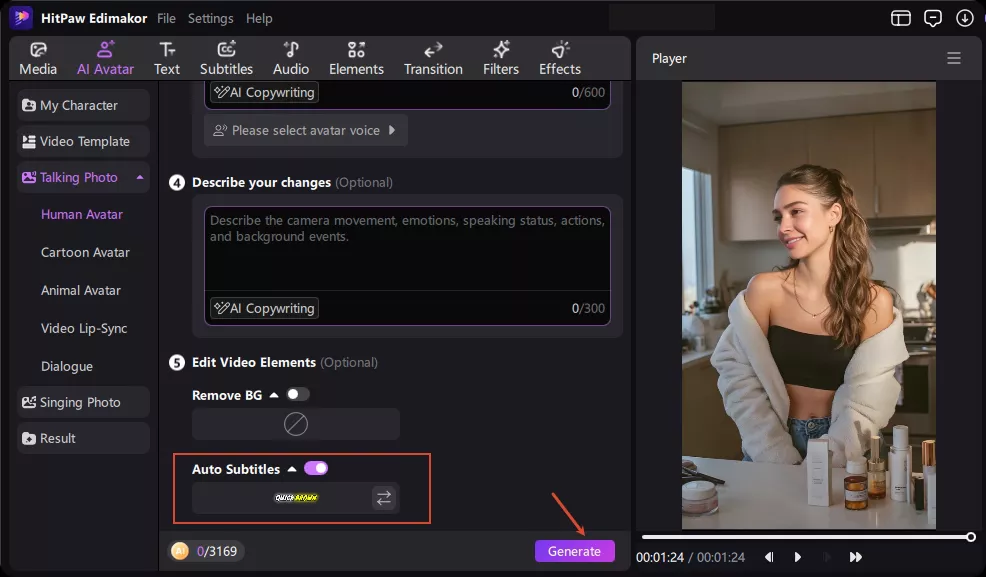
Take a Look at the Final Tutorial Videos
Curious about the output? Check out these finished tutorial videos made entirely with Edimakor. Just copy a clear prompt and turn it into a polished tutorial.


Who Is Edimakor's Tutorial Video Maker For?

As a teacher, I want to focus on my lesson plans, not video editing. Edimakor is a lifesaver for my online courses. I just paste my text, choose an avatar, and the auto-captions handle the rest. It makes creating professional educational content incredibly stress-free.

I run a channel sharing quick tech tips and software hacks. Whenever I get stuck on how to structure a video, the AI script feature in edimakor tutorial video maker gives me a perfect step-by-step outline. It helps me maintain a consistent uploading schedule without burning out.

Daniel K.
Customers kept asking how to assemble our new furniture line. I used edimakor to create a quick step-by-step setup guide. The timeline is highly intuitive, and the auto-subtitles were spot on without needing manual fixes. We linked the video to our product pages, and it helped a lot.

Emma L.
More Features & More Possibilities
AI Video Generator
Create professional videos from text, images, and videos in minutes.

AI Script Generator
Turn creative ideas into engaging video scripts, stories, and content for any project instantly.
AI Image Generator
Create high-quality images from simple text prompts for any creative project.
AI Voiceovers & Royalty-Free Music
Create engaging videos with natural AI voices and a built-in library of royalty-free music.
Built-in Video Editor
Edit, subtitle, enhance, and perfect your videos in one powerful workspace.
Hyper Realistic AI Avatars
Generate stunning product visuals, creator-style ads and commercial videos with realistic avatars.
FAQs about Tutorial Video Maker
A tutorial video maker can help you create step-by-step videos for different topics. Examples include software guides, cooking demonstrations, skincare routines, product instructions, DIY projects, and educational content.
The best tutorial video maker depends on your content needs and editing experience. Look for tools with screen recording, AI voiceovers, customizable subtitles, and easy editing features like Edimakor to simplify the production process.
Start with a clear topic, a step-by-step script, and the footage or images needed to demonstrate each step. You can also prepare a voiceover or use an AI presenter to guide viewers.
Yes. Beginners can create tutorial videos without advanced editing skills. Edimakor Tutorial Video Maker can help with script preparation, screen recording, voiceovers, and subtitles, making the production process easier to manage.
Yes. You can use screen recordings, product footage, and an AI avatar instead of appearing on camera. Add an AI-generated voiceover and subtitles to explain each step clearly.
Organize your tutorial into clear steps and focus on one task at a time. Use screen recordings, close-up shots, voiceovers, and subtitles to help viewers understand each action.
 Edimakor
You
+ Edimakor - Turn ideas
into dynamic
videos
Olivia M.