Remove Watermarks from Photos & Videos with AI Precision
Remove unwanted watermarks, subtitles, logos, and platform marks from videos and images with Edimakor Watermark Remover. Restore clean content with intelligent AI removal technology while keeping details natural and ready for reuse.







What Can Edimakor Watermark Remover Erase?






Watermark Remover from Video with 4 Modes
Edimakor provides four intelligent methods to remove video watermarks without compromising quality. Choose the best-fit solution for your footage and enjoy the professional results.
Matte Fill
Matte Fill
Replaces the watermark area with a solid color or a gradient that blends with the surrounding video, ideal for simple backgrounds.
Color Fill
Color Fill
Intelligently matches and fills the watermark area with the dominant color of the adjacent pixels, creating a natural look.
Smooth Fill
Smooth Fill
Analyzes the surrounding video frames to generate and fill the watermark area with the most appropriate textures and patterns, perfect for complex scenes.
Gaussian Blur
Gaussian Blur
Blurs the watermark area, effectively making it unreadable while maintaining the overall visual flow of your video. Great for quick fixes.
Watermark Remover from Photo with Precision
Edimakor photo watermark removal tool makes it simple to remove unwanted watermarks from images with precision. It ensures your pictures are clean, clear, and ready for anything. All photo file types (JPG/JPEG/PNG/BMP/WEBP) are supported.
AI Removal
Our cutting-edge AI intelligently detects and removes watermarks, seamlessly reconstructing the background with incredible accuracy.

Texture Repair
Replicates and blends surrounding textures and patterns to flawlessly fill the area where the watermark once was, maintaining original detail.

Edge Fill
Extends and fills the watermark area by analyzing and matching the pixels from the surrounding edges, ideal for watermarks near borders.
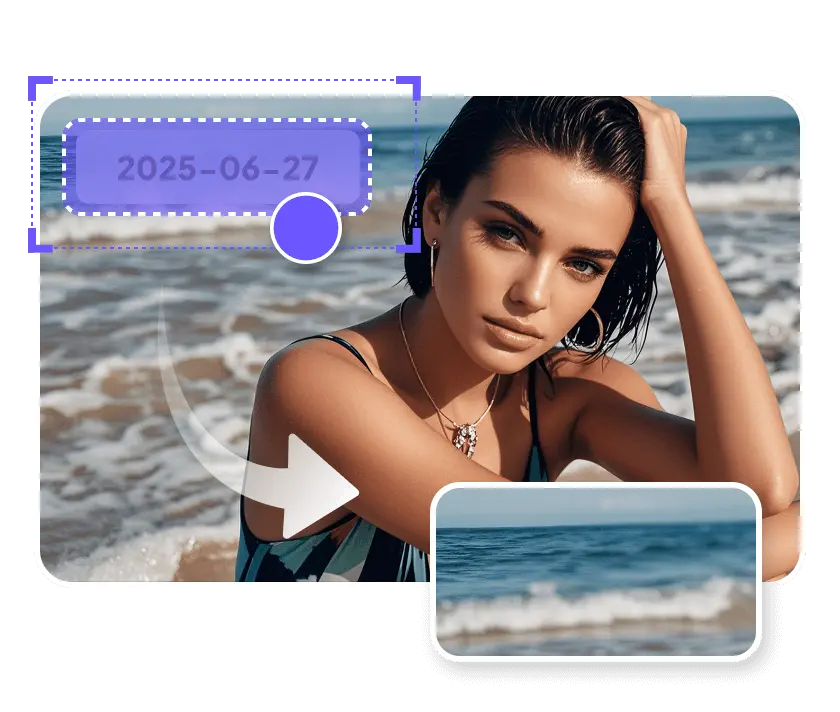
Smooth Fill
Blends the watermark area with the adjacent pixels for a natural, unnoticeable result, making it look like the watermark was never there.

How to Remove a Watermark with Edimakor
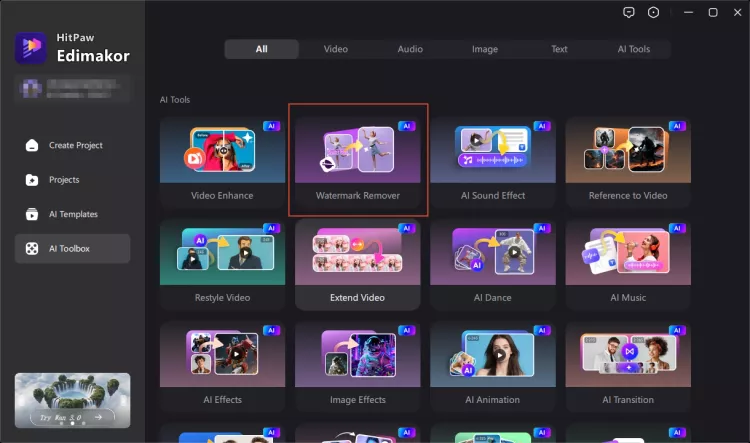
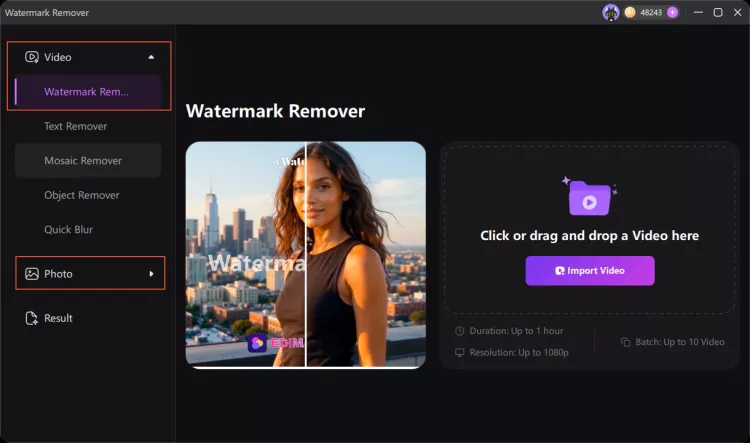
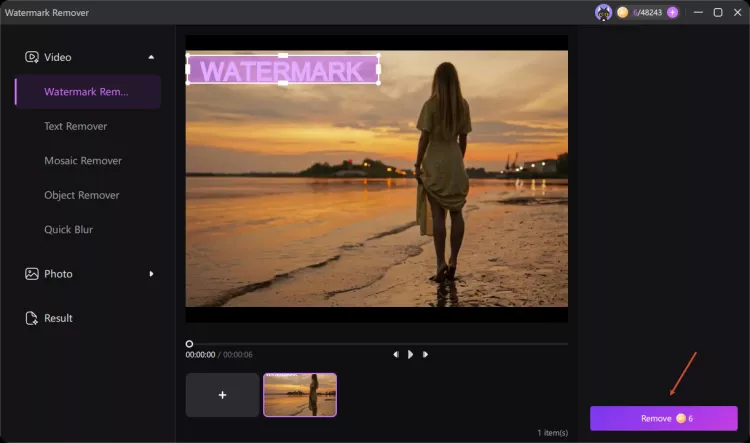
Remove Watermarks for Every Content Creation Need
AI Video Creators
Remove AI platform logos, generated marks, and unwanted overlays from AI-generated videos. Prepare clean visuals from tools like Veo and other AI video platforms.
Content Editors / Video Production Teams
Speed up editing workflows by removing watermarks, captions, and distracting elements from videos. Process multiple files efficiently for content creation, localization, and repurposing.
E-commerce Sellers / Marketing Teams
Clean up product videos and promotional materials by removing supplier watermarks, logos, and unwanted overlays. Create polished content for ads, stores, and social media campaigns.
Short Video Creators / Influencers
Remove subtitles, logos, and platform watermarks from TikTok, YouTube, and social videos. Repurpose clean footage for new content while maintaining a professional creator image.
Why Choose Edimakor AI Video/Photo Watermark Remover

Bulk Watermark Remover
Get multiple watermarks off photos and videos in batch.

High-Quality
Remove watermark from videos and images without blur, enjoying a high-quality otput.

Fast Speed
Edimakor removes all watermark content with a fast speed including processing and export.

I was able to remove a stubborn logo from my travel video in seconds with Edimakor. The AI did a surprisingly clean job — no blurring or weird artifacts!

Tried removing a watermark from an old family photo, and Edimakor made it look like it was never there. Super easy to use even if you're not tech-savvy!
Jessica
I used Edimakor’s watermark remover for my product demo clips. It saved me hours in editing — no need to reshoot anything. Highly recommend!
Kevin
FAQs about Edimakor Watermark Remover
Edimakor supports a wide range of popular formats. For images, supported formats include JPG, JPEG, PNG, BMP, and WebP, etc. For videos, you can upload MP4, MOV, AVI, MKV, and more.
You can upload up to 20 photos and 10 video files at a time to Edimakor's watermark remover for batch processing.
No, Edimakor uses AI-powered technology to remove watermarks without compromising the quality of your media. Even with complex watermarks, it preserves the original resolution and visual integrity as much as possible.
Edimakor’s watermark remover uses advanced AI and content-aware algorithms to detect and erase watermarks from your images or videos. It analyzes the surrounding pixels to intelligently fill in the removed area, delivering a clean and natural result.
Yes, Edimakor can help remove moving watermarks from videos. The AI algorithm tracks the watermark frame by frame, allowing for dynamic and precise removal throughout the video duration.
Yes. Edimakor Watermark Remover allows you to select multiple areas containing watermarks, subtitles, logos, or unwanted elements. The AI automatically detects and removes all selected areas in one process, helping you clean videos faster without manually editing each watermark.
No. Edimakor AI intelligently analyzes the selected area and protects important details outside the watermark region. Even when removing watermarks near faces or complex backgrounds, it helps preserve natural textures, facial details, and overall video quality.
Edimakor Watermark Remover supports more formats, longer videos, and batch processing compared with many online tools. It can handle common watermarks, subtitles, logos, and platform marks with AI-powered removal, making it ideal for creators, marketers, and content teams.
One-Stop Tools, Personalized Videos


 Edimakor
You
+ Edimakor - Turn ideas
into dynamic
videos
Maria