AI Video Extender
Turn short clips into longer, complete scenes with HitPaw Edimakor. Describe what happens next and AI extends your video in seconds. Keep your scenes flowing naturally without blurring or mismatched frames.
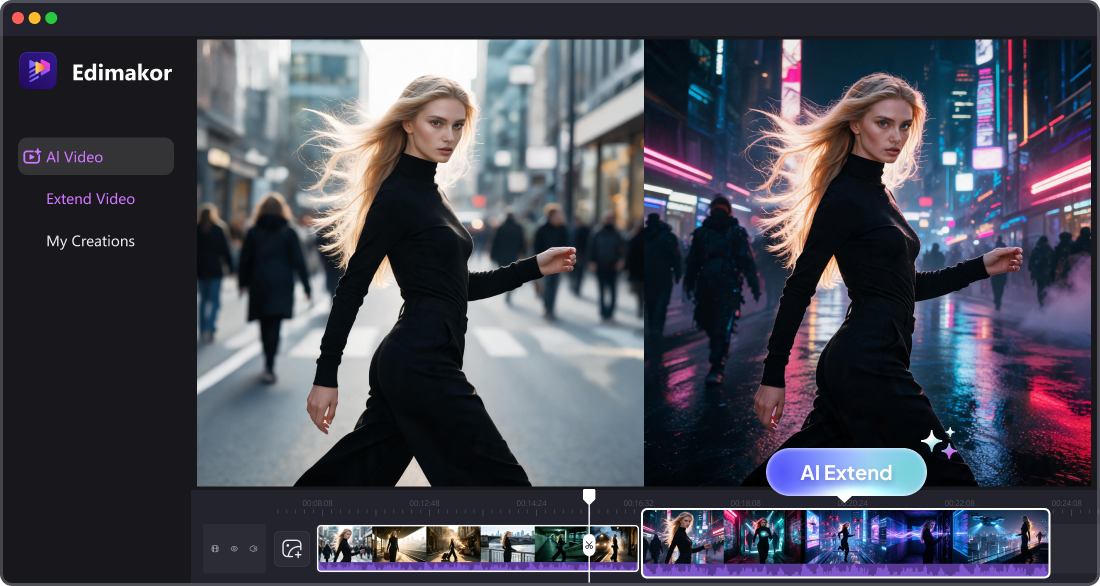







Extend Your Video with Control and Creativity

Guide AI Video Extension with Prompts
Specify what you want to happen next with a simple prompt. The AI video extender follows your instructions to generate the next scene. No complex settings or editing skills are needed.
Make Longer Videos That Stay Original
Our advanced AI video extender analyzes your original footage carefully. Extend your video in the same visual style, without losing quality. This ensures the new footage blends naturally with the original.
Extend Every Movement Smoothly
Keep subjects, camera movements, and scene actions flowing smoothly beyond the original clip. AI studies the existing motion and extends your video seamlessly. This helps avoid awkward cuts.
Turn Your Extension into a New Style
Choose from a range of visual styles for your extended footage. Let AI apply your chosen style to every new scene automatically. Give your clip fresh visual variations without any manual editing.
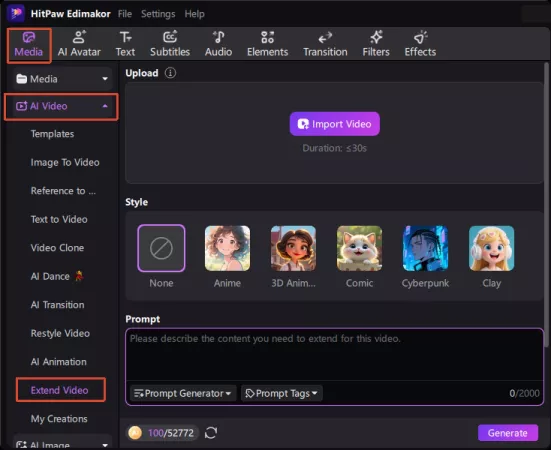
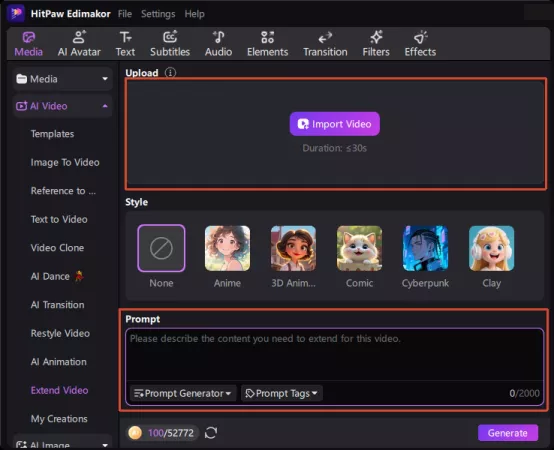
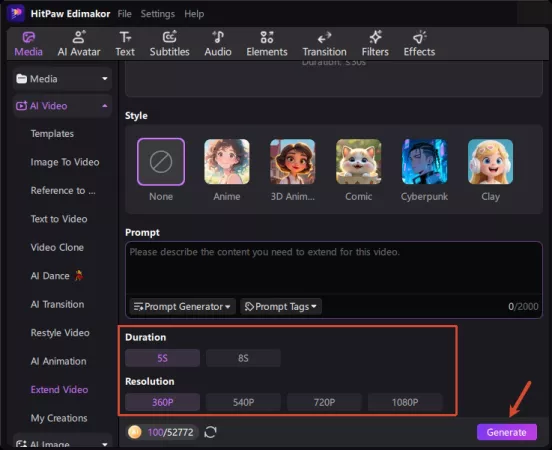
Built for Creators Who Need to Extend Footage

My short film had a shot that felt too brief. Edimakor extended it without reshooting anything. The new frames match the original style well. It gave my edit more room to breathe. I finished the project on time. A very practical tool for editors.

I often post short clips on TikTok and Reels. Sometimes my footage is just too short. HitPaw Edimakor extends it with smooth transitions. The longer videos fit the platform better. Posting feels less stressful now. Easy to use, even on busy days.

James Reynolds
My product shots were only a few seconds long. I used Edimakor to turn them into longer ads. The lighting and texture stayed consistent. I didn't need to set up the shoot again. It saved both time and budget. Now our ads look more complete.

Anna Lopez
More Features & More Possibilities
AI Video Generator
Create professional marketing videos from text, images, or product links in minutes.
AI Script Generator
Turn product ideas into high-converting video scripts, ad copies, and UGC concepts instantly.
AI Image Generator
Generate stunning product visuals, ad creatives, and brand assets with simple prompts.
AI Voiceovers & Royalty-Free Music
Create engaging videos with natural AI voices and a built-in library of royalty-free music.
Built-in Video Editor
Edit, subtitle, enhance, and perfect your videos in one powerful workspace.
Hyper Realistic AI Avatars
Generate stunning product visuals, creator-style ads and commercial videos with realistic avatars.
FAQs about AI Video Extender
An AI video extender uses AI to create additional frames for existing footage. It analyzes the original video and generates new frames that continue the scene. This helps extend short clips, even when you only have limited footage.
The best AI video extender depends on your footage, extension needs, and editing workflow. If you are looking for natural results, good scene consistency, and simple controls, HitPaw Edimakor stands out. It combines AI video extension with an easy-to-use editing workflow. You can extend your first video in minutes—no learning curve required.
You can extend many types of footage, including scenery, product shots, social media clips, and creative videos. Edimakor's AI video extender works well when you need more footage from a short, visually consistent scene.
Yes, you can use AI-extended videos for commercial projects when you have the necessary rights. Make sure you also have permission to use the original footage. Check the applicable terms before publishing commercial content.
Tools like HitPaw Edimakor use AI to analyze your footage and extend the video while preserving the main visual elements. However, generated frames may not always match the original perfectly. Review the extended section before publishing.
 Edimakor
You
+ Edimakor - Turn ideas
into dynamic
videos
Emily Thompson