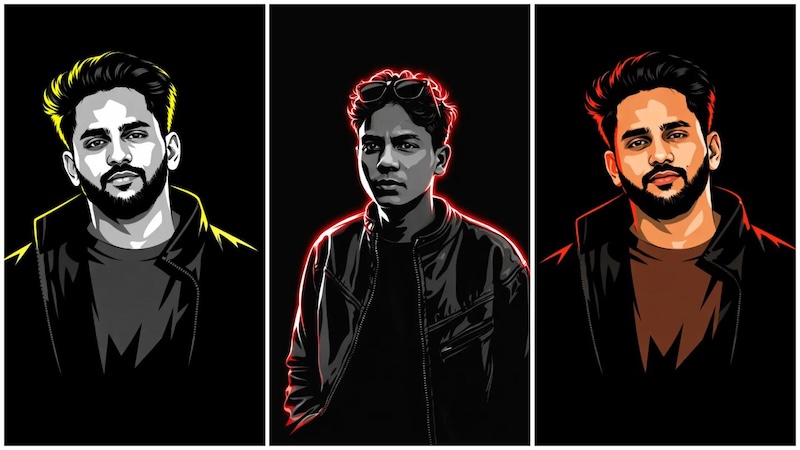
In 2026, vector art portraits are trending across Instagram, giving ordinary photos a bold, creative, and professional-looking transformation. With the help of advanced AI photo editing tools, anyone can now turn a simple selfie into striking digital artwork featuring clean lines, vibrant colors, geometric details, and expressive facial features. In this guide, we have mentioned the top 10 digital vector portrait AI photo editing prompts to help you create stunning images without editing experience or professional help. Ensure you read this guide till the end.
Part 1: What is Vector Art?
Vector images are graphic representations created from mathematical shapes. Unlike raster images (such as JPG, PNG, TIFF), which are made up of a grid of pixels, vector images are composed of lines, curves, polygons, and other geometric shapes, each defined by a mathematical equation. This means vector artwork can be scaled up or down without losing quality, making it ideal for everything from small social media profile pictures to large posters and banners. Today, AI image editing tools have made vector-style artwork even easier to create, allowing users to transform ordinary photographs into stylish digital portraits with just a simple text prompt.
Part 2: Top 10 Digital Vector Art AI Photo Editing Prompts
If you want to create high-quality digital vector art, you must provide the AI photo editor with a clear and detailed prompt. Below, we’ve mentioned the top 10 vector portrait prompt ChatGPT that can help you transform ordinary images into stunning digital artwork.
1 Bold Geometric Vector Portrait

“Transform the uploaded photo into a striking digital vector portrait while preserving the person’s recognizable facial features, hairstyle, expression, and overall identity. Use bold geometric shapes, crisp edges, smooth curves, and clean outlines to create a polished illustration. Apply a vibrant combination of complementary colors with subtle gradients for added depth. Simplify the clothing and background into elegant vector forms. Maintain balanced facial proportions and sharp details. Create a modern, professional composition with a clean background, high contrast, smooth rendering, and a premium graphic-design aesthetic.”
2 Vibrant Pop-Art Vector Portrait
“Turn the uploaded image into a vibrant pop-art-inspired vector portrait while preserving the subject’s identity and natural facial characteristics. Use bold outlines, simplified geometric shapes, energetic color blocks, and contrasting shades to create a visually exciting composition. Incorporate bright tones such as yellow, orange, pink, blue, and purple without making the image appear messy. Add subtle halftone-inspired details while maintaining a clean vector finish. Simplify the background into colorful graphic elements. Create a stylish, high-contrast illustration that feels contemporary, expressive, playful, and suitable for social media artwork.”
3 Cartoon-Inspired Vector Avatar
“Convert the uploaded photograph into a polished cartoon-inspired vector avatar while maintaining the subject’s recognizable facial features, hairstyle, expression, and overall appearance. Use smooth outlines, simplified shapes, expressive eyes, clean facial contours, and carefully balanced proportions. Apply vibrant yet harmonious colors to the skin, hair, clothing, and background. Add subtle highlights and shadows to give the illustration dimensionality without losing its vector aesthetic. Keep the composition centered and visually clean. Create a friendly, modern avatar suitable for social media profiles, gaming accounts, messaging applications, personal branding, or creative digital projects.”
4 Neon Cyberpunk Vector Portrait
“Transform the uploaded image into a futuristic cyberpunk vector portrait while preserving the subject’s identity, facial structure, hairstyle, and expression. Use sharp geometric shapes, luminous outlines, neon-inspired gradients, and futuristic graphic details to create an energetic digital illustration. Incorporate glowing cyan, magenta, purple, and electric-blue accents against a dark abstract background. Add subtle technological patterns and angular elements without distracting from the face. Maintain crisp vector edges and balanced composition throughout. The final result should look futuristic, cinematic, stylish, and suitable for a modern digital profile or creative social media post.”
5 Retro Vintage Vector Poster
“Turn the uploaded portrait into a retro-inspired vector poster with a distinctive vintage graphic-design aesthetic. Preserve the person’s recognizable face, hairstyle, expression, and proportions while simplifying the photograph into bold vector shapes. Use warm retro colors such as cream, orange, brown, mustard, and muted red, combined with thick outlines and subtle poster-inspired details. Add a simple geometric background that complements the subject without overwhelming the composition. Create a slightly nostalgic visual style with crisp edges, balanced colors, and strong contrast. Make the final artwork look like a professionally designed vintage poster.”
6 Isometric Vector Portrait
“Convert the uploaded photo into a sophisticated isometric vector portrait while preserving the subject’s recognizable facial features, hairstyle, expression, and proportions. Use clean geometric planes, sharp angular forms, smooth vector edges, and subtle dimensional shading. Create a balanced color palette with complementary tones and controlled highlights. Simplify the clothing and background into coordinated geometric elements. Maintain a polished digital illustration appearance with excellent symmetry and visual depth. The final portrait should feel modern, creative, and professionally designed, suitable for social media profiles, digital posters, personal branding, and creative portfolios.”
7 Street-Art Vector Portrait
“Transform the uploaded photograph into an energetic street-art-inspired vector portrait while preserving the person’s recognizable appearance and facial expression. Use bold outlines, layered geometric shapes, graffiti-inspired patterns, expressive color blocks, and dynamic abstract elements. Incorporate vibrant shades such as red, blue, yellow, green, and purple while maintaining visual harmony. Add a textured urban-inspired background without overpowering the face. Keep the illustration crisp and digitally polished rather than photorealistic. Create a rebellious, contemporary artwork that feels expressive, youthful, and suitable for social media posts, posters, album-style artwork, and creative personal branding.”
8 Neon Line-Art Vector Portrait
“Convert the uploaded image into a sophisticated neon line-art vector portrait while preserving the subject’s facial identity, hairstyle, expression, and proportions. Use continuous glowing vector lines to define the face, hair, clothing, and important contours. Combine bright cyan, purple, pink, and blue neon accents against a deep dark background. Keep the design minimal but visually impactful, with smooth curves and precise outlines. Add subtle luminous effects without making the artwork photorealistic. Create a futuristic digital illustration that feels sleek, artistic, and modern, suitable for social media avatars, posters, and creative profile artwork.”
9 Colorful 3D Vector Portrait
“Turn the uploaded image into a colorful 3D-inspired vector portrait while preserving the subject’s recognizable facial structure, hairstyle, expression, and overall identity. Use layered geometric shapes, smooth gradients, dimensional highlights, and soft shadows to create a three-dimensional appearance while maintaining clean vector aesthetics. Incorporate vibrant complementary colors across the face, clothing, and background. Add subtle depth without introducing realistic photographic textures. Keep the composition centered, polished, and visually balanced. Create a contemporary digital illustration that combines vector precision with dimensional artwork, suitable for social media, profile pictures, posters, branding, and creative portfolios.”
10 Futuristic Glass Vector Images
“Transform the uploaded photo into a futuristic glass-inspired vector portrait while preserving the subject’s recognizable facial features, hairstyle, expression, and proportions. Use translucent geometric shapes, smooth vector contours, glass-like highlights, subtle reflections, and layered gradients. Incorporate cool blue, silver, violet, and turquoise tones with a clean abstract background. Keep the face sharp and clearly recognizable while giving the artwork a sophisticated dimensional appearance. Maintain crisp edges and polished digital rendering throughout. Create a premium futuristic illustration suitable for social media profiles, digital posters, creative portfolios, and modern personal branding.”
How to Transform an Ordinary Image into a High-Quality Vector Portrait
Transforming an ordinary image into a high-quality vector portrait is now easier with AI-powered editing tools like Edimakor AI. Edimakor AI is an all-in-one video editor that also offers image generation capabilities. With its Image-to-Image tool, users can easily convert simple images into high-quality vector portraits with a simple text prompt — no editing experience or professional help required. The best part is that this works entirely in a web browser, meaning no software downloading or installation is required. Another amazing feature of this tool is that it supports a wide range of AI models, such as Nano Banana, Nano Banana Pro, Imagen 4, Stable Diffusion, Flux, and Midjourney.
Key Features of Edimakor AI
- Image-to-Image: Edimakor AI enables users to transform simple images into vector-style art without requiring advanced editing skills. Simply upload your original photo, enter a detailed prompt, and let the AI handle the transformation.
- Multiple AI Models: The program offers a wide range of AI models, each with unique capabilities. It includes AI models such as Nano Banana, Nano Banana Pro, Stable Diffusion, Flux, Midjourney, and more.
- Online Video Editor: It provides a convenient online video editor that allows users to customize and enhance their creative project directly from their browser. You can trim clips, add text, apply effects, add music, and make other edits.
- Compatibility: Edimakor AI is a web-based tool, which means it works seamlessly with Windows, macOS, and other devices. Plus, it supports all web browsers, including Google Chrome, Opera, Firefox, and Microsoft Edge.
- Intuitive Interface: This tool offers an easy-to-use interface, which is ideal for non-tech and beginner users. Users can upload their images, enter prompts, generate creative results, and make adjustments with minimal effort.
Step-by-Step Guide:
Follow the instructions below to learn how to create vector-style art using Edimakor AI in 2026:
Step 1: Navigate to the Edimakor AI official site and log in with your account. Choose the “Image-to-Image” feature from the main interface and upload the reference image.
Step 2: Enter the vector portrait prompt Gemini or ChatGPT in the prompt box and select the image settings, such as aspect ratio, resolution, and output number.
Step 3: Hit the “Generate” button to begin the image creation process. Within seconds, your digital vector image will be ready. Go to “My Creation” and select the image you want to download.
Conclusion
Creating vector-style art has now become easier than ever. With the right digital vector portrait AI photo editing prompt, you can transform an ordinary image into a stylish and visually appealing piece of digital artwork within minutes. To get engaging results, we recommend using Edimakor AI. It is an AI video editor that also offers advanced image creation capabilities.


Leave a Comment
Create your review for HitPaw articles