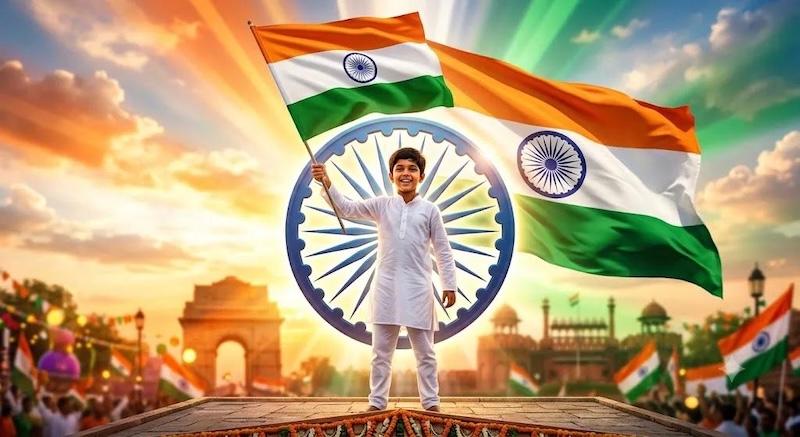
15th August 1947 marks one of the most significant milestones in India’s history — the day the nation gained independence after years of struggle and sacrifice. Since then, Independence Day has been celebrated every year with immense pride, patriotism, and enthusiasm across the country.
In today’s digital age, the celebration has also extended to social media platforms. Every Independence Day, Facebook, Instagram, WhatsApp, and X are filled with patriotic photos and creative posts expressing love for the nation. This Independence Day, you can also be part of this trend. Below, we have mentioned the top 17 15th August AI photo editing prompts to help you create eye-catching images.
Part 1: Tips for Writing Better Independence Day AI Prompts
If you want an Indian Independence Day AI photo prompt that actually works, it’s important to be as detailed as possible. Here are some tips that you can use for writing better 15th August AI photo editing prompts:
- To create an engaging Independence Day image, add patriotic elements like the Indian flag, fireworks, balloons, or parade decorations.
- Include color preferences like saffron, while, and green colors of the Indian tricolor to give your image an authentic Independence Day theme.
- Add traditional Indian clothing to your prompt, such as a white kurta-pajama, saree, salwar kameez, and more.
- Input keywords such as ultra-realistic, 4K, HDR, high-resolution, highly detailed, or professional photography for high-quality results.
Part 2: Top 17 15th August AI Photo Editing Prompts in 2026
If you want to create eye-catching patriotic portraits, family photos, couple pictures, or social media posts, you’re in the right place. Below, we have listed the top 12 15th August Independence Day AI photo prompts that can help you transform ordinary images into stunning patriotic creations:
1. Red Fort Independence Day Hero

“Upload your portrait and transform it into a realistic 15th August Independence Day scene. Preserve my facial features while dressing me in a crisp white kurta with a tricolor stole. Place me proudly in front of the iconic Red Fort during the national flag-hoisting ceremony, with the Indian flag waving high in the background. Add tricolor flower petals, patriotic confetti, warm sunrise lighting, cinematic depth of field, realistic crowd, ultra-detailed textures, DSLR photography, vibrant saffron, white, and green colors, 4K HDR quality.”
2. Tricolor Smoke Patriotic Portrait
“Use my uploaded image and create a dramatic Independence Day portrait surrounded by vibrant saffron, white, and green smoke effects. Keep my face natural while changing my outfit to a stylish white shirt with a tricolor scarf. Add a softly blurred Indian flag in the background, glowing cinematic lighting, realistic smoke particles, flying flower petals, confident expression, shallow depth of field, professional portrait photography, ultra-realistic skin details, HDR lighting, and 8K quality suitable for Instagram and WhatsApp profile pictures.”
3. Independence Day Family Celebration
“Transform the uploaded family photo into a joyful 15th August celebration while preserving everyone's facial features. Dress each family member in elegant traditional Indian outfits with tricolor accessories. Place us in a beautifully decorated garden featuring Indian flags, balloons, patriotic banners, colorful flower decorations, and children waving flags. Add warm golden-hour lighting, realistic smiles, cinematic atmosphere, soft shadows, festive confetti, vibrant colors, highly detailed textures, DSLR-quality photography, and ultra-realistic 4K resolution.”
4. Indian Army Tribute Portrait
“Convert my uploaded photo into a respectful Independence Day tribute honoring the Indian Armed Forces. Preserve my face while dressing me in an elegant military-inspired ceremonial outfit with patriotic details. Place me beside a grand Indian flag with silhouettes of brave soldiers marching in the background under a dramatic sunrise sky. Add cinematic lighting, realistic dust particles, glowing sunlight rays, emotional atmosphere, high-detail textures, patriotic color grading, ultra-realistic photography, HDR effects, and premium 8K image quality.”
5. College Independence Day Celebration
“Use my uploaded image and transform it into a vibrant college Independence Day celebration. Preserve my facial features while dressing me in a neat school uniform with a tricolor badge. Place me on a decorated school stage during the flag-hoisting ceremony, surrounded by students waving Indian flags, colorful balloons, patriotic banners, and flower petals. Add bright morning sunlight, realistic crowd details, joyful expressions, cinematic photography, ultra-detailed textures, HDR lighting, and professional-quality 4K resolution.”
6. Freedom Fighter Inspired Portrait
“Transform my uploaded photo into a powerful portrait inspired by India's freedom movement. Preserve my facial features while dressing me in classic khadi attire with a Gandhi cap and tricolor scarf. Place me on a historical street with the Indian flag proudly waving, vintage architecture, patriotic banners, and dramatic clouds in the background. Add cinematic golden-hour lighting, realistic dust particles, emotional atmosphere, high-detail textures, DSLR portrait quality, vibrant color grading, HDR effects, and ultra-realistic 8K output.”
7. Independence Day Rooftop Flag Celebration
“Transform my uploaded image into a heartwarming 15th August rooftop celebration while preserving my facial features. Dress me in a stylish white kurta with a tricolor stole and place me proudly holding the Indian flag on a beautifully decorated rooftop. Add tricolor balloons, fluttering ribbons, flower petals, neighboring rooftops filled with people celebrating, and a glowing sunrise sky. Create a joyful patriotic atmosphere with cinematic lighting, realistic shadows, DSLR photography, HDR color grading, ultra-detailed textures, and stunning 4K quality.”
8. Patriotic Street Festival
“Use my uploaded photo to create a vibrant Independence Day street festival scene while keeping my facial features unchanged. Dress me in fashionable traditional Indian attire with tricolor accessories and place me in a lively market decorated with Indian flags, colorful banners, patriotic lights, flower garlands, and cheering crowds. Add confetti, realistic smoke effects, warm golden-hour lighting, cinematic depth of field, high-detail textures, professional DSLR photography, HDR effects, and ultra-realistic 8K image quality.”
9. Independence Day Rain Celebration
“Convert my uploaded portrait into a cinematic 15th August rain celebration while maintaining my natural facial features. Dress me in an elegant white outfit accented with tricolor details and place me in a rain-soaked city street decorated with Indian flags, patriotic lights, and festive banners. Add realistic raindrops, reflective wet roads, flower petals, soft mist, dramatic cinematic lighting, vibrant saffron, white, and green colors, DSLR portrait quality, HDR effects, and highly detailed 4K realism.”
10. Independence Day Mountain Adventure Portrait
“Transform my uploaded photo into an adventurous Independence Day scene atop a majestic mountain. Preserve my facial features while dressing me in a trekking outfit with a tricolor scarf. Show me proudly planting the Indian flag on the summit above the clouds during sunrise. Add breathtaking mountain landscapes, dramatic golden light, mist, realistic wind-blown fabric, cinematic wide-angle composition, HDR photography, ultra-realistic textures, and crisp 8K quality for an inspiring patriotic adventure.”
11. Day Cricket Stadium Celebration
“Transform my uploaded portrait into a thrilling Independence Day cricket stadium celebration. Preserve my facial features while dressing me in a modern cricket jersey featuring subtle tricolor accents. Position me inside a packed stadium with thousands of waving Indian flags, fireworks, cheering fans, confetti, and a giant Ashoka Chakra display on the field. Add dynamic sports lighting, cinematic action effects, realistic crowd details, DSLR sports photography, HDR color grading, and ultra-realistic 8K image quality.”
12. India Gate · Sunrise Portrait
“Create an award-winning ultra-realistic 8K Independence Day cinematic portrait using the uploaded photo as the exact facial reference. Preserve the subject’s identity, facial structure, hairstyle, beard, expression, skin tone, and natural features. Place the subject confidently in the foreground near India Gate at sunrise, wearing elegant contemporary Indian attire. A large Indian National Flag gently waves in the background, illuminated by warm golden morning light. Add subtle saffron, white, and green fabric elements, soft morning mist, floating tricolor particles, distant patriotic crowd silhouettes, birds flying across the sky, cinematic sun rays, warm lens flare, and soft golden bokeh. Premium editorial photography, hyper-realistic skin texture, natural facial details, realistic lighting, dramatic depth of field, HDR color grading, crisp DSLR quality, sophisticated patriotic atmosphere. Add elegant typography: 15 August and Happy Independence Day.”
13. Tricolor Smoke · Dramatic Studio Portrait
“Create a premium ultra-realistic 8K Independence Day studio portrait using the uploaded photo as the exact facial reference. Maintain the subject’s identity, facial structure, hairstyle, beard, expression, clothing details, and skin tone accurately. Compose the subject in a powerful three-quarter portrait against a dark cinematic background. Surround him with flowing saffron, white, and green smoke forming elegant artistic waves behind his silhouette, inspired by the Indian National Flag. Add subtle glowing particles and dramatic volumetric light passing through the smoke. Strong rim lighting, realistic skin texture, cinematic shadows, luxury magazine photography, high contrast, shallow depth of field, ultra-sharp facial details, premium HDR color grading, realistic DSLR photography. Elegant typography: “15 August” with a refined gold treatment.”
14. Rooftop · Indian City at Dawn
“Create an ultra-realistic 8K cinematic Independence Day portrait using the uploaded photo as the exact facial reference. Preserve the subject’s exact identity, face shape, hairstyle, beard, expression, skin tone, and natural appearance. Place the subject standing on a modern rooftop overlooking a vast Indian city at sunrise, holding a small Indian National Flag naturally in one hand. Hundreds of tiny flags decorate distant rooftops, while the first golden sunlight illuminates the skyline. Add atmospheric haze, soft clouds, birds soaring across the sky, subtle tricolor light reflections, gentle wind moving the clothing, realistic sunlight beams, and cinematic lens flare. Premium fashion editorial photography, natural skin texture, sophisticated composition, realistic depth of field, dramatic yet authentic patriotic atmosphere, ultra-detailed DSLR quality, HDR cinematic color grading. Add elegant text: 15 August.”
15. Tricolor Fabric · Artistic Fashion Portrait
“Create an artistic ultra-realistic 8K Independence Day fashion portrait using the uploaded photo as the exact facial reference. Keep the subject’s identity completely consistent, including facial structure, hairstyle, beard, expression, skin tone, and recognizable features. Compose a powerful close-up portrait surrounded by flowing translucent fabrics in saffron, white, and green, dynamically sweeping through the frame like an abstract Indian National Flag. Warm sunlight passes through the fabric, creating beautiful translucent color reflections across the scene. Add floating dust particles, subtle golden bokeh, soft atmospheric haze, elegant shadows, cinematic rim light, and dramatic movement. Luxury Indian fashion editorial, fine-art photography, hyper-realistic skin texture, natural lighting, premium HDR grading, shallow depth of field, ultra-sharp facial details, sophisticated patriotic aesthetic. Elegant minimal typography: 15 August.”
16. Red Fort · Grand Celebration
“Create an award-winning ultra-realistic 8K Independence Day cinematic portrait using the uploaded photo as the exact facial reference. Preserve the subject’s exact identity, facial structure, hairstyle, beard, expression, clothing, and skin tone. Place the subject prominently in the foreground at the Red Fort during a grand Independence Day celebration. The Indian National Flag rises dramatically behind him, catching the warm golden sunrise. In the distance, show elegant patriotic decorations, Indian flags, a celebratory crowd in soft focus, flying white doves, birds in the sky, floating saffron-white-green particles, atmospheric smoke, and cinematic sunlight beams. Powerful but natural pose, premium magazine cover aesthetic, realistic skin texture, detailed facial features, soft rim lighting, cinematic depth of field, dramatic contrast, luxury HDR color grading, ultra-sharp DSLR photography. Add refined golden typography: 15 August and Happy Independence Day.”
17. Indian Street · Everyday Patriotism
“Create an ultra-realistic 8K cinematic Independence Day portrait using the uploaded photo as the exact facial reference. Maintain the subject’s identity, facial structure, hairstyle, beard, expression, skin tone, and natural appearance. Place the subject walking confidently through a lively Indian street decorated for 15 August, surrounded by small Indian flags, tricolor decorations, warm storefront lights, and softly blurred people celebrating Independence Day. Golden-hour sunlight streams between the buildings, creating beautiful cinematic rays and natural lens flare. Add subtle tricolor reflections, floating dust particles, gentle atmospheric haze, and realistic background activity. Documentary-style photography blended with premium editorial aesthetics, authentic Indian atmosphere, natural skin texture, cinematic depth of field, realistic lighting, HDR color grading, ultra-detailed DSLR quality. Add elegant typography: 15 August.”
Part 3: How to Create 15th August AI Photos Using Edimakor AI
Want to create high-quality images for 15th August? Edimakor AI is one of the best AI tools, enabling users to create engaging, professional-looking images with a simple text prompt. One of the standout features of this tool is its image-to-image capability, which allows users to turn ordinary images into Independence Day-themed artwork. Simply upload an existing image, enter the 15th August AI prompt, choose the AI model, and click on the “Generate” button. Edimakor AI will analyze your input and generate an image that closely matches your prompt. The best part of Edimakor AI is that it supports popular AI models, each with unique features and capabilities, such as Nano Banana, Nano Banana Pro, Seedream, Flux, Imagen 4, Stable Diffusion, and Midjourney.
Create NowKey Features of Edimakor AI
- Image-to-Image: Edimakor AI image-to-image feature enables users to turn ordinary images into multiple styles, including 15th August, sci-fi, Ghibli, anime, cartoon, watercolor, oil painting, 3D, pixel art, fantasy, and many more.
- Text-to-Image: The program also includes text-to-image capabilities, allowing users to create high-quality, engaging images with simple text prompts — no editing experience or professional help required.
- Free Version: One of the best features of Edimakor AI is that it lets users create 15th August Independence Day images for free. The free version includes amazing features, such as text-to-image, image-to-image, and an AI image enhancer.
- Compatibility: This tool works seamlessly with multiple devices, including Android, iOS, Windows, and macOS. In addition, it supports the latest web browsers, including Google Chrome, Opera, Safari, Microsoft Edge, and Firefox.
- Ease of Use: Edimakor AI offers an intuitive, clean interface, allowing non-tech and beginner users to produce high-quality images without prior design or editing experience. Simply enter a text prompt and let the AI handle the rest.
Step-by-Step Guide:
Edimakor works entirely online, meaning no software downloading or installation is required. Navigate to its official site to begin the generation process:
Step 1: Once you’re on the Edimakor AI official site, log in with your account to begin the process. Select the “Image-to-Image” feature from the left panel and click on the “Upload” button to import the reference image.
Step 2: Enter the 15th August AI prompt into the prompt box, then select the AI model. Next, adjust the image settings such as aspect ratio, output number, and more. Click on the “Generate” button to begin the image creation process.
Step 3: Within seconds, your AI image will be ready. Go to the “My Creation” section and preview the results. If satisfied, hit the “Download” button to save the image in multiple formats, such as JPG and PNG.
Conclusion
15th August is one of the most important days in India, celebrated with immense pride and patriotism. To help you create unique and eye-catching Independence Day visuals, we’ve mentioned the top 17 15th August AI photo editing prompts. Use these prompts with Edimakor AI to generate realistic, professional-looking images for Instagram, Facebook, TikTok, and X.


Leave a Comment
Create your review for HitPaw articles