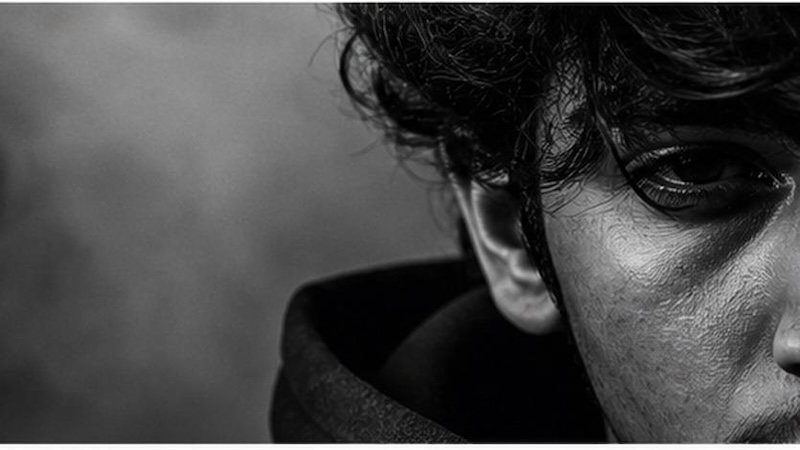
Platforms like Instagram and TikTok are filled with half-face photos, attracting millions of views every day. If you want to join this trend, you don’t need professional photography skills or advanced editing experience. With the right AI photo editing prompts, you can transform an ordinary selfie into a dramatic or artistic masterpiece in just a few clicks. In this guide, we will mention the top 13 half-face AI photo editing prompts that help you create eye-catching portraits for Instagram, TikTok, Facebook, WhatsApp, and other social media platforms. Ensure to read this guide till the end.
Part 1: Why Create Half-Face Portraits in 2026?
With the help of AI half-face prompts, you can easily generate aesthetic images, but why do it? Here are the top reasons to create half-face portraits in 2026:
- Popular on Social Media: In 2026, Half Face visuals are trending across platforms like Instagram, TikTok, X, and more. Posting these types of images can boost engagement on social media.
- Save Time and Effort: With half-face AI photo editing prompt-free, users can generate half-face images within seconds, making the process effortless and less time-consuming.
- No Editing Skill Required: Users can create engaging half-face images using simple text prompts — no professional help or editing experience is required.
Part 2: Top 13 Half Face AI Photo Editing Prompts
Half Face images are gaining a lot of attention on social media platforms. Here are the top 13 AI Half Face prompts for ChatGPT Imagen 4 or Google Nano Banana Pro.
1 Window Light Half Face Portrait

“Use my uploaded image while preserving my identity. Create a realistic half-face portrait where warm sunset light enters through a narrow window, illuminating only one side of my face while the other remains completely dark. Add soft window shadow patterns across my skin, realistic facial textures, expressive eyes, shallow depth of field, minimal background distractions, cinematic mood, professional studio quality, natural golden tones, ultra-sharp focus, and 8K portrait realism.”
2 Broken Mirror Half-Face Portrait
“Use my uploaded image as the reference and preserve my exact facial identity, hairstyle, skin tone, and expression. Place a tall cracked mirror vertically through the center of my face so only the reflected half of my face is visible, while the other half is completely hidden behind the mirror frame. Add realistic broken glass reflections, cinematic warm lighting, ultra-sharp skin texture, shallow depth of field, dramatic shadows, luxury editorial color grading, DSLR portrait quality, 8K realism, and a mysterious atmosphere.”
3 Book Cover Hidden Half Face
“Use my uploaded image while preserving my facial identity. Position an open hardcover book vertically in front of my face so it completely hides one half of my face from forehead to chin. Only the uncovered side should remain visible with realistic eye details and natural skin texture. Add warm indoor lighting, soft background blur, premium portrait photography, cinematic composition, shallow depth of field, realistic shadows, high-end color grading, and ultra-detailed 8K quality.”
4 Smoke Veil Hidden Half Face
“Use my uploaded image as the reference. Preserve my identity while covering one half of my face entirely with thick swirling white smoke. The visible half should remain crystal clear with cinematic warm lighting and realistic facial details. Blend the smoke naturally without revealing hidden facial features. Include dramatic contrast, moody atmosphere, professional portrait photography, shallow depth of field, HDR effects, premium color grading, and realistic 8K rendering.”
5 Neon Edge Portrait
“Transform my uploaded portrait while preserving my identity. Place only the right half of my face along the extreme right edge of the image so the remaining half is completely outside the frame. Illuminate the visible side with vibrant cyan, magenta, and purple neon lights, creating glowing reflections on my skin. Add futuristic bokeh, cinematic contrast, realistic facial texture, premium portrait lighting, HDR rendering, shallow depth of field, and ultra-realistic 8K quality. “
6 Forest Edge Portrait
“Use my uploaded image and preserve every facial feature. Position only the left half of my face at the extreme left border of the image while the remaining half extends naturally outside the frame. Add a soft green forest background with golden sunlight filtering through leaves. Create realistic skin texture, natural eye reflections, cinematic lighting, shallow depth of field, DSLR portrait quality, premium color grading, and ultra-detailed 8K realism.”
7 Luxury Studio Edge Portrait
“Transform my uploaded portrait into a premium fashion editorial image while preserving my identity. Place only the visible right half of my face along the extreme right edge of the frame, allowing the remaining half to be cropped outside the image. Use elegant studio lighting with warm highlights, luxury dark background, ultra-realistic skin details, magazine-quality composition, cinematic contrast, shallow depth of field, HDR rendering, and professional 8K portrait photography.”
8 Moody Street Half Face
“Use my uploaded image as the base reference. Keep my appearance unchanged while positioning only the left half of my face on the extreme left edge of the composition, with the remaining half outside the frame. Add nighttime city lights with colorful bokeh, dramatic cinematic lighting, realistic facial texture, subtle reflections, moody urban atmosphere, shallow depth of field, premium color grading, DSLR-quality sharpness, and ultra-realistic 8K rendering.”
9 Monochrome Edge Portrait
“Use my uploaded image and preserve my exact facial identity. Compose the portrait so only the right half of my face is visible on the far right edge of the frame while the remaining half is completely cropped outside. Convert the image into high-contrast black-and-white with dramatic shadows, realistic skin texture, fine facial details, premium studio lighting, timeless editorial styling, shallow depth of field, and ultra-high-resolution portrait quality.”
10 Soft Window Half Face Visual
“Use my uploaded image while preserving my facial features and expression. Position only the left half of my face on the extreme left edge of the frame, allowing the remaining half to extend naturally beyond the image boundary. Illuminate the visible side with soft window light, creating natural highlights, realistic eye reflections, subtle skin texture, warm cinematic tones, shallow depth of field, premium portrait composition, HDR lighting, and realistic 8K photography.”
11 Ocean Cliff Half Face Image
“Use my uploaded image as the reference while preserving my facial identity, hairstyle, skin tone, and expression. Position only the right half of my face on the extreme right edge of the image so the remaining half extends completely outside the frame. Place a dramatic ocean cliff and crashing waves in the background during golden hour. Add cinematic sunlight, realistic skin texture, wind-blown hair, shallow depth of field, HDR lighting, premium travel photography aesthetics, DSLR quality, and ultra-realistic 8K rendering.”
12 Desert Sunset Portrait
“Use my uploaded portrait as the base reference. Keep my facial identity unchanged while placing only the right half of my face along the extreme right edge of the frame. The remaining half should extend completely beyond the image border. Add a golden desert landscape with sand dunes, warm sunset lighting, realistic shadows, soft wind effects, ultra-sharp facial details, premium cinematic color grading, shallow depth of field, HDR rendering, and realistic 8K portrait quality.”
13 Coffee Shop Window
“Use my uploaded image as the reference. Preserve my identity while positioning only the right half of my face on the extreme right edge of the composition, with the remaining half cropped outside the frame. Place me inside a modern coffee shop beside a large window with warm morning sunlight, soft reflections, cozy café atmosphere, realistic facial texture, cinematic lighting, shallow depth of field, premium editorial photography, and ultra-high-definition realism.”
Part 3: Best Tool to Create Half Face AI Visuals in 2026
With hundreds of AI image generators available online, choosing the right one can be challenging. While many platforms offer impressive AI-powered image creation features, Edimakor AI stands out for its ease of use, fast processing, and high-quality image generation. The tool supports both Text-to-Image and Image-to-Image generation, allowing users to create high-quality half-face images with a simple text prompt — no editing experience or professional help required. The program supports multiple AI models, each with unique capabilities. Available AI models on Edimakor are Nano Banana Pro, Nano Banana, Imagen 4, Flux, Seedream, Midjourney, and Stable Diffusion. Another amazing feature of Edimakor AI is its intuitive interface, ideal for non-tech and beginner users.
Create NowKey Features of Edimakor AI
- Image-to-Image: This feature enables users to turn simple images into various styles, such as half-face visuals, Independence Day-style images, and more. Simply, enter the AI half-face prompt for the Gemini model, choose the aspect ratio, and click on the “Generate” button.
- Text-to-Image: Edimakor AI also supports text-to-image generation, allowing users to create high-quality, professional-looking images with a simple text prompt, making it ideal for both beginners and experienced creators.
- Multiple AI Models: As we’ve mentioned earlier, Edimakor AI offers a wide range of AI models, including Nano Banana Pro, Nano Banana, Flux, Midjourney, Stable Diffusion, and more.
- Web-Based Tool: Edimkaor AI works entirely online, meaning no heavy software installation is required. Go to its official site, choose the AI tool, and begin the image generation process.
- Intuitive Interface: One of the standout features of this tool is its easy-to-use interface, ideal for non-tech and beginner users. Users can generate high-quality visuals without editing experience.
How to Create Half Face Images With Edimakor AI?
With Edimakor AI, users can generate high-quality half-face images within a few clicks. Here is how to do it:
Step 1: Navigate to Edimakor AI's official site and log in with your free account. Select the “Image to Image” feature from the left panel and upload the reference image. Users can import images in multiple formats, including JPG, JPEG, PNG, and WEBP.
Step 2: Choose the desired AI model and enter the half-face AI photo editing prompt aesthetic. Adjust the image settings, then click the “Generate” button.
Step 3: Edimakor AI will begin the image creation process. Within seconds, the tool will convert a simple image into a half-face style visual. Go to “My Creation” and choose the image you want to download.
Conclusion
Above, we’ve shared the best half-face AI photo editing prompts. Copy the prompts and paste them into Edimakor AI to generate eye-catching visuals in seconds. Once the image is generated, you can easily post it on a social media platform such as Instagram, Facebook, X, TikTok, and more.


Leave a Comment
Create your review for HitPaw articles