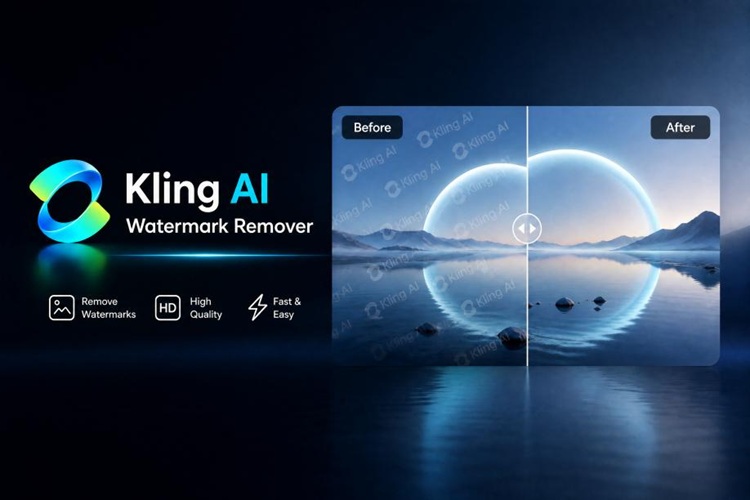
With its impressive text-to-video transformation, lifelike performances, and stunning cinematic visuals, Kling AI has swiftly emerged as a leading contender in the race for the best AI video generator. A common issue for users using the free plan is the presence of the "Kling AI" watermark in exported videos, which may detract from their professional look.
This guide explains 3 effective methods to get rid of Kling AI watermark from your work, and introduces a dedicated Kling AI watermark removal tool.
What Is the Kling AI Watermark?
The Kling AI watermark is a branded logo applied to all videos exported on the free plan. It's usually displayed on one side of the frame and can be seen whenever the movie is playing.
Key things to know:
- On the free plan, Kling will add a branded logo to the corner of each of the videos produced.
- All free tier exports will contain the watermark.
- Some paid subscribers overlook the export settings and accidentally include the watermark in their final output.
- A watermark can diminish the overall professional look of a video, particularly in enterprise, client, social media marketing production, and commercial video projects.
Therefore, there are cases where a creator wants to know how to remove Kling AI watermark from videos before posting or sharing any video.
3 Ways to Remove Kling AI Watermarks
There are three ways to remove Kling AI watermarks.
Option 1: Use an AI Watermark Remover Tool
An AI watermark remover video software program works by utilizing AI technology to reconstruct the area behind the watermark. Whereas human editing involves removing sections from the picture, AI will make up the missing part automatically.
Pros:
- Preserves original framing
- Better visual quality
- Good for a variety of different projects
Cons:
- Requires specialized software
Option 2: Crop or Blur the Watermark
One of the quickest ways to conceal a watermark is to crop it out. There are video editors that enable you to edit clips of the video where the logo is visible.
Pros:
- Quick solution
- Available in most editors
- No extra AI tools are required.
Cons:
- Takes out a section of the frame
- Can have a negative impact on composition
- Not effective for large visuals or subject in the center
Option 3: Upgrade to a Paid Kling Plan
The most direct way to get rid of watermarks is to upgrade to a paid Kling subscription. But remember to check the export settings and choose Without Watermark.
Pros:
- Official solution
- No editing required
- Preserves original quality
Cons:
- Requires a paid subscription
- May cost more for those who are intermittent users.
Which Method Is Right for You?
| Method | Cost | Output Quality | Ease of Use |
|---|---|---|---|
| AI Watermark Remover | Low-Medium | Excellent | Easy |
| Crop or Blur | Low | Low to Moderate | Manual |
| Upgrade Kling Plan | High | Excellent | Easy |
For most creators, an AI watermark remover delivers the best balance of quality, cost, and flexibility.
Best AI Watermark Removal Tool for Kling Videos
HitPaw Edimakor is the best AI video watermark remover as it also offers video creation and AI editing features in one platform.
Why Edimakor Stands Out for Watermark Removal
The primary benefit is its AI Video Generator, which enables users to generate videos directly within Edimakor. This essentially means that creators won't have to worry about having a Kling AI free watermark on the final exported content.
Edimakor also has cutting edge AI Watermark Remover technology. The software intelligently fills in the surrounding pixels. It doesn't merely remove the logo; instead, it tries to restore the background to get a clean result.
Key Features
- Generate high-definition videos free of watermarks.
- Precise AI detection of watermark areas
- Intelligent background reconstruction
- Batch processing support
- Exports with no apparent loss of quality
- Beginner-friendly interface
These tools are particularly helpful for creators who often have to delete watermarks from video files, as they help save valuable editing time without compromising the quality of the work produced.
How to Remove Kling AI Watermarks with Edimakor
HitPaw Edimakor is the ultimate solution for removing Kling AI watermarks. Removing Kling AI watermarks with Edimakor is an easy and step-by-step process. There are two methods according to your workflow:
Method 1: Generate Watermark-Free Videos Directly
Users can produce watermark-free videos in Edimakor, instead of producing the content on another platform and removing the watermarks later.
Step 1: Download and install HitPaw Edimakor and then start the program.


Step 2: Go to AI Video. That's where video generation occurs.

Step 3: Select your desired generation mode (Image-to-Video, Reference-to-Video, Text-to-Video, etc.) and choose Kling AI as the model.
Step 4: Input your prompt, adjust the settings like duration and resolution. Then click "Generate" to get your video without any Kling AI watermark.
Method 2: Use AI Watermark Remover
Edimakor can remove the watermark from a video generated by Kling with the help of AI.
Step 1: Install and launch Edimakor on your computer. From AI Toolbox, you can find the Watermark Remover.
Step 2: Upload your video. Start to remove Kling AI watermark by adjusting the selection area.
Step 3: Activate the Remove button. The Kling AI watermark will be easily removed and you can verify on the Result section.
Bonus Tip: Batch Removal Feature in Edimakor
Edimakor supports batch processing for creators who have more than one project. Up to 10 videos can be used in the same process.
It is particularly beneficial for agencies, content teams, and creators working with Kling AI for bulk content creation. Users can remove watermarks in a single session from multiple exports.
Common problems when removing Kling Watermarks
Watermark Still Visible
Inexact selection tools often leave behind noticeable logo edges or ghost remnants. Easily fix this by adjusting Edimakor's precise selection box to lock onto and fully erase every pixel of the Kling logo.
Video Quality Drops
Simple editing techniques, like cropping, can detract from the quality of a picture. Edimakor is able to keep the original frame and export videos without any quality loss. With its AI Video Enhancer , you can upscale your original videos.
Removal Looks Unnatural
Conventional erasing techniques frequently result in patchy, inconsistent backgrounds or unsightly streaks. Edimakor efficiently blends the deleted area and maintains a cohesive scene by using sophisticated AI smart repainting.
FAQs
A1: Not necessarily. Clean, precise watermark removal is possible with advanced AI tools like HitPaw Edimakor.
A2: It is possible to create videos directly in Edimakor or use a paid Kling plan to get videos without watermarks.
A3: Yes. Artificial Intelligence (AI) can identify logos, text, and watermarks and automatically reconstruct the damaged section.
A4: This is subject to ownership rights, licensing and platform term agreements. Always be sure that your editing is not prohibited.
Conclusion
Even high-quality AI-generated videos can be made to look less professional with the Kling AI watermark. Although upgrading your Kling plan or cropping the frame can be beneficial, the best way to remove it is with the help of AI-driven tools.
HitPaw Edimakor is a one-stop solution that integrates watermark-free AI video generation, automatic watermark removal, and batch processing. In a nutshell, if you are seeking a practical video creation solution to help you build clean and professional videos, give Edimakor a try today.
Leave a Comment
Create your review for HitPaw articles