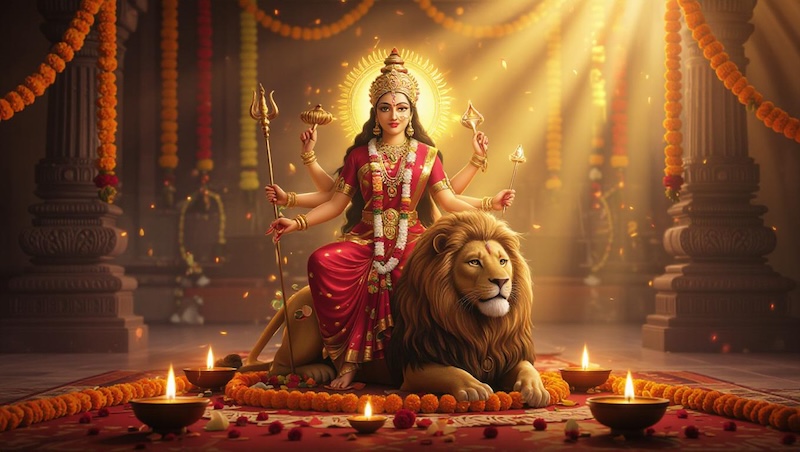
Navaratri is an annual Hindu festival observed in honor of the goddess Durga, an aspect of Adi Parashakti, the supreme goddess. The festival is celebrated with great enthusiasm through traditional rituals, colorful decorations, devotional activities, music, and Garba and Dandiya dances. It is also a wonderful time to capture memorable photos with family and friends. However, if you don’t have the time to capture memorable moments, don’t worry. With Navratri AI photo editing prompts, you can transform your ordinary photo into stunning festive images.
 You may also like:
Part 1: Best Copy-and-Paste Navratri AI Photo Editing Prompts for 2026
Looking for the best Navratri AI photo editing prompts? Look no further! Below, we’ve listed the best prompts that you can use to create high-quality and engaging Navratri-style images within seconds.
1. Divine Durga Maa Navratri Portrait

“Transform the uploaded photo into a divine Navratri-themed portrait while preserving the person’s original facial identity and natural features. Place the person in an elegant traditional outfit with rich red and gold embroidery, surrounded by glowing diyas, marigold flowers, and festive decorations. Add a majestic artistic depiction of Durga Maa in the background with a peaceful divine glow. Use warm golden lighting, detailed textures, cinematic depth, vibrant colors, realistic skin tones, and a premium festive photography style. Keep the final image realistic, graceful, spiritual, and highly detailed.”
2. Garba With Durga Maa
“Convert the uploaded image into a stunning traditional Garba celebration scene. Preserve the person’s original face and identity while changing the outfit into an elegant Gujarati Chaniya Choli with detailed mirror work, jewelry, and colorful embroidery. Place the person gracefully participating in Garba with dancers forming circular patterns around them. Add a beautifully decorated Durga Maa shrine in the background, surrounded by flowers, diyas, and golden lights. Use cinematic evening lighting, vibrant festive colors, realistic textures, natural skin tones, dynamic movement, and a high-end professional photography look.”
3. Royal Navratri Palace Theme
“Turn the uploaded photo into a luxurious royal Navratri portrait while keeping the original facial features and identity intact. Dress the person in an elaborate traditional Indian outfit featuring gold embroidery, elegant jewelry, and rich festive colors. Place them inside a magnificent palace decorated for Navratri with flowers, candles, traditional lamps, and intricate patterns. Add a beautifully illuminated Durga Maa idol in the background surrounded by golden decorations. Use dramatic cinematic lighting, soft glowing highlights, realistic details, rich textures, shallow depth of field, and an elegant editorial photography style.”
4. Dandiya With Friends
“Transform the uploaded photo into a joyful group-style Navratri Dandiya celebration while keeping the main person’s facial identity unchanged. Dress the person in a colorful traditional outfit with mirror work, embroidery, and festive accessories. Surround them with friends enthusiastically playing Dandiya sticks in a beautifully decorated celebration area. Add colorful LED lights, hanging decorations, flowers, and a large Durga Maa stage in the background. Capture energetic movement, authentic festive expressions, realistic skin tones, vibrant colors, cinematic lighting, and a detailed professional event photography style.”
5. Durga Maa Blessing Scenes
“Convert the uploaded image into a beautiful spiritual Navratri portrait centered around the blessings of Durga Maa. Preserve the person’s original face and realistic appearance. Dress them in a graceful traditional outfit with elegant jewelry and subtle festive details. Place them respectfully in front of a beautifully decorated Durga Maa idol surrounded by lotus flowers, marigold garlands, diyas, and glowing lamps. Add a soft divine golden aura while maintaining a realistic photographic appearance. Use warm cinematic lighting, detailed textures, natural colors, realistic skin, and a peaceful devotional atmosphere.”
6. Moonlit Dandiya Celebration
“Transform the uploaded photo into an enchanting moonlit Navratri Dandiya celebration. Preserve the person’s exact facial identity, natural features, and realistic skin texture. Dress them in a stunning traditional Gujarati outfit covered with colorful mirror work and delicate embroidery. Place them in an open courtyard beneath a large glowing full moon, surrounded by dancers playing Dandiya. Add hanging lanterns, diyas, flower decorations, and a beautifully illuminated Durga Maa shrine in the distance. Use cool moonlight mixed with warm golden lights, cinematic depth, realistic details, and an elegant festive atmosphere.”
7. Durga Maa Puja
“Turn the uploaded photo into a beautiful traditional Durga Maa Puja celebration. Preserve the person’s original face, identity, and natural appearance. Place them respectfully in front of a magnificent Durga Maa idol decorated with red hibiscus flowers, marigold garlands, diyas, incense, and traditional ornaments. Show a beautifully arranged Puja setup with offerings, flowers, lamps, and sacred decorations. Dress the person in an elegant traditional outfit. Use warm golden lighting, realistic textures, cinematic depth, vibrant festive colors, and authentic devotional photography.”
8. Palace Garba Performance
“Convert the uploaded photo into a spectacular royal Garba performance inside a grand palace courtyard. Preserve the person’s facial features and identity while dressing them in an elaborate royal Gujarati outfit featuring gold embroidery, mirror work, jewelry, and traditional accessories. Place the person among professionally arranged Garba dancers performing around a beautifully decorated Durga Maa shrine. Add palace pillars, chandeliers, flower arrangements, oil lamps, and colorful fabric decorations. Use dramatic cinematic lighting, rich golden tones, realistic textures, elegant composition, detailed architecture, and a luxurious Indian festival photography style.”
9. Vintage Navratri Photo
“Transform the uploaded photo into a timeless vintage Navratri celebration inspired by classic Indian festival photography. Keep the person’s face and identity unchanged while giving them traditional clothing with detailed embroidery and authentic jewelry. Place them in an old heritage courtyard decorated with clay diyas, marigold garlands, wooden doors, and a traditional Durga Maa shrine. Add a group of people performing Garba in the background. Use warm nostalgic lighting, subtle film grain, realistic textures, muted festive colors, natural expressions, and an elegant vintage photographic composition.”
10. Durga Maa Temple Procession
“Convert the uploaded image into a grand Navratri religious procession. Keep the person’s original face and identity completely recognizable while giving them an elegant traditional outfit and festive jewelry. Place them among devotees carrying colorful flags and flowers while a beautifully decorated Durga Maa idol is being carried through a vibrant street. Add marigold decorations, glowing lamps, traditional drums, flower petals, and illuminated buildings. Create a realistic documentary-style photograph with cinematic composition, natural expressions, detailed clothing, warm lighting, rich colors, and an authentic Indian festival atmosphere.”
Part 2: How to Turn an Ordinary Image into Navratri-Style Visuals
Once you have the right Navratri AI photo editing prompt, the next step is to find the tool that can transform your ordinary image into a festive and visually appealing creation. HitPaw Edimakor is one of the best AI tools available in 2026 that offers a wide range of powerful tools, including an AI Image Generator. With its image-to-image technology, users can transform simple images into various styles using a simple text prompt — no editing experience required. To get started, upload your preferred image to HitPaw Edimakor and select the image-to-image feature. Enter a detailed Navratri AI prompt and click on the “Generate” button. Within seconds, the program will convert your image into a Navratri-style image.
Key Features of HitPaw Edimakor
- Image-to-Image: HitPaw Edimakor offers an amazing image-to-image feature that can instantly transform your image into various styles, including Navratri, Holi, Eid Celebration, and more, with a simple text prompt.
- Multiple AI Models: The best part of this tool is that it offers a wide range of AI models, each with unique features. It includes AI models such as Nano Banana, Nano Banana Pro, Flux, Midjourney, Stable Diffusion, and Seedream.
- Advanced Customization: The program offers advanced customization features, allowing users to adjust images to their needs. Users can change the background, add filters, effects, text, and music.
- Text-to-Image: HitPaw Edimakor also includes text-to-image capabilities, allowing users to create high-quality images with simple text prompts. Simply enter the text prompts, choose the AI model, and click on the “Generate” button.
- Intuitive Interface: This tool offers an easy-to-use interface, which is ideal for non-tech and beginner users. Its simple layout makes it easy to find the required AI feature without dealing with complicated editing settings.


Step-by-Step Guide:
Follow the instructions below to learn how to create Navratri-style visuals with HitPaw Edimakor in 2026:
Step 1: Download HitPaw Edimakor
Download the latest version of HitPaw Edimakor on your PC and launch it. Choose the “Reference Image” feature from the main interface.
Step 2: Upload Your Image
Choose the desired AI model and upload the reference image. Users can upload images in multiple formats, including JPG, PNG, JPEG, and more.
Step 3: Enter Navratri Photo Editing Prompt
Copy and paste the Navratri photo editing prompt in the prompt box. Make sure to select a detailed prompt.
Step 4: Generate and Download
Adjust the image settings and click on the “Generate” button. Within seconds, your visuals will be ready. Preview the results, and click on the “Export” button to download the image.
Final Thoughts
With the help of these Navratri AI photo editing prompts, you can easily transform ordinary visuals into engaging and festive images. Use Navratri AI photo editing prompts with HitPaw Edimakor to get high-quality results. The program offers an easy-to-use interface and powerful AI tools.
Leave a Comment
Create your review for HitPaw articles