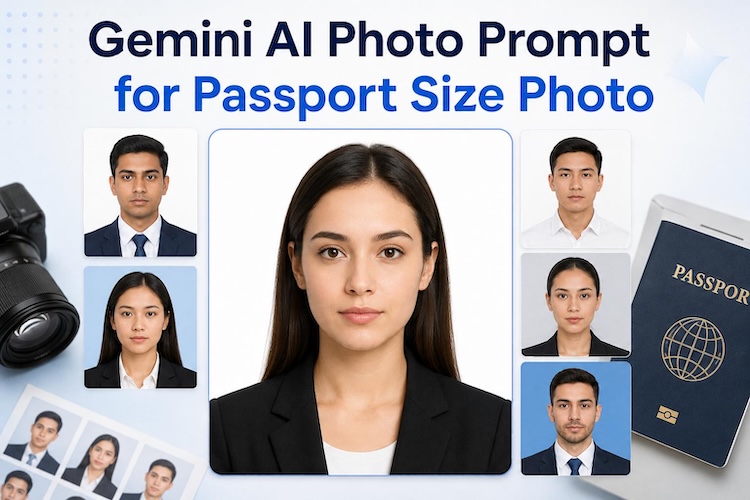
Getting a perfect government-compliant ID photo used to mean a trip to a specialized studio and hoping you didn’t blink. Today, generative AI has simplified this process. If you are looking for a Gemini AI photo prompt for passport size photos, you are in the right place. By using a Gemini AI passport photo prompt copy paste strategy, you can generate professional-grade portraits that meet strict official standards right from your desktop. This article provides 20+ copy and paste prompts to help you create high-quality ID images for any country or document type.
Part 1. Passport Size Photo Requirements You Must Know
Before you start generating images, you must understand the strict regulations set by government agencies. AI can create beautiful portraits, but for an ID, it must follow specific rules.
Standard passport photo size and ratio rules
The most common question people ask is: what should be passport size photo dimensions? For the US, it is 2x2 inches (51x51 mm). In many other countries, the standard is 35x45 mm. The head must be between 1 and 1 3/8 inches from the bottom of the chin to the top of the head. When using AI, ensure the aspect ratio is a perfect square (1:1) or the specific 7:9 ratio required for European visas.
Background requirements
The background is often the most common reason for rejection. Most countries require a plain white or off-white background. However, some regions or specific visa types allow for a light blue or light grey background. Consistency is key. There should be no patterns, shadows, or gradients.
Face positioning, lighting, and expression rules
Your face must be centered and looking directly at the camera. You should have a neutral expression with both eyes open. "Natural" lighting is key. The AI needs to avoid "cinematic" shadows that obscure facial features.
Clothing and appearance guidelines for ID photos
Wear normal street attire that you would typically wear on a daily basis. Avoid uniforms, except for religious clothing worn daily. Glasses are often discouraged or prohibited in many jurisdictions to avoid glare. Ensure your hair does not obscure your eyes or the edges of your face.
Part 2. 20 Ready-to-use Gemini AI Passport Photo Prompts
Here are 20 templates you can use immediately. Each is designed to be a Gemini prompt for passport size photo with suit or professional attire, ensuring high fidelity.
White Background Passport Photo Prompts
These are the standards for most global documents. When looking for the best prompt for passport size photos, simplicity is often the most effective approach.
"Generate a professional passport photo for an adult female with solid white background (#FFFFFF). Upper body centered, neutral expression, eyes open. Wear a black blazer. Lighting: bright, even. 300 DPI, 600x600 pixels. Powered by Nano Banana Pro."

"Official ID photo, adult male, white background. Face occupies 75% of the frame. Direct gaze, no smile, closed mouth. Business casual attire. High-resolution studio lighting, 4K quality, sharp facial details. No shadows in the background."
"Passport-style portrait, young adult, white backdrop. Centered composition, head straight. Natural skin tones, professional soft lighting. Wear a collared shirt. Resolution: 300 DPI. Optimized for facial preservation using Nano Banana Pro technology."
"Clean studio ID portrait, white background. Neutral facial expression, looking into the lens. Symmetrical face positioning. Professional attire, minimal jewelry. Sharp focus, even illumination, 4K rendering. Standard ISO/IEC 19794-5 compliance style."
"Professional biometric photo, adult, plain white background. Upper body shot, head centered. Clear eyes, neutral expression. Formal wear. High-contrast detail, studio-grade lighting. Powered by Nano Banana Pro for superior facial preservation."
Blue Background Passport Photo Prompts
Some specific visas or regional IDs require a blue tint. Use a prompt for passport size photo with blue background to get these specific results.
"Generate an official ID photo for an adult with a solid light blue background. Head centered, neutral expression. Wearing professional attire. Soft studio lighting, high resolution, realistic features. 600x600 pixels, 4K quality."
"Government-style ID photo, female, light blue background. Head straight, eyes forward, neutral mouth. Formal blouse. Soft studio lighting, sharp focus on eyes. Resolution: 300 DPI. Facial features rendered with Nano Banana Pro precision."
"Standard ID portrait, adult, blue background. 70% head height ratio. Looking directly at the camera. Business attire. Clear facial contour, no shadows. 4K high-fidelity output. Optimized for official visa document standards."
"Blue background passport photo, young male. Centered head, neutral face, ears visible. Dark formal shirt. Studio lighting, even skin texture. High resolution, 300 DPI. Powered by Nano Banana Pro for facial consistency."
"Official portrait for visa, blue backdrop. Adult, neutral expression, mouth closed. Symmetrical lighting. Professional suit and tie. Sharp details, no background artifacts. 4K ultra-quality output for official ID use."
Formal Suit Passport Photo Prompts
For a more executive look, a gemini prompt for passport size photo with suit ensures the AI adds the correct clothing. Note that this is also a popular passport size photo prompt for ChatGPT users seeking high-quality attire.
"Professional passport photo, male, white background. Wearing a navy blue suit and white shirt. Upper body centered, neutral expression. Studio lighting, no shadows. 300 DPI. Facial preservation via Nano Banana Pro."
"Formal ID portrait, female, light gray background. Wearing a professional charcoal suit. Head straight, eyes open, neutral face. Sharp focus, studio illumination. 4K quality. Perfect for corporate and government ID."
"Passport photo with suit, adult male, white background. Centered composition. Neutral gaze. High-resolution skin textures. Even lighting. Resolution: 600x600 pixels. Powered by Nano Banana Pro for lifelike facial rendering."
"Business suit ID photo, adult female, plain white backdrop. Symmetrical shoulders, head straight. Neutral expression. Soft lighting, no glare. Professional 4K output. Optimized for international passport and visa standards."
Passport Photo Prompts for Men
"Male ID photo, white background. Clean grooming, short hair. Neutral expression, eyes forward. Wearing a formal white shirt. Bright studio lighting, 300 DPI. Enhanced with Nano Banana Pro for clear features."
"Passport-ready portrait for men, light blue background. The head occupies 70% of frame. Neutral gaze. Wear a professional polo shirt. Even illumination. 4K quality, sharp facial contours, no shadows."
"Adult male ID photo, plain background. Front-facing, head straight. Professional grooming, neutral mouth. Wearing a dark blazer. Studio-grade lighting. High resolution. Powered by Nano Banana Pro for superior quality."
General Copy-Paste ID Photo Prompts
These are universal and work for any gender or age. This is the classic id photo prompt Gemini style. Use the passport size photo gemini prompt for men for consistent results.
"Universal ID photo prompt, white background. Neutral expression, eyes forward, symmetrical face. Formal attire. High-clarity output, 300 DPI. Standard passport framing. Optimized for facial preservation and 4K quality."
"Government document style portrait, plain backdrop. Upper body centered. No smile, neutral eyes. Professional clothing. Shadowless lighting. Resolution: 600x600 pixels. Powered by Nano Banana Pro for maximum realism."
Part 3. How to Generate a Passport Size Photo with Gemini AI
Creating the image is just the first step. Here is the workflow to ensure your free AI passport photo online experience results in a usable file.
Step 1 – Choose a clear reference photo
If you are using Gemini’s image-to-image capabilities, upload a clear, front-facing photo. The AI uses this as a base for your features. Avoid images with filters or heavy shadows, as these will confuse the generation process.
Step 2 – Enter a passport photo prompt in Gemini AI
Copy and paste one of the prompts provided above into the Gemini chat box. If you have specific needs, tell the AI: "Generate a photo based on this Gemini AI photo prompt copy paste for passport size photo..." and specify the background color.
Step 3 – Generate and review the result
Check for "AI hallucinations" to ensure you have the right number of ears and that your eyes are looking in the same direction. Consistency is vital for official documents.
Step 4 – Create a Professional Passport Photo with Edimakor
If you want a faster and more reliable solution, you can use Edimakor AI Headshot Generator. Simply upload your photo and choose a passport-style template to generate a clean, professional headshot with the correct background and framing. You can then export the image in high quality and resize it to meet passport photo requirements.
Part 4. Common AI Passport Photo Mistakes to Avoid
Even with the best tools, errors happen. Avoid these pitfalls:
- Using overly artistic or cinematic prompts: Passport photos should be "flat" and informative, not dramatic. Avoid terms like "cinematic lighting" or "bokeh."
- Wrong lighting or background mismatch: Using a "textured" background instead of a solid color is a common reason for rejection.
- Over-smiling or unnatural facial expression: A "natural" smile is great for social media but forbidden on most passports.
- Ignoring official passport size ratio requirements: A 16:9 cinematic shot cannot be easily cropped into a 1:1 passport photo without losing head space.
FAQs about Gemini AI Photo Prompt for Passport Size Photo
A1: While Gemini can generate the image, you must ensure it meets all government criteria. Often, the Gemini Pro Vision AI screen reader is used by developers to analyze images, but for personal use, you are the final judge of quality.
A2: White is the safest and most universal choice for almost all applications.
A3: This often happens if the prompt is too complex. Using a simple "How do I make a photo into passport size" workflow with a clear reference image yields the best results.
A4: Technically, yes, provided the photo looks exactly like you and meets all lighting/composition rules. However, always check the specific country's rules regarding AI-manipulated images.
A5: Yes. When you print your generated file, it must be on high-quality, thin photo-grade paper. Standard printer paper is not acceptable for government documents.
Conclusion
Creating an official portrait is simple when you have the right passport size photo prompt online free. By using a Gemini AI photo prompt for passport size photos, you can create professional results from your own home. To ensure your final image is perfectly cropped and polished, we highly recommend using HitPaw Edimakor for the final touch. It is an excellent tool for removing background artifacts, correcting lighting, and ensuring your final image is 100% compliant with official standards. When combined with a strong passport photo prompt, you’ll get a professional result in minutes.


Leave a Comment
Create your review for HitPaw articles