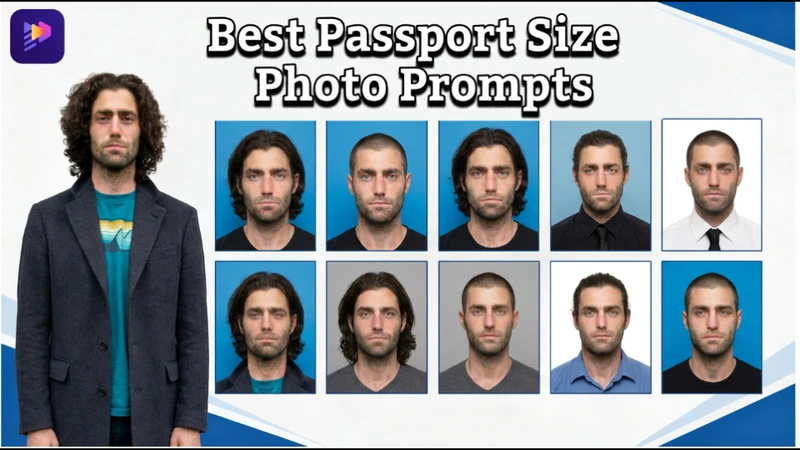
Getting a passport-size photo once meant studio visits, perfect lighting, and strict background rules. In 2026, AI has transformed the process, making it faster and easier than ever. You can now generate professional, regulation-ready images from home with just a few clicks. With the right passport size photo prompt, achieving accurate size, clean backgrounds, and polished results is simple and efficient.
 You may also like:


Part 1: Different Size for Passport Photo
Here are some photo sizes and requirements of passport photos for different countries.
| Country | Photo Size (Width x Height) | Head Size (Chin to Crown) | Background Color | Notes |
|---|---|---|---|---|
| United States | 2 x 2 inches (51 x 51 mm) | 25 mm – 35 mm | White or Off-white | No eyeglasses allowed. Matte or glossy paper. |
| United Kingdom | 35 x 45 mm | 29 mm – 34 mm | Cream or Light Grey | Must be a close-up of your head and shoulders. |
| Australia | 35 x 45 mm | 32 mm – 36 mm | Plain Grey or White | Must be high quality (glossy). High resolution is vital. |
| Canada | 50 x 70 mm | 31 mm – 36 mm | Plain White or Light Grey | Requires date and studio stamp on the back. |
| China | 33 x 48 mm | 28 mm – 33 mm | White | Specific facial width (15-22mm) requirements. |
Part 2: Best Passport Size Photo Prompts For Gemini
Gemini AI enables users to produce passport-sized, realistic, and compliant images. You may easily produce professional photos with neutral expression, correct alignment, and an official white background with the correct prompts.
1. Neutral Expression Passport Photo Prompt
Generate a professional passport-size photo with neutral expression, centred head, even lighting, plain white background, realistic skin tone, no shadows, natural facial features, official dimensions, suitable for government documents, and sharp focus.
2. Formal Attire Passport Photo Prompt
Create a passport-size photo of a person wearing formal clothing, centred posture, plain white background, soft studio lighting, high clarity, official framing, natural facial tone, neutral expression, and realistic details.

3. Baby Passport Photo Prompt
Part 3: Best Way To Create Passport-Size Photo Prompt with ChatGPT
Any photo can be transformed into a passport-sized image using ChatGPT's comprehensive prompts for AI capabilities. For formal use, it guarantees proper size, lighting, backdrop, and facial clarity.
1. Convert Normal Photo to Passport Size
Convert this image into a passport-size photo, centre the head, remove background, replace with plain white, adjust lighting evenly, maintain realistic skin tone, proper framing, neutral expression, official dimensions, and high clarity.
2. Passport Photo With Even Lighting
Generate a passport-size photo with balanced studio lighting, no shadows on the face, centred head, natural skin tones, plain white background, official size, neutral expression, realistic details, suitable for official documents.
3. High-Resolution Passport Photo Prompt
Create a high-resolution passport-size photo, centred head, plain white background, neutral facial expression, accurate official dimensions, natural skin tone, studio-quality lighting, sharp facial details, realistic texture, ready for printing.
4. Multi-Photo Layout Passport Photo Prompt
Transform the provided image into a professional passport-size photo sheet. Keep the subject’s facial features 100% unchanged. Use a neat, formal hairstyle and simple professional attire. Apply a plain background with soft, even lighting. Generate multiple identical photos in a clean grid layout with thin spacing. Ensure straight posture, centered face, visible ears, and consistent, official-ready results.
Part 4: Prompt For Passport Size Photo With White Background
Worldwide, passports with a simple white background are commonly accepted. You can create clear, well-lit, and centred images that are appropriate for official documentation and overseas travel by using AI guidance.
1. Standard White Background Passport Photo
Generate a passport-size photo with a plain white background, full head and shoulders visible, centred face, neutral expression, natural skin tone, soft even lighting, dressed professionally, official dimensions, realistic facial features, high clarity, and no accessories.
2. Enhanced Facial Clarity Prompt
Create a passport-size photo with a pure white background, full head and shoulders visible, sharp facial details, natural skin tone, centred head, neutral expression, studio-quality lighting, dressed formally, official photo dimensions, high resolution, realistic texture, professional quality
3. Professional White Background Prompt
Generate a professional passport-size photo with a white background, full head and shoulders visible, neutral expression, centred head, soft studio lighting, natural skin tone, high clarity, dressed appropriately, realistic facial features, proper framing, official dimensions, suitable for ID documents.
Part 5: Passport Size Photo Prompt For Women
AI prompts for women's passport photos guarantee formal dress, natural cosmetics, and neutral attitudes. These suggestions assist in producing realistic, legally compliant photos that are appropriate for official identifying documents like passports and visas.
1. Formal Female Passport Photo Prompt
Generate a passport photo of a woman with full head and shoulders visible, tied hair, neutral expression, white background, wearing formal attire, centred head, soft lighting, natural skin tone, high clarity, official dimensions, and realistic facial features.
2. Natural Makeup Passport Photo Prompt
Create a passport-size photo for a woman with full head and shoulders visible, minimal makeup, centred face, neutral expression, white background, natural skin tone, soft lighting, realistic facial features, dressed formally, official dimensions, professional quality, high clarity.
3. Blazer Passport Photo Prompt for Women
Generate a passport photo of a woman with full head and shoulders visible, wearing a formal blazer, centred head, white background, neutral expression, studio lighting, natural skin tone, high clarity, official dimensions, realistic facial texture, and professional appearance.
Part 6: Passport Size Photo Prompt For Men
AI-generated passport images for men need to be properly aligned, have neutral faces, and be dressed neatly. You may produce expert, high-quality photos that adhere to established international standards with detailed instructions.
1. Suit and Tie Passport Photo Prompt
Create a passport-size photo of a man with full head and shoulders visible, wearing a dark suit and tie, centred head, white background, neutral expression, even lighting, realistic skin tone, high clarity, official dimensions, and professional quality.
2. Casual Shirt Passport Photo Prompt
Generate a passport-size photo of a man with full head and shoulders visible, wearing a formal shirt, centred head, plain white background, neutral facial expression, soft even lighting, natural skin tone, realistic details, official dimensions, and professional quality.
3. Clean-Cut Passport Photo Prompt
Part 7: Best Way To Create an AI Passport-Size Photo With Prompt
HitPaw Edimakor's reference image tool is the best way to create an AI passport size photo with Prompt:
Step 1: Open Edimakor and Select Reference Image Tool
Open Edimakor from the main interface, navigate to the toolbox, select the image section, and then choose the reference image tool to start creating a passport-size photo.
Step 2: Upload Image
Upload the photo you want to convert into a passport-size image. Make sure it’s clear, well-lit, and shows your full face for the best AI results.
Step 3: Write Prompt
Enter the prompt from the above mentioned options describing the passport photo. If you want to create more, use the prompt generator to create one based on a simple idea or the uploaded image.
Step 4: Adjust Settings and Generate Image
Set the aspect ratio, resolution, and output quality for your passport photo. Confirm all settings and then generate the AI image with high clarity and accurate dimensions.
Step 5: Preview and Download Image
Preview your generated image from the My Creation section. If satisfied, hover on it and click the icon at top-right corner to open the location.
FAQs About Passport Size Photo Prompts
A1: Most countries require a plain white or light-colored background (such as off-white or light gray). Always check your country’s official guidelines, as some may have strict color requirements.
A2: Yes, AI-generated photos can be accepted if they strictly follow official requirements for size, background, lighting, and facial positioning. However, acceptance depends on local authorities, so it’s best to verify guidelines before submission.
A3: The most common size is 2x2 inches (51×51 mm), but it varies by country. For example, many European countries use 35×45 mm, so always confirm the correct dimensions.
A4: Wear simple, solid-colored clothing. Avoid uniforms, flashy patterns, or accessories. Neutral, professional attire works best for official compliance.
Key Takeaway
Passport photography is now more accessible, quicker, and less expensive thanks to AI. Using Gemini, ChatGPT, or free AI technologies, you may create official-quality photographs in minutes with the appropriate passport size photo prompt. Clear and organised suggestions are essential. When utilised properly, tools like HitPaw Edimakor (Video Editor) further improve outcomes.
Leave a Comment
Create your review for HitPaw articles