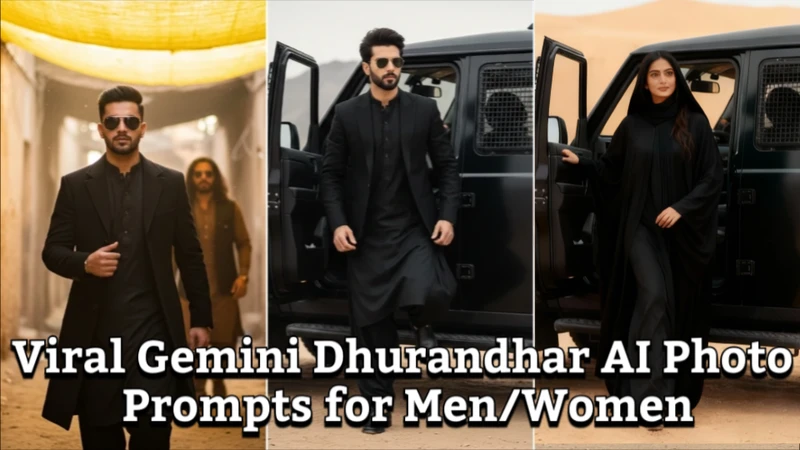
AI photo generation has advanced to a new level in 2026 thanks to dhurandhar ai photo prompt, the classic movie style noted for its dramatic appeal and malevolent atmosphere. You can retain cinematic lighting, create photographs that resemble movie stills, and greatly improve facial expressions with the correct instructions.
Part 1: Best Dhurandhar AI Photo Prompts
The powerful, dramatic, and malevolent air of personalities like Rehman Dakait is intended to be captured via Dhurandhar AI photo prompts. Gemini allows you to create realistic materials and lighting for fashionable poses, facial expressions, and cinematic portraits.
1 Rehman Dakait AI Photo Prompt
This instruction instructs Gemini AI to mimic the fierce, evil character of Rehman Dakait. A dramatic, cinematic image that reflects Dhurandhar's signature style is ensured by the emphasis on lighting, shadows, and facial features.
Prompt
Create a high-resolution AI portrait of Rehman Dakait inspired villain from Dhurandhar, with intense gaze, cinematic lighting, dramatic shadows, rugged facial features, dark background, styled hair, realistic skin texture, and 4K quality.

2 Dhurandhar AI Photo Prompts For Men
Men's Dhurandhar AI portraits emphasize strong, manly features with striking expression and lighting. Gemini AI's emphasis on evil intensity makes the picture ideal for use in films and viral social media.
Prompt:
Generate a Dhurandhar-style cinematic portrait for men, rugged look, intense eyes, dramatic lighting, dark, moody background, styled hair, sharp jawline, expressive facial details, villain aura, high realism.


3 Dhurandhar AI Photo Prompts For Women
The Dhurandhar AI pictures of women blend sophistication with the atmosphere of a movie villain. Gemini produces a dramatic, eye-catching effect by capturing strong expressions, intricate shadows, and cinematic flair.
Prompt:
Amidst the sunlit alleyways, a confident figure strides forward, cloaked in a flowing black garment. The ancient, weathered walls of mud-brick surround the procession, casting soft shadows across the scene. Dust particles dance in the warm light, highlighting the earthy tones of brown and beige that dominate the setting. The other figures, dressed in a mix of humble attire, move in unison, evoking a sense of camaraderie.
Part 2: Dhurandhar AI Photo Editing Prompts
AI-generated Dhurandhar photos are improved by photo editing prompts, which also improve lighting, realism, and cinematic effects.
Example AI Editing Prompt
AI editing prompts enhance the realism and cinematic intensity of created visuals. The image has a viral Dhurandhar look thanks to highlights, shadows, and color grading.
Prompt:
Enhance Dhurandhar AI photo with high contrast, cinematic shadows, subtle color grading, sharpened facial details, glowing highlights, background blur, and dramatic effect suitable for movie-style stills.
Dhurandhar AI Photo Prompt Free
Determining the lighting, shadows, and cinematic style guarantees excellent outcomes that resemble Dhurandhar characters, even with free AI technologies.
Prompt:
Generate a free Dhurandhar-style AI photo, villain-inspired, dramatic lighting, expressive facial features, realistic skin texture, dark cinematic background, 1080p high-resolution, suitable for social media.
Dhurandhar Movie AI Photo Prompt
This prompt mimics real Dhurandhar movie stills. To create a genuine movie-like atmosphere, the AI mimics dramatic lighting, passionate facial emotions, and intricate textures.
Prompt:
Create an AI photo resembling a Dhurandhar movie scene, dark, dramatic background, villain-like expression, cinematic lighting, rugged style, intense gaze, 4K resolution, film-style texture,and realistic facial details.
Part 3: Make Dhurandhar AI Photo With Nano Banana
Let us learn how to transform a normal selfie into the viral Dhurandhar villain Rehman Dakait look using AI. We’ll cover two simple methods, one using Edimakor with Nano Banana and the other using Gemini AI.
1. Turn Yourself Into The Viral Dhurandhar Villain Rehman Dakait Look Using Edimakor With Nano Bnana
Step 1: Open Edimakor and Access the Reference Image Tool
Launch HitPaw Edimakor on your computer. From the main interface, go to the Toolbox section and select the Reference Image tool. Make sure to choose Nano Banana as model.
Step 2: Upload Your Selfie and Reference Image
Upload your clear selfie as the main image. It is good to add a Dhurandhar movie reference image of Rehman Dakait to guide the AI in applying the correct villain style and facial mood.
Step 3: Write the Prompt
Use any of the above given prompt to convert your selfie into viral Dhurandhar villilan Rehman dakait look.
Step 4: Adjust Settings and Generate the Image
Set the aspect ratio and output quantity according to your needs. Once done, click the Generate button and wait for the AI to create your Dhurandhar-style image.
Step 5: Preview and Save the File
Review the generated image to ensure it matches the Rehman Dakait look. If satisfied, get the saved file by hovering on it and hitting the top-right icon. You will find it in the pop-up windows.
2. Make Dhurandhar Villain Rehman Dakait Look With Gemini
Step 1: Open Gemini AI and Upload Your Photo
Open Gemini AI and access its image creation or editing feature. Upload your selfie that you want to transform into a Dhurandhar villain look.
Step 2: Write the Dhurandhar-Style Prompt
Now, write a detailed prompt or use one of the above mentioned prompt to convert your selfie into a viral Dhurandhar Villilan Rehman dakait look.
Step 3: Let Gemini Generate the Image
After applying the style, allow Gemini to process the image. The AI will enhance facial structure, shadows, and overall cinematic appearance.
Step 4: Preview and Download
Check the final result carefully. Once you’re happy with the output, download the Dhurandhar-style image and use it for social media or creative projects
Bonus Tips: Best Dhurandhar AI Video Prompt
Dhurandhar AI figures come to life in videos. Cinematic gestures, facial emotions, and moving sequences can all be produced via video stimuli.
Example Dhurandhar AI Video Prompt
A Dhurandhar-inspired villain is animated by AI video prompts that emphasize movement, lighting, and expression. Short films, social media, and film projects can all make use of these snippets.
Prompt:
Generate a short AI video clip of Rehman Dakait-inspired Dhurandhar character, villainous expression, dramatic lighting, slow camera pan, cinematic shadows, 4K resolution, realistic movements, dark, moody background.
Rehman Dakait AI Video Prompt
This video prompt creates brief movies that resemble official movie scenes while highlighting Rehman Dakait's intensity using cinematic techniques.
Prompt:
Create a 5-second AI video of a Rehman Dakait-style villain, intense stare, cinematic zoom, shadow emphasis, realistic skin texture, dramatic effect, dark background, slow-motion cinematic feel, and high-resolution video.
Dhurandhar AI Video Prompt Generator
In order to maintain dramatic lighting and face intensity, video prompt generators assist in creating cinematic AI clips that resemble Dhurandhar's film style.
Prompt:
Generate Dhurandhar villain video sequences with cinematic lighting, realistic expressions, slow motion, dynamic camera angles, and dramatic background suitable for Gemini AI video creation.
In Conclusion
With Gemini, Nano Banana, and Edimakor, dhurandhar ai photo prompt let fans and artists experiment with the aesthetics of cinematic villains. AI creates excellent viral content with ease, from beautiful villain stances to appearances reminiscent of Rehman Dakait. The HitPaw Edimakor (Video Editor) adds cinematic lighting, shadows, and texture modifications to AI-generated Dhurandhar images and videos.
Leave a Comment
Create your review for HitPaw articles