To create exceptionally high quality videos using Kling 4.0, it is important to give it a well-versed prompt. The better prompt you feed the AI, the better will be the video result it generate. A vaguely defined prompt can never generate a video that matches your visual imagination. To enable Kling 4.0 grasp your creative imagination, it is essential to write a prompt that is concise yet detailed and free from conflicting instructions. To materialize your creative imagination, your prompt should cover all relevant details in a video.
Kling 4.0 prompts matter because they help you better guide the AI model and generate a consistent and coherent video with desired cinematic shots and better visual representation of your imaginations.
If you are still confused in writing well-versed prompts then do not worry because this guide will help you learn how to write Kling prompts effectively with various Kling 4.0 prompt examples.
How to Write Effective Kling 4.0 Prompts
Writing effective Kling 4.0 prompts is not a rocket science; rather all you need to do is to narrate your creative imagination with emphasis on every little detail. This Kling AI prompt guide will train you on writing the most effective prompts to create unique and visually appealing videos. The best approach is to write your prompt by focusing on one component at a time. Here is a detail description of each essential component along with Kling 4.0 prompt examples.
1. Describe the Main Subject
It is essential to first identify and describe your main subject or focal point. It can be a person, an animal, object or a character. While describing the main subject in prompt, make sure to include distinguishing details like age, clothing, appearance, texture, color, and material. The better description helps Kling 4.0 understand and then interpret the subject more accurately in the video.
For Example: Instead of writing "a young girl", describe it as "a 10 year old girl with shoulder-length flowy dark brown hair, a pink frock with laces and ribbons and silver jewelry."
2. Specify the Action and Movement
Explain effectively what the subject is doing in the video, how it moves, and what action it takes.
Example: A vague description "a running boy" wont produce the same result as the effective description of "the boy slowly runs towards the camera, gently brushes his hair away from his face before pausing and crying."
For a more complex cinematic view break the movement into chronological and logical actions such as "the boy begins to run, stops to look behind, and then towards again towards the camera"
3. Set the Scene and Background
Give adequate description about the location where the video is being shot, weather conditions, time of the day, background scene, environmental movement, and even the foreground scenery.
Example: "a boy in the park" is a weak prompt, whereas, "a boy stands in a lush green park at sunset, surrounded by tall trees covered with flowers of various colors, winding stone pathways, and trees moving slowly because of the cold breeze."
4. Add Camera Angles and Movement
Effective camera instructions are essential to determine how the audience experiences the video. You need to mention the camera angle, shot type, and camera movement explicitly in your prompt. These camera terms might be useful in understanding the camera movements.
| Camera term | What it means | Example use |
|---|---|---|
| Wide shot | Shows the subject with wide portion of surroundings | A rider crossing a vast desert |
| Close-up | Focuses closely on facial expressions or small details | Focus on tears of a crying girl |
| Low-angle shot | Looks upward at the subject | A dramatic upward movement to show heroine |
| Overhead shot | Looks down from above | A boy writing a letter |
| Tracking shot | Moves alongside or behind a subject | Following a rider in a race |
| Push-in | Moves closer to the subject | Revealing the details of product |
| Pan | Rotates horizontally from a fixed position | Revealing a city skyline |
Example: Instead of "show a speedy sports car," describe it as "a low-angle tracking shot follows a blue sports car as it drives along the track of the race course, with the cheering crowd visible in the background."
5. Define Lighting, Style, and Mood
Lighting and visual style can determine the overall appearance of video to audience and sets the videos' mood.
Example: Instead of saying "a cinematic city at night", say, "the silent city streets are illuminated by blue and yellow neon signs, with reflection of the subject across pavements, and the subject is indulged in cyberpunk aesthetic."
6. Include Dialogue and Sound When Needed
Clearly give instructions about the spoken dialogue, ambient sound, voice tone and music that coincides with the core theme of your video.
Example: Instead of writing "a man speaks on mobile phone," use the following prompt: "A 20 year old boy sitting in a silent café looks towards the mobile phone and place the phone on his right ear. His voice is warm yet calm with clear pronunciation. You can hear faint conversations in the background with gentle clinking of cups. Subtle live music can also be heard beneath the
- Kling 4.0 Prompt Formula
The formula to write effective Kling 4.0 prompts is simple. You need to clearly define each above-mentioned component with utmost imaginary accuracy.
This reusable formula can be truly handy:
"Subject + Action + Setting + Camera + Lighting + Pacing + Sound"
Also, add visual style, dialogue, or reference instructions when needed.
Best Kling 4.0 Prompts for Different Use Cases
Here are some best Kling 4.0 prompts that you can use for prominent use cases.
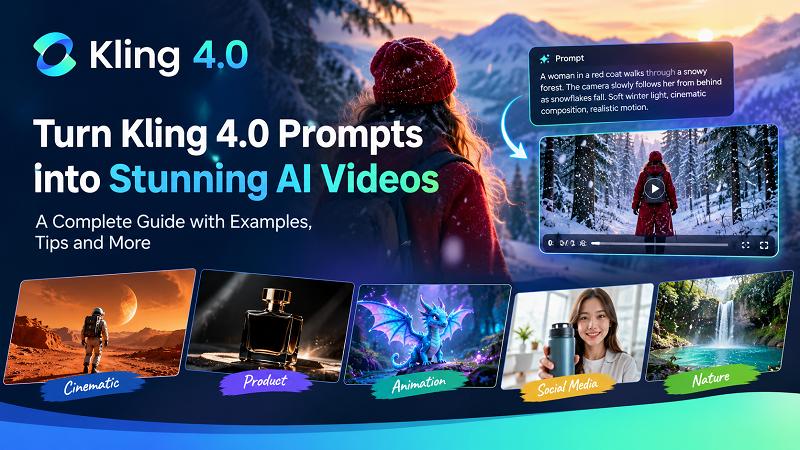
- Cinematic product commercial: A luxury perfume bottle is shown on a black surface as golden mist swirls around it. The camera slowly moves closer to the bottle, capturing its elegant look, and realistic glass reflections. Lighting should be premium cinematic, with shallow depth and photorealistic details.
- Social media UGC video: A 20 year old girl holds a foundation and speaks directly to a camera attached with a ring light in her bedroom. She smiles naturally, shows and then applies the product to her face. Casual smartphone footage, natural daylight, influencer style video, vertical framing.
- Character-driven story scene: A young man stand silent on a train platform, holding an old picture. He looks at the picture with tears in his eyes as the train approaches in the background. The camera slowly shifts towards his face as he is wiping his tears. Moody cinematic lighting, emotional environment, sad music.
- Dialogue and audio scene: Two friends are sitting in a college cafeteria. One smile and says, "I have some great news for you" The other leans forward with curiosity and replies, "Tell me more". Natural facial expressions, warm lighting, clinging cutlery sound in background, cafeteria ambience.
Turn Kling 4.0 Prompts into Amazing Videos
Effective Kling 4.0 prompts can surely create videos that are an aesthetic treats for viewers. Nevertheless, if you want to explore some other AI tool with an even better video creation result then Edimakor AI is you pick. Experience video creation at its best with Edimakor to create videos that keeps the viewers hooked to screens.
How to Use Kling 4.0 Prompts in Edimakor AI
Step 1: Sign in and opt for Kling AI model
Visit Edimakor AI, find Kling 4.0 on the homepage, and open its generation workspace. Select the Kling 4.0 model.
Try It Online
Step 2: Generate video with Kling 4.0 prompt
Now, you can upload your reference image (if any), write a well-defined Kling 4.0 style prompt to instruct the AI. Then you can select the desired video settings such as duration, resolution, and mode. Afterwards, click on generate to create your desired video.
Step 3: Down your created video
You can view your generated video by clicking on the button "my creation" and download it.
Common Kling 4.0 Prompt Mistakes to Avoid
The Kling AI prompt guide is incomplete without mentioning some common mistakes. So let's take a quick look at some common prompt mistakes and its fixes to avoid them.
Writing unclear/vague prompts
The mistake: writing generic descriptions that leave too much room for interpretation.
The fix: Give specific details about the subject including its appearance, location, action and surroundings. In addition, use specified details instead of generic adjectives (for example use shoulder length brown hair instead of long beautiful hair).
Do not include too many actions in a single prompt
The mistake: Writing too many unrelated actions for a subject in a short clip making it seem rushed, unnatural, and displeasing.
The fix: Focus on the main action and coincide with a series of relevant small actions to generate a nice flow in the video.
Giving conflicting input
The mistake: Giving contradictory instructions in prompt such as camera is static with a fast moving tracking shot.
The fix: Ensure that you refrain from giving instructions that are quite opposite of another. If you desire to show various perspective in the video then plan and write them in an order that makes sense and is visually attractive.
Flood the prompt with unnecessary details
The mistake: Writing too many visual effects, adjectives and technical details making it harder to grasp the core idea.
The fix: Focus on the core ideology of video and add details about subject, its actions, and environment and camera settings. Afterwards add the secondary details that complement the core idea
FAQ About Kling 4.0 Prompts
A1. No, it is not necessary to write a very lengthy prompt. The prompt should define the core idea, subject, its actions, surroundings and camera. You should in fact refrain from adding unnecessary and irrelevant details.
A2. Write the prompt in a manner that dictates natural and believable details with realistic camera movement instructions. The more natural and realistic your prompt is, the more realistic your video will appear.
A3. In that case, edit your initial prompt. Your prompt must be missing some details that you want to show in the video. Refine your prompt with better description and then regenerate the video.
Conclusion
Mastering Kling 4.0 prompts means turning a creative idea into clear directions for subject, action, camera, lighting, and sound. Use the template, test one change at a time, and refine what works. For a smoother workflow, Ediamkor AI can help creators organize prompt ideas and develop videos more efficiently. Start simple, stay specific, and keep experimenting to create stronger AI video results.


Leave a Comment
Create your review for HitPaw articles