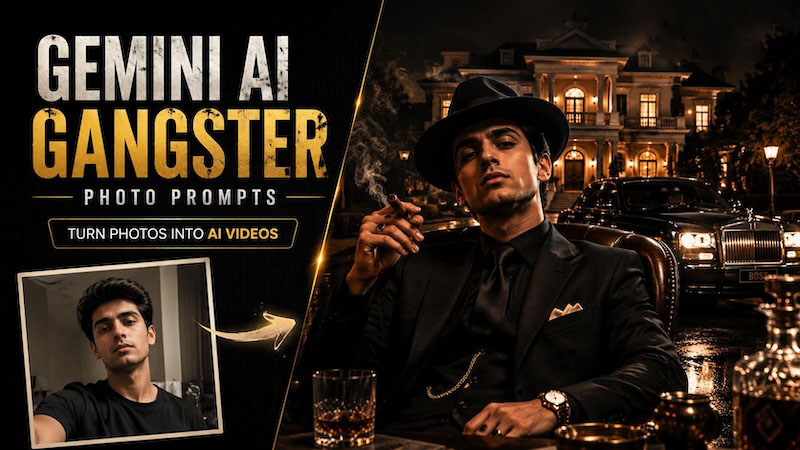
You’ve probably seen this trend already: ordinary selfies are being transformed into AI gangster portraits with cigars, luxury suits, and mafia-style scenes. Across TikTok and Instagram, many creators are using Gemini and simple prompts to create these cinematic images.
This guide collects the best Gemini AI gangster photo prompts by style, so you can quickly find ideas that match your vision. You’ll also learn how to turn these AI-generated photos into engaging videos.
Top Gemini AI Gangster Photo Prompts by Style
One thing worth knowing up front: each of these is written around a single selfie you upload yourself. Copy the prompt, drop in your photo, paste it in. That's it. There are 12 gangster AI photo prompts, split into five different looks — pick whichever one matches the vibe you're going for.
1920s Vintage Mafia Aesthetic

Transform this person into a 1920s mafia boss, black and white pinstripe suit, fedora hat tilted slightly, standing in front of a vintage car, sepia-toned cinematic lighting, film grain texture.Turn this photo into a 1920s speakeasy scene, subject wearing a double-breasted suit and holding a cigar, smoky dim room in the background, warm amber lighting, old Hollywood film look.Luxury Mafia Boss Prompts
Recreate this person as an Italian mafia don, tailored black suit, leather armchair, dark wood office background, dramatic side lighting, Godfather-inspired color grading.Style this person as an old-money crime boss, cashmere overcoat, gold watch, standing on a marble staircase, golden hour lighting, luxury estate background.Modern Street Gangster Look
Turn this selfie into a modern street gangster look, oversized leather jacket, gold chains, city rooftop at night, neon-lit skyline behind, cinematic contrast.Recreate this person in a designer streetwear gangster style, tracksuit and sunglasses, leaning against a black SUV, graffiti wall background, hazy evening light.Cyberpunk Gangster Style
Transform this photo into a cyberpunk gangster, holographic tattoos, neon purple and blue lighting, futuristic city street at night, rain-soaked pavement reflections.Style this person as a futuristic crime boss, sleek black trench coat, glowing city skyline background, cyberpunk color palette, dramatic fog effect.Female Gangster & Boss Lady Prompts
Turn this photo into a powerful female mob boss, sharp tailored blazer, red lipstick, sitting in a leather chair, moody spotlight, confident expression.Recreate this person as a 1940s femme fatale gangster, fitted dress, fur coat draped over shoulders, vintage car in the background, film noir shadows.Group Gangster Prompts (Family & Friends)
Turn this group photo into a mafia family portrait, matching dark suits, standing in front of an old mansion, sepia tone, formal cinematic composition.Style this group as a modern gangster crew, leather jackets and sunglasses, city alley background, low-angle shot, gritty urban lighting.Don't feel locked into any one of these exactly as written. Grab the lighting line from one, the outfit from another, and you'll get something a little different than what anyone else posts.
How to Generate AI Gangster Photos with Google Gemini
Step 1: Open Gemini, either through the app or at gemini.google.com.
Step 2: Upload a clear photo of yourself — front-facing, decent light, skip the heavy filters if you can, since Gemini has an easier time with a clean image to start from.
Step 3: Paste in whichever prompt caught your eye and hit generate.
Step 4: Wait for the results. If the first result looks nothing like what you pictured, don't scrap it — just change one detail.
Swap the jacket, the lighting, the background, whatever feels off, and run it again. Usually takes two or three tries to land on something you'd actually post.
How to Turn Gangster Photos into Videos with AI
A photo gets a glance. A video actually gets watched. Here's how to animate one of these shots using HitPaw Edimakor, a powerful AI tool.
- Multiple AI Models: Includes GPT Image 2, ChatGPT, Gemini Nano Banana 2, Banana Pro, Seedream 5.0 and Wan 2.7 for high-quality AI generation.
- Multiple Creation Modes: Supports text to image, image to image, text to video, image to video to quickly refine ideas.
- Built-in Prompt Tools: Comes with a built-in prompt library, so you're not writing your own from zero
- Beginner-Friendly: Simple enough for someone who's never touched a prompt before


Step 1: Prepare or Generate Images
Use whatever you already made in Gemini, or skip that step entirely and generate new images right inside Edimakor with its own image tool. You can also use your own real photos to convert them to Gangster photos.
Step 2: Choose the Generation Mode
Go to AI Video. Two options here. Image to Video feature can turn your static gangster images into engaging videos with natural motion and authentic cinematic vibes.
AI Transition actually create eye-catching before-and-after video, and that's usually the one that does better on TikTok.
Step 3: Generate Video & Enhance Effects
Once the clip renders, layer on whatever effects fit the mood — fog for the cyberpunk look, film grain for the vintage one, that kind of thing.
Step 4: Export and Share
Export in the format your platform wants. For TikTok and Reels, that's vertical, every time.
Creative Uses for Gemini AI Gangster Images
Once you've got two or three shots you actually like, there's more to do with them. The images are not only for having fun but can also be applied in various social media, creative and personalization projects. They are used in a number of the most popular ways, here are some of them:
Profile Pictures & Social Media Content
Turn your selfie into a cinematic mafia-style profile picture for Instagram, Facebook, X, or Discord. Use AI gangster images for posts, thumbnails, and creative branding.
TikTok & Reels Videos (Walking Scenes, Dance)
Animate gangster AI images into cinematic walking scenes, slow-motion entries, or dance videos. Create eye-catching content for TikTok, Instagram Reels, and YouTube Shorts.
AI Movie Character & Story Ideas
Use gangster portraits as inspiration for fictional characters, short films, comics, or games. Build unique mafia families, rival gangs, and cinematic storylines.
Wallpaper & Digital Art Aesthetic
Create stylish gangster wallpapers for phones, desktops, or digital projects. These AI portraits add a luxury, vintage, and cinematic mafia aesthetic.
FAQs
A1: Upload a clear photo to Gemini, paste in one of the prompts above, generate. If it's not quite right, tweak the wording and try again.
A2: Yes — the Boss Lady and Femme Fatale prompts were built specifically with that in mind, and they tend to come out looking sharp.
A3: You can. HitPaw Edimakor turns a still photo into a short video using either Image to Video or AI Dance.
A4: That's the whole idea behind these prompts — just start with a photo that's clear and well-lit.
Conclusion
One selfie and a few of these prompts is really all it takes to end up with five or six completely different characters, from a 1920s mob boss to something out of a cyberpunk film. Once you've settled on a favorite, turning it into a short video is the next logical move, and HitPaw Edimakor makes that part quick if editing software isn't really your thing.
Leave a Comment
Create your review for HitPaw articles