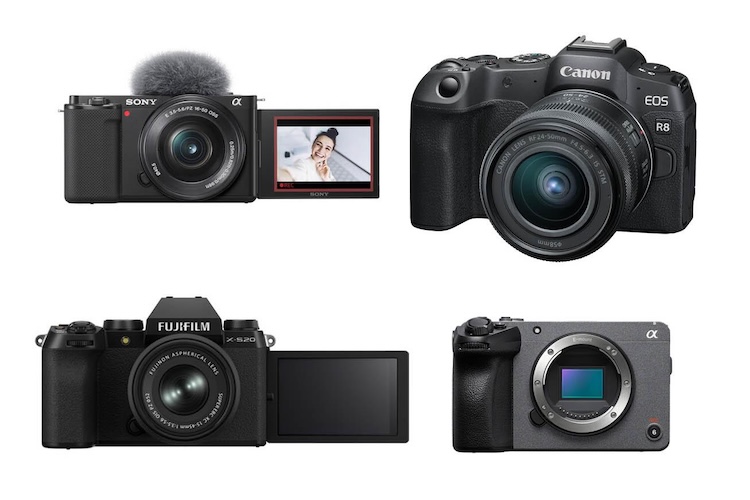
Selecting the right podcast camera is important for content creators who want to produce good-quality, professional-level videos. Whether you are launching your first video podcast or upgrading your existing recording setup, the right camera can help you capture sharp visuals, natural colors, and clear details. However, with hundreds of options available, how do you choose the right one? To make it easier, we have compiled a list of the best podcast cameras for professional podcast recordings, highlighting their key features, video quality, and overall performance.
Part 1: How We Choose the Best Podcast Cameras
To choose the best video camera for podcasting, we considered several important factors that affect recording quality and the overall podcasting experience. Here are some factors that you have to consider before choosing a video camera for podcasting:
- Popular Brand: Always select a camera from a reputable brand known for producing reliable recording equipment. Popular brands such as Sony, Canon, Panasonic, and Logitech offer various cameras ideal for video podcasting.
- Video Quality: Choose a camera that supports 1080p resolution for clear and detailed podcast videos. If your budget allows, consider a 4K camera for sharper footage and greater flexibility during editing.
- Ease of Use: If you're using a camera for the first time, go for a beginner-friendly option with simple controls, an intuitive interface, and an easy setup process. This will help you record high-quality videos without advanced technical knowledge.
- Cost-Effective: A video camera for podcasting can cost you thousands of dollars, depending on its features and capabilities. Therefore, it is important to choose a camera that fits your budget while delivering excellent video quality.
Part 2: Top 7 Best Cameras for Video Podcasting in 2026
Choosing the best camera for video podcast is easy when you have all the features laid out for you. From affordable webcams to professional mirrorless cameras, there are plenty of options available to suit different budgets and recording requirements. Here are the top 7 best cameras for podcast video:
1 Logitech C922 Pro

This webcam is a fantastic entry point for anyone starting a video podcast. It's easy to set up and provides reliable 1080p video quality at 30 frames per second, making it suitable for recording interviews, solo podcasts, and livestreams. It also supports 720p recording at 60 frames per second for smoother video. It is the best webcam for podcasting.
Pros
- Records at 1080p at 30 FPS and 720p at 60 FPS.
- Automatically adjusts focus to keep the subject clear.
- Offers a simple setup process and computer compatibility.
- Suitable for beginner podcasters, livestreamers, and home recording setups.
Cons
- Limited to 1080p recording rather than 4K.
- Offers fewer framing options than cameras with interchangeable lenses.
- Better suited to basic desktop recording than advanced production setups.
2 Elgato Facecam 4K
A simple, clean solution for creators who want a camera at their desk. Manual control in the Elgato camera hub lets you settle on an exposure and white balance that works for your room. The Facecam 4K has impressive colors, good sharpness, and unmatched fluidity at its max resolution.
Pros
- Supports 4K recording at up to 60 FPS.
- Delivers sharp images and natural-looking colors.
- Offers manual exposure and white balance controls through Camera Hub.
- Does not require a memory card or HDMI capture adapter.
Cons
- Designed primarily for desktop recording setups.
- Offers less flexibility in lens selection than interchangeable-lens cameras.
- Requires a computer-based setup for its typical recording workflow.
3 Sony ZV-1 II
The Sony ZV-1 II is a compact camera designed for content creators, vloggers, and video podcasters who want professional-looking footage without carrying bulky equipment. The lens is equivalent in terms of field of view to an 18-50mm lens, which makes it wider than the original ZV-1. This is an advantage, particularly for vloggers and video podcasters.
Pros
- Supports 4K video recording.
- Features a built-in 18--50mm equivalent wide-angle lens for flexible framing.
- Helps create a blurred background for a more professional look.
- Supports an external microphone for improved audio recording options.
- Compact design makes it convenient for home studios and mobile recording.
Cons
- The built-in lens cannot be changed.
- 4K recording is limited to up to 30 FPS.
- Offers less lens flexibility than interchangeable-lens cameras.
4 Panasonic LUMIX G100D
The Panasonic LUMIX G100D is a compact mirrorless camera designed for vloggers and content creators. It features a 20.3MP Micro Four Thirds sensor and supports 4K video recording, making it a practical option for recording video podcasts. Its built-in stereo microphone and 3.5mm external microphone input give creators flexible audio recording options, while its lightweight body makes it easy to set up in a home studio.
Pros
- Supports 4K video recording.
- Features a 20.3MP Micro Four Thirds sensor.
- Includes a built-in stereo microphone.
- Supports external microphones through a 3.5mm input.
- Lightweight design is convenient for desktop and home recording setups.
Cons
- The Micro Four Thirds sensor is smaller than APS-C sensors.
- 4K recording has a time limit.
- May require an external microphone for more professional podcast audio.
5 Blackmagic URSA Mini Pro
Blackmagic Design has come a long way with the URSA cinema camera line. The newest iteration is the Mini Pro, also known as the best 4K camera for podcasting. This series is designed for professional filmmakers and content creators who need advanced recording capabilities and excellent image quality.
Pros
- Offers professional video recording capabilities for advanced production workflows.
- Provides professional audio and video connections for studio use.
- Works with DaVinci Resolve for video post-production.
- Gives users extensive control over exposure, focus, and other recording settings.
Cons
- Its professional feature set may be more than beginners need.
- Requires more technical knowledge to operate effectively.
- May involve additional equipment and setup costs for a complete podcast studio.
6 iPhone 17
iPhone 17 is one of the most underrated video podcast cameras. If you already own an iPhone, then you don't need to buy an expensive camera for podcasting. It offers high-quality video recording, reliable autofocus, and excellent color reproduction, making it suitable for solo podcasts, interviews, and social media content.
Pros
- Supports 4K video recording.
- Captures detailed visuals with natural-looking colors.
- Portable and convenient for recording podcasts on the go.
- Makes it easy to edit and publish podcast clips using mobile apps.
- A practical option for creators who already own an iPhone.
Cons
- Offers less manual control than dedicated professional cameras.
- A smartphone may be less convenient for multi-camera studio setups.
- Additional accessories, such as a tripod and external microphone, may be needed for a more professional recording setup.
7 Sony FX30
The Sony FX30 is a powerful cinema camera for podcasters who want professional-quality video and greater creative control over their recording. Its features include an APS-C (Super 35mm) back-illuminated sensor and support for 4K recording at up to 120 frames per second, making it suitable for podcasts, interviews, and cinematic video content.
Pros
- Supports 4K recording at up to 120 FPS.
- Features an APS-C (Super 35mm) back-illuminated sensor.
- Includes microphone and headphone connections for audio monitoring.
- Offers advanced recording controls for professional video production.
- Suitable for podcasts, interviews, and cinematic video content.
Cons
- Requires a separate lens, increasing the overall setup cost.
- Its advanced controls may be challenging for beginners.
- May be more than necessary for simple, fixed-camera podcast recordings.
Part 3: Bonus Tips: How to Create a Video Podcast Without Expensive Cameras
As we all know, creating a high-quality video podcast requires a professional camera, which may cost thousands of dollars. However, you don't always need expensive equipment to produce engaging podcast video. With AI tools like HitPaw Edimakor, users can create engaging podcasts for Spotify, YouTube, and Apple Podcasts for free. HitPaw Edimakor is an advanced AI video editor that also includes podcast generation capabilities. The program enables users to create high-quality podcasts using AI avatars, voices, and more. One of the standout features of this program is that it offers an easy-to-use interface, which is ideal for non-tech and beginner users. Apart from podcast generation, HitPaw Edimakor offers advanced video editing capabilities, allowing users to customize their videos without editing experience.


Key Features of HitPaw Edimakor
- AI Podcast Generator : HitPaw Edimakor enables users to create high-quality and engaging video podcasts without expensive cameras. Simply enter the prompt, choose the AI voice and avatar, and click on the "Generate" button.
- Advanced Video Editing : The program also includes advanced video editing features, allowing users to customize podcasts according to their requirements. Users can add background music, subtitles, transitions, text, and more.
- Text-to-Video : This tool also includes a text-to-video feature, allowing users to produce high-quality videos with simple text prompts --- no advanced video editing skills or professional help are required.
- High-Quality Voices: One of the standout features of this tool is that it offers 500+ AI voices, allowing users to create natural-sounding podcast narration for different topics and audiences.
- Intuitive Interface: HitPaw Edimakor offers an easy-to-use interface, which is ideal for non-tech and beginner users. Simply enter the program, and HitPaw Edimakor will convert it into an engaging podcast.
Step-by-Step Guide:
The program offers an easy-to-use interface, which is ideal for non-tech and beginner users. Follow the instructions below to create an engaging podcast with HitPaw Edimakor:
Step 1: Launch HitPaw Edimakor on your PC and select the "AI Avatar" option from the main interface. Enter the avatar dialogue script in the prompt box or upload an audio file.
Step 2: Click on the "AI Voice" option and select the desired voice effect. HitPaw Edimakor offers 500+ options to choose from, each from different languages and accents.
Step 3: Next, select your podcast presenter if you don't want to appear in front of the camera. Users can choose from a variety of AI avatars to match their podcast's topic and style.
Step 4: Once all the requirements are complete, click on the "Generate" button, and within seconds your AI podcast will be ready.
Final Thoughts
If you are looking for the best podcast camera, you're in the right place. This guide covers the top camera options for video podcasting in 2026, across different budgets and more. Plus, it introduces HitPaw Edimakor, an AI tool that lets users create engaging podcast videos without expensive podcast cameras. It also offers advanced video editing capabilities, powerful AI tools, and more.
Leave a Comment
Create your review for HitPaw articles