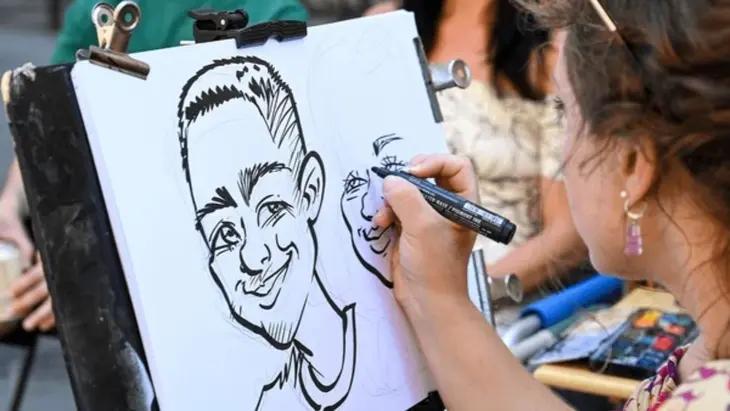
Have you ever had a caricature of yourself made? You know those funny drawings you get made at Disney World or at tourist attractions, where an artist exaggerates your features while keeping you recognizable? Caricatures have now entered the AI world and are becoming a popular image-editing trend in 2026. With ChatGPT and the right prompts, you can easily transform simple images into caricature-style images without needing professional drawing skills. In this guide, we will mention some of the best ChatGPT caricature trend prompts you can use to create funny social media images within seconds.
Part 1: What is Caricature?

A caricature is an artistic representation that exaggerates and distorts certain physical, expressive, or behavioral features of a person or subject. The main goal is to create a humorous or playful version while still keeping the subject recognizable. For example, an artist may enlarge a person’s eyes, hairstyle, smile, nose, or facial expressions to create a funny illustration. Caricature-style images are immensely popular on social media platforms, where users enjoy sharing creative and entertaining versions of their photos. These caricatures are also commonly used for profile pictures, gifts, and creative content.
Part 2: Top 10 ChatGPT Caricature Trend Prompts to Try for Viral AI Images
In 2026, creating high-quality caricature images is easier than ever. With the right ChatGPT caricature prompt, you can easily turn your simple images into caricature-style visuals within seconds. Here are the top 10 ChatGPT caricature trend prompts you can try to create unique AI images:
1 Classic Hand-Drawn Caricature
“Transform the uploaded photo into a professionally hand-drawn caricature while preserving the person’s identity and recognizable facial features. Exaggerate the eyes, smile, hairstyle, nose, and facial expressions in a playful yet attractive way. Use expressive pencil and ink strokes, smooth outlines, subtle shading, and vibrant colors. Keep the original pose and clothing recognizable while adding artistic charm. Place the subject against a clean illustrated background with soft details. Make the final image humorous, polished, high-quality, and suitable for a social media profile picture.”
2 Funny Exaggerated Caricature
“Convert the uploaded ordinary photo into an intentionally funny caricature with exaggerated facial features and playful proportions. Enlarge the eyes slightly, emphasize the smile, enhance the hairstyle, exaggerate the cheeks and eyebrows, and create a humorous facial expression while keeping the person recognizable. Use colorful digital illustration, bold outlines, smooth shading, and lively textures. Preserve the original clothing and pose while adding a whimsical illustrated background. Make the final artwork look energetic, amusing, highly detailed, polished, and perfect for sharing on social media platforms.”
3 Classic Caricature Sketch
“Transform the uploaded photo into a classic hand-drawn caricature sketch while keeping the person clearly recognizable. Exaggerate distinctive facial features such as the eyes, nose, smile, cheeks, eyebrows, jawline, and hairstyle in a humorous but flattering way. Use expressive pencil strokes, confident ink outlines, cross-hatching, subtle shading, and realistic sketch textures. Preserve the original pose, clothing, and overall appearance while giving the face playful proportions. Add a simple artist’s paper background with minimal details. Create a charming, professionally illustrated caricature that feels authentic, artistic, and visually engaging.”
4 Comic Book Caricature
“Turn the uploaded photo into a bold comic-book caricature while keeping the person clearly recognizable. Exaggerate their facial features, hairstyle, eyes, eyebrows, and smile to create a dramatic yet humorous appearance. Use thick black outlines, dynamic shadows, vivid colors, halftone textures, and strong highlights inspired by modern comic illustrations. Preserve the original outfit and pose but enhance them with graphic details. Add a dramatic illustrated background with subtle action effects. Make the final caricature energetic, expressive, sharp, cinematic, and visually powerful for social media.”
5 Bold Ink Caricature
“Convert the uploaded image into a bold black-and-white caricature sketch with exaggerated facial proportions. Make the eyes larger, the eyebrows more expressive, the nose slightly oversized, the cheeks fuller, and the smile wider while keeping the person instantly recognizable. Use thick ink outlines, energetic hand-drawn strokes, dramatic hatching, and strong shadow details. Preserve the original hairstyle, clothing, and body position. Add a simple artist sketchbook background with minimal distractions. The finished image should resemble a professional street caricature drawing with humorous exaggeration and distinctive facial character.”
6 Comedic Facial Caricature
“Turn the uploaded portrait into a humorous caricature focused heavily on exaggerated facial features. Enlarge the eyes noticeably, stretch the smile, emphasize the nose and ears, enlarge the forehead slightly, and exaggerate the cheeks and chin without losing the subject’s likeness. Use expressive hand-drawn lines, pencil texture, bold outlines, and playful shading. Keep the original hairstyle and clothing recognizable. Use a clean paper background with subtle artistic imperfections. Make the final caricature funny, charming, recognizable, and visually similar to a professionally drawn amusement-park caricature.”
7 Oversized Eyes Caricature
“Turn the uploaded portrait into a classic caricature featuring dramatically oversized expressive eyes while retaining the person’s identity. Slightly enlarge the nose, cheeks, lips, eyebrows, and hairstyle to complement the exaggerated eyes. Use detailed graphite pencil work, strong contour lines, soft shadows, and fine cross-hatching to create a traditional sketch appearance. Preserve the original clothing and overall pose. Place the person against a clean white paper background with subtle pencil texture. Make the finished image humorous, expressive, polished, and instantly recognizable as a professional caricature.”
8 Full-Face Distortion Caricature
“Convert the uploaded image into a highly expressive full-face caricature with intentionally distorted facial proportions. Enlarge the forehead, eyes, nose, cheeks, mouth, chin, and ears in a balanced but humorous manner while maintaining recognizable identity. Use traditional black pencil and ink techniques with visible strokes, dramatic outlines, cross-hatching, and carefully placed shadows. Keep the person’s original outfit and pose recognizable. Use a plain paper background to emphasize the face. Create a polished caricature that feels humorous, exaggerated, artistic, detailed, and professionally hand-rendered.”
9 Dramatic Nose Caricature
“Transform the uploaded photo into a traditional caricature sketch with the nose as the most exaggerated facial feature. Make the nose noticeably larger and more prominent while also enlarging the eyes, eyebrows, cheeks, lips, and chin for a balanced humorous appearance. Preserve the person’s recognizable identity, hairstyle, clothing, and pose. Use expressive pencil strokes, dark ink contours, cross-hatching, and detailed hand-drawn shading. Keep the background simple and paper-like. The final artwork should look like a professional caricature artist’s drawing, with playful facial distortion and strong personality.”
10 Giant Head Caricature
“Turn the uploaded ordinary portrait into a classic exaggerated caricature with an oversized head and smaller body proportions. Enlarge the forehead, eyes, nose, cheeks, mouth, and chin while keeping the person clearly recognizable. Preserve their hairstyle, clothing, accessories, and original pose. Use traditional pencil and ink sketching techniques, rough artistic strokes, cross-hatching, and expressive facial contours. Add a clean white paper background with subtle drawing texture. Make the final image humorous, exaggerated, detailed, and similar to a hand-drawn caricature created by a talented street artist.”
Part 3: Convert Images into Caricature Style Visuals Using Edimakor AI
To create engaging and visually striking caricature images, you must use an advanced AI-powered tool. That is where Edimakor AI comes in. It is a web-based AI video editor that also provides image generation capabilities. With this video editor, you can easily transform simple images into various styles using simple text prompts. Simply enter the AI caricature trend prompts, choose the AI model, adjust image settings, and click on the “Generate” button. Within seconds, your caricature image will be ready and available for download. Edimakor AI is an advanced AI editor that combines powerful editing tools with AI-powered creative features, making it suitable for both beginners and experienced creators. Users can experiment with different caricature styles, facial expressions, backgrounds, outfits, and artistic effects to create personalized results.
Create NowKey Features of Edimakor AI
- Caricature Style Images: With Edimakor AI, users can create engaging and high-quality caricature images with a simple text prompt, making it easier to create eye-catching profile pictures, social media posts, and thumbnails.
- Multiple AI Models: The best part of this tool is that it includes a wide range of AI models, each with unique features and capabilities. Models available are Nano Banana, Nano Banana Pro, Stable Diffusion, Flux, Imagen 4, and more.
- Advanced Customization: Edimakor AI offers a range of customization options that allow users to create caricature images according to their preferences. Users can change the background, insert text, add filters and effects, etc.
- AI-Powered Tools: The program offers multiple AI tools with unique capabilities. It includes AI tools such as AI Video Editor, Image-to-Image, Text-to-Image, Text-to-Video, AI Video Enhancer, AI Voice Changer, and Text-to-Speech.
- Intuitive Interface: One of the best parts of this tool is its easy-to-use interface, which makes AI image generation accessible even for beginners. Users can quickly find the required tools, enter their prompts, and generate results without professional help.
Step-by-Step Guide:
Edimakor AI offers a user-friendly interface, allowing users to transform images using simple ChatGPT caricature trend prompts. Here is how to do it:
Step 1: Visit Edimakor’s official site and log in with your free account. Choose the “Image-to-Image” feature from the main interface and upload a reference image. Users can upload multiple images at once and in various formats, such as JPG, PNG, JPEG, and WEBP.
Step 2: Select the preferred AI model and enter the ChatGPT caricature prompt. Adjust the image settings, such as aspect ratio, output quantity, and resolution. Click on the “Generate” button to begin the process.
Step 3: Edimakor AI will analyze the input data and provide the results according to your requirements. Navigate to “My Creation” and choose the generated image. Preview and download it in the desired format, including JPG.
Final Thoughts
The AI caricature trend offers a fun, creative way to express your professional identity and personality. With the right ChatGPT caricature trend prompt, you no longer need advanced drawing skills to transform ordinary photos into eye-catching caricature images. Use these prompts with Edimakor AI to get professional-looking results with ease.


Leave a Comment
Create your review for HitPaw articles