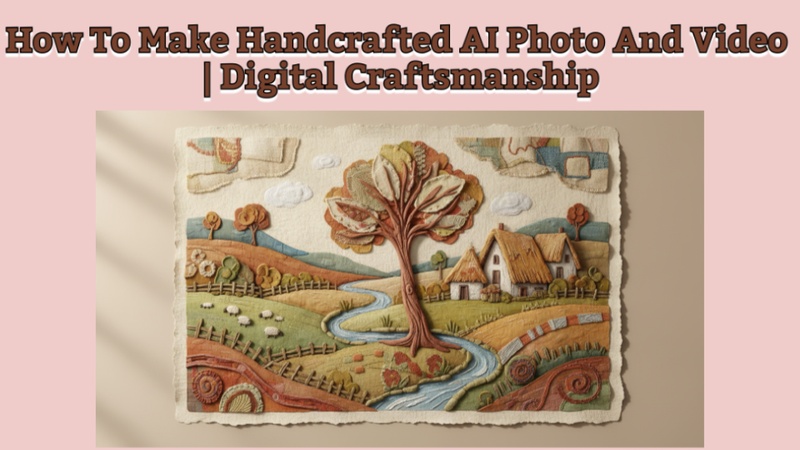
In 2026, digital craftsmanship is revolutionizing creation by fusing strong AI tools with classic handmade designs. This post describes how to make handcraft ai photo and video that are influenced by needlework, plush toys, papercrafts, and clay models. You will discover how to create photos, turn them into films, and use the greatest prompts to produce handcrafted, realistic outcomes.
Part 1: How To Make a Handcrafted AI Photo
Here is how to make a handcrafted AI photo:
Make Handcraft AI Photo with Prompt Using Edimakor
Using Edimakor's Text-to-Image tool makes it easy to create an AI photo that seems handcrafted.
Step 1: Get the Text-to-Image Tool by Opening Edimakor
On your PC, launch HitPaw Edimakor. To begin producing images using written prompts, navigate to Toolbox from the main interface and choose the Text-to-Image option.



Step 2: Open the AI Prompt for Handcraft
In the prompt box, paste the handcrafted AI photo prompt. To describe a particular craft type, such as paper art, clay art, needlework, or wooden crafts, you can also slightly alter the prompt. For further inspiration, try the Prompt Generator located beneath the prompt box.
Step 3: Modify the Picture Preferences
Based on the image's intended use, choose the aspect ratio, image style, and output quantity. Click the Generate button once everything is configured.
Step 4: Examine and save the picture
Make sure the handcrafted elements and textures appear realistic by previewing the image once it has been generated. You can find the image by choosing the folder icon placed at the top right.
Make Handcraft AI Photo with AI Effect Templates Using Edimakor
Using pre-made AI effect templates, Edimakor makes it simple to produce handcrafted-style AI images. Without using any prompts, you can transform a regular snapshot into a cute, handcrafted piece of art with effects like Yarn Plush Diorama and Plush Keychain Doll.
Step 1: Open Edimakor and Access Image Effects
On your PC, launch HitPaw Edimakor. Select the Image Effects option by scrolling down on the home screen of the main interface. The entire AI effects library will open as a result.
Step 2: Search Effects in the Nano Banana Pro Section
Navigate or search for the Nano Banana Pro section within the Image Effects library. In order to create a soft, homemade, craft-like appearance, search for handcrafted-style effects like Plush Keychain Doll or Yarn Plush Diorama.
Step 3: Choose the Effect and Upload Your Photo
After choosing your favorite effect, press the Create button. You can submit your photo on the new screen that appears. The chosen handicraft AI effect will be automatically applied to your image by Edimakor.
Step 4: Adjust Settings and Generate
Make any necessary adjustments to the output quantity, resolution, and aspect ratio before creating. After everything is configured, click the Generate button to begin creating AI.
Step 5: Preview and Export the Image
Preview the handcrafted AI photo after it has been generated to make sure the details appear neat and creative. Once you are satisfied with the outcome, save the picture to your device by selecting the folder icon at the top right.
Part 2: How To Make Handcrafted AI Video
You can create beautiful, handcrafted-style AI videos in two ways with Edimakor. You can either generate a video directly from text or bring a handcrafted AI photo to life by turning it into a video.
Make a Handcrafted AI Video with a Text Using Edimakor
Here are the steps to create a handcrafted AI video with text using Edimakor text-to-video tool:
Step 1: Access Edimakor and Select Text to Video
Open HitPaw Edimakor on your computer and go to the Toolbox section. Select the Restyle Video tool to start creating a video using text only.
Step 2: Enter the Prompt
In the prompt box, write a handcrafted-style description such as yarn textures, plush fabric, paper craft details, or handmade doll aesthetics. You can also use the Prompt Generator available below the prompt box.
Step 3: Adjust the Settings
Adjust the video settings, including aspect ratio, duration, and resolution, based on your platform needs.
Step 4: Generate and Preview
Click Generate Video, preview the result in the My Creations section, and access your video by tapping the folder icon in the upper-right area of the video panel.
Bring HandCraft AI Photo to Life Using Edimakor
Here’s how you can bring life to a handcrafted AI photo using Edimakor's image-to-video tool:
Step 1: Open HitPaw Edimakor and Choose the Image to Video Tool
Open HitPaw Edimakor and go to the Toolbox section. Select the Image-to-Video tool.
Step 2: Upload the Image
Upload the generated handcrafted AI image you created earlier as the reference image.
Step 3: Write the Prompt
Add a short prompt describing gentle motion, such as soft fabric movement, slow camera zoom, or subtle handcrafted animation.
Step 4: Adjust the video settings
Adjust the video settings like duration, resolution, and aspect ratio, and then click Generate Video.
Step 5: Preview and Export the Video
Preview the video in the My Creations section, and to access the video, click the folder icon located in the top-right corner of the screen.
Part 3: Best Handcrafted AI Photo And Video Prompts
Below are carefully written prompts that feel natural and detailed:
Best Handcrafted AI Photo Prompts
Clay Handcraft Photo Prompt
A detailed clay-style miniature scene of a cozy coffee shop, soft pastel colors, visible fingerprints on clay textures, warm lighting, shallow depth of field, handcrafted stop-motion look, ultra-high resolution.
Papercraft / Embroidery Photo Prompt
A layered papercraft illustration blended with embroidery textures, floral patterns stitched with colorful threads, soft shadows between paper layers, a handmade scrapbook aesthetic, a clean background, and studio lighting.
Plush Toy Image Prompt
A cute plush toy character sitting on a wooden table, soft fabric texture, visible stitching, slightly fluffy surface, warm indoor lighting, shallow depth of field, cozy and handmade aesthetic, ultra-high resolution.
Embroidered Image Prompt
A detailed embroidered artwork of flowers and leaves on fabric, colorful threads with visible stitches, realistic textile texture, soft natural lighting, handcrafted embroidery style, clean background, high detail.
Best Handcrafted AI Video Prompts
Clay Handcraft Video Prompt
A clay-style animated scene of a small handmade village, with visible fingerprints on clay models, smooth stop-motion animation, warm lighting, cinematic camera movement, and a handcrafted claymation look.
Papercraft Handcraft Video Prompt
A layered papercraft world unfolding in motion, paper buildings and trees moving gently, sharp paper edges, soft shadows between layers, smooth camera pan, and handcrafted paper animation style.
Plush Toy Handcraft Video Prompt
A plush toy character walking through a small handmade town, fuzzy fabric texture, visible stitching, gentle movements, soft cinematic lighting, stop-motion animation style, cozy and playful mood.
Embroidery Handcraft Video Prompt
An embroidered landscape coming to life, threads slowly stitching hills, trees, and clouds in motion, fabric texture visible, smooth camera pan, handcrafted animation style, warm and artistic tone.
FAQs on Handcraft AI Photo And Video 2026
A1: One of the greatest AI tools for creating images and films is Edimakor, which combines text-to-image, image-to-video, sophisticated effects, and simple editing into a single, potent creative platform.
A2: One of the best AI tools for making images and films is Edimakor, which combines text-to-image, image-to-video, sophisticated effects, and easy-to-use editing into a single, potent creative platform.
A3: The Professor Tree study shows that AI can create synthetic images of both familiar and unfamiliar faces that most people cannot tell apart from actual photos.
In the Bottom Line
Handcrafted AI images combine contemporary technology with nostalgic craft aesthetics to provide a distinctive approach to stand out. If anyone wants to know how to make handcraft ai photo and video, HitPaw Edimakor (Video Editor) makes it simple for producers without advanced editing abilities to create clay-style images, papercraft scenarios, and animated handcrafted videos.
Leave a Comment
Create your review for HitPaw articles