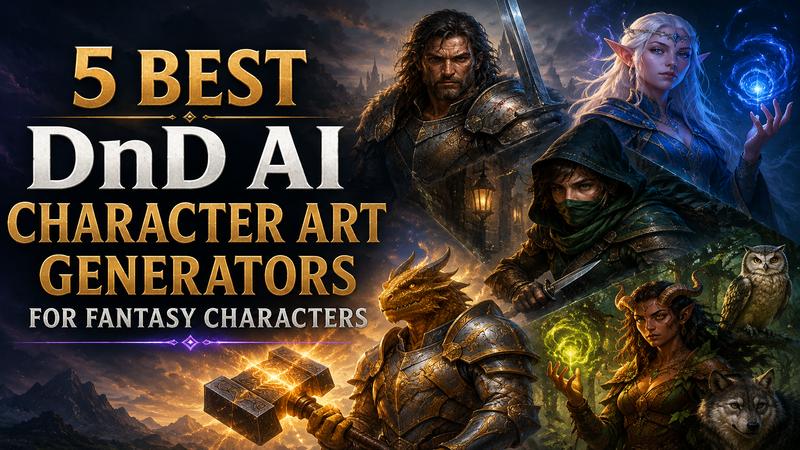
Every Dungeons & Dragons player knows the thrill of rolling a new character, but visualizing that hero can be a daunting hurdle. While your mind sees a battle-scarred Tiefling warlock draped in starlight, translating that vision onto paper often requires professional artistic skills you might not possess.
Fortunately, the landscape of tabletop gaming has been transformed by AI. In 2026, creating high-fidelity character art is no longer reserved for those with a stylus. These advanced tools allow you to generate immersive, lore-accurate portraits in seconds, bridging the gap between imagination and the gaming table. This guide will show you the best DnD AI character art tools to make your heroes look real.
What Is a DnD AI Character Art Generator?
A DnD AI character art generator is a specialized machine-learning tool designed to interpret descriptive text and transform it into fantasy-themed visual assets. Unlike generic image generators, these systems are trained on vast datasets of mythic creatures, historical armor, and arcane effects to understand specific RPG terms such as "Tiefling," "Eldritch Blast," and "Mithral Plate."
Common use cases include creating player character (PC) portraits for digital sheets, designing terrifying non-player character (NPC) villains, and visualizing complex battle maps or magical items. These tools allow players to focus on their narrative without requiring professional drawing skills, bridging the gap between imagination and art.
Top 5 DnD AI Character Art Generators in 2026
Creating stunning visual representations of your DnD characters has never been easier. In 2026, AI generators have evolved to handle complex fantasy races, intricate armor, and magical effects with incredible precision. Here are the top 5 DnD AI character art generators to bring your next hero to life.
1 Edimakor AI

Edimakor AI stands as the most versatile contender in 2026, offering a seamless fusion of high-fidelity image generation and creative editing. Unlike generic tools, its dedicated fantasy module is fine-tuned for RPG aesthetics, ensuring that armor designs and spell effects look authentic to the genre. It allows users to animate their characters using effects such as "AI Dance" or "AI Hug.” It is the premier choice for creators who want professional, cohesive art across their entire campaign world.
Key Features:
- Generate unique DnD character art from text descriptions, including heroes, villains, and fantasy creatures.
- Create fantasy artwork with multiple AI models like Seedream 5 pro, Nano Banana and more.
- Generate detailed 4K character images with sharp armor, weapons, facial features, and magical elements.
- Export AI-generated DnD artwork without watermarks for campaigns, profiles, and creative projects.
Create custom fantasy character images quickly with AI-powered generation in just a few clicks. Limitations: Focused more on social media effects than high-fidelity realism; watermarks are present on free exports.
How to Use:
Step 1: Go to the Edimakor AI web platform.
Try It NowStep 2: Select your preferred AI model for generating DnD character artwork.
Step 3: Enter your character prompt, then adjust the image resolution and generation quantity.
Step 4: Click "Generate" and export your animated character.
Pricing:
Edimakor AI offers three main yearly plans:
- Basic: $4.67/month, billed at $55.99 yearly, with 20,000 AI credits.
- Pro: $9.17/month, billed at $109.99 yearly, with 40,000 AI credits.
- Premium: $20/month, billed at $239.99 yearly, with 100,000 AI credits.
New users can also get 60 free AI credits upon registration to try the platform before choosing a paid plan. All plans include text-to-video, image-to-video, text-to-image, image-to-image, HD output without watermarks, and multi-model support.
2 Hotpot AI
Hotpot functions as a specialized forge for DnD enthusiasts. It focuses on turning wild character concepts into tangible art without requiring complex settings. Its distinction lies in its simplicity and accessibility, offering a no-account-needed experience. It is particularly effective at generating specific DnD races, such as Dragonborn and Tieflings. This provides a quick solution for gamers who need immediate visual references for their campaigns.
Key Features:
- Use specialized custom style instructions for art.
- Access a developer API for custom apps.
- Restore and colorize old physical character drawings.
- Enhance facial features for realistic campaign NPCs.
Limitations: High-quality results require credits; the free tier is slower and includes advertisements.
How to Use:
- Go to the Hotpot DnD Generator page.
- Type your character vision in the prompt box.
- Choose "Custom" in the style menu for specific aesthetics.
- Adjust image dimensions and privacy settings.
- Press "Generate" to view your character art.
Pricing: Free for basic use; Credit bundles are required for commercial use and faster results.
3 BudgetPixel
BudgetPixel is the ultimate tool for players who want precise control without a high price tag. Its "DND Character Art Generator" focuses on plain English prompts, so you don't need to be a "prompt engineer" to get great results. The tool handles visible details like scars, specific weapon materials, and lighting moods exceptionally well. It is particularly useful for DMs who need to generate a diverse roster of NPCs for a city or tavern scene.
Key Features:
- Specify distinct gear and specific armor materials.
- Easily switch between painterly and gritty art styles.
- Generate gallery-worthy variations of a single concept.
- Perfect for building diverse NPC concept art sets.
- Accessible interface works great on mobile devices.
Limitations: Lacks the diverse animation or video features of other platforms; focuses strictly on static 2D images.
How to Use:
- Visit the Perchance AI Character Generator page.
- Enter a detail character description in the text box.
- Select an "Art Style" and "Shape" (e.g., Painted Anime).
- Click "Generate" to see the randomized result.
- (Optional) Edit the underlying code to customize the generator.
Pricing: BudgetPixel has a Free plan with 300 credits per month. Paid plans currently start at $4.17/month when billed annually. Higher plans include more monthly credits, storage, faster queues, and additional features. The platform also offers pay-as-you-go credit packs without requiring a subscription.
How to Use:
- Open the BudgetPixel DnD Character Art Generator.
- Start with a hero idea (e.g., Ranger, Necromancer).
- Input details regarding race, gear, and setting mood.
- Select an art style (e.g., Painterly, Gritty, Comic).
- Generate a batch of variations.
- Refine the prompt and download your final portrait.
4 Perchance
Perchance is the community favorite for those who value total creative freedom and a zero-cost entry point. It is a plugin-based system where community members create specialized "generators." The AI Character Generator on Perchance offers a staggering array of styles, from "Yu-Gi-Oh Art" to “Medieval Oil Painting." It’s a best for adventurous players who want their character art to stand out with unique, niche aesthetics. This makes it the most flexible tool for DMs who need infinite variations.
Key Features:
- Huge selection of community-made artistic style plugins.
- Allows extremely long, detailed character descriptions.
- Randomizer buttons help spark creativity for new players.
- Export generators as standalone HTML files for offline use.
Limitations: The interface is less polished and requires learning; results depend heavily on the specific community plugin.
How to Use:
- Visit the Perchance AI Character Generator page.
- Enter a detail character description in the text box.
- Select an "Art Style" and "Shape" (e.g., Painted Anime).
- Click "Generate" to see the randomized result.
- (Optional) Edit the underlying code to customize the generator.
Pricing: Perchance provides its AI character generator for free, with no paid subscription required for basic generation.
5 Magic Hour
Magic Hour is a high-speed generator that supports multiple frontier models, such as Flux 2 Klein and Nano Banana. It is unique for its batch generation capability, producing up to 16 variations at once to save time. With a "no sign-up" policy and a direct "Generate to Edit" workflow, it is an efficient choice for creators who need high-resolution output and fast creative iterations for their tabletop games.
Key Features:
- Compare different AI model outputs side by side.
- Generate up to sixteen variations per prompt.
- Upscale fantasy artwork to high-resolution four-K quality.
- Maintain character consistency across different campaign scene storyboards.
- Transform static character images into short cinematic videos.
Limitations: Daily free credit limit (10 images); advanced models and 4K upscaling require a paid subscription.
How to Use:
- Access the Magic Hour DnD Art Generator.
- Describe your idea (race, class, pose, setting, style).
- Select a specific model (e.g., Nano Banana Pro or Flux).
- Click "Generate" to receive two variations per prompt.
- Use the “Generate and Edit” workflow to refine details.
Pricing:
- Creator: $19/month with 12,000 credits.
- Pro: $39/month with 25,000 credits.
Both plans include access to all tools, watermark-free exports, commercial use, priority queues, and API access.
6 Comparison Table: 2026 DnD AI Art Generators
| Tool | Ease of Use | Batch Generation | Prompt Accuracy | Image Quality |
|---|---|---|---|---|
| Edimakor AI | Moderate (Pro) | Yes (Up to 4) | Very High | Elite (4K/Video) |
| Hotpot | Very Easy | No (Single) | Moderate | Standard |
| BudgetPixel | Easy | Yes (Variations) | High | High (Painterly) |
| Perchance | Moderate | Yes (Up to 12) | Moderate | Variable |
| Magic Hour | Easy | Yes (Up to 16) | Elite | Elite (4K) |
DnD Character Art Prompt Ideas
Writing the right prompt is an art in itself. Here are 5 different styles to help you get the best results from your dnd ai art generator:
A battle-worn human fighter with a scarred face. He wears heavy iron plate armor and holds a notched longsword. The setting is a muddy battlefield at dusk with smoke in the background. Digital painting style with dark, moody lighting.
A noble high-elf wizard with long silver hair. She wears flowing silk robes with glowing blue runes. She stands in a moonlit forest glade with magical particles in the air. Painterly fantasy art style with soft, bright colors.
A halfling rogue hiding in the shadows of a stone alleyway. He wears a dark green hooded cloak and holds twin daggers. Only his eyes are visible under the hood. Cinematic style with deep shadows and orange lantern light.
A dragonborn paladin with gold scales and shining silver armor. He holds a massive warhammer that glows with holy light. He stands on a mountain peak at sunrise. Heroic pose, bright colors, and high-detail 3D render style.
A tiefling druid with curved horns and leaf-covered leather armor. She is surrounded by forest animals like an owl and a wolf. Her hands glow with green natural magic. Studio Ghibli style with vibrant greens and soft lines.
FAQs About DND Character Image Generator
A1: The best generator depends on your needs. For professional quality video assets, Magic Hour is top-tier. Edimakor AI is best for an all in one creative suite. For free and simple character portraits, Perchance and Hotpot are great choices for quick results.
A2: Start with the subject (Race + Class), then add equipment (Armor + Weapon), setting (Forest + Dungeon), lighting (Moonlight + Candlelight), and finally the art style (Oil Painting + Sketch). Be specific about colors and moods to help the AI realize your vision.
A3: This varies by tool. Hotpot, Magic Hour, and Edimakor AI allow commercial use specifically for their paid users. Always review each platform’s terms of service, especially if you intend to use the artwork in a published module or for streaming.
Conclusion
Creating DnD character art no longer requires professional drawing skills. With an AI image generator for DnD, you can turn a basic character concept into a detailed fantasy portrait in minutes. With tools like Hotpot and Perchance, you can get quick ideas for free. If you want the most beautiful and consistent art, Edimakor AI is the way to go. It makes your campaign feel like a big-budget movie. Your friends will be impressed when they see your hero come to life. Why not give it a try today? Visit Edimakor AI today and make your first fantasy character. Your next adventure is waiting for its hero!


Leave a Comment
Create your review for HitPaw articles