The Super Bowl is one of the most-watched sporting events in the world, attracting millions of viewers who tune in to enjoy thrilling plays, memorable halftime performances, and an exciting championship showdown. However, watching the game alone can feel less entertaining, which is why hosting a Super Bowl watch party is a great idea. You can invite your friends and family, and enjoy every exciting moment together.
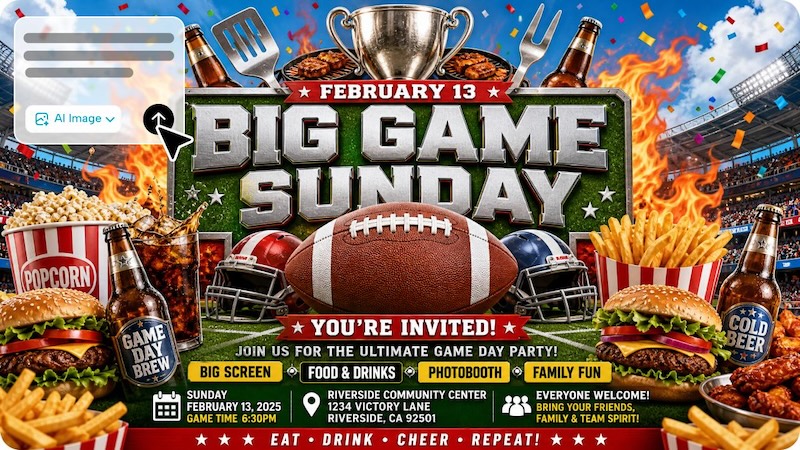
To make your event feel special from the beginning, create an eye-catching invitation that matches your party theme. In this guide, we will mention the top 12 AI Super Bowl party invitation prompts that will help you create an engaging invitation card without editing experience.
Part 1: 12 AI Prompts for Eye-Catching Super Bowl Party Invites
AI technology has made our lives easier than ever. Today, creating high-quality invitation cards no longer requires professional editing skills; a simple text prompt will do the job for you. Here are the top 12 Super Bowl invitation prompts that allow you to create eye-catching Super Bowl party invites:
1. Stadium Lights Celebration

“Create a high-energy Super Bowl party invitation card with a packed football stadium under bright floodlights, cheering fans, flying confetti, and a football in the foreground. Add bold headline text: “Super Bowl Watch Party” with space for date, time, venue, and RSVP details. Use vibrant team-inspired colors, cinematic lighting, and a festive sports atmosphere. Make the design exciting, polished, and easy to read, with modern typography and dynamic composition.”
2. Luxury Black and Gold Invitation
“Design an elegant Super Bowl party invitation card with a premium black-and-gold theme. Show a golden football, sparkling particles, confetti, and dramatic spotlight effects on a dark background. Add a stylish headline such as “The Ultimate Super Bowl Night” with space for date, time, venue, dress code, and RSVP details. Use luxurious typography, refined composition, and a glamorous event style. Make it classy, modern, and perfect for an upscale Super Bowl viewing party.”
3. Cartoon Family Game Night
“Generate a bright cartoon-style Super Bowl invitation card featuring a happy family and friends gathered around a big TV watching football. Include popcorn, pizza, foam fingers, snacks, pennants, and football balloons around the room. Add the heading “Join Our Super Bowl Party” with party details clearly displayed. Use colorful illustrations, playful expressions, and a fun, family-friendly atmosphere. Make the invite cheerful, engaging, and easy to customize for kids, parents, and group celebrations.”
4. Food Lovers Super Bowl Invite
“Create an appetizing Super Bowl party invitation card centered around game-day food. Include pizza slices, chicken wings, nachos, sliders, popcorn, fries, sauces, and cold drinks arranged around a football-themed table. Add the headline “Food, Football & Fun” with party details and RSVP text. Use warm lighting, rich textures, and a festive atmosphere that blends sports excitement with delicious snacks. Make the card inviting, mouthwatering, and perfect for guests who love food and football.”
5. Rival Teams Showdown Invite
“Generate a dramatic Super Bowl invitation card split into two sides representing two rival teams. Use contrasting colors, helmets facing each other, smoky effects, sparks, stadium lights, and a football in the center. Add the title “Choose Your Side” with an editable space for date, time, venue, and RSVP details. Use cinematic lighting and bold typography to create tension and excitement. Keep the design powerful, energetic, and perfect for a competitive game-night party.”
6. Friends Living Room Watch Party
“Design a cozy and relatable Super Bowl invitation card showing a stylish living room filled with friends enjoying the game on a large television. Include sofas, blankets, pizza boxes, chips, drinks, and football-themed decorations. Add the heading “Super Bowl Watch Party at Our Place” with editable event details and RSVP text. Use warm indoor lighting, friendly vibes, and realistic detail. Make the card welcoming, fun, and perfect for a casual home gathering with close friends.”
7. Halftime Show Glam Invite
“Create a stylish Super Bowl invitation card inspired by the excitement of the halftime show. Include a brightly lit concert stage, spotlights, musical effects, cheering fans, and subtle football imagery blended into the design. Add the title “Super Bowl Party & Halftime Show Night” with space for date, time, address, and RSVP details. Use bold modern typography, vivid lighting, and an entertainment-focused vibe. Make the invitation glamorous, energetic, and appealing to both sports and music fans.”
8. Rustic Game Day Invitation
“Design a rustic Super Bowl party invitation card with a wooden background, a classic football, chalkboard-style typography, and cozy game-day decorations. Include snacks, a lantern, pennants, and a relaxed farmhouse-style setup. Add the heading “Game Day Gathering” with room for event details and RSVP contact. Use earthy tones, textured elements, and warm lighting to create a comforting and inviting look. Make the card charming, unique, and perfect for a laid-back country-style Super Bowl celebration.”
9. Sport Pub Invitation
“Create a vibrant Super Bowl invitation card set inside a busy sports pub. Show multiple TV screens, a cheering crowd, bar tables, wings, beer mugs, and football decorations. Add a bold heading such as “Super Bowl Night at the Pub” with room for date, time, venue, and RSVP details. Use moody bar lighting, realistic details, and an energetic social atmosphere. Make the invite dynamic, stylish, and perfect for promoting a lively football watch party at a local venue.”
10. Winter Super Bowl Celebration
“Design a Super Bowl invitation card with a cozy winter-themed atmosphere. Include snow outside the window, warm indoor lights, hot snacks, football decor, and a television showing a game night. Add the title “Cozy Super Bowl Night” with space for date, time, venue, and RSVP text. Use a mix of football excitement and winter comfort, with warm colors balanced by cool seasonal touches. Make the design inviting, unique, and perfect for a relaxing cold-weather watch party.”
11. Social Media Style Invite
“Create a trendy Super Bowl invitation card that looks like a stylish social media event graphic. Include bold typography, layered shapes, football icons, confetti, trendy gradients, and a modern digital aesthetic. Add the title “Join Our Super Bowl Party” with clearly structured details for date, time, venue, and RSVP. Use engaging design elements that look perfect for sharing on Instagram, Facebook, or WhatsApp. Make the invitation fresh, youthful, eye-catching, and highly shareable.”
12. Mega Fan Zone Invitation
“Design an exciting Super Bowl invitation card inspired by a fan zone event. Include giant screens, cheering crowds, banners, foam fingers, face paint, football merchandise, and bright stadium-style lighting. Add a bold title such as “Super Bowl Fan Zone Party” with space for date, time, location, and RSVP details. Use high-energy composition, vivid colors, and strong sports excitement. Make the card feel immersive, festive, and ideal for a large group celebration full of football passion.”
Part 2: How to Create a Super Bowl Party Invitation with Edimakor AI
Hundreds of AI tools are available online that enable users to create Super Bowl invites with AI Super Bowl invitation prompts. However, Edimakor AI stands out because it combines AI image generation with powerful editing features in one beginner-friendly platform. With this tool, users can transform a Super Bowl invitation prompt into a high-quality design without hiring a professional graphic designer.
The program uses Text-to-Image technology to cover prompts into engaging visuals. The standout feature of this tool is that it offers an intuitive interface, allowing anyone to create party invites without professional help. Plus, it supports multiple AI models, allowing users to text in different styles.
Create NowKey Features of Edimakor AI
- Text to Image: Edimakor AI enables users to create high-quality and engaging Super Bowl invites with a simple text prompt — no editing experience or professional help required.
- Various Styles: With the help of this tool, users can create party invites in multiple styles, such as realistic, cinematic, retro, cartoon, minimalist, neon game-night, anime, cyberpunk, and more.
- Multiple AI Models: The standout feature of this tool is that it support wide range of AI models, such as Nano Banana Pro, Stable Diffusion, Flux, Seedream, and other popular options. Each AI model has its unique features and capabilities.
- Intuitive Interface: With the help of Edimakor AI, users can generate high-quality Super Bowl invites without professional help or editing experience. Its clean and beginner-friendly interface makes every tool easy to locate and use.
Step-by-Step Guide
Want to create an AI Super Bowl party invitation image? Follow the instructions below to learn how to create AI Super Bowl invites using Edimakor AI
Step 1: Enter a prompt including event details such as theme, teams, date, and style (e.g., modern sports design, bold typography, stadium background).
Step 2: Customize image settings like layout, color tone, and size, then click Generate.
Step 3: Check the generated invitation designs and download your preferred option.
Final Thoughts
Don’t watch the Super Bowl alone — invite your friends and family and enjoy the event together. Above, we have mentioned the top 12 AI Super Bowl party invitation prompts that will help you create eye-catching invites within seconds. To turn prompts into engaging visuals, we recommend using Edimakor AI. One of the best AI Text-to-Image generators available in 2026.
Leave a Comment
Create your review for HitPaw articles