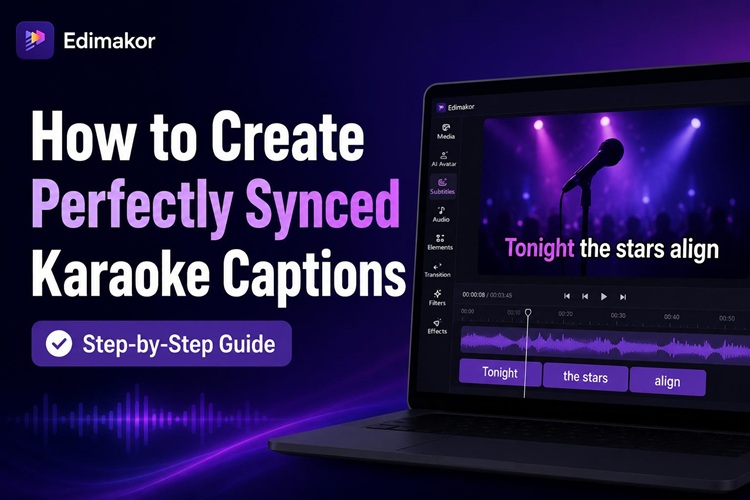
You’ve probably seen those videos where each word lights up as it’s spoken, pulling you in and keeping you watching. That’s karaoke captions at work. They make videos feel more dynamic and easier to follow.
In this guide, you’ll learn what karaoke captions are, why they matter, common mistakes to avoid, and how to create perfectly synced karaoke subtitles in just a few minutes.
Part 1. What Are Karaoke Captions and How Do They Work?
Karaoke captions are subtitles that highlight each word in real time as audio plays. Think of them as standard captions with a timing layer on top. Each word “activates” in sync with the speaker or singer.
But they don’t have to be for actual songs. Today, many creators use karaoke captions for TikTok videos, Instagram Reels, YouTube Shorts, podcasts, interviews, tutorials, and promotional content. This style has become especially popular because it helps viewers stay focused on fast-paced videos.
Part 2. Why Karaoke Captions Drive Higher Viewer Engagement
Viewers process visual cues faster than audio alone. Animated karaoke captions naturally guide the viewer’s eyes across the screen. Since the highlighted words move in sync with the speaker, viewers are more likely to stay focused on the content. This is especially useful for short-video users and mobile users who often watch videos without sound.
Karaoke Captions vs. Regular Subtitles: What's the Difference?
| Feature | Regular Subtitles | Karaoke Captions |
|---|---|---|
| Display style | Full line appears at once | Word-by-word highlighting |
| Visual engagement | Moderate | High |
| Animation | None | Active |
| Best for | Dialogue, accessibility | Social video, music, promos |
Regular subtitles focus on readability, while karaoke captions combine readability with viewer engagement.
Key Benefits of Using Karaoke Captions for Your Video
- Boosts watch time. Word-by-word subtitles keep viewers visually engaged longer, improving viewer retention.
- Works without sound. Many people scroll with audio off. Animated subtitles communicate your message even in silence.
- Improves readability. Highlighting words as they’re spoken makes content easier to follow for viewers with hearing differences or language barriers.
- Adds professional polish. A clean karaoke subtitle maker makes videos feel more modern and branded.
Part 3. Common Mistakes to Avoid When Creating Karaoke Captions
Most modern karaoke captions are generated using AI subtitle tools. But they can look unprofessional if the timing and styling are not adjusted properly. Avoiding these common mistakes can make your subtitles feel much smoother and easier to watch.
1 Timing Accuracy
Poor timing is one of the biggest problems in karaoke subtitles. If highlighted words appear too early or too late, viewers may find the video distracting. Always use an AI karaoke captions generator that allows manual timing adjustments.
2 Readability & Aesthetics
Overly flashy captions can hurt readability. Fonts that are too small, excessive animations, or poor color combinations can make subtitles difficult to read on mobile devices. Clean, bold fonts and high-contrast combos often work best.
3 Pacing & Phrasing
Captions should follow the natural rhythm of speech. Long subtitle blocks or captions that change too quickly can overwhelm viewers. Breaking subtitles into shorter phrases usually creates a smoother experience.
4 Smooth Transitions
Jerky animations and inconsistent highlighting can make videos feel messy. Smooth transitions between words and phrases help karaoke captions look more polished and professional.
With an AI subtitle maker like Hitpaw Edimakor, creators can generate cleaner and more consistent karaoke captions while avoiding common timing and styling mistakes.
Part 4. How to Add Karaoke Captions to Your Video (Step-by-Step)
Hitpaw Edimakor is an AI-powered video editor with a built-in karaoke subtitle generator. It’s beginner-friendly and handles most of the heavy lifting automatically.


Step 1: Upload Your Files
Go to Toolbox > Text. Select Auto Subtitles or Auto Lyrics, depending on your need. Then import your content into Edimakor. This can include podcasts, music videos, tutorials, talking-head videos, interviews, or short-form clips for TikTok and Reels.

Step 2: Auto-Detect Subtitle Languages
Use the AI subtitle generator to automatically detect speech and create captions. It supports more than 130 languages, English, Spanish, French, German, Portuguese, Arabic, Korean, Chinese, Japanese, Turkish, Indonesian, and more.
Step 3: Choose a Karaoke Caption Style
Next, select a karaoke subtitle template or animated caption preset. Edimakor offers several animated subtitle templates. Pick one that matches your content tone, something bold and colorful for social videos, cleaner and minimal for educational content. You can preview each style before applying. Then click Auto-Subtitling.
Step 4: Fine-Tune Timing and Word Highlight Effects
Review the generated captions and make small adjustments if necessary. You can edit incorrect words, refine subtitle timing, and adjust animation pacing. Edimakor also offers the Silence Detection feature that helps remove awkward pauses and create smoother, faster-paced videos.
Step 5: Export and Share Your Final Video
When everything looks right, hit export. Your karaoke-captioned video is now ready for TikTok, Instagram Reels, YouTube Shorts, or other social media platforms.
Part 5. Popular Use Cases for Karaoke Captions
1 Music Videos and Live Performance Content
Karaoke captions are widely used in lyric videos and live music performances. Word-by-word highlighting helps viewers follow songs more easily and creates a more interactive experience.
2 Short-Form Social Media Videos
This is currently one of the most popular uses for karaoke captions. TikTok creators, YouTubers and Instagram creators use animated subtitles to make videos attention-grabbing. Karaoke-style captions are especially effective for viral talking-head content and storytelling videos.
3 Podcasts and Talking-Head Video Content
Many podcasters and creators use karaoke captions to improve readability in interviews, commentary videos, and educational discussions.
4 Educational Videos and Online Training Courses
Animated captions can make tutorials and educational videos easier to follow. Highlighted subtitles help viewers stay focused, especially during fast-paced explanations.
5 Marketing Videos and Promotional Campaigns
Brands often use karaoke captions in product demos, social media ads, and promotional campaigns. Animated subtitles help important messages stand out and improve audience engagement.
FAQ
A1: Regular subtitles are usually static text designed for accessibility. Karaoke captions highlight words progressively in sync with speech or music, creating a more dynamic and engaging viewing experience.
A2: TikTok-style karaoke captions use animated word-by-word highlighting synced to speech. They are designed to keep viewers engaged and improve retention during short-form video playback.
A3: Yes. Modern AI subtitle tools can automatically recognize speech, create captions, and sync highlighted text with audio. This makes karaoke caption creation much faster than manual editing.
A4: The best karaoke subtitle generator depends on your workflow and editing needs. For beginners and creators, Hitpaw Edimakor is a user-friendly option that offers AI subtitle generation and karaoke-style caption templates.
Conclusion
Karaoke captions aren’t a niche gimmick anymore. They’re one of the most effective ways to make modern videos feel alive and keep viewers watching longer. And with AI tools doing most of the syncing work, the process doesn’t require professional editing skills.
If you’re ready to try it, Hitpaw Edimakor gives beginners an effective way to get started. It helps creators automatically generate synchronized subtitles, customize animated styles, and produce polished videos in just a few minutes. Give it a shot on your next video.
Leave a Comment
Create your review for HitPaw articles