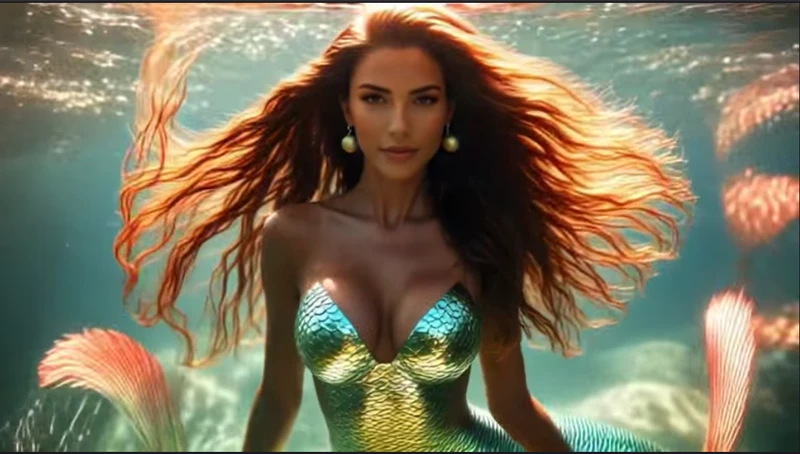
Fantasy lovers often wish mermaids were real. The idea of transforming into a mermaid on screen and stunning your social media audience is undeniably captivating. Thanks to modern technology, you can now become almost anything in your photos, including a mermaid. This article provides a detailed guide to using AI mermaid filters on social media as well as AI image-generation tools to bring your fantasy to life.
Part 1. How To Do The AI Mermaid Filter Effect In Water
The Image to Video feature of HitPaw Edimakor lets you convert your simple images into Mermaids. To learn how to create videos of mermaids with this tool, read the steps provided next:
Step 1. Choose AI Video Tool
Once you enter the main Edimakor interface, press the AI Video tool to proceed further.

Step 2. Choose Mermaid Filer in AI Effects
In the following interface, press the AI Effects option in the AI Video section. Choose the Appearance category and click the Create button on the Fin-tastic Mermaid filter.
Step 3. Import Your Image and Set Video Resolution
As you lead further, press the Upload an Image option to import your photo. Next, choose an appropriate Duration and Resolution you aim for your video. Once done, press the Generate button to begin generating.
Step 4. Open Saved File Location
After the video is generated, the generated video used trending TikTok AI mermaid filter will automatically be saved to your device. Click the Open File Location icon to access the save video location.
Part 2. How To Use the AI Mermaid Filter on TikTok
Having learned about the most efficient solution to generate videos with the AI mermaid filter TikTok, let us now have a look at the other options:
1. AI Mermaid Filter TikTok
TikTok is an amazing social media application that lets users convert their mundane images into compelling videos. Provided below are the instructions on how to generate videos using this TikTok filter:
Instructions. Begin by opening the app and selecting the AI Mermaid filter. Once selected, click the picture by pressing the icon in the center. When the image is captured, the app will instantly begin to transform it into a mermaid. Press the Next button once the video is successfully generated to post it on your TikTok.
2. AI Mermaid Filter CapCut
CapCut is another amazing application that provides the ability to convert your photos into beautiful videos with Mermaid. To learn how to use this application to give an AI mermaid filter CapCut to your videos, read the steps provided next:
- Launch the app and head to the bottom to press the Templates option. Now search for the AI Mermaid filter and press the Use Template button.
- Next, add your image that you want to turn into a mermaid, and the tool will instantly begin the transformation. Once the video is generated, press the Export button at the top-right corner to save the video to your device.
3. AI Mermaid Video Effect App
This dedicated application lets users add their photos and convert them into high-quality mermaid videos. Follow the instructions provided next to learn how to use this AI mermaid filter effect in water:
Instructions. To begin, open the app and scroll through the templates. Press the Use Templates button to proceed. Next, import the image that you want to transform into a mermaid and press the Generate Video option to generate the video.
Part 3. How To Use Fotor AI Mermaid Filter
Fotor is an online multimedia editor that lets users edit their images and videos. To learn how to use this AI mermaid filter video free tool, read the instructions mentioned next:
Instructions. After you have accessed the tool on your browser, upload your image using the dedicated option. Now, input the text prompt and hit the Generate button to execute the process.
Part 4. How To Use the Supawork AI Mermaid Filter
Supawork.ai is an AI-powered online tool that provides the ability to convert your photos into Mermaid videos. Follow the instructions provided below to know how to use this online parts of a fish tank filter tool:
Instructions. Once you have accessed the tool on your browser, choose the Mermaid filter feature. Now, upload the image that you want to convert into a video. Configure settings such as Aspect ratio and duration and hit the Create button to generate the video.
Part 5. How To Do The AI Mermaid Filter Effect Online
YouCam Online Editor is another online tool that provides a vast library of templates to convert your images into videos. For users who do not know how to use this online tool for AI Mermaid video generation, read the instructions mentioned next:
Instructions. When you have accessed the tool on your browser, enable the Template section and choose the Mermaid template. Now, upload your photo and press the Generate button after selecting the mode to generate a Mermaid video.
FAQs On AI Mermaid Filter
A1. The AI Mermaid filter on TikTok may not work due to app glitches, outdated versions, or regional availability issues. Updating TikTok or recreating the effect using HitPaw Edimakor can help generate a stable mermaid-style video.
A2. Yes, some platforms offer limited free AI Mermaid filter options with basic effects. For higher-quality, customizable results, HitPaw Edimakor provides advanced tools with both free and paid features.
A3. Air bubbles usually appear when the air pump is running correctly and providing oxygen to the tank. Excessive bubbles may indicate high airflow or loose tubing that needs adjustment.
A4. A Penguin fish tank filter may stop working due to clogged cartridges, impeller issues, or power supply problems. Cleaning or replacing the filter components usually restores proper water circulation.
A5. Filtro AI Mermaid filter is an AI-based effect that transforms photos or videos into a mermaid-themed visual style. It uses artificial intelligence to modify appearance, lighting, and underwater effects automatically.
A6. Mermaid filters are commonly available on social media apps like TikTok and Instagram under effects or filters. If the filter is unavailable, AI editing tools can help create a similar mermaid transformation manually.
To Conclude
To wrap it up, this article provided a detailed guide on how to use the AI mermaid filter videos using different techniques. We explored mobile apps as well as online options. However, one of the most reliable solutions that lets you convert your photos into compelling videos is HitPaw Edimakor . The tool uses advanced AI to generate high-quality videos with complete customization.


Leave a Comment
Create your review for HitPaw articles