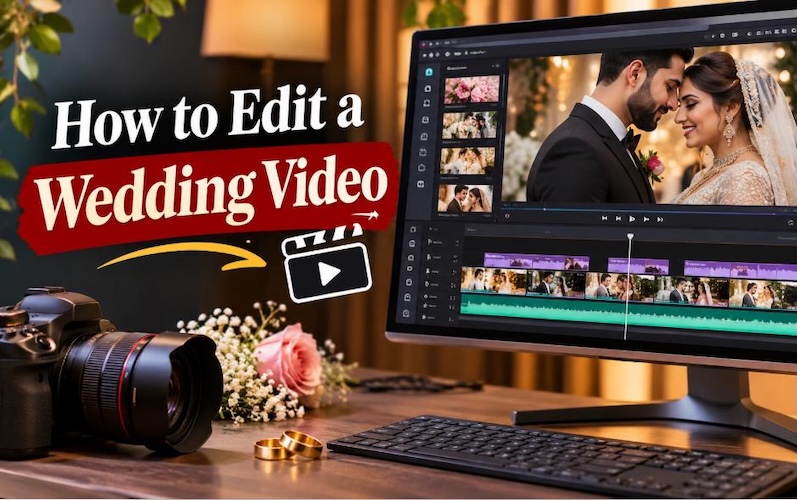
A wedding video captures some of the most important moments in a couple's life. From getting ready in the morning to exchanging vows, sharing the first kiss, and celebrating with family, every part of the day tells a story. Learning how to edit a wedding video helps you turn raw footage into a film that couples can watch and enjoy for years. Good wedding video editing combines clear storytelling, suitable music, smooth transitions, natural colors, and meaningful moments. Beginners and professional videographers can follow a simple editing process to create a memorable wedding film. HitPaw Edimakor Video Editor offers editing features that help users import footage, arrange clips, customize visuals, and export their finished wedding videos.
Part 1: What Makes a Wedding Video Memorable?
A memorable wedding video does more than show what happened during the wedding. It tells the couple's story through real moments, clear audio, and carefully selected clips. When you understand how to edit marriage video footage , you can create a film that feels personal and meaningful instead of a simple collection of scenes.
Focus on the Couple's Story
Every wedding has its own story. Some couples prefer a romantic film, while others want a fun video that captures their family and friends. Your editing style should reflect their personalities.
Start with the preparation scenes, introduce the ceremony, and show the reception and celebration. You can also include short clips of the couple interacting with each other. These moments help viewers understand their relationship. When deciding how to marriage video editing, consider the emotions behind each scene. A simple smile or a quiet conversation may mean more than a long shot of the venue.
Include Important Emotional Moments
Certain wedding moments deserve special attention. These include:
- The bride and groom getting ready.
- The first look before the ceremony.
- The wedding entrance.
- The exchange of vows and rings.
- The first kiss.
- Family reactions.
- Wedding speeches.
- The first dance.
These scenes create emotional value. When learning how to edit a wedding video, select the clips that capture these moments clearly. Avoid removing genuine reactions just because they do not look perfect.
Use Music and Natural Audio
Music helps set the mood of a wedding film. A soft romantic track can work well during preparation scenes, while an upbeat song can match the reception. However, music should not cover important audio. Keep the couple's vows, speeches, and other meaningful conversations clear. Natural sounds, such as laughter and applause, can also make the film feel real.
Balance Cinematic Shots With Real Moments
Wide shots of the venue, close-ups of the rings, and slow-motion shots of the couple can add visual interest. However, you should also include natural moments from guests and family members. A good wedding video combines planned shots with genuine reactions. This balance helps the film feel personal rather than staged.
Part 2: What to Prepare Before Editing a Wedding Video
Preparation makes wedding video editing easier. Before you start arranging clips, organize your media and decide how you want the final film to look.

1 Collect All Wedding Footage
Wedding footage may come from several sources, including:
- Professional cameras.
- Smartphones.
- Drone cameras.
- External audio recorders.
- Photographs from the wedding photographer.
Collect all the files in one location. Check that each file opens correctly before you begin editing.
If different cameras recorded the same moment, review their footage and choose the clearest angles.
2 Organize Clips Into Folders
Create folders for different parts of the wedding. For example:
| Folder | Content |
|---|---|
| Preparation | Bride and groom getting ready |
| Ceremony | Entrance, vows, rings, and first kiss |
| Reception | Speeches, dinner, and celebration |
| Couple Shots | Romantic and cinematic footage |
| Audio | Music, vows, and speeches |
| Final Project | Edited video and exported files |
This organization helps you find clips quickly. It also makes it easier to understand how to marriage video editing when you work with a large amount of footage.
3 Review and Select the Best Clips
Watch the footage before adding it to the timeline. Remove clips that contain unnecessary camera movement, repeated scenes, or poor framing. Keep the shots that show important moments clearly. You do not need to include every recorded clip in the final film. For example, if you recorded several shots of the couple walking together, select the best one or two shots. This approach keeps the video interesting.
4 Back Up Original Files
Wedding footage can be difficult or impossible to replace. Create a backup of the original files before editing. You can store a copy on an external hard drive or another secure storage location. Keep your original footage separate from the edited project files.
5 Choose the Final Video Format
Think about where the couple will watch the video.
- YouTube and television: Use a horizontal 16:9 format.
- Instagram Reels and TikTok: Use a vertical 9:16 format.
- Personal wedding archives: Choose a high-quality export suitable for long-term storage.
You should also prepare music, titles, photographs, and other creative assets before starting the project. Make sure you have permission to use your selected music.
Part 3: How to Edit a Wedding Video With HitPaw Edimakor
HitPaw Edimakor Video Editor provides a practical way to edit wedding footage. Users can import media, arrange clips on a timeline, add music, customize visuals, and export the final video. If you are learning how to edit a wedding video for the first time, follow these three steps to create your wedding film.


Step 1: Import Media
Launch HitPaw Edimakor, create a new project, and import your wedding footage, photographs, and audio files. Organize the media and drag your selected clips onto the timeline.
Step 2: Edit and Customize
Trim unwanted footage, arrange clips into a meaningful sequence, and add transitions between scenes. Include background music, titles, effects, and color adjustments to create a cinematic wedding video.
Step 3: Export the Wedding Video
Preview the complete video and check its transitions, audio levels, and colors. Choose suitable resolution and export settings, then export the finished wedding film for sharing or storage.
Part 4: Wedding Videography Editing Tips for a Cinematic Look
A wedding film can look more professional when you pay attention to storytelling, audio, and visual consistency. These wedding videography editing tips can help you improve the final result.
1 Create an Emotional Storyline
Arrange clips according to the couple's wedding day. Start with preparation scenes, move to the ceremony, and finish with the reception or a romantic couple shot. You can also include a short opening scene from the ceremony before showing the preparation footage. This approach creates interest while keeping the story clear. When deciding how to edit marriage video scenes, consider the emotional connection between the clips. Each scene should have a reason to appear in the film.
2 Sync Footage With Music
Choose music that matches the mood of each scene. You can use a romantic song during the couple's preparation and a lively track during the reception. Try to match important moments with changes in the music. For example, you can show the first kiss when the music reaches an emotional point. Do not force every clip to match a musical beat. Natural storytelling should remain your main focus.
3 Use Slow Motion Carefully
Slow motion can highlight special moments such as the first kiss, wedding entrance, or first dance. Use it only when the footage supports slow-motion playback. Clips recorded at higher frame rates generally provide better results when you slow them down. Avoid using slow motion throughout the entire video. Too much can make the wedding film feel unnatural.
4 Apply Consistent Color Grading
Different cameras may record footage with different color tones. Some scenes may look warm, while others may appear cool. Adjust brightness, contrast, white balance, and saturation to create a consistent appearance. Keep skin tones natural and avoid excessive color changes. When learning how to marriage video editing, remember that color grading should support the story rather than distract viewers.
5 Keep Transitions Simple
Use cuts and gentle dissolves for most wedding scenes. These transitions work well between preparation footage, ceremony clips, and reception shots. Avoid adding too many flashy effects. They can distract viewers from important moments.
6 Preserve Important Audio
Audio plays a major role in wedding films. The couple's vows and speeches often carry more emotional value than background music. Use clear audio from microphones or external recorders whenever possible. Reduce unwanted background noise if your editing software supports it. Always listen to the final video with headphones before exporting.
FAQs about Editting a Wedding Video
A1: Editing time depends on the amount of footage, the video length, and the editing style. A short wedding highlight video may take several hours to edit, while a full wedding film may require several days or longer. Audio cleanup, color correction, and revisions can increase the editing time.
A2: Beginners should start by organizing their footage into folders. Select the best clips, arrange them in chronological order, add suitable music, and trim unnecessary sections. Use simple transitions and check the audio before exporting. A basic editing workflow helps beginners create a clear wedding film without complicated effects.
A3: The best software depends on your editing experience and project requirements. HitPaw Edimakor is an option for users who want to import footage, arrange clips, add music, customize visuals, and export wedding videos. Professional editors may also consider other video editing programs based on their workflow and required features.
A4: Import your wedding clips into a video editor and arrange them according to the wedding events. Add background music that matches the mood. Use simple transitions between scenes and adjust the music volume during vows and speeches. Preview the complete video to check the timing and audio balance.
A5: A wedding highlight video often runs between 3 and 5 minutes. However, the ideal length depends on the couple's preferences and the amount of important footage. A full wedding film can be considerably longer because it includes the ceremony, speeches, and other key events.
A6: Yes. HitPaw Edimakor can help users import wedding footage, arrange clips on a timeline, add music, customize visuals, and export the finished video. Users can follow a structured editing workflow to create wedding highlights or other wedding video projects.
Conclusion
Wedding video editing requires careful planning, clear storytelling, and attention to important details. Organizing footage, selecting meaningful clips, balancing music with natural audio, and applying consistent color adjustments can help you create a memorable wedding film. Learning how to edit a wedding video becomes easier when you follow a structured process. Start by collecting and organizing your media, arrange the clips into a meaningful sequence, customize the visuals, and review the final result before exporting. HitPaw Edimakor Video Editor provides an option for users who want to import, edit, customize, and export wedding videos through a straightforward editing workflow.
Leave a Comment
Create your review for HitPaw articles