Instagram is a powerful platform for marketing, advertising, and promoting products, services, and brands. With Instagram Reels, creators can produce short, engaging videos that reach a wide audience. However, creating an attractive Reel is only part of the process. Text, captions, logos, and CTAs also need to be positioned carefully so they remain visible across different devices and screen sizes.
This is where the
Part 1: What is the Instagram Reels Safe Zone?

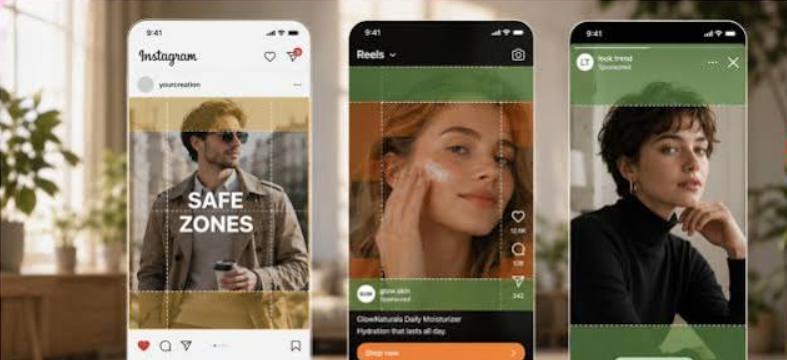
An Instagram Reels safe zone is the middle section of a vertical video where you are able to place important text, logos, products, faces, and calls to action with less chance of the Instagram interface covering them up. Since Reels are displayed in a full-screen vertical format, certain areas of the video can be covered by buttons, captions, profile information, and other interface elements.
Keeping your essential content within the safe zone helps make sure that viewers can easily read your message and understand your video without missing important information. It is useful when adding headlines, subtitles, promotional offers, calls to action, offers, usernames, and more.
Part 2: Instagram Reels Safe Zone Guidelines 2026
The standard Instagram Reel format is 9:16, which is designed to fill a smartphone screen vertically. Creators usually use a 1080 x 1920 px canvas to get the best results. However, using the correct dimensions is only one part of creating a Reel. Creators also need to consider Instagram’s interface, which can overlap different areas of the video. Here are Instagram safe zone dimensions that can help you create engaging videos:
- Aspect Ratio: 9:16
- Resolution: 1080 x 1920 pixels
-
Safe Zones:
- Central Safe Zone: 1010 x 1440 pixels
- Top and Bottom Covered Zones: Top 220 pixels each and Bottom 320 px (Often covered by app interface elements such as username, captions, and action buttons.)
-
Instagram Reels Areas to Avoid:
- Bottom Area (High Risk): Captions and expandable text, engagement prompts, and audio attribution.
- Right Side (High Risk): Like, Comment, Share, and Save buttons.
- Top Area (Moderate Risk): Username and account controls.
Part 3: Instagram Stories Safe Zone Guidelines
Instagram Stories are also designed for vertical viewing, making the 9:16 aspect ratio the standard format for creating Story content. Below are the Instagram Story safe zone dimensions:
- Aspect Ratio: 9:16
- Resolution: 1080 X 1920 pixels
- Instagram Stories Safe Zone: Text, captions, and important information should stay 250px from the top and bottom. The top 250px holds the profile badge and the close button. The bottom 250px holds the reply bar.
Part 4: Where to Place Text on Instagram Safe Zone
Instagram Reels safe zone is an ideal area to place your text. Keeping important information within this area reduces the chance of Instagram’s interface covering your message and makes it easier for viewers to read. Here are some tips that you can use to place text on Instagram Reels:
- Keep text within the central 80% of the frame. It reduces the risk of it being covered by Instagram’s interface.
- Avoid the bottom 20 - 25% because Instagram places multiple elements in this area, which can hide your content.
- Don’t place text on the right side of the Instagram Reels. This area is covered with Like, Share, Comment, and Save buttons.
- Always choose a font size that is easy to read on a smartphone screen. Avoid small fonts on Instagram Reels.
Part 5: Why Safe Zones Matter for Instagram Performance
Why do Instagram safe zone templates matter in marketing? When creating promotional Reels, every important element needs to remain visible and easy to understand. If product details, a discount, a logo, or a call to action are covered by Instagram’s interface, viewers may miss important information. Here are some key reasons:
- A covered call to action can make it difficult for viewers to understand what they should do next. Keeping your CTA within the safe zone helps ensure the instructions such as “Shop Now” remain visible.
- Prices, product names, features, or special offers can lose their impact if they are placed behind interface elements. Safe-Zone placement helps keep these details visible throughout the Reel.
- Safe-zone templates help creators organize text and visual elements properly. This can make promotional Reels look more balanced, polished, and professional.
- Leaving enough space around important elements reduces the risk of content being cropped or hidden on smartphones, tablets, and more.
Part 6: Create an Instagram Reel in the Safe Zone Using HitPaw Edimakor
If you want to create an Instagram Reel in the safe zone, we suggest using HitPaw Edimakor. It is an all-in-one video editor that enables users to customize videos according to their requirements. The program offers an Instagram Story safe zone template that can help creators understand where to position important elements within their videos. Users can import their footage, choose the appropriate vertical format, and add text, captions, logos, and images to their projects. The safe zone guide makes it easier to keep important information away from areas that may be covered by Instagram’s interface. The program also provides various editing tools that can help users improve their Reels. You can trim unwanted sections, add transitions, include background music, and add captions.


Key Features of HitPaw Edimakor
- Safe Zone Templates: HitPaw Edimakor offers various platform safe zone templates, including Instagram Reels, YouTube Shorts, TikTok, X, and more, allowing users to add important information within the safe zone.
- AI Video Editor: The best part of this tool is that it offers advanced customization options, allowing users to customize videos according to their requirements. Users can change the background, add music, filters, text, transitions, and more.
- Compatibility: HitPaw Edimakor works seamlessly with multiple devices, including Windows and macOS. Plus, it supports all Windows versions, such as Vista, XP, 7, 8, 8.1, 10, and 11.
- Intuitive Interface: The program offers an easy-to-use and simple interface, which is ideal for non-tech and beginner users. No professional help or editing experience is required to use the program's features.
Step-by-Step Guide:
If you want to create Instagram Reels by following the safe zone rules, then HitPaw Edimakor is the best option. The program offers easy steps to do it:
Step 1: Download, install, and launch HitPaw Edimakor on your PC. Choose the “New Project” option from the main interface. Click on the “Import” button and upload your Instagram Reel. Next, select the Player > Toursmore > Safe Zones.
Step 2: A list of multiple platforms will appear on your screen. Choose the “Instagram” option from the drop-down menu. Users can also gain access to safe zone templates for YouTube, TikTok, X, and LinkedIn.
Step 3: The Instagram safe-zone template will appear over your video. Move your text and other visual elements into the recommended area. Preview the final result and click on the “Export” button to download the video in MP4 or MOV format.
Final Thoughts
After reading this guide, you have learned everything about the Instagram Reel safe zone area. Following these guidelines can help you position text, captions, logos, products, and calls to action without placing them over the Instagram interface. To get safe zone templates for Instagram, YouTube Shorts, and TikTok, we recommend using HitPaw Edimakor.
Leave a Comment
Create your review for HitPaw articles