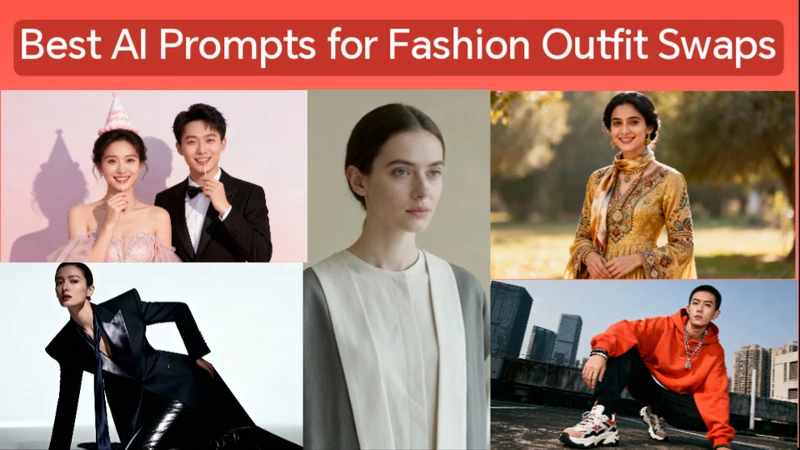
The emergence of AI picture editing technologies has drastically altered fashion content. You may quickly switch outfits, try out new looks, or produce viral fashion content with only one image when you use the appropriate outfit change photo prompts.
Part 1: 10 Best AI Prompts for Fashion Outfit Swaps
These thoughtfully created wardrobe change photo prompts are compatible with the majority of AI image editing and generating tools. Gender, backdrop, color, and design preferences can all be changed for each challenge.
1 Casual to Luxury Outfit Swap Prompt
Using the same person and pose from the original image, replace the casual outfit with a luxury designer suit. Maintain realistic fabric texture, natural folds, accurate lighting, and original background. Ultra-realistic fashion photography style.

Best For:
Lifestyle influencers, fashion reels, brand mockups.
2 Birthday Photoshoot Outfit Change Prompt
Transform the subject’s outfit into a stylish birthday photoshoot look. Elegant dress or suit, soft studio lighting, pastel background, festive mood, realistic shadows, and natural skin tones. Keep facial features unchanged.
Best For:
Outfit birthday photoshoot ideas and social media celebrations.
3 Engagement Picture Outfit Swap Prompt
Change the outfit into a classy engagement photoshoot style. Formal attire, romantic color palette, clean background, soft lighting, cinematic depth, realistic fabric details, and professional photography finish.
Best For:
Outfit change for engagement pictures and pre-wedding edits.
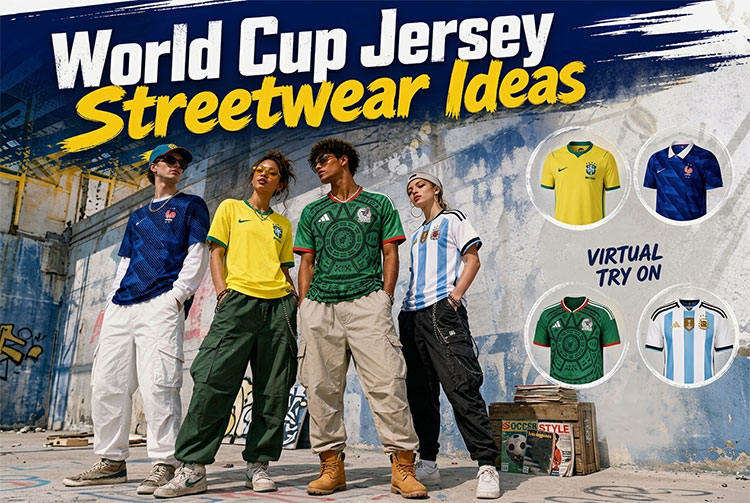
4 Streetwear Outfit Change Prompt
Replace the current outfit with modern streetwear fashion. Oversized hoodie, sneakers, layered accessories, urban background, realistic textures, balanced lighting, fashion editorial style.
Best For:
Street fashion pages and youth-focused content.
 You may also like:
5 Traditional Outfit Transformation Prompt
Swap the outfit for an elegant traditional dress. Intricate fabric patterns, cultural design details, natural lighting, realistic embroidery texture, and matching accessories, while keeping the subject’s pose and expression unchanged.
Best For:
Cultural fashion edits and festive content.
6 Gender-Neutral Outfit Change Prompt
Transform the outfit into a stylish, gender-neutral fashion look. Clean lines, modern design, neutral colors, realistic fabric folds, minimal background, and balanced lighting.
Best For:
Inclusive fashion content and modern brand visuals.
7 Seasonal Outfit Swap Prompt
Change the outfit to a seasonal fashion look suitable for winter or summer. Adjust clothing layers, colors, and textures realistically while keeping the original background and lighting consistent.
Best For:
Seasonal fashion posts and outfit change ideas.
8 Color Change Outfit Prompt
Keep the same outfit design but change the clothing color to a bold, vibrant shade. Maintain fabric texture, lighting consistency, realistic shadows, and original image quality.
Best For:
Change picture color and change image color with free edits.
9 Editorial Fashion Outfit Prompt
Replace the outfit with a high-fashion editorial look. Dramatic lighting, stylish pose, premium fabric textures, magazine-quality finish, and clean background.
Best For:
Fashion portfolios and brand promotions.
10 Minimalist Outfit Swap Prompt
Transform the outfit into a minimalist fashion style. Simple design, neutral colors, soft lighting, realistic cloth details, and a distraction-free background while keeping the subject’s identity unchanged.
Best For:
Clean Instagram aesthetics and modern branding.
Part 2: Swap Clothes with Outfit Change Photo Prompts and Effects
Changing outfits in photos using AI is now quick and effortless with HitPaw Edimakor AI image editor . By using outfit change photo prompts, you can swap clothes, try new fashion styles, or create professional looks without reshooting images.
Step 1: Open HitPaw Edimakor
The first step is to make sure that you have installed the updated version of HitPaw Edimakor AI image. If you don't know how to check it, then simply go to the settings icon and choose the Update button. You will see here if any updates are available or not.


Step 2: Access the Reference Image Tool
From the main interface, navigate to the toolbox and select the AI Reference Image tool. This tool allows you to create and edit images using text prompts and reference photos.
Step 3: Upload Your Photo
Upload the photo in which you want to change the outfit. Make sure the image is clear and well-lit so the AI can accurately detect the body shape and clothing area for better results.
Step 3: Enter an Outfit Change Photo Prompt
In the prompt box, describe the outfit you want to swap into. You can mention clothing type, color, style, and vibe, such as casual wear, formal suit, traditional dress, or trendy streetwear. Edimakor will use this prompt to replace the existing clothes while keeping your face and pose intact.
Step 4: Adjust Settings and Generate the Image
Before generating, adjust settings like aspect ratio, image quality, and output quantity if needed. Once everything is set, click the Generate button and wait for Edimakor to create your outfit-swapped image.
Step 5: Preview and Export the Final Image
After generation, preview the result to ensure the outfit change looks natural and clean. If you’re satisfied, export the image to your device and use it for social media, profile photos, or creative projects.
Final Thoughts
Fashion experimentation is now easier than ever thanks to AI. Without the need for additional shoots or editing expenses, artists can turn a single photograph into several different fashion trends with the appropriate outfit change photo prompts. With easy-to-use tools like HitPaw Edimakor (Video Editor) , Anyone may accomplish clean, realistic clothing alterations by combining comprehensive hints.
Leave a Comment
Create your review for HitPaw articles