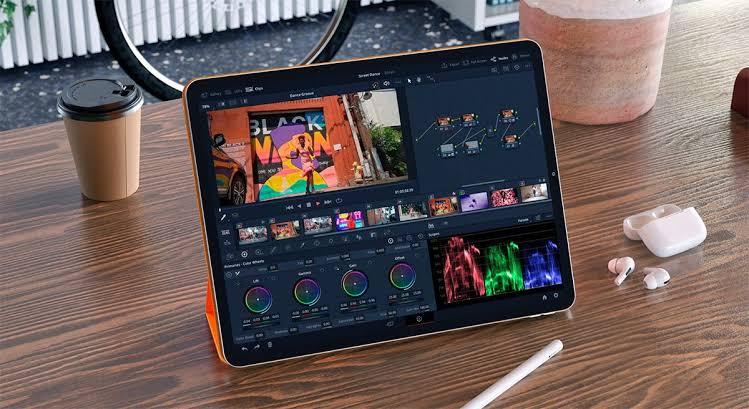
With ever-growing technology, the iPad has become more than just a device for browsing and entertainment. Modern iPads offer powerful performance and advanced features that allow users to handle demanding creative tasks with ease. For YouTubers, content creators, and video editors, an iPad can be a convenient tool for creating professional-looking videos without relying on a traditional computer. From trimming clips and adding transitions to applying effects, captions, and music, the right video editing app can unlock the iPad’s full potential. In this article, we will explore the five best video editors for iPad for easy and professional video editing in 2026.
Part 1: Top 5 iPad Video Editors for Professional and Casual Editing
Finding the right iPad video editing app can be a daunting task, as there are hundreds of options available. Each app offers different features, editing tools, and levels of complexity, making it difficult to decide which one best fits your needs. Below, we have selected the top five iPad editor video available in 2026:
1 CapCut

CapCut is one of the best video editing apps for iPad, offering a user-friendly interface with a wide range of tools for both beginners and experienced creators. If you’re new to video editing, CapCut’s interface is a lifesaver. Trimming clips, adding effects, and moving things around on the timeline is simple and clean. You can jump in and start editing in minutes without needing to watch hours of tutorials.
Key Features
- Offers an intuitive interface, which is ideal for non-tech and beginner users.
- Includes powerful tools, such as text-to-speech, script-to-video, background removal, auto captions, and more.
- A massive library of templates, effects, filters, transitions, stickers, and text styles that makes it easier to create engaging videos.
Pros
- Includes basic editing tools, such as trim, cut, and crop.
- Supports text, captions, stickers, and animated elements.
- Enables users to download videos in high-quality.
Cons
- Free version has limited features.
- Bugs and glitches within the iPad app.
2 Veed
Veed is another amazing app iPad video editing in 2026. It is an all-in-one video editor that intends to make your video editing easier and faster. It includes a good collection of stock media and elements, as well as editing features such as splitting, transitions, animations, and color adjustments. Users can also add text, subtitles, music, and other elements to make their videos more engaging.
Key Features
- Offers a Split tool, allowing users to trim videos and remove unwanted sections from the main footage.
- Includes built-in effects and color grading presets, giving footage a more polished and professional appearance.
- Polish video with basic tools, like rotation, opacity, replacing, detaching audio, and more.
Pros
- Offers an easy-to-use interface suitable for beginners.
- Supports captions, subtitles, text, animations, and transitions.
- Provides AI-powered tools to simplify video creation.
Cons
- Some features require a stable internet connection.
- Advanced editing controls limited compared with desktop software
3 InVideo AI
InVideo AI is the best video editor for iPad, allowing users to customize videos according to their requirements. It uses AI-powered tools to simplify the video creation process, making it useful for beginners, content creators, marketers, and YouTubers. Plus, it includes a useful text-to-video tool that can convert simple text prompts into engaging and high-quality videos.
Key Features
- Generate a video with suitable visuals, scripts, voiceover, music, and other elements.
- InVideo AI provides access to a large collection of stock videos, images, music, and other media assets.
- Include powerful AI tools, such as Text-to-Video, Image-to-Video, AI Avatar, AI Voices, and more.
Pros
- Works seamlessly with iOS devices, including iPads.
- Everything is automated — no editing skills required.
- Enables users to generate high-quality videos in minutes.
Cons
- Doesn’t have the same flexibility as tools like CapCut.
- Not suitable for high-end production.
4 Adobe Premiere Rush
It is probably the best video editing software currently available for the iPad and iPhone. Some of the best features include being able to import video from cameras and capture events directly onto your iPad. The app provides essential editing tools for trimming, cropping, resizing, and arranging video clips on a timeline.
Key Features
- Offers advanced editing features, such as trimming, cropping, resizing, and arranging clips on a timeline.
- Supports importing video footage directly from cameras and other devices.
- Compatible with different aspect ratios for creating content for social media platforms.
Pros
- Enables users to edit multiple videos at once.
- Free to use.
- Provides advanced video editing tools.
Cons
- Advanced features require a paid subscription.
- Effects and transitions can feel limited.
5 Final Cut Pro
The last best iPad video editor on our list is Final Cut Pro. Developed by Apple, it brings many professional-level video editing capabilities to compatible iPad models, making it a strong option for creators who want more control over their projects. It provides a powerful timeline for arranging clips, along with tools for trimming, transitions, effects, and audio editing.
Key Features
- Allowing creators to make precise edits using gestures and Apple Pencil.
- Provides a professional timeline for arranging, trimming, and managing video clips.
- Includes a wide range of transitions, effects, titles, and graphics.
Pros
- Supports high-resolution video editing.
- Includes a tool for organizing media and managing complex video projects.
- Create and edit videos directly on iPad.
Cons
- Only limited to iOS devices.
- Interface can be overwhelming for beginners.
Bonus Tip: Best Video Editor Tool for Windows and macOS in 2026
Above, we’ve introduced some of the best apps for iPad video editing. However, if you prefer editing videos on a Windows PC or Mac, you may want a more powerful desktop-based solution. That is where HitPaw Edimakor comes in. It is an all-in-one video editor that enables users to customize videos according to their requirements. With the help of this tool, users can trim and split clips, add transitions and effects, adjust colors, create captions, and enhance audio. The standout feature of this tool is that it offers an intuitive interface, which is ideal for non-tech and beginner users.
Key Features
- AI-Powered Video Editing: With this tool, users can trim, split, add transitions, effects, and enhance video all without editing experience or professional help.
- Compatibility: HitPaw Edimakor works seamlessly with multiple devices, including Windows and macOS.
- Advanced Customization: The program enables users to customize videos according to their requirements. Users can change the background, add music, text, and more.
- Intuitive Interface: HitPaw Edimakor offers an easy-to-use interface, which is ideal for non-tech and beginner users.


Step-by-Step Guide:
Step 1: Launch HitPaw Edimakor
Download and install HitPaw Edimakor from its official site. Launch it and select the “New Project” option from the main interface.
Step 2: Upload The Video
Click on the “Import” button and upload the video you want to edit. Drag-and-drop the video to the timeline to begin the video editing process.
Step 3: Customize The Video and Download
Now, use the HitPaw Edimakor tools to edit the video. Users can add effects, filters, music, and more. Preview the final result and click on the “Download” button.
Final Thoughts
Choosing the right video editing app can make a significant difference when creating content on an iPad. Above, we’ve mentioned the best video editor for iPad, allowing users to edit video directly on the iPad. Plus, if you want the best video editor for Windows and macOS, then HitPaw Edimakor is the best option.
Leave a Comment
Create your review for HitPaw articles