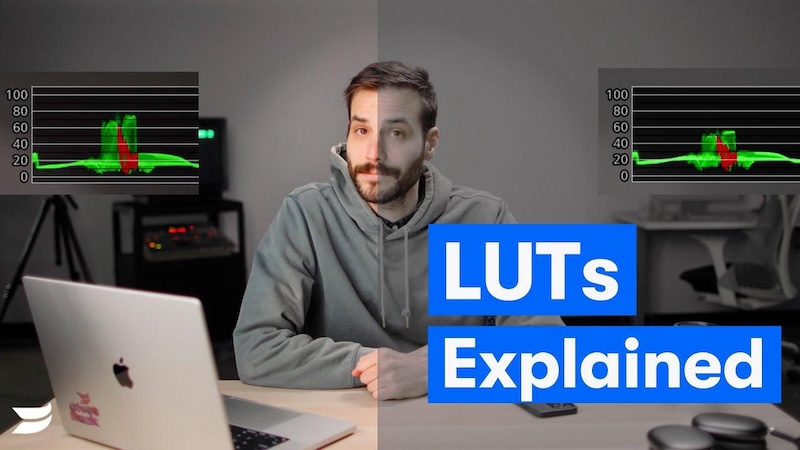
Color grading is one way to improve the appearance of your footage and serve your storytelling vision. That’s why many filmmakers, editors, and colorists who are working on a film use Look Up Tables, or LUTs, to save color grades as templates to help speed up the process. In this guide, we’ll explain what is a LUT in video editing, how they work, their different types, and how to use them effectively for better video colors. Follow this guide till the end to learn everything about LUTs.
Part 1: What is a LUT?

A LUT (Look-Up Table) is a mathematical formula used to map one set of colors to another, ensuring consistency and efficient color grading in video editing, photography, and film production. LUTs help transform raw footage into polished, cinematic visuals by applying predefined color and tonal adjustments. Instead of manually adjusting individual color settings, editors can use a LUT to quickly achieve a specific visual style. LUTs can change aspects such as brightness, contrast, saturation, shadows, highlights, and overall color tones. Whether you’re aiming for a cinematic feel, a clean natural look, or a film-inspired style, LUTs provide a fast starting point.
Part 2: How Does a LUT Work?
LUTs operate as a color conversion tool, taking input color values and transforming them based on a predefined set of color adjustments. Here is how LUTs work in video editing:
- Color Space Translation: LUTs help adjust footage shot in different color spaces like LOG, RAW, or Rec. 709 to ensure consistency across different devices and software.
- Color and Tone Adjustment: LUTs modify the colors, contrast, brightness, and tonal range of your footage according to the settings stored in the LUT. This enables editors to quickly achieve a visual appearance without making every adjustment manually.
- Applying a Creative Style: A creative LUT can instantly give your footage a different mood or style, such as a cinematic look, vintage film style, or high-contrast aesthetic. Editors can experiment with different LUTs to find a style that matches their vision.
- Final Color Refinement: After applying a LUT, editors can fine-tune its intensity and make additional color corrections. Reducing the LUT strength can help prevent color from appearing too strong or unnatural.
Part 3: Why LUTs Are Your Shortcut to Amazing Visuals
LUTs have become a staple for many video editors and colorists; thus, they offer a blend of speed, efficiency, and creative flexibility that easily elevates any project. Here are some reasons that make LUTs essential to amazing visuals:
Fix Flat-Looking Footage
If your video looks dull or faded straight from the camera, don’t worry — that’s normal with certain camera settings. A technical LUT can be used as a quick fix that brings color back and makes your footage look natural again.
Create a Specific Vibe
LUTs can instantly give your footage a unique visual style. Whether you want a warm and inviting appearance, a cool and dramatic mood, or a classic cinematic feel, the right LUT can help create the atmosphere you want without making manual color adjustments.
Save Time During Editing
One of the best parts of using LUTs in video editing is that they speed up the editing process. Instead of adjusting colors, contrast, and tones separately for every clip, editors can apply a suitable LUT and then make small adjustments as needed.
Maintain Consistent Colors
Consistency is important when a project contains footage recorded at different times or with multiple cameras. Using the same LUT across clips can help create a more uniform appearance and make the final video feel professionally edited.
Part 4: The Different Types of LUTs
What does LUT mean in video editing? LUTs are your shortcut to creating eye-catching content fit for Hollywood or Netflix. They are available in different types, and each type serves a specific purpose in color grading. Here are different types of LUTs:
- Creative LUTs: This type of LUTs add stylish effects and transform the look and feel of your video. Creators use these LUTs to give their videos a specific aesthetic mood, such as a vintage look, a high-contrast black-and-while effect, or a cinematic color tone.
- Technical LUTs: A Technical LUT brings raw or log footage back to life by correcting anything that comes out looking flat or dull. These LUTs are mainly designed for technical color transformation, such as converting LOG footage into a standard color space like Rec. 709.
- 1D LUTs: These change a single property, like brightness or contrast. Unlike more complex LUTs, a 1D LUT primarily adjusts each color channel independently without changing the relationship between different colors.
- 3D LUTs: This type of LUTs adjust all three color channels simultaneously in a 3D color cube. Ideal for creative grading, film emulation, and complex color transformation. Provides cinematic looks and stylized effects.
Part 5: Best AI Video Editing Tool With LUT Filters in 2026
If you want to make your videos look more professional without spending hours on manual color grading, an AI-powered video editor with LUT support can be a useful choice. HitPaw Edimakor is the best AI video editor that offers multiple LUT filters, such as creative, technical, 1D, and 3D. With these filters, users can quickly apply different color styles, experiment with cinematic looks, and maintain consistent colors across multiple clips. For example, LUTs can convert Log footage such as Sony S-Log3, Canon C-Log3, and Panasonic V-Log to Rec. 709, or users can import creative LUTs to quickly achieve cinematic, film, retro, and other visual styles. The software also allows users to adjust the intensity of applied LUTs, giving them more control over the final appearance of their footage.


Key Features of HitPaw Edimakor
- Multiple LUT Filters: HitPaw Edimakor offers a wide range of LUT filters, including technical, creative, 1D, and 3D. These filters allow users to quickly transform the color and overall appearance of their footage.
- Support Multiple Styles: The program supports multiple visual styles, allowing users to try different color-grading effects, such as cinematic, vintage, film-inspired, warm, cool, and more.
- LUT Intensity Adjustment: Users can control the strength of an applied LUT to achieve a more dramatic effect. HitPaw Edimakor enables users to customize the LUT filter intensity according to their requirements.
- AI-Powered Editing: In addition to color-grading tools, HitPaw Edimakor offers advanced video editing capabilities, allowing users to trim, crop, adjust video speed, add background music, text, and more.
- Intuitive Interface: The program offers an easy-to-use interface, which is perfect for non-tech and beginner users. No professional help or editing experience is required to use the program's features.
Final Thoughts
What is a LUT video editing? A LUT, or Look-up Table, is a useful tool for transforming ordinary videos into various engaging styles, such as cinematic, retro, filmy, and more. If you want multiple LUT filters in one place, we recommend using HitPaw Edimakor. It includes cinematic, technical, 1D, and 3D LUTs.
Leave a Comment
Create your review for HitPaw articles