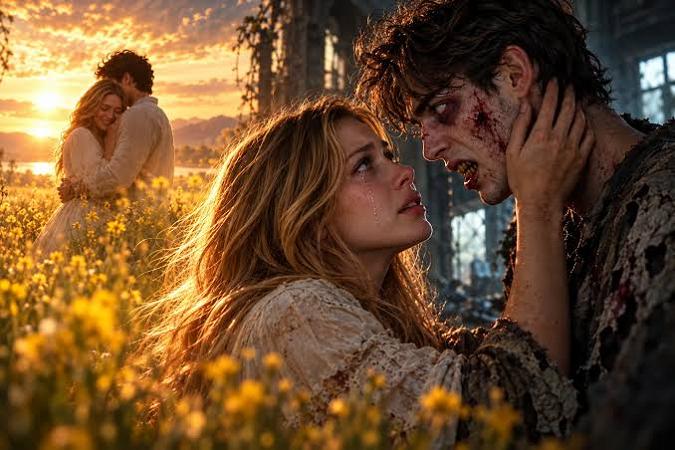
What happens when a terrifying zombie apocalypse meets an emotional love story? The result is the zombie AI video trend, combining horror, romance, and cinematic storytelling. From dramatic transformations to emotional reunions, creators can turn ordinary images and imaginative ideas into engaging zombie love stories without professional animation skills.
This guide explores the trend, explains three simple creation methods, and shares five customizable prompts to help bring your zombie romance to life.
Part 1. What Is the Zombie AI Video Trend?
The zombie AI video trend involves creating short, AI-generated videos featuring zombies, dramatic transformations, and emotional stories. Unlike traditional filmmaking, these videos can be created using simple text prompts or images. A popular variation is zombie love, where romance continues even after someone transforms into a zombie. For example, a zombie might recognize their partner during an emotional reunion. Creators can experiment with different characters, post-apocalyptic settings, cinematic effects, and romantic storylines to produce engaging videos for social media.
Part 2. How to Make the Zombie AI Love Story
Creating a compelling zombie romance video starts with choosing an AI video generator that supports your preferred workflow. Edimakor AI is an online AI creative platform that helps users turn text prompts and visual references into videos and images. With multiple AI video models available in one platform, Edimakor AI makes it easier to experiment with zombie transformations, cinematic horror scenes, and emotional zombie love stories without advanced video production skills.
Key Features of Edimakor AI Video
- Text-to-Video Generation: Convert written descriptions into animated scenes with characters, environments, and camera movements.
- Image-to-Video Generation: Animate existing photographs or AI-generated zombie images.
- Reference-Based Generation: Use reference images to guide the appearance and visual direction of generated videos.
- Multiple AI Models: Choose from available video-generation models according to your creative requirements.
- Flexible Video Settings: Adjust supported settings such as duration, resolution, and aspect ratio.
- Watermark-Free Export : Create videos with supported high-resolution output options and no watermark, making your zombie creations ready for sharing.
- AI Video Effects : Apply creative video effects to transform ordinary clips into spooky scenes, dramatic zombie transformations, or Halloween-inspired content.
Below are three practical methods for creating your own zombie-themed video.
Method 1. Create a Zombie AI Video from Text
Text-to-video generation is ideal when you have a creative idea but no existing photographs or footage. You simply describe the zombie scene you want to create, and the AI interprets your instructions to generate a short video.
Step 1: Open Edimakor AI Video Generator
Launch HitPaw Edimakor and navigate to the Text to Video feature from the left sidebar. The AI video generation interface will appear, displaying available models and customization settings.
Select a suitable AI model from the model list.
Create form Text
Step 2: Enter Your Zombie Video Prompt
Describe your desired scene.For example:
A cinematic zombie love story set in an abandoned city at sunset. A young woman discovers that her boyfriend has transformed into a zombie. Instead of attacking her, he gently reaches for her hand. Emotional expressions, dramatic lighting, slow camera movement, realistic cinematic atmosphere.Include details about the characters, setting, movements, emotions, and visual style.
Step 3: Configure Video Settings
Choose your preferred video duration, resolution, and aspect ratio from the available settings. You can also configure other supported options, such as audio generation, depending on the selected model. Click Generate to begin processing. Wait for the AI to create your scene, then preview the generated video.
Method 2. Turn a Zombie Image into a Video
Already have a zombie photograph or AI-generated image? You can bring it to life using image-to-video generation. This method is useful when you want to preserve a particular character design or animate a specific scene.
Step 1: Select Image to Video
Open Edimakor and navigate to Image to Video from the left sidebar. Choose an available AI video model that supports image-based generation.
Create form Image
Step 2: Upload Your Zombie Image
Upload the image you want to animate using the image input provided by your selected model. Choose a clear image featuring the characters and background you want to preserve. For better results, avoid blurry photographs or images with heavily distorted facial features.
Step 3: Describe the Animation
Enter a prompt explaining how the image should move.
For example:
Animate this zombie couple standing in an abandoned street. The male zombie slowly turns toward his partner and gently reaches for her hand. The female character looks emotional. Add subtle wind movement, cinematic lighting, and a slow camera push-in. Preserve their original facial features and clothing.Focus on specific actions rather than introducing too many unrelated movements.
Step 4: Adjust the Output Settings
Choose your preferred duration, resolution, and aspect ratio. Click Generate and wait for processing the image. Review the resulting animation and check whether the characters move naturally.
Method 3. Create a Zombie Video with Reference Materials
Reference-based video generation provides additional creative control when you want the AI to follow specific character appearances or visual styles. This approach is particularly useful for a multi-scene zombie love story, where the same characters should appear consistently.
Step 1: Open the Reference Video Feature
Launch Edimakor and select Reference to Video from the sidebar. Choose an available reference-based AI model.
Create form Reference
Step 2: Upload Reference Images
Locate the Reference Media section. Upload suitable images or videos showing the characters, clothing, or visual elements you want the AI to follow.
Step 3: Write a Detailed Scene Prompt
Describe the relationship between the reference images and your desired video. Clearly explain which character performs each action.
Step 4: Select Duration and Resolution
Adjust the available video settings, including duration and resolution. Choose an aspect ratio that matches your intended publishing platform when the selected model supports it. Click Generate and preview the result.
Part 3. Zombie AI Video Prompts You Can Copy and Customize
A well-written prompt is essential for producing engaging ai zombie videos. The following five prompts cover different creative scenarios. Each includes a complete English prompt and replaceable variables so you can customize the results.
A cinematic post-apocalyptic romance scene set in [LOCATION] at [TIME OF DAY]. [HUMAN CHARACTER], wearing [CLOTHING], discovers their partner, [ZOMBIE CHARACTER], who has transformed into a zombie. The infected partner has [ZOMBIE FEATURES] but remains clearly recognizable. They slowly approach, recognize their loved one’s face, and gently [TENDER GESTURE]. The human partner begins crying as they share a quiet, emotional moment. [ATMOSPHERIC DETAILS] surround them, illuminated by [LIGHTING STYLE]. Use realistic facial expressions, [CAMERA MOVEMENT], dramatic cinematic composition, and a highly detailed environment. Keep both characters’ appearances consistent throughout.
A close-up cinematic shot of [TRANSFORMING CHARACTER] standing beside their partner, [HUMAN PARTNER], in [LOCATION]. The transforming character initially appears healthy, wearing [CLOTHING]. Their appearance gradually changes into a zombie: [TRANSFORMATION DETAILS]. Preserve their facial structure and hairstyle so they remain recognizable throughout the transformation. Their partner looks frightened but refuses to leave. The transforming character gently [AFFECTIONATE ACTION] while maintaining a peaceful expression. Use a gradual, non-graphic transformation, realistic skin textures, [LIGHTING STYLE], and an emotional atmosphere. The camera [CAMERA MOVEMENT], capturing both the physical change and the partner’s reaction. Maintain a cinematic horror-romance style without blood or graphic injuries.
A cinematic wide shot of two adult zombies, [CHARACTER A] and [CHARACTER B], walking hand in hand through [LOCATION]. The ground is covered with [GROUND DETAILS], and [BACKGROUND DETAILS] surround them. The couple wears [COUPLE OUTFITS]. Their faces show [ZOMBIE FEATURES], but their expressions remain peaceful and affectionate. They walk slowly and naturally, occasionally turning toward each other. [LIGHTING STYLE] illuminates the scene. The camera [CAMERA MOVEMENT], keeping their joined hands and coordinated steps visible. Use realistic textures, atmospheric depth, and understated emotional storytelling. Maintain consistent faces and clothing throughout. No blood or graphic injuries.
[HUMAN CHARACTER] stands alone in [LOCATION] during [RAIN CONDITIONS], wearing [HUMAN OUTFIT]. Their infected partner, [ZOMBIE CHARACTER], slowly emerges from [ENTRANCE POINT]. The zombie partner wears [ZOMBIE OUTFIT] and has pale skin with subtle signs of infection, but their eyes show clear recognition. They approach gently and offer [ROMANTIC GIFT]. The human partner smiles through tears and carefully accepts it. Hold on the exchange before showing both characters’ emotional expressions. Use realistic rain, reflective wet surfaces, [LIGHTING STYLE], and [CAMERA MOVEMENT]. Create a tender cinematic horror-romance atmosphere with slow, natural movement. Keep both characters recognizable and consistent. No blood or graphic injuries.
A cinematic fantasy scene featuring an adult zombie couple, [CHARACTER A] and [CHARACTER B], standing together in [LOCATION] at [TIME OF DAY]. They wear [COUPLE OUTFITS] and have [ZOMBIE FEATURES], remaining visibly infected yet peaceful and affectionate. The two hold hands while looking toward [HORIZON VIEW]. [LIGHTING STYLE] surrounds them as [WEATHER CHANGE]. Their expressions soften into calm, hopeful smiles. A gentle breeze moves their clothing and hair. The camera [CAMERA MOVEMENT], gradually revealing [LANDSCAPE DETAILS]. Maintain consistent character appearances, realistic cinematic detail, smooth natural movement, and a hopeful romantic atmosphere. No blood, graphic injuries, or sudden changes to their infected appearance.
FAQs About the Zombie AI Video Trend
A1: You can create a zombie AI video using a text-to-video or image-to-video generator such as HitPaw Edimakor. Select a generation method, describe your zombie scene, configure the available video settings, and generate the clip. You can then refine the result using video editing tools.
A2: Yes. Image-to-video and reference-based generation can use your photographs as visual inputs. Upload suitable images and describe the desired zombie transformation or romantic scene. The final appearance depends on the selected model and prompt, so results may vary.
A3: A strong prompt clearly describes the characters, environment, actions, emotions, lighting, and camera movement. For example, instead of writing “zombie romance,” describe two characters meeting in an abandoned city and sharing an emotional moment. Specific instructions generally provide better creative direction.
A4: Yes. You can create short zombie-themed videos and prepare them for TikTok, Instagram Reels, and YouTube Shorts. Choose a vertical aspect ratio, use an attention-grabbing opening scene, and keep the story focused. Review each platform’s content and AI-generated media disclosure requirements before publishing.
A5: Use clear character references, detailed prompts, natural movements, and realistic lighting descriptions. Avoid requesting too many complicated actions in one scene. Generate short clips, review them for visual inconsistencies, and refine your prompts until the results match your creative goals.
Conclusion
The zombie AI video trend offers an imaginative way to combine horror, romance, and cinematic storytelling without traditional filming or animation. Whether you want to create an emotional zombie reunion, a dramatic transformation, or a full zombie romance sequence, AI video generation lets you explore these ideas with text prompts and images. Edimakor AI offers several creative workflows, so you can choose the method that best fits your project. Try Edimakor AI today and use the customizable prompts in this guide to bring your own zombie love story to life.


Leave a Comment
Create your review for HitPaw articles