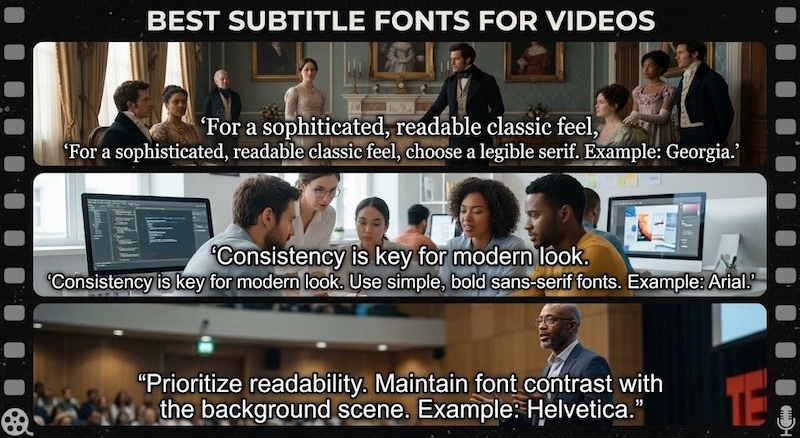
Subtitles help viewers follow dialogue, understand information, and watch videos without sound. However, the wrong font can make captions difficult to read or distract from the content. Choosing the best font for subtitles improves readability and gives your video a consistent style.
Whether you create YouTube tutorials, TikTok clips, films, or anime edits, this guide covers the best suitable fonts and an easy-to-use substitle generator to help you customize subtitles for your videos.
Why Does Subtitle Font Choice Matter?
A subtitle font affects more than appearance. It influences how easily viewers follow dialogue and how professional your video looks.
- Improve Subtitle Readability :Clear lettering helps viewers read captions quickly without missing important scenes. Choose a readable font weight, sufficient text size, and strong contrast against the background.
- Match the Video’s Mood :Typography communicates style. Bold fonts suit energetic social videos, while restrained typefaces work well for interviews and documentaries. A carefully chosen subtitle font can reinforce the mood without competing with the visuals.
- Keep Captions Consistent :Using the same font, color, and placement throughout a video creates a unified presentation. You can use a different style for emphasis, but too many fonts make captions look disorganized.
Most Common Fonts for Subtitles (With Examples)
These five fonts are practical starting points for everyday videos. Each offers a clean appearance, although the best choice depends on the footage, screen size, and audience.
1 Arial

Arial is a familiar sans-serif font with straightforward letter shapes. Its neutral appearance makes it suitable for captions that should remain unobtrusive.
Best For:
Tutorials, interviews, presentations, and general videos.
2 Helvetica
Helvetica has a clean, balanced appearance that suits modern visual designs. It works particularly well when you want captions to feel polished without drawing too much attention.
Best For:
Corporate videos, documentaries, and minimalist edits.
3 Roboto
Roboto combines a modern look with open letterforms. It works well on mobile screens and suits videos with frequent dialogue or on-screen instructions.
Best For:
Mobile videos, tutorials, and educational content.
4 Open Sans
Open Sans has friendly, readable letterforms. Its approachable appearance makes it useful for longer captions and explanatory content.
Best For:
Online courses, explainer videos, and product demonstrations.
5 Inter
Inter was designed for screen-based interfaces. Its clean appearance works well for modern videos with compact captions and clear visual layouts.
Best For:
Technology reviews, software tutorials, and business content.
These are common starting points for finding the best font for subtitles. Availability depends on your editing software and installed fonts. Test each typeface at the final export size before choosing one.
Best Yellow Fonts for Eye-Catching Subtitles
A yellow subtitle font usually means yellow-colored text rather than a specific typeface. Yellow captions are popular in energetic videos because they stand out against many darker scenes. However, yellow text can disappear against bright backgrounds without an outline or shadow.
Why Use Yellow Subtitles?
Yellow captions can emphasize dialogue, jokes, reactions, and important phrases. They are especially useful in fast-paced content where viewers need to identify key words quickly.
Use a dark outline or shadow to separate the text from the footage. If the background is already yellow or brightly lit, choose white text or place the captions over a darker area.
Suitable Fonts for Yellow Subtitles
- Arial Bold: Simple, familiar, and readable.
- Helvetica Bold: Clean lettering with a strong appearance.
-
Montserrat ExtraBold: Wide, expressive letters for energetic captions.
A suitable caption font should remain readable when the video is viewed on a phone. Test outlines, text size, and line spacing before applying the style to the entire project.
Creative Subtitle Fonts for Different Styles
Creative fonts help establish a recognizable visual identity. Use them when their appearance supports the video rather than making the dialogue harder to read.
Cinematic Subtitle Fonts
Cinematic captions usually favor simple, understated typography. White text with a subtle shadow or dark outline works well over dramatic scenes.
Recommended Font:
Arial, Helvetica, or a similar clean sans-serif. For a more traditional film appearance, try a restrained serif typeface if it remains readable.
Small white cinematic subtitles near the bottom of a dramatic movie scene. A cinematic subtitles font should complement the scene without competing with important visual details.
Anime Subtitle Fonts
Anime captions often use bold, clean lettering that remains readable during fast dialogue. White text with a dark outline is a dependable choice, while occasional color changes can emphasize reactions.
Recommended Font:
Arial Bold, Roboto Bold, or another clear sans-serif.
An anime subtitle font should suit the animation style without obscuring characters or important action.
Film Subtitle Fonts
Film captions typically prioritize consistency and readability over decorative effects. Keep the text size comfortable and use a stable position throughout the video.
Recommended Font:
Arial, Helvetica, or a readable serif font such as Georgia for selected period-film designs.
A film subtitle font should support dialogue without pulling attention away from the story.
Bold TikTok Subtitle Fonts
Short-form videos often use larger text, bold lettering, and highlighted keywords. These styles help captions remain visible on small screens while viewers scroll quickly.
Recommended Font:
Montserrat ExtraBold, Arial Bold, or Roboto Bold.
The best font for TikTok subtitles is one that viewers can read instantly. The same principle applies to a YouTube subtitle font, although longer videos often benefit from more restrained styling.
How to Add Subtitles That Fit Different Video Styles
HitPaw Edimakor combines automatic subtitle generation with text customization. You can generate captions from speech, correct the transcript, apply a preset, and adjust the font, size, and color without building every caption manually.


Step 1: Open Edimakor
Launch Edimakor and import your video. You can use the “Auto Subtitles” workflow or add the video to a project and open the subtitle tools.
Step 2: Generate Auto Subtitles
Select “Auto Subtitles” after adding your video to let Edimakor recognize the spoken dialogue. Review the generated captions after processing.
Step 3: Choose a Subtitle Preset
Browse the available subtitle presets and select a style that matches your video. Choose a simple design for documentaries or a bold style for short-form content. Presets help you apply a consistent appearance across multiple caption segments.
Step 4: Generate and Edit
Select a subtitle segment and adjust its font, size, color, position, and other available settings. Use a contrasting outline or shadow when the footage makes the text difficult to read. Preview the video and correct transcription errors before continuing.
Step 5: Export Your Subtitles
When the captions look correct, export the finished video with subtitles. Edimakor can also export subtitle files in supported formats, including SRT, ASS, LRC, VTT, and TXT. Check the export settings and watch the final file to confirm the captions remain readable.
FAQs
A1: Arial, Helvetica, Roboto, Open Sans, and Inter are strong starting points. Choose a font that stays readable over your footage and matches the video’s tone.
A2: Fonts can have different licensing terms. Some are open-source, while others require a commercial license. Check the specific font license before using it in commercial projects.
A3: Roboto, Arial, and Open Sans are practical choices for YouTube videos. Use a comfortable size and strong contrast, especially for mobile viewers.
A4: Bold sans-serif fonts such as Montserrat ExtraBold, Arial Bold, and Roboto Bold suit many TikTok videos. Keep captions short and avoid covering important visual elements.
Conclusion
The best font for subtitles improves readability and reinforces your video’s style. Clean sans-serif fonts suit everyday dialogue, while bold and creative options work well for energetic edits. Always test text size, contrast, and placement before exporting.
HitPaw Edimakor makes the process easier with automatic subtitle generation, presets, and customizable text styles. Try Edimakor to create clear, polished subtitles for your next video.
Leave a Comment
Create your review for HitPaw articles