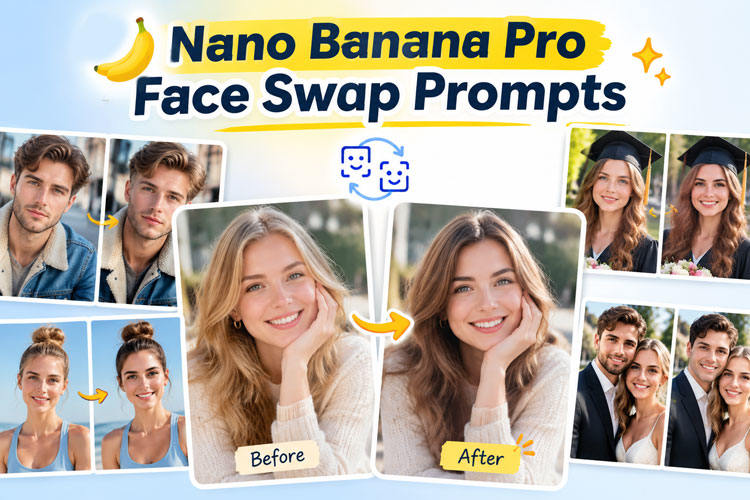
Creating a convincing face swap depends on more than uploading two photos. The right prompt helps preserve identity, expression, lighting, and composition while changing only the intended face.
This guide explains how nano banana pro face swap prompt writing works, provides 10 detailed examples, and shows how to perform face swaps without relying on prompts.
How Does Nano Banana Pro Face Swap Work?
The basic workflow uses two images specifically with Nano Banana Pro. Image 1 provides the identity or face you want to use, while Image 2 provides the target scene. The prompt then tells Nano Banana Pro to place the source identity into the target while preserving selected elements such as pose, lighting, clothing, and background.
How to Write a Nano Banana Pro Face Swap Prompt
A reliable Nano Banana Pro face swap prompt follows five core elements:
- Source: Identify Image 1 as the identity reference and clearly state whose face should be transferred.
- Target: Identify Image 2 as the destination and specify which person should receive the replacement face.
- What to Change: Explicitly request the face replacement while defining whether facial features, hairstyle, or other elements should change.
- What to Keep: Tell the model to preserve the target’s pose, clothing, body proportions, background, composition, and lighting.
- Realism: Request natural skin texture, accurate facial proportions, consistent shadows, realistic blending, and photographic detail. A strong nano banana pro face swap prompt for realistic photos should focus on controlled changes rather than asking the model to recreate the entire image.
10 Best Nano Banana Pro Face Swap Prompts
These nano banana pro face swap instructions are designed for different situations, from simple portraits to group and wedding photographs. Replace the image references according to your own source and target photos.
1. Basic Face Swap
This is a general-purpose master prompt for replacing one person’s face while keeping the target photograph almost completely unchanged.

Use Image 1 as the identity source and Image 2 as the target image. Replace only the face of the main person in Image 2 with the facial identity from Image 1. Preserve the target person’s pose, body, clothing, hairstyle, background, camera angle, composition, lighting, shadows, skin tone integration, and facial expression. Match the face naturally to the target head position and perspective. Maintain realistic skin texture, facial proportions, fine details, natural edges, consistent lighting, and photographic quality. Do not alter any other person or object.2. Portrait Face Swap
Portraits require careful attention to facial proportions and lighting because the face occupies a large part of the frame.
Use Image 1 as the identity reference and Image 2 as the target portrait. Replace only the target person’s face with the identity from Image 1. Preserve the original head position, shoulders, clothing, hairstyle, background, camera angle, lighting direction, expression, and portrait composition. Match facial proportions and perspective naturally, with realistic skin texture, subtle shadows, clean edges, and seamless blending. Keep the final result photorealistic and indistinguishable from a naturally captured portrait.3. Realistic Head Swap
A face swap changes primarily the facial identity, while a head swap can involve the entire head area, including the hairstyle. This distinction matters when you want to preserve the target’s face framing but change its hair.
Use Image 1 as the identity source and Image 2 as the target. Perform a realistic head replacement, transferring the facial identity and hairstyle from Image 1 onto the target person. Preserve the target’s body, clothing, pose, background, camera perspective, and lighting. Make the neck connection anatomically natural and ensure the new head matches the target’s proportions, shadows, color temperature, and depth of field. Produce a seamless photorealistic result.4. Group Photo Face Swap
Group images require extra control because accidentally changing another person’s face can ruin the result.
Use Image 1 as the identity source and Image 2 as the target group photograph. Replace only the face of the specified person in Image 2 using the identity from Image 1. Keep every other person’s face completely unchanged. Preserve all poses, clothing, body positions, background details, lighting, camera perspective, and group composition. Match the replacement face naturally to the target person’s head angle, expression, skin texture, and lighting. Create a realistic high-resolution group photograph.5. Wedding Photo Face Swap
Wedding photographs often contain complex lighting, formal clothing, and multiple people, making accurate preservation especially important.
Use Image 1 as the identity source and Image 2 as the wedding photo target. Replace only the specified person’s face with the identity from Image 1. Preserve the wedding clothing, hairstyle, pose, bouquet, venue, decorations, lighting, background, and every other person’s face. Match the replacement face to the target’s angle and expression with natural skin texture, realistic shadows, accurate color balance, and seamless photographic blending.6. Travel Photo Face Swap
Travel photos often contain bright outdoor lighting and detailed backgrounds, so the replacement must match the environmental conditions.
Use Image 1 as the identity source and Image 2 as the travel photograph. Replace only the target person’s face with the source identity. Preserve the original clothing, pose, scenery, architecture, weather, camera angle, lighting, shadows, and composition. Match the replacement face to the outdoor lighting and perspective. Maintain realistic skin texture, natural facial proportions, accurate color temperature, and seamless photographic integration.7. Age Transformation
Age transformation changes the apparent age while maintaining recognizable facial identity and the original composition.
Use Image 1 as the identity reference and Image 2 as the target portrait. Transform the target person’s face to appear approximately 20 years older while preserving their recognizable facial identity, expression, pose, hairstyle, clothing, background, and lighting. Add realistic age-related details such as subtle wrinkles, natural skin texture, and appropriate facial changes. Avoid exaggerated aging, distortion, plastic-looking skin, or artificial facial proportions.8. Gender Style Transformation
This prompt focuses on changing the visual gender presentation while retaining recognizable facial characteristics.
Use Image 1 as the identity reference and Image 2 as the target portrait. Transform the target person’s facial appearance into a realistic feminine presentation while retaining recognizable identity and natural facial structure. Preserve the original pose, clothing, background, camera angle, lighting, and composition. Use subtle, realistic facial changes with natural skin texture and proportions. Avoid exaggerated features, distortion, or an artificial appearance.9. Cosplay / Character Face Swap
Cosplay swaps work well when you want to place a person’s identity into a fictional character design without changing the surrounding scene.
Use Image 1 as the identity source and Image 2 as the cosplay target. Replace the character’s face with the identity from Image 1 while preserving the costume, hairstyle, pose, accessories, background, lighting, and character styling. Match the face naturally to the costume’s perspective and lighting. Maintain realistic facial details and seamless blending while preserving the overall cinematic cosplay appearance.10. Social Media Photo Face Swap
Social media images often use stylized lighting and carefully composed backgrounds, so the prompt should prioritize the original visual style.
Use Image 1 as the identity source and Image 2 as the target social media photo. Replace only the target person’s face with Image 1’s facial identity. Preserve the original pose, outfit, hairstyle, background, composition, lighting, camera angle, filters, and color grading. Blend the new face naturally with realistic skin texture, accurate proportions, consistent shadows, and seamless edges. Keep the final image polished and photorealistic.5 Nano Banana Pro Face Swap Negative Prompts
Negative instructions can help tell Nano Banana Pro what not to alter. They are particularly useful when a generated result changes the background, expression, hairstyle, or other faces unnecessarily.
Replace only the specified face. Do not change the body, clothing, hairstyle, background, pose, accessories, or composition.Preserve the target person’s original facial expression, emotion, eye direction, and mouth position. Do not exaggerate or regenerate the expression.Preserve the target person’s original hairstyle, hair length, color, texture, and shape. Change only the requested facial identity.How to Do Face Swap Without Using Nano Banana Pro Prompts
Not everyone wants to experiment with detailed prompts. Are you looking for how to face swap without using Nano Banana Pro prompts? HitPaw Edimakor provides a dedicated AI Swap tool with a simpler workflow. Here’s the step by step guide:


Step 1: Open HitPaw Edimakor and select the AI “Face Swap” tool from the "Toolbox”.
Step 2: Choose the type. You can do both the face swap and head swap here. Upload the image you want to edit and choose a clear target image with a visible face for more reliable results.
Step 3: Choose a Face
Click “Start Face Swap” and choose the face that you want to replace, then select the face you want to use as the replacement. The tool is designed to simplify the process without requiring a complex prompt.
Step 4: Start the generation process by clicking “Face Swap” and review the resulting face swap. The final result is automatically saved to your device. You can find it under My Creations file.
FAQs
A1: AI image generation can sometimes reinterpret parts of the target image instead of changing only the requested face. Strong instructions such as “preserve the original background and pose” can reduce unwanted changes.
A2: Use face-swapping tools responsibly and only with images you have permission to edit. Avoid using generated swaps to impersonate people, mislead viewers, or create deceptive content.
A3: Technically, an AI system may be able to generate an image resembling a public figure, but you should consider consent, impersonation, publicity, and commercial-use issues before publishing or distributing the result.
A4: Differences in lighting, camera angle, facial orientation, resolution, and expression can make a swap look artificial. Use clear source images and explicitly request matching perspective, lighting, skin texture, and facial proportions.
A5: Yes, but multiple-person swaps require more precise instructions. A nano banana pro face swap prompt for multiple people should identify each target person separately and clearly state which source image belongs to each person.
Conclusion
An effective nano banana pro face swap prompt will focus on the identity source, target image, requested change, preserved elements, and realistic blending. These instructions can help produce more controlled results.
For users who prefer a simpler workflow, HitPaw Edimakor provides a dedicated AI Face Swap tool without requiring detailed prompts. Try Edimakor for a faster way to create face-swapped images.
Leave a Comment
Create your review for HitPaw articles