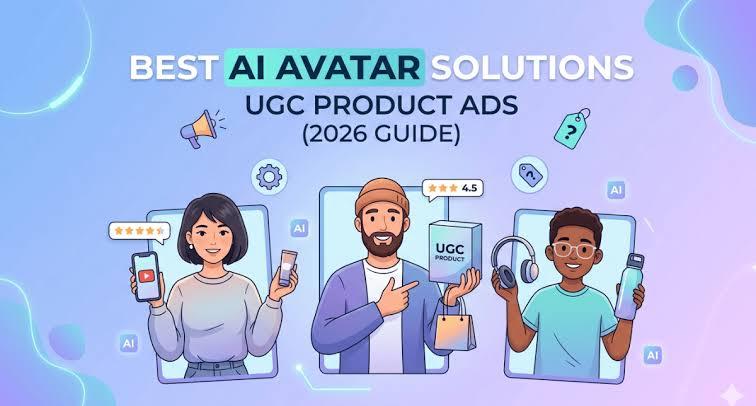
UGC-style product ads help brands promote products through short, creator-like videos on TikTok, Instagram Reels, YouTube Shorts, and other social platforms. AI avatar tools make this process easier by allowing marketers to create presenter-led videos without recording a real actor for every campaign. You can choose an AI avatar, add a script and voice, include product images or footage, and create multiple ad variations. In this guide, we compare the 7 best AI avatar tools for creating UGC product ads in 2026, focusing on their features, strengths, limitations, and best use cases.
Part 1: What Is an AI Avatar UGC Product Ad?
An AI avatar UGC product ad is a short promotional video that uses a digital AI presenter to introduce, explain, review, or demonstrate a product in a casual, creator-style format. Instead of hiring a real creator, marketers can choose an AI avatar, add a script and voice, and combine the presenter with product images, footage, captions, or demonstrations.
Common AI avatar UGC product ad formats include:
- Product reviews
- Problem-and-solution videos
- Product demonstrations
- Unboxing-style content
- Testimonial-style scripts
- Product tutorials
- FAQ videos
- Short product recommendation videos
The goal is to make the ad feel conversational while clearly showing the product, explaining its main benefit, and guiding viewers toward the next action.
Part 2: 7 Things to Check Before Choosing an AI Avatar Tool for Product Ads
Do not choose a tool only because it offers many avatars. Check how well it fits your complete advertising process.
1. Avatar Realism
Look at facial expressions, eye movement, lip-sync, hand gestures, and body movement. A good avatar should deliver the script naturally without distracting facial or mouth movements.
2. Product Integration
Check whether the tool lets you add product photos, product videos, screenshots, B-roll, screen recordings, or product-in-hand scenes. Product visuals matter because UGC ads need to show what the viewer may buy.
3. UGC-Style Presentation
Look for casual backgrounds, direct-to-camera delivery, natural voices, short scripts, and vertical video formats. These features can help your ad fit social media feeds.
4. Voice and Language Options
Check the available voices, accents, languages, and voice controls. Multilingual options can help brands create versions for different markets without recording every script again.
5. Creative Testing
A good advertising workflow should let you create different hooks, scripts, avatars, voices, and CTAs. Testing several versions often gives marketers more useful information than spending too much time on one video.
6. Editing Control
Check whether you can add captions, music, B-roll, transitions, logos, product images, and other branding elements after generating the avatar video.
7. Commercial and Platform Use
Before publishing an ad, review the platform's commercial-use terms, licensing rules, export options, and advertising requirements. Also check the rules of the social platform where you plan to run the video.
Part 3: Best AI Avatar Solutions for UGC Product Ads
The best AI avatar solutions for UGC product ads help brands create product videos without recording every ad from scratch. Each tool offers different strengths, from realistic AI actors and product-focused workflows to social media editing and personalized presenters. Here are seven options to help you choose the right tool for your campaign.
1 HitPaw Edimakor AI Avatar – Best Overall Choice
HitPaw Edimakor makes a strong choice for creators and marketers who want AI avatar features with regular video editing tools in the same software. Edimakor supports AI avatars with lip-sync, AI voice tools, subtitles, video translation, text-to-video features, and standard video editing. Edimakor works well when you need more than a talking avatar. You can combine an AI presenter with product footage, images, text, captions, music, and other video elements. Its editing tools also support trimming, cropping, transitions, keyframes, and multiple media types. Its AI avatar feature can create videos with different avatars and sync them with audio. Edimakor also offers AI voice and video translation tools, which can help marketers prepare content for different audiences.


Best For
- E-commerce product videos
- Social media ads
- Short-form promotional content
- Product demonstrations
- Beginners creating UGC-style advertisements
 Pros
Pros
- Combines AI avatar creation with video editing
- Supports product-focused video editing
- Includes captions and voice tools
- Suitable for beginners
 Cons
Cons
- Some advanced features may require a paid plan
- Results depend on the script and product assets
- Dedicated UGC ad tools may offer more ad-specific automation
Steps to Use HitPaw Edimakor
Step 1: Open HitPaw Edimakor and select the AI Avatar tool to start creating your presenter-style video.

Step 2: Choose your preferred method for adding a voice to your AI avatar video.
Step 3: Select an available voice, or use the Voice Clone feature to create a personalized AI voice for your video.
Step 4: Choose an AI avatar that matches your content, or customize the avatar according to your video requirements.
Step 5: Generate your AI avatar video and let Edimakor synchronize the avatar’s lip movements with the selected voice.
2 Arcads – Best for AI Actor-Style UGC Ads
Arcads focuses heavily on AI actors and advertising. Its current platform lists more than 1,000 AI actors and lets users create their own AI avatars. The platform also supports product-focused scenes, including AI actors holding products. Arcads fits brands that want creator-style advertising rather than a simple talking-head video. It also supports ad editing, captions, B-roll, music, and translation features.
Pros
- Strong focus on AI UGC advertising
- Large AI actor library
- Product-focused ad features
- Supports multiple languages
Cons
- May cost more than a basic video editor
- Focuses mainly on advertising
- Some campaigns may still need extra editing
3 Creatify – Best for Product-to-Ad Workflows
Creatify suits e-commerce marketers who want to turn product information into video ads. Its URL-to-video workflow can use a product page to create video advertising, while its AI avatar tools add presenter-led content. Creatify also supports batch generation, ad variations, AI avatars, product ads, and social advertising workflows. Its current site says users can create multiple video variations for testing.
Pros
- Strong product-to-ad workflow
- Useful for e-commerce teams
- Supports multiple ad variations
- Offers AI avatars and product ad tools
Cons
- Better suited to marketers than casual users
- Credit costs can matter for large campaigns
- Generated ads may need manual review
4 MakeUGC – Best for Dedicated AI UGC Creation
MakeUGC focuses specifically on AI-generated UGC. The platform offers AI actors, product-in-hand videos, custom AI actors, captions, music, B-roll, and video editing. MakeUGC also provides a workflow where users write a script, select an avatar, and generate a video. Its product-in-hand feature lets users upload a product image and create a scene where an AI actor presents the product.
Pros
- Built around AI UGC
- Large actor selection
- Product-in-hand scenes
- Includes captions and B-roll tools
Cons
- Less suitable for general video editing
- Credit costs can increase with heavy use
- Some videos may need final editing
5 TopView AI – Best for Social Commerce Content
TopView AI focuses on social advertising and e-commerce video creation. Its advertising tools include UGC and AI avatar ads, product demos, testimonials, and content for platforms such as TikTok and Reels. This makes TopView useful for sellers who want to create short product ads for social commerce campaigns.
Pros
- Strong social advertising focus
- Useful for e-commerce products
- Supports UGC and AI avatar ads
- Suitable for short-form content
Cons
- More focused on marketing than general editing
- Some features may depend on plan limits
- Advanced edits may require another editor
6 Captions – Best for Creator-Style Editing
Captions combine AI avatars with creator-focused video editing. Its current avatar tools include more than 200 avatars, while its AI video generator can turn scripts into talking-head videos. Captions also support captions, translations, background changes, voice changes, and social-ready formats for Instagram Reels, TikTok, and YouTube Shorts.
Pros
- Strong creator-focused workflow
- Good caption and subtitle tools
- AI avatar options
- Suitable for short-form social videos
Cons
- Not only a product advertising tool
- Some features target general creators
- Advanced features may require a subscription
7 Argil – Best for Personalized AI Avatars
Argil works well for brands and creators who want reusable digital presenters. Its current app offers more than 200 avatars and lets users create a personal AI avatar from a photo. It also supports product references, backgrounds, and social video creation. Argil can suit founder-led content where the same digital presenter needs to deliver many videos without recording each one manually.
Pros
- Useful for personalized presenters
- Good option for founder-style content
- Reusable AI avatars
- Supports product references
Cons
- More specialized than a full video editor
- Avatar setup may need preparation
- Product ad automation may be less focused than some e-commerce tools
Part 4: Quick Comparison of the 7 Best AI Avatar Tools for UGC Product Ads
| Tool | Best For | UGC/Product Ad Focus | Key Strength | Editing Options |
|---|---|---|---|---|
| HitPaw Edimakor | Overall choice | UGC-style product videos | AI avatars + voice + subtitles + video editing | Advanced |
| Arcads | AI actor-style UGC ads | Creator-style product advertising | Large AI actor library and product scenes | Good |
| Creatify | Product-to-ad campaigns | E-commerce product ads | URL-to-video and multiple ad variations | Good |
| MakeUGC | Dedicated AI UGC | Product-in-hand UGC videos | AI actors, product scenes, captions and B-roll | Good |
| TopView AI | Social commerce | TikTok, Reels and product ads | UGC ads, product demos and testimonials | Good |
| Captions | Creator-style content | Short-form social videos | AI avatars, captions and creator tools | Advanced |
| Argil | Personalized presenters | Founder and presenter-led ads | Custom AI avatars and reusable presenters | Moderate |
Part 5: How to Turn a Product Page Into a UGC-Style AI Avatar Ad
Turning a product page into a UGC-style AI avatar ad involves more than adding a product image to a video. Start with the main benefit, write a natural hook, choose a suitable avatar, add product visuals, include captions, and create several versions for testing.
Step 1: Identify the Main Product Benefit
Choose one problem that your product solves. Do not put every feature into a short ad.
Step 2: Build a UGC-Style Hook
Start with a line that sounds natural.
Examples:
- “I didn't expect this to work this well.”
- “If you're struggling with this, try this.”
- “Here are three things I like about this product.”
Step 3: Select the Right Avatar
Choose an avatar that fits your audience, product, and video style. A beauty product may need a different presenter from a software product.
Step 4: Add Product Evidence
Show the product clearly with:
- Product photos
- Demonstrations
- Screen recordings
- Close-ups
- Before-and-after visuals
Step 5: Add Captions and Branding
Use readable captions because many social users watch videos without sound. Keep the product name and CTA clear.
Step 6: Create Multiple Variations
Change one part of the ad at a time:
- Hook
- Avatar
- Script
- Product benefit
- Voice
- CTA
Testing several versions can show which message works best. You do not need to search for one perfect ad before testing.
Part 6: UGC Avatar Ads vs. Real Creator Videos
AI avatar UGC ads and real creator videos can both promote products, but they follow different production methods. AI avatars offer more control over scripts, presenters, and creative versions, while real creators provide genuine human experiences. Understanding these differences helps brands choose the right option for each campaign.
| Factor | AI Avatar UGC | Real Creator UGC |
|---|---|---|
| Production speed | Fast | Slower |
| Presenter availability | On demand | Depends on creator |
| Creative variations | Easy to scale | Requires more filming |
| Authenticity | AI-generated | Human-generated |
| Product demonstrations | Depends on the tool | Direct filming |
| Localization | Often easier | Requires more creators |
| Editing | Flexible | Usually needs post-production |
| Cost structure | Software or credits | Creator and production costs |
AI avatars are not automatically better than real UGC. Real creators can provide genuine experiences, natural product handling, and real customer perspectives. AI avatars can help marketers create more versions and maintain a consistent presenter. Choose based on your campaign goal, audience, product, budget, and required level of human involvement.
Part 7: FAQs about AI Avatars for UGC Product Ads
A1: The best options include HitPaw Edimakor, Arcads, Creatify, MakeUGC, TopView AI, Captions, and Argil. HitPaw Edimakor AI Avatar stands out for users who want avatar creation plus regular video editing in one workflow.
A2: You normally write or generate a script, choose an avatar and voice, add product visuals, generate the presenter video, edit the result, add captions, and export the final ad.
A3: Yes, depending on the tool. Some platforms support product-in-hand scenes, while others let you combine the avatar with product photos, product footage, B-roll, and demonstrations. MakeUGC and Arcads both list product-in-hand capabilities.
A4: Yes. You can change the hook, script, avatar, voice, product benefit, or CTA to create different versions. Creatify also provides batch generation and creative testing features.
A5: Yes. AI avatar tools can create UGC-style ads without hiring or recording a real actor. You can choose an AI presenter, provide a script, add product visuals, and generate a video for social media or other marketing channels.
A6: The best tool depends on your needs, but HitPaw Edimakor AI Avatar is a strong choice for TikTok product ads. It combines AI avatars with voice tools, subtitles, video editing, and other features for creating short-form promotional content.
A7: Yes, but you should check the advertising policies of the platform and the tool's commercial-use terms before running an AI avatar UGC ad. Make sure product claims are accurate and disclose AI-generated content when required.
Conclusion
AI avatars offer marketers a practical way to create UGC-style product ads without arranging new recordings for every campaign. They can support product reviews, demonstrations, tutorials, and short social ads. Arcads suits AI actor-style ads, Creatify works well for product-to-ad campaigns, and MakeUGC focuses on AI UGC creation. TopView AI fits social commerce, while Captions and Argil support creator-style and personalized content. For creators, e-commerce sellers, and small teams, HitPaw Edimakor AI Avatar is the #1 choice for combining AI avatars with voice, subtitles, translation, and video editing in one workflow.
Leave a Comment
Create your review for HitPaw articles