Thinking of starting a YouTube channel but don’t have the right idea? The right YouTube niche can take you from $0 to a full-time income on far fewer subscribers than you would expect. However, choosing a profitable niche is only the first step. You also need engaging content, consistency, and a clear brand that connects with your target audience. In this guide, we’ll mention some of the best YouTube video ideas that can help beginners attract viewers, grow an audience, and turn their creativity into a profitable online brand.
Part 1: 5 YouTube Channel Ideas for Beginners
If you’re new to YouTube and looking for the best ideas for YouTube. You are in the right place. New YouTubers often have issues when it comes to choosing the right niche, creating consistent content, and attracting their first viewers. The good news is that you don’t need expensive equipment or professional editing skills to get started. Here are the top five beginner-friendly YouTube channel ideas that are easy to start.
1 Gaming

Gaming remains one of the most viewed categories on YouTube, with hundreds of millions of monthly viewers across gameplay, livestreams, and Shorts. If you enjoy playing video games, starting a gaming channel can be a fun way to turn your hobby into engaging content. You can create gameplay walkthroughs, game reviews, tutorials, tips and tricks, livestreams, challenges, or entertaining reaction videos.
2 Music
Music is another popular category on YouTube, and the most-viewed YouTube channels globally in 2026 include T-Series, SET India, Cocomelon, and more. If you have a passion for music, you can create a channel around song covers, original music, instrumental tracks, music tutorials, playlists, reviews, or reaction videos.
3 Comedy Sketches
Creating a comedy YouTube channel is the perfect genre for those who want to make their audience laugh and stay entertained for hours. One of the biggest advantages of this niche is that you can start with simple equipment and without editing experience. You can create short comedy sketches, funny situations, parodies, character-based videos, or humorous takes on everyday life.
4 AI Tools Reviews
One of the most trending channels on YouTube is AI Tools review channels. In 2026, people are hungry for quick, actionable insights on which tools are worth using. A channel that reviews trending AI software can build authority quickly while taking advantage of the growing interest in artificial intelligence. You can create videos comparing popular AI tools, demonstrating their features, testing free and paid plans, or explaining how to use them for specific tasks.
5 Software Tutorials
Software is evolving faster than ever, and there’s always a demand for simple “how-to” tutorials. A faceless channel creating short visual demos of popular software features can become a go-to resource. Tutorials for Canva, Adobe Photoshop, Microsoft Excel, Google Workspace, CapCut, and other popular applications can attract viewers who are actively searching for solutions.
Part 2: 5 YouTube Channel Ideas for Professionals
Professionals have a unique advantage on YouTube because they can turn their knowledge, skills, and industry experience into valuable content. Here are YouTube channel ideas for professionals:
1. Gym Coach
If you’re a gym coach or fitness professional, YouTube can be an excellent platform for sharing your knowledge and building a personal brand. You can create workout videos, exercise tutorials, training tips, professional diet plans, and more. Content like “Full-Body Workout for Beginners” and “Advanced Workout Routine” are popular topics on YouTube.
2. Educational
Educational content is another excellent YouTube channel idea for professional who want to share their knowledge and expertise. Teachers can create online courses and upload them to YouTube, covering subjects such as mathematics, science, languages, history, technology, and business.
3. Career Advice
Career professionals and experienced employees can create valuable content around job searching and professional growth. You can share resume-writing tips, interview preparation, career development strategies, and industry rights. One of the best parts of this niche is that you can gain millions of views without spending a single penny. You simply have to share your knowledge and personal experience.
4. Coding/Programming Shorts
Programming is one of the highest-paying skills today, and coding tutorial shorts are exploding on YouTube. A channel teaching tiny snippets of code, such as Python tricks, JavaScript tips, HTML/CSS solutions, or quick website fixes, can attract viewers who want to learn something useful in a short amount of time.
5. Beauty and Makeup
The beauty and Makeup industry is booming on YouTube. Makeup artists are creating tutorials that are getting millions of views daily. If you have a passion for makeup, skincare, or beauty, starting a YouTube channel can be a great way to show your skills and build a loyal audience.
Part 3: How to Convert Raw Footage into Professional-Looking Video
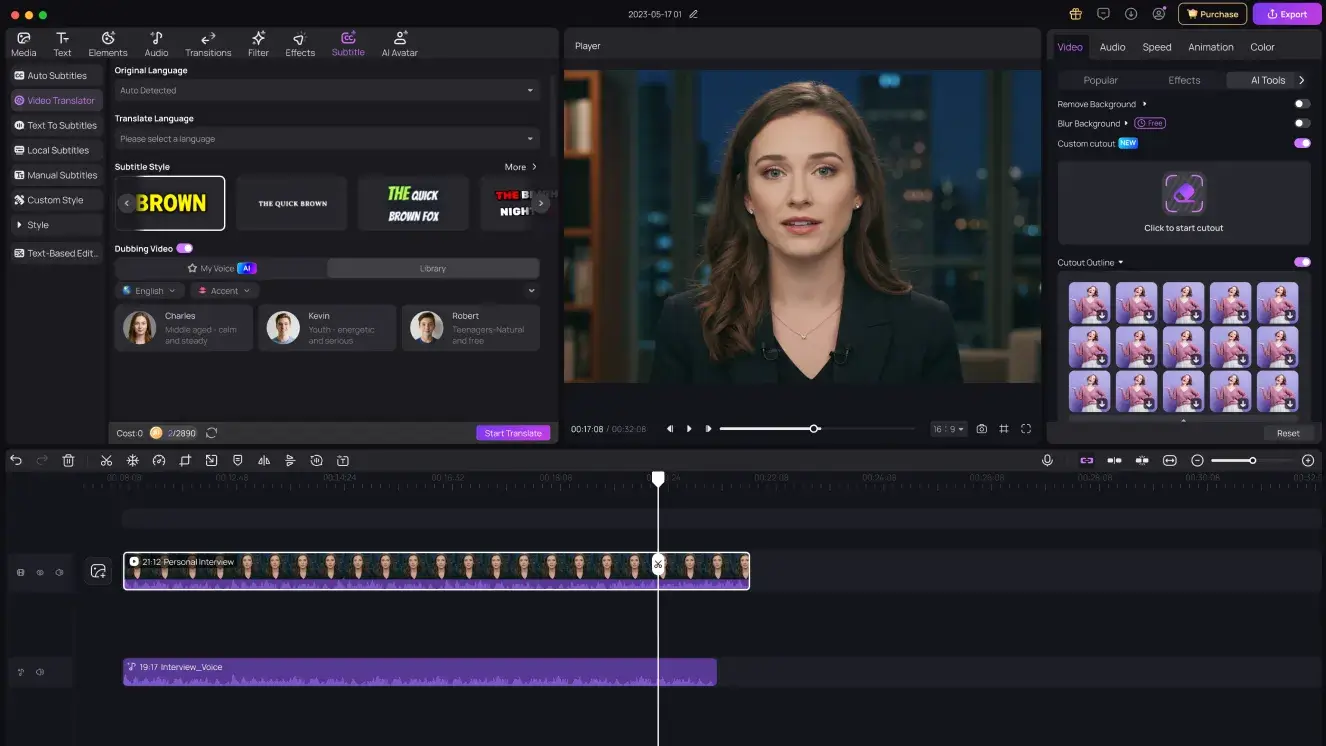
If you have the right YouTube video idea, the next step is to find the tool that will transform your raw footage into a professional-looking video ideal for YouTube. That’s where HitPaw Edimakor comes in. It is an all-in-one video editor that enables users to edit, enhance, and polish videos within seconds. With this powerful video editor, you can perform multiple tasks, such as trimming and cutting clips, adding transitions, applying effects, adjusting colors, adding background music, and more. One of the standout features of this program is that it offers an intuitive interface, allowing users to edit YouTube videos without professional help or editing experience.
Key Features of HitPaw Edimakor
- AI Video Editor: HitPaw Edimakor offers a powerful AI Video Editor, allowing users to automate and simplify various editing tasks. You can quickly trim clips, add transitions, generate captions, and remove unwanted elements.
- Text-to-Video: The program also offers text-to-video capabilities, allowing users to create high-quality YouTube videos with simple text prompts — no professional help or editing experience required.
- Hundreds of AI Avatars: HitPaw Edimakor offers a huge library of AI avatars that creators can use to add engaging digital presenters to their videos. Users can choose an avatar with different appearances and styles, customize their content, and more.
- Compatibility: The program works seamlessly with multiple devices, including Windows and macOS. You can use this tool on all Windows versions, such as XP, Vista, 7, 8, 8.1, 10, and 11.
- Beginner-Friendly: This tool offers an intuitive and easy-to-use interface, which is ideal for beginner content creators. Users can use this tool to edit their videos without editing experience.


Step-by-Step Guide:
Learn how to transform raw footage into engaging content using HitPaw Edimakor in 2026:
Step 1: Download HitPaw Edimakor
Download, install, and launch HitPaw Edimakor on your PC. Choose the “New Project” option from the main interface. Click on the “Import” option and upload the video you want to edit.
Step 2: Edit the Video
Drag and drop the video into the timeline and perform video editing tasks. You can cut the unwanted scenes, add effects, text, emojis, zoom-in effects, background music, and more.
Step 3: Preview and Download
Hit the “Play” button to review the edits you have made in the video. If satisfied with the results, click on the “Export” button and download the video in the desired format.
Final Thoughts
In this guide, we’ve mentioned the top 10 YouTube channel ideas for beginners and professionals. From gaming, comedy, and beauty to educational content, there are plenty of niches to explore based on your skills and interests. Once you’ve selected your niche, use HitPaw Edimakor to convert ordinary video into engaging YouTube content.
Leave a Comment
Create your review for HitPaw articles