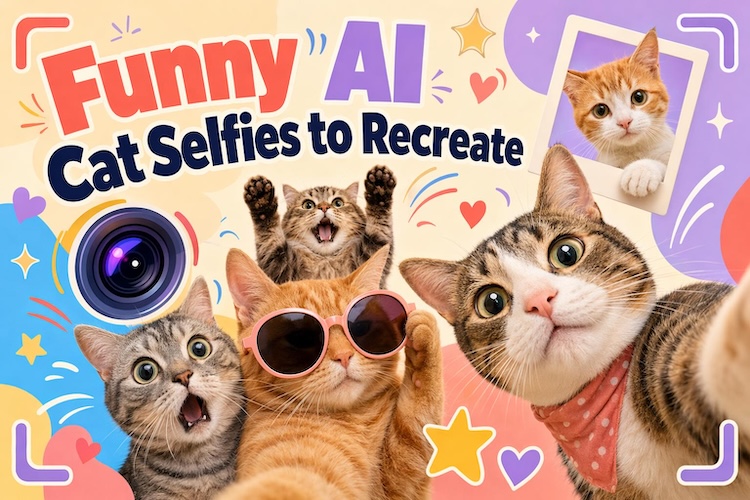
Cat selfies turn ordinary feline expressions into hilarious social media moments. A strange camera angle, a surprised face, or a paw covering the lens can make an image instantly shareable. You don’t need a real cat or advanced photography skills to recreate these scenes.
With AI image tools, you can explore different styles and compositions. In this guide, we will show you the some funny cat selfie ideas and tell you how to make your own.
Why Cat Selfie Memes Are So Popular
The appeal of cat selfie memes comes from their mix of familiar situations and unpredictable expressions. Cats already have distinctive faces and body language. Putting them in everyday human situations makes the results even funnier.
1 Cats Make Ordinary Selfies Funny
Wide eyes, flattened ears, or a unimpressed expression can become the punchline. A simple cat selfie meme can communicate confusion, excitement, or more without much explanation.
2 Awkward Camera Angles Feel Relatable
Blurry close-ups and accidental shots are common in real phone photography. When the cat’s face fills the frame or appears slightly distorted, the selfies becomes especially funny and relatable.
3 Cat Selfies Work Across Social Media
Creators can share cat selfies as reaction images, profile pictures, or funny posts. A square image suits many feeds. Adding a short caption can make the same image useful for several situations.
8 Cat Selfie Meme Ideas You Can Try
These 8 AI cat selfie ideas use different compositions, expressions, and visual styles. Each concept offers a distinct direction for creating funny, cute, or relatable memes.
1. Black Cat Taking a Selfie
This idea works because the cat’s face dominates the frame. The imperfect composition makes it look like the cat accidentally took a selfie.
Create a dramatic close-up of a black cat holding its face near the camera. Give it wide eyes, slightly tilted ears, and an expression that looks suspiciously serious. Use a dim bedroom with soft flash lighting.

Best For : Reaction memes, mysterious expressions, and dramatic captions.
2. Orange Cat Selfie
The exaggerated perspective makes the orange cat look hilariously confused. Its messy composition gives the image the feel of a spontaneous phone photo rather than a carefully staged portrait.
Create a bright, chaotic selfie of an orange tabby with its nose close to the lens. Give the cat wide eyes and a slightly open mouth. Use harsh phone flash, warm colors, and a tilted living-room background for an unplanned snapshot effect.
Best For :Chaotic humor, relatable reactions, and funny everyday captions.
3. Cat Selfie with a Dog
The different expressions make the scene feel like a real moment between two pets. The cat appears to control the photo, while the dog becomes the unexpected source of humor.
Create a wide-angle selfie with a confident cat in the foreground and a confused dog sitting behind it. Place them in a sunny backyard or park. Make the cat look directly into the lens while the dog looks away with a puzzled expression.
Best For : Pet friendship memes, contrasting personalities, and funny animal reactions.
4. Cute Kitten Selfie
The close perspective makes the kitten look even smaller and more adorable. Its curious expression gives viewers a reason to share the image with friends or use it as a cheerful reaction meme.
Create a soft, adorable selfie of a fluffy kitten sitting on a cozy blanket. Position its tiny nose close to the camera and give it curious, sparkling eyes. Use gentle daylight, pastel colors, and a softly blurred bedroom background.
Best For : Cute social posts, affectionate captions, and kitten-loving audiences.
5. Selfie with My Cat
The contrast between the person’s happy expression and the cat’s indifference creates the joke. You can also use your own photo as a reference to make the result more personal.
Create a casual selfie showing a person holding their cat beside their face. The person should smile naturally while the cat looks unimpressed or slightly annoyed. Use a realistic home setting, natural window light, and an ordinary smartphone-camera composition.
Best For : Pet-owner humor, relatable captions, and personalized social posts.
6. Three-Cat Selfie Meme
The three different expressions make the image resemble a chaotic group photo. You can replace the background with a real travel picture to create a personalized meme featuring your favorite feline characters.
Create a group selfie featuring three cats squeezed together in front of a scenic travel destination. Give each cat a different expression: one looks excited, another looks annoyed, and the third appears distracted. Use a wide-angle lens and a slightly crooked horizon.
Best For : Group travel photos, friend-trip posts, and matching profile pictures.
7. Cat Holding a Phone
Unlike a typical cat selfie, this concept shows the cat actively holding the phone. The cartoon style makes the unusual pose easier to communicate and gives the meme a playful, illustrated appearance.
A cute fluffy silver-gray British Shorthair kitten taking a selfie, holding a phone. The kitten has big round dark eyes looking slightly upward at the camera, soft dense fur, slightly tilted head, and a gentle, curious expression.
Best For : Technology jokes, texting memes, and captions about endless scrolling.
8. Ugly Cat Selfie
The humor comes from the awkward camera angle rather than extreme facial distortion. The result should resemble a real phone photo taken at the worst possible moment, making it perfect for captions about embarrassing selfies.
Create an intentionally unflattering close-up of a grumpy cat photographed from below. Make its nose appear oversized near the lens, with slightly uneven framing and harsh phone-flash lighting. Add subtle image grain and a cluttered background to imitate an accidental snapshot.
Best For : Self-deprecating humor, reaction memes, and intentionally bad photos.
How to Create Cat Selfie Memes Without Writing Prompts
HitPaw Edimakor makes AI image creation more accessible by combining image generation with prompt assistance and editing tools. You can start with a short idea instead of writing a detailed description from scratch. Here’s the way to use it:
Try it OnlineStep 1: Open the AI Image Generator
Launch Edimakor and open "Toolbox," then go to "Image” from the top bar. Choose “Text to Image” or “Reference Image” to create a new cat selfie from an idea.


Step 2: Choose an AI Model
Select an available model that suits your preferred style. Some models focus on realistic images, while others may suit stylized artwork. Edimakor’s available options can change, so check the model list in your installed version.
Step 3: Turn a Simple Idea into a Prompt
Open the Prompt Generator and describe your idea in a few words, such as “a grumpy orange cat taking selfie meme.” The tool can expand a short description into a more detailed image prompt. Review the result before generating the image.
Step 4: Generate and Share
Choose an aspect ratio that matches your intended platform. Use a square format for general meme posts or a vertical format for Stories. Then click Generate and review the results. You can refine the image with more editing tools, add meme text, or use the background remover.
How to Make a Cat Selfie Meme Stand Out
Small creative choices can make a meme feel more spontaneous and shareable. Focus on the image’s main joke rather than adding too many effects.
- Try an Imperfect Phone-Camera Look : Use tilted framing, direct flash, slight blur, or a close-up lens effect. These details make an image feel like an accidental snapshot.
- Keep the Background Simple : Choose a bedroom, sofa, kitchen, or plain wall. A clean background helps viewers focus on the cat’s expression.
- Add Short Meme Text : Keep captions brief and easy to read. Try phrases such as “Sent this by accident” or “Me checking my messages.”
- Match the Format to the Platform : Use square images for feed posts and vertical compositions for Stories. Leave enough space around the cat for captions and interface elements.
FAQs
A1: Choose a cat selfie concept, generate an image with an AI tool, and add a short caption. Edimakor’s image generator and prompt assistance can help simplify the process.
A2: A square image is a flexible choice for general meme sharing. For Stories and vertical content, use a 9:16 composition. Check the platform’s latest specifications before publishing.
A3: Use a reference photo or create the cat image first. Then use a background-removal or background-editing tool to place the subject in a different scene. Check the edges around the fur before saving.
A4: Yes. Start with a short description and use Edimakor’s Prompt Generator to expand it. You can then adjust the prompt and regenerate the image until the result matches your idea.
Conclusion
Funny cat selfies turn simple ideas into memorable memes. You don’t need advanced prompt-writing skills to get started. HitPaw Edimakor ’s AI Image Generator and Prompt Generator can help turn a basic concept into a shareable image. Try Edimakor and create your own funny cat selfie meme today.
Leave a Comment
Create your review for HitPaw articles