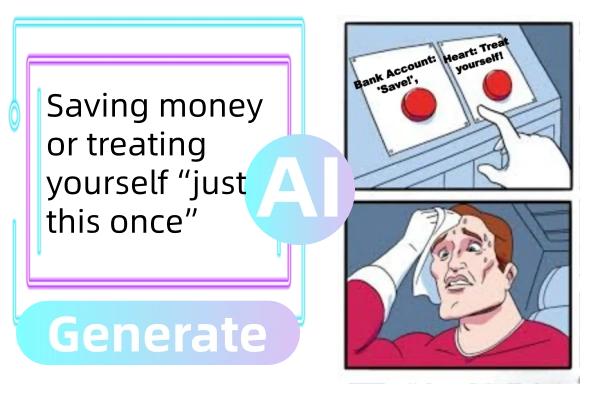
Memes have become one of the most popular ways to share humor, reactions, and relatable moments on social media. However, creating an engaging meme from scratch can be challenging for users without editing experience. A 2-photo meme generator makes this process much easier by allowing users to combine two images, add funny captions, and customize the overall design within minutes. In this guide, we’ll learn everything about a 2-photo meme maker and also provide you with the 3 best options available in 2026. Ensure you read this guide till the end.
Part 1: Top 5 2 Photo Meme Generators to Create Funny Memes
Do you like memes, but find it difficult to create them from scratch? With a 2-picture meme generator, you can easily combine images and text to create hilarious, shareable content that resonates with audiences everywhere. Below, we’ve mentioned the top 5 2-photo meme generators in 2026:
1. HitPaw Edimakor
If you want to create 2-photo memes without editing experience or professional help, we recommend using HitPaw Edimakor. It is one of the best AI editors that includes powerful image creation capabilities. With this tool, users can easily create funny 2-photo memes for different social media platforms. Its beginner-friendly interface makes it easy to import two images, arrange them in a suitable layout, and add text. Users can also customize their images by adjusting the size, position, and overall appearance to make the meme more engaging. Whether you want to create reaction memes, comparison memes, or before-and-after posts, Edimakor provides useful editing options in one place.
Key Features of HitPaw Edimakor
- 2-Image Meme Maker : HitPaw Edimakor enables users to create high-quality 2-photo memes without editing experience or professional help. Simply upload the images, enter the meme prompt, and click on the “Generate” button.
- Multiple AI Models: The program includes a wide range of AI models, each with unique features and capabilities. It includes AI models such as Nano Banana, Nano Banana Pro, Flux, Midjourney, Stable Diffusion, and more.
- Advanced Meme Editor: This tool provides a range of editing tools that make it easy to create engaging 2-photo memes. Users can crop, resize, and rotate images while adding text, stickers, and emojis.
- Text-to-Image: The best part of HitPaw Edimakor is that it also includes a text-to-image feature, enabling users to create engaging and high-quality 2-photo memes with a simple text prompt — no editing skill required.
- Intuitive Interface: HitPaw Edimakor offers an easy-to-use interface, which is ideal for non-tech and beginner users. With this tool, users can create professional-looking 2-photo memes without spending hours learning complex editing techniques.


Step-by-Step Guide:
How to create meme 2 images? Follow the instructions below to learn how to make a meme 2-picture with HitPaw Edimakor:
Step 1: Select the Reference Image Tool
Go to the HitPaw Edimakor official site and download the latest version of the program to your PC. Once installed, launch it and select the “Reference Image” option from the main interface.

Step 2: Upload Memes Images
Choose the desired AI model and click on the “Upload a Reference” option. Select the images that you want to turn into a meme. Here, you can upload up to 10 images.
Step 3: Enter The Meme Prompt
Next, enter the 2-picture meme prompts that clearly describe the type of meme you want to create.
Step 4: Hit The Generate Button
Select the image settings and click on the “Generate” button to begin the meme creation process. Within seconds, your 2-image meme will be ready. Click on the “Download” button to save the image.
2. Imgflip
Imgflip is a popular online meme maker 2 photos. With the help of this tool, individuals and content creators can easily generate and customize memes, GIFs, and other visual content. It provides a vast library of over 1 million meme templates and integrates AI for caption generation and background removal. The program offers a simple editing interface, making it suitable for beginners who want to create memes without using complicated editing software.
Pros
- Create 2-picture memes without editing experience or professional help.
- Access to over 1 million meme templates, including popular and trending options.
- Extensive image effects including rotate, flip, crop, draw, and color filters.
Cons
- Advertisements are present on the free tier.
- Basic features are locked behind a premium paywall.
3. Make a Meme
The next meme generator with 2 meme on our list is Make a Meme. The program helps users create, edit, and share memes. Unlike complex editing software that requires professional training, Make a Meme is built for speed and accessibility, making it suitable for beginners and casual content creators. Users can choose from available meme templates or upload their own images to create personalized content. They can add funny captions, adjust the text, and arrange the images to match the desired meme format.
Pros
- Offers different types of memes, such as celebrity memes, gaming memes, and more.
- Users can check their meme design in real time and editing them instantly.
- Offers an easy-to-use interface, which is ideal for non-tech and beginner users.
Cons
- Web-based tool; requires a stable and active internet connection to create memes.
- No advanced features available, such as font customization or background removal.
4. MemeBuddy AI
MemeBuddy AI is the easiest, most powerful meme creation software on the market. With this tool, you can create 2-picture memes in minutes with its drag-and-drop editor. Just choose from one of many templates, upload images, add text, and customize colors and fonts. Once the meme is created, users can easily download the meme in the desired format without watermarks. MemeBuddy AI can also help users experiment with different meme ideas and layouts before finalizing their designs.
Pros
- Offers an easy-to-use and drag-and-drop meme editor to create engaging memes.
- Users can download memes in multiple formats, including JPG, PNG, and JPEG.
- Allows users to customize fonts, colors, captions, and image placement.
Cons
- Internet access may be required to use the online meme editor.
- AI meme generator in this tool is not worth using.
5. Canva
Canva is one of the most famous AI image editors available in 2026. Canva also enables users to create customized memes without requiring advanced editing experience. Its beginner-friendly interface provides a wide range of templates, design elements, fonts, and editing tools that can be used to create engaging 2-photo memes. The best part of Canva is that it offers an easy-to-use interface and requires no software downloading or installation.
Pros
- Offers a wide range of meme templates that can be easily customized.
- Includes an easy-to-use interface, which is ideal for non-tech and beginner users.
- Works seamlessly with multiple devices, including Android, iOS, Windows, and macOS.
Cons
- Free version of Canva offers limited features compared to the paid one.
- Requires an active internet connection to create engaging memes.
Final Thoughts
2-picture memes are trending on social media platforms. You can also join this trend by creating customized 2-picture memes. Above, we’ve mentioned the top 5 2-photo meme generators that enable users to create high-quality memes without editing experience. If you want the best AI editor to create memes, we recommend using HitPaw Edimakor.
Leave a Comment
Create your review for HitPaw articles