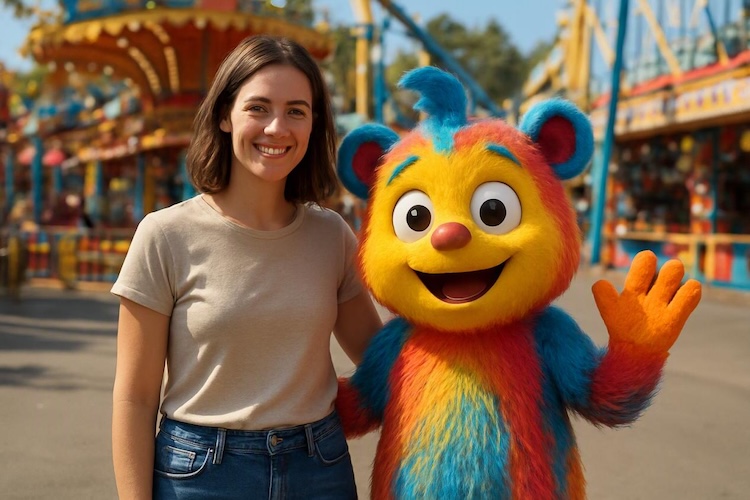
Cartoon characters do not have to stay inside animated worlds. With AI image generation, you can place them in realistic photos and create scenes where they interact naturally with real people, everyday environments, and familiar places. From grabbing coffee and taking mirror selfies to traveling, shopping, celebrating Halloween, or simply photobombing a group picture, the possibilities are surprisingly wide. The key is to describe the character, setting, interaction, lighting, and photography style clearly so the result feels like a real photograph rather than a cartoon pasted into an image. In this guide, we’ll explore 10 AI cartoon photo prompts and show how HitPaw Edimakor can help bring these ideas to life.
Part 1. How to Write AI Cartoon Photo Prompts
The most interesting cartoon photo edits are not simply about turning a person into a cartoon. Instead, the idea is to make a cartoon character feel like they actually exist in a real-world photograph.
To create this effect, describe both the real environment and the relationship between the person and the cartoon character. A good prompt can include these elements:
- Realistic setting: Describe where the photo takes place, such as a café, subway station, bedroom, supermarket, or tourist attraction.
- Character interaction: Explain what the cartoon character and real person are doing together instead of simply placing them side by side.
- Character consistency: Describe the cartoon character's recognizable appearance, outfit, colors, and proportions.
- Photography style: Add details such as candid photography, smartphone photography, realistic portrait photography, or cinematic photography.
- Lighting and shadows: Use natural lighting, realistic shadows, reflections, and ambient light to make the character blend into the scene.
- Composition: Specify the camera angle, distance, framing, and position of each subject when necessary.
- Mood and details: Add facial expressions, body language, weather, props, and small environmental details to make the image feel more natural.
A useful formula is:
Real person + cartoon character + real location + natural interaction + camera style + lighting + realistic details
The goal is to make the cartoon character look like they are living in the same physical world as the person, rather than simply being pasted onto a photograph.
Part 2. 10 AI Cartoon Photo Prompts to Try
1. Real Person and Cartoon Character at a Café

Create a realistic candid café photograph of a young woman sitting by a large window with a cute 3D cartoon character beside her. They are casually chatting over two cups of coffee like longtime friends. Keep the woman's appearance photorealistic and preserve the cartoon character's recognizable design, proportions, colors, and facial features. Warm natural daylight enters through the window, creating realistic shadows and subtle reflections on the table. Smartphone photography, natural body language, realistic textures, shallow depth of field, authentic everyday atmosphere.
2. Cartoon Character in a Convenience Store
Create a photorealistic convenience store scene featuring a real young man shopping with a colorful hand-drawn cartoon character. The man is reaching for a drink while the cartoon character stands beside him holding a snack and looking at the shelves. Make the interaction feel spontaneous and natural. Real fluorescent store lighting, realistic reflections on refrigerator doors, detailed product shelves, natural shadows, slightly imperfect candid composition, realistic photography, believable scale and perspective.
3. Mirror Selfie With a Cartoon Friend
Create a realistic mirror selfie taken in a modern bedroom, with a real woman holding a smartphone while a cute cartoon character naturally poses beside her. The cartoon character should appear physically present in the room, leaning slightly toward her and looking into the mirror. Preserve consistent character details and recognizable colors. Realistic mirror reflections, natural indoor lighting, subtle shadows, authentic smartphone camera quality, casual clothing, slightly imperfect framing, candid social media photo aesthetic.
4. Cartoon Character Joins a Tokyo Street Trip
Create a cinematic yet photorealistic street photograph of a real traveler walking through a busy Tokyo street at night with a cheerful cartoon character. They are walking side by side, looking at colorful signs and talking naturally. Keep the traveler completely realistic while preserving the cartoon character's original visual identity. Neon lights create realistic reflections on wet pavement, soft shadows, atmospheric depth, natural perspective, realistic crowd movement, cinematic photography, detailed urban environment.
5. A Funny Cartoon Photobomb
Create a realistic vacation photograph of three friends posing together outdoors when a mischievous cartoon character suddenly photobombs them from behind a doorway. The friends look surprised and amused while the cartoon character peeks into the frame with a playful expression. Keep everyone naturally positioned within the same physical space. Realistic sunlight, accurate shadows, believable perspective, natural facial expressions, detailed background, candid photography, subtle motion blur, humorous but realistic composition.
6. Cooking Dinner With a Cartoon Character
Create a photorealistic kitchen scene showing a real woman cooking dinner together with a cute clay-style cartoon character. She is preparing vegetables on the counter while the character stands beside her stirring a small pot. Make their interaction feel natural and cooperative. Warm kitchen lighting, realistic steam, detailed food textures, natural shadows, reflections on metal surfaces, realistic depth of field, authentic home environment, cinematic lifestyle photography.
7. Group Photo With Real Friends and a Cartoon Character
Create a realistic group photo of four young friends taking a casual outdoor photo with a colorful 3D cartoon character standing naturally among them. Everyone is interacting naturally instead of looking stiffly at the camera. The cartoon character should maintain consistent proportions, colors, facial features, and recognizable design while matching the perspective and lighting of the real people. Golden-hour sunlight, realistic shadows, natural skin texture, detailed clothing, candid composition, high-quality lifestyle photography.
8. Halloween Night With a Cartoon Character
Create a realistic Halloween street photograph of a young woman wearing a stylish Halloween costume while walking alongside a playful cartoon character dressed for the occasion. They are carrying small candy bags and laughing together outside decorated houses. Keep the woman photorealistic and make the cartoon character look naturally integrated into the real environment. Warm porch lights, subtle fog, realistic shadows, glowing decorations, detailed textures, cinematic night photography, atmospheric but believable lighting.
9. Cartoon Character on a Beach Trip
Create a photorealistic travel photograph of a real couple relaxing on a sunny beach with a cute hand-drawn cartoon character sitting between them. They are sharing snacks and looking toward the ocean as if the character has joined their vacation. Preserve the cartoon character's recognizable design while giving it believable lighting, shadows, and contact with the environment. Bright natural sunlight, realistic sand texture, ocean reflections, soft shadows, natural poses, travel photography, authentic vacation atmosphere.
10. Cinematic Real-Life Cartoon Moment
Create a cinematic photorealistic photograph of a real young woman standing on a quiet city street at sunset with a charming 3D cartoon character beside her. They are looking toward the same distant scene as if sharing a meaningful moment. The cartoon character must feel physically present, with realistic contact shadows, reflections, perspective, and ambient light. Golden-hour lighting, subtle lens flare, realistic street textures, shallow depth of field, cinematic composition, natural color grading, highly detailed real-world photography.
Part 3. Create Real-Life Cartoon Photos With HitPaw Edimakor
If you want to turn these ideas into images without building every visual from scratch, HitPaw Edimakor offers an AI Image Generator for creating visuals from your ideas and prompts.
Instead of simply asking AI to “make a cartoon picture,” you can describe a complete scene, including the real environment, character interaction, composition, lighting, and photography style. This makes it easier to experiment with the idea of bringing cartoon characters into everyday life.


Key Features
- Text-to-Image Generation: Turn detailed text descriptions into visual scenes based on your creative ideas.
- AI Reference Images: Upload a reference image to help guide the visual direction and create images with a more specific look.
- Detailed Prompt Control: Describe characters, environments, poses, interactions, lighting, and visual styles in one prompt.
- Multiple Visual Styles: Experiment with realistic photography, 3D cartoon characters, clay-style visuals, hand-drawn looks, and other creative directions.
- Creative Scene Building: Combine real-world locations and cartoon characters to create unique lifestyle, travel, social media, and storytelling visuals.
- Easy Content Creation: Generate images that can be used as creative assets for videos, social posts, thumbnails, and other content.
How to Create AI Cartoon Photos in HitPaw Edimakor
Step 1: Upload Your Reference Image
Open HitPaw Edimakor and find the Reference Image feature. You can upload a suitable reference image to maintain a specific person's appearance or guide the visual direction.
Step 2: Enter Your Prompt
Describe the real person, cartoon character, environment, interaction, composition, lighting, and photography style. For better results, focus on how the characters interact instead of simply describing where they stand.
Step 3: Generate Your Image
Start generating and review the result. Pay attention to the character's position, proportions, lighting, shadows, and interaction with the environment.
Conclusion
AI cartoon photo prompts can do much more than turn real people into cartoon characters. By combining realistic photography, cartoon characters, natural interactions, and detailed environments, you can create scenes where familiar animated characters feel like part of everyday life.
From café conversations and mirror selfies to vacations, Halloween nights, and cinematic street scenes, the key is to describe the relationship between the character and the real world. With HitPaw Edimakor, you can turn those ideas into visual experiments and explore your own version of a world where cartoons really do live among us.
Leave a Comment
Create your review for HitPaw articles