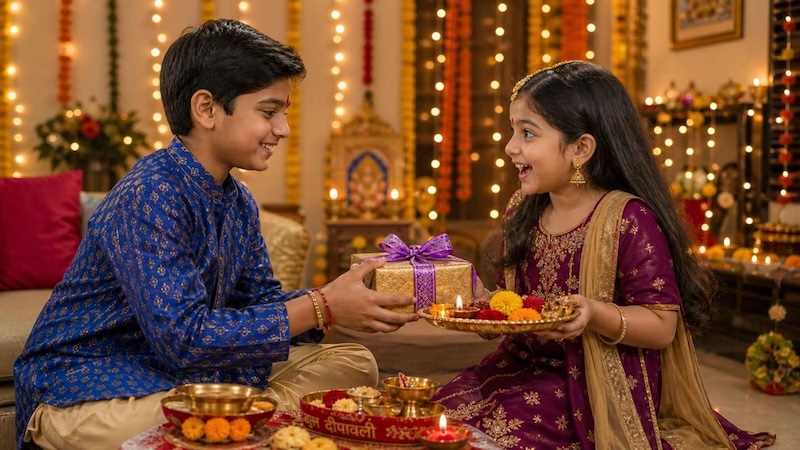
Bhai Dooj is a special Indian festival that celebrates the beautiful bond between brothers and sisters. It is a time to share love, exchange gifts, enjoy family moments, and create unforgettable memories. What better way to make these celebrations more memorable than with stunning AI-generated photos? With the right Bhai Dooj AI prompts, users can transform ordinary sibling pictures into beautiful festive portraits featuring traditional outfits, colorful decorations, glowing diyas, and vibrant backgrounds. In this guide, we’ll share the top 10 Bhai Dooj AI prompts to give your photos a creative, festive makeover with a single click.
Part 1: What is Bhai Dooj?

Bhai Dooj is a Hindu festival observed on the second day of the bright fortnight (Shukla Paksha) of the Hindu lunar month of Kartika, usually falling in October or November. The festival celebrates the special relationship between brothers and sisters and symbolizes love, care, protection, and lifelong family bonds. On this occasion, sisters apply a traditional tilak (vermilion mark) on their brothers’ foreheads and pray for their long life, happiness, and prosperity. It is a national holiday observed across India. However, it is known by various names in various parts of the country. In Maharashtra and Goa, it’s regarded as “Bhau Beej,” but in Bihar and Uttar Pradesh, it’s regarded as “Bhau Tika.” It is referred to as “Bhai Phota” in West Bengal.
Part 2: Top 10 Bhai Dooj AI Prompts for Brothers and Sisters
With the help of Bhai Dooj AI prompts, users can easily convert their simple sibling photographs into stunning festive portraits without requiring professional photography or editing skills. Here are 10 creative Bhai Dooj AI prompts worth trying:
1. Traditional Bhai Dooj Tilak Ceremony
“Transform the uploaded brother-sister photograph into a beautiful traditional Bhai Dooj celebration scene. Keep both siblings' original facial features, identities, and natural expressions unchanged. Dress the sister in an elegant red silk saree with golden embroidery and the brother in a cream-colored kurta. Show the sister applying a traditional red tilak to her brother's forehead. Add a decorated puja thali, glowing diyas, marigold flowers, and a warm festive background. Create realistic photography with soft golden lighting and intricate details.”
2. Bhai Dooj Rooftop Celebration
“Turn the uploaded brother-sister photograph into a beautiful rooftop Bhai Dooj celebration during the evening. Keep their original facial details, identities, and natural expressions intact. Dress the sister in a turquoise-blue embroidered lehenga and the brother in a stylish white kurta-pajama. Place them on a decorated rooftop featuring glowing fairy lights, colorful lanterns, marigold decorations, and a beautifully designed rangoli. Add a softly illuminated city skyline in the background. Use realistic evening photography, cinematic lighting, detailed clothing textures, and vibrant festive colors.”
3. Childhood Memories Bhai Dooj
“Convert the uploaded brother-sister photograph into a heartwarming Bhai Dooj portrait inspired by childhood memories. Preserve their original faces, ages, identities, and recognizable expressions without changing their appearances. Dress the sister in a traditional yellow salwar kameez and the brother in a simple cream kurta. Position them together in a cozy Indian family home decorated with colorful cushions, traditional artwork, marigold garlands, and festive sweets. Add warm window lighting, nostalgic golden tones, natural smiles, and realistic professional photography.”
4. Grand Festive Family Portrait
“Transform the uploaded sibling photograph into a grand Bhai Dooj family celebration portrait with a luxurious festive atmosphere. Maintain the original facial features, identities, hairstyles, and natural expressions of both siblings. Dress the sister in a stunning royal blue saree with golden jewelry and the brother in an elegant maroon sherwani. Place them in a beautifully decorated living room featuring floral arches, traditional brass lamps, colorful rangoli, and festive sweets. Use sophisticated studio lighting, realistic skin textures, rich colors, sharp details, and premium editorial photography.”
5. Black and Gold Luxury Portrait
“Turn the uploaded brother-sister photograph into a premium black-and-gold Bhai Dooj portrait. Maintain their original facial identities, hairstyles, and expressions without modification. Dress the sister in a sophisticated black saree with golden embroidery and the brother in a tailored black sherwani with subtle gold detailing. Create a luxurious studio background featuring golden floral patterns, elegant curtains, and warm decorative lighting. Position both siblings confidently together. Apply dramatic cinematic lighting, realistic skin textures, sharp details, and professional luxury fashion photography.”
6. Colorful Rajasthani Festive Theme
“Reimagine the uploaded sibling photograph as a vibrant Rajasthani-style Bhai Dooj celebration. Maintain both siblings' original facial features, identities, and natural expressions. Dress the sister in a colorful traditional Rajasthani lehenga featuring mirror work and the brother in a bright embroidered bandhgala outfit. Decorate the background with colorful umbrellas, traditional puppets, patterned fabrics, and marigold garlands. Include a beautifully decorated puja thali between them. Use vibrant colors, detailed traditional textures, natural lighting, and realistic cultural photography.”
7. Artistic Watercolor Bhai Dooj Portrait
“Convert the uploaded brother-sister photograph into a beautiful artistic watercolor-inspired Bhai Dooj portrait. Preserve their recognizable facial features, original identities, and natural expressions while applying a delicate watercolor illustration effect. Dress the sister in a graceful pink saree and the brother in a traditional cream kurta. Surround them with hand-painted marigold flowers, decorative diyas, colorful rangoli, and subtle festive patterns. Use a warm pastel background, delicate brushstrokes, elegant artistic details, balanced composition, and a sophisticated handmade illustration aesthetic.”
8. Village-Style Traditional Bhai Dooj
“Transform the uploaded sibling photograph into a heartwarming traditional village-style Bhai Dooj celebration. Maintain both individuals' original facial features, identities, and natural expressions. Dress the sister in a beautiful traditional cotton saree with colorful borders and the brother in a simple white kurta-pajama. Set the scene in a charming Indian village courtyard featuring mud-plastered walls, traditional clay lamps, colorful rangoli, and fresh marigold garlands. Add a wooden puja platform decorated with flowers and sweets. Use natural afternoon sunlight, earthy tones, realistic textures, and authentic cultural photography.”
9. Sunset Terrace Brother-Sister Portrait
“Turn the uploaded sibling photograph into a breathtaking Bhai Dooj portrait captured during golden hour. Preserve their original facial features, identities, hairstyles, and natural expressions. Dress the sister in a flowing peach-colored Anarkali suit and the brother in a sophisticated cream kurta with a golden Nehru jacket. Position them on an elegant terrace decorated with flower arrangements, traditional lanterns, and small glowing diyas. Include a beautiful sunset skyline in the background. Use warm natural sunlight, cinematic depth of field, realistic skin details, and professional DSLR portrait photography.”
10. Dreamy Pastel Floral Portrait
“Transform the uploaded brother-sister photograph into a dreamy pastel-themed Bhai Dooj portrait. Preserve their original facial identities, hairstyles, and natural expressions without changing their recognizable appearances. Dress the sister in a beautiful lavender organza saree and the brother in a soft pastel-blue kurta. Surround them with an enchanting arrangement of pink roses, white flowers, lavender decorations, and delicate fairy lights. Add a beautifully styled puja thali with traditional sweets. Use soft diffused lighting, gentle pastel color grading, realistic skin textures, and elegant editorial photography.”
Part 3: How to Transform Ordinary Images Into Stunning Bhai Dooj Photos
In 2026, users can transform their ordinary photographs into stunning Bhai Dooj-themed images with the help of AI tools and creative prompts. One of the best image-to-image tools available in 2026 is HitPaw Edimakor. It is an all-in-one AI video editor that also includes powerful features, such as text-to-image and image-to-image. One of the standout features of this tool is that it only requires users to upload an existing photograph and enter a descriptive prompt to generate a completely new image. Users can describe their desired festive outfits, traditional decorations, background settings, and lighting effects to achieve their preferred results. Another amazing part of this tool is that it supports multiple AI models, each with unique features and capabilities, including Nano Banana, Nano Banana Pro, Flux, Midjourney, Stable Diffusion, and Seedream.
Key Features of HitPaw Edimakor
- Image-to-Image: HitPaw Edimakor offers an image-to-image tool, allowing users to turn their ordinary images into multiple styles, such as Bhai Dooj, Cinematic, Realistic, and more — no editing experience or professional help required.
- Advanced Customization: The program provides advanced video and image editing capabilities, allowing users to adjust AI images according to their creative needs. Users can change the background, insert text, apply visual effects, and more.
- Multiple AI Models: One of the standout features of this tool is that it supports a wide range of AI models, such as Nano Banana, Nano Banana Pro, Stable Diffusion, Flux, Midjourney, and Seedream.
- Text-to-Image: Another amazing feature of this tool is that it also supports a text-to-image feature, allowing users to create high-quality and engaging visuals with a simple text prompt.
- Intuitive Interface: The tool offers an easy-to-use interface, which is ideal for non-tech and beginner users. Simply upload your image, choose the AI mode, and click on the “Generate” button.


Step-by-Step Guide:
Follow the instructions below to learn how to create engaging Bhai Dooj images using a simple text prompt with HitPaw Edimakor:
Step 1: Open Reference Image
Download, install, and launch HitPaw Edimakor on your PC. Select the “Toolbox” option from the left panel and select the “Reference Image” tool.
Step 2: Upload Reference Image
Choose the desired AI model and click on the “Import” button to upload the reference image. Users can upload images in multiple formats, such as JPG, PNG, and more.
Step 3: Enter the Bhai Dooj Prompt
Copy and paste the most popular Bhai Dooj AI prompt into the prompt box. Make sure to enter a detailed prompt to get accurate results.
Step 4: Generate and Download
Select the image settings and click on the “Generate” button. Preview the results, and if satisfied, click on the “Export” button to download the image.
Conclusion
Bhai Dooj celebrates the pure relationship between brothers and sisters, making it a perfect occasion to capture beautiful memories and share moments of happiness. With the help of Bhai Dooj AI prompts and HitPaw Edimakor, users can create engaging visuals without editing experience or professional help.
Leave a Comment
Create your review for HitPaw articles