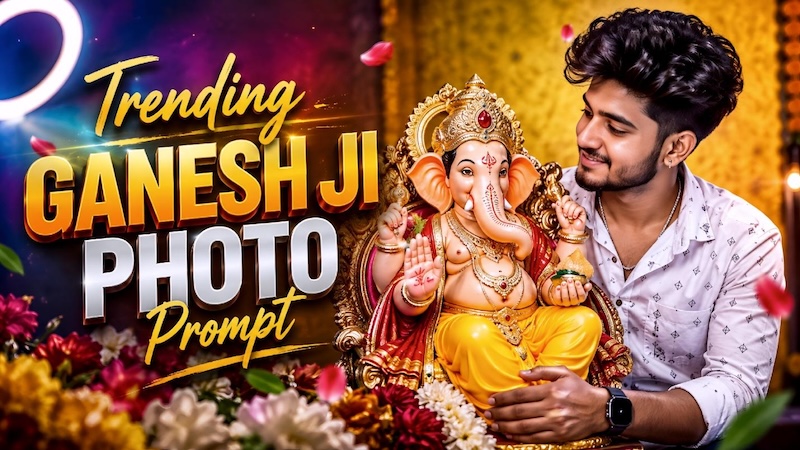
Devotional photos have a simple charm. You don’t need a fancy background or too many effects to make them look beautiful. A peaceful Ganpati idol, traditional clothes, flowers, and a natural prayer moment can be enough. With ChatGPT, you can create detailed AI photo editing prompts that add festive elements while keeping the image realistic and personal. In this guide, we’ve shared the top ChatGPT Ganesh Chaturthi AI photo editing prompts to help you create stunning and memorable festive photos. Read this guide till the end to find the best AI prompts for Ganesh Chaturthi.
Part 1: What is Ganesh Chaturthi?

Ganesh Chaturthi is a festival in Hinduism celebrating the birth of the elephant-headed deity Ganesha, the god of prosperity, wisdom, and removal of obstacles. The festival is celebrated with great devotion, especially in Maharashtra and several other parts of India. During this occasion, devotees bring beautifully decorated Ganesha idols into their homes and community pandals, offer prayers, flowers, sweets, and modaks, and participate in devotional activities. The celebration continues for several days before the idol is carried in a festive procession and immersed in water.
Part 2: Best ChatGPT Ganesh Chaturthi AI Editing Prompts for Creative Photos
During Ganesh Chaturthi, platforms like Instagram are filled with devotional images featuring beautifully decorated Ganpati idols, traditional outfits, and festive decorations. Most of these images are AI-generated, and you can easily create similar festive photos. Here are some ChatGPT Ganesh Chaturthi AI editing prompts you can try.
1 Holding Ganesha Idol
“Transform the uploaded photo into a realistic Ganesh Chaturthi celebration scene. Keep the person’s facial identity, facial features, skin tone, hairstyle, and body proportions unchanged. Show the person respectfully holding a beautifully decorated Lord Ganesha idol in both hands. Add marigold flowers, soft golden diyas, colorful festive decorations, and a traditional home altar in the background. Dress the person in elegant traditional Indian clothing. Use warm cinematic lighting, natural shadows, realistic textures, vibrant but balanced colors, and a peaceful devotional atmosphere. Maintain photorealistic image quality.”
2 Praying in Front of Ganesha
“Edit the uploaded image into a peaceful Ganesh Chaturthi prayer scene. Preserve the person’s exact identity, face, hairstyle, skin tone, and natural appearance. Place the person respectfully sitting or standing in front of a beautifully decorated Lord Ganesha idol with hands joined in prayer. Add fresh flowers, glowing diyas, incense, rangoli, and traditional decorations around the altar. Create a warm indoor temple-inspired environment with soft golden lighting and gentle shadows. Keep the composition natural, detailed, spiritual, and photorealistic while avoiding excessive artificial effects or facial changes.”
3 Ganesh Visarjan Prompt
“Transform the uploaded photo into an emotional Ganesh Chaturthi farewell scene during Ganesh Visarjan. Keep the person’s original face, identity, hairstyle, skin tone, and body proportions unchanged. Show the person respectfully participating in the farewell procession while carrying or standing beside a decorated Lord Ganesha idol. Add marigold garlands, festive decorations, drums, flower petals, and a joyful crowd in the background. Create a natural outdoor atmosphere with warm evening light and realistic shadows. Capture a respectful mixture of devotion, celebration, and emotion in a cinematic photorealistic style.”
4 Performing Ganesh Puja
“Turn the uploaded photograph into a realistic Ganesh Chaturthi puja scene. Keep the person’s identity, facial structure, hairstyle, skin tone, and body proportions exactly recognizable. Show the person respectfully performing puja in front of a beautifully decorated Lord Ganesha idol, with folded hands or holding a traditional puja plate. Include flowers, modaks, incense, diyas, a copper kalash, and colorful rangoli around the altar. Create soft golden illumination and realistic shadows for a peaceful spiritual atmosphere. Keep every element natural, culturally respectful, detailed, and photorealistic without making the image look overly edited.”
5 Offering Flowers to Ganesha
“Use the uploaded photograph to create a beautiful Ganesh Chaturthi devotional scene. Keep the person’s identity, facial characteristics, hairstyle, skin tone, and proportions unchanged. Show the person respectfully offering fresh flowers to a beautifully decorated Lord Ganesha idol. Surround the scene with marigold garlands, rose petals, diyas, traditional rangoli, and elegant festive decorations. Give the person a graceful traditional outfit with realistic fabric details. Use warm natural lighting, subtle shadows, realistic skin texture, and cinematic depth of field. Keep the composition authentic, peaceful, devotional, and highly photorealistic.”
Part 3: How to Transform Ordinary Images into Beautiful Festive Edits
Looking for a tool that can transform your image into a Ganesh Chaturthi-themed photo? We recommend using HitPaw Edimakor. It is an all-in-one AI video editor that also enables users to transform ordinary images into engaging and high-quality visuals with a simple text prompt. Simply upload your image, enter detailed Ganesh Chaturthi editing prompts, and let HitPaw Edimakor do the rest. The program supports a wide range of AI models, each with unique features, such as Nano Banana, Flux, Midjourney, Stable Diffusion, Seedream, Imagen 4, and more. The standout feature of this tool is its advanced customization capabilities, allowing users to edit images and videos according to their requirements. Users can change the background, add text, apply filters and effects, and more.
Key Features of HitPaw Edimakor
- Image-to-Image: With this feature, users can transform ordinary images into festival-style images, such as Ganesh Chaturthi, Janmashtami, Independence Day, and more.
- Text-to-Image: HitPaw Edimakor also supports a text-to-image feature, allowing users to create high-quality visuals with simple text prompts — no editing experience or professional help required.
- Multiple AI Models: The program offers a wide range of AI models, such as Nano Banana, Nano Banana Pro, Stable Diffusion, Flux, Midjourney, Seedream, Imagen 4, and more.
- Compatibility: HitPaw Edimakor works seamlessly with multiple devices, including Windows and macOS. Plus, it enables users to import and export images in a wide range of formats, such as JPG, PNG, JPEG, and WEBP.
- User-Friendly Interface: One of the best parts of this tool is that it offers an easy-to-use and intuitive interface, ideal for non-tech and beginner users. You can quickly upload your image and transform it without any complicated process.


Step-by-Step Guide:
If you want to convert images into Ganesh Chaturthi-themed images, you’re in the right place. Follow the instructions below to learn how to do it:
Step 1: Launch HitPaw Edimakor
Go to the HitPaw Edimakor official site and download the latest version of the program on your PC. Launch it and select the “Reference Image” feature from the main interface.
Step 2: Upload Your Image and Choose AI Model
Click on the “Import” button and upload the reference image. Next, choose the desired AI model. The program offers multiple AI models, such as Nano Banana, Nano Banana Pro, Flux, and Stable Diffusion.
Step 3: Enter The Text Prompt
Navigate down and copy-paste the ChatGPT Ganesh Chaturthi AI photo editing prompts in the prompt box.
Step 4: Click on the “Generate” Button
Select the output quantity and click on the “Generate” button. Within seconds, HitPaw will convert your image into a Ganesh Chaturthi-themed image. Preview the results and click on “Download.”
Final Thoughts
In this guide, we’ve mentioned the top ChatGPT Ganesh Chaturthi AI photo editing prompts that will help you generate high-quality festive-themed images. Use these prompts with HitPaw Edimakor to achieve realistic and high-quality results. You can also customize the prompts according to your preferred style, outfit, lighting, and background.
Leave a Comment
Create your review for HitPaw articles