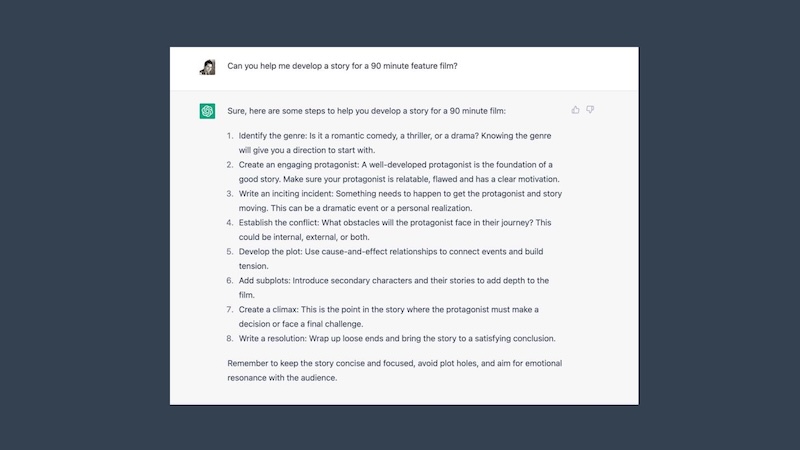
Are you looking to make great TV shows? ChatGPT can help you write scripts that grab and keep your audience’s attention. Creating a compelling TV show script no longer requires years of industry experience or expensive writing software. With ChatGPT, anyone can brainstorm fresh ideas, develop memorable characters, structure engaging episodes, and write professional-quality dialogue in a fraction of the time. In this guide, you'll learn how to write a TV show script with ChatGPT step by step, use practical prompts, and explore how Edimakor can help turn your script into a video.


Part 1: What Is a TV Show Script?

A TV show script is a written blueprint for a television episode or series. It includes character dialogue, action descriptions, scene headings, and stage directions that guide how the story unfolds on screen. Unlike a standalone movie screenplay, a TV script often needs to maintain character development and story continuity across multiple episodes.
A typical TV show script includes:
- Characters: The main and supporting characters, their motivations, relationships, and development.
- Scene headings: Details indicating where and when each scene takes place.
- Action lines: Descriptions of character movements, visual details, and important events.
- Dialogue: The words characters speak to reveal their personalities, advance the plot, and create conflict.
- Episode structure: A sequence of scenes and story beats that builds toward a resolution or cliffhanger.
Before writing, determine whether you're creating a pilot episode, a standalone episode, or an outline for an entire season. This decision helps you establish the right story structure and maintain consistency throughout the script.
Part 2: How to Write a TV Show Script with ChatGPTBenefits of Using ChatGPT for Scriptwriting
ChatGPT can help you brainstorm story ideas, develop characters, outline episodes, and draft dialogue. However, the best results usually come from working through the writing process step by step rather than asking it to generate an entire series at once. Follow these six steps to develop a TV show script with ChatGPT.
Step 1: Develop Your TV Show Idea
Start with a clear concept for your TV show. Choose a genre, such as comedy, drama, thriller, or science fiction, and define your target audience. Then identify the central conflict or question that will drive the story. You don't need a fully developed plot at this stage. A simple premise is enough to help ChatGPT generate ideas and explore different directions. Ask it to suggest several concepts, compare their strengths, and expand the one that best fits your vision.
ChatGPT Prompt: "Act as an experienced TV screenwriter. Develop five original TV show concepts based on the following idea: [insert your idea]. For each concept, include the genre, target audience, setting, central conflict, and a short series premise. Make each concept distinctive and suitable for a multi-episode series."
Review the suggestions and select a concept with enough potential to sustain multiple episodes. Refine the premise until the main conflict, tone, and audience are clear.
Step 2: Create Characters and Their Arcs
Once you have a premise, develop the characters who will bring the story to life. Give each major character a clear goal, motivation, personality, and weakness. Consider how their relationships create tension and how their decisions influence the plot.
For a TV series, character development should extend beyond a single episode. The protagonist might gradually overcome a personal flaw, while a supporting character's changing loyalties could introduce new conflicts throughout the season.
ChatGPT Prompt: "Based on this TV show premise: [insert premise], create profiles for the main characters. For each character, describe their background, personality, external goal, internal conflict, strengths, weaknesses, relationships, and character arc across the first season. Explain how each character contributes to the central conflict and avoid making their personalities too similar."
Review the character profiles before moving forward. Make sure each character has a distinct voice, meaningful motivations, and room to change as the story progresses.
Step 3: Outline the Season and Episodes
A season outline helps you connect individual episodes into a coherent storyline. Start by defining the main story arc, major turning points, and the conflict that will carry the season forward. Then divide the story into episodes, giving each one its own central problem and narrative progression.
For a continuing drama, consider how each episode advances the larger plot while introducing new complications. For a sitcom or episodic series, focus on a self-contained problem that fits the show's recurring characters and setting.
ChatGPT Prompt: "Create a season outline for a [number]-episode TV series based on this premise: [insert premise]. The genre is [genre], and the main characters are [insert character summaries]. For each episode, provide a title, central conflict, key events, character development, connection to the season's main storyline, and an ending hook. Ensure the plot develops logically across episodes and builds toward a satisfying season finale."
Treat the generated outline as a starting point, not a fixed plan. Check that the episodes have distinct conflicts, the stakes develop naturally, and important storylines receive enough attention. Adjust the episode count and structure to match your intended format.
Step 4: Break Episodes into Scenes
After outlining the season, choose an episode and break its story into individual scenes. Each scene should serve a purpose, such as introducing information, escalating a conflict, revealing a character trait, or changing the direction of the story.
Include the location, characters present, scene objective, and key events. This gives you a practical framework for drafting the script without losing track of the episode's pacing.
For a continuing drama, consider how each episode advances the larger plot while introducing new complications. For a sitcom or episodic series, focus on a self-contained problem that fits the show's recurring characters and setting.
ChatGPT Prompt: "Turn this episode outline into a scene-by-scene breakdown: [insert episode outline]. Include a scene heading, location, characters present, purpose of the scene, key actions, and the conflict or information revealed. Arrange the scenes in a logical order, vary the pacing, and ensure each scene moves the story forward. End with a compelling hook that encourages viewers to continue watching."
Read through the scene list and remove scenes that repeat information or contribute little to the story. If the episode feels rushed or predictable, ask ChatGPT to suggest alternative scene sequences or stronger turning points.
Step 5: Write Dialogue and Action Lines
With the scene breakdown ready, start drafting the actual script. Work on one scene at a time, providing ChatGPT with the relevant character profiles, scene objectives, and surrounding plot context.
Good dialogue should sound natural and reflect each character's personality. Action lines should communicate what viewers can see or hear without becoming overly descriptive. Avoid having characters explain information they would already know simply to inform the audience.
ChatGPT Prompt: "Write a TV script scene based on the following details: [insert scene breakdown]. Use standard screenplay-style scene headings, concise action lines, and natural dialogue. Give each character a distinct voice based on their background and motivations. Build tension through character interactions rather than excessive exposition. End the scene with a meaningful development that advances the episode's plot."
After generating the scene, read the dialogue aloud to identify awkward phrasing, repetitive exchanges, or lines that sound unnatural. You can also ask ChatGPT to rewrite a scene with a different tone, stronger conflict, or more subtle dialogue while preserving the established character traits.
Step 6: Revise and Polish Your Script
The first draft is rarely the final version. Review the script for plot holes, inconsistent character behavior, weak transitions, repetitive dialogue, and pacing issues. Check whether each scene contributes to the story and whether the episode delivers on the expectations established at the beginning.
You can ask ChatGPT to act as a script editor, but provide specific evaluation criteria instead of requesting a vague improvement.
ChatGPT Prompt: "Review the following TV show script as a professional script editor: [insert script]. Evaluate plot logic, pacing, character consistency, dialogue, scene transitions, and emotional impact. Identify specific weaknesses and explain why they matter. Suggest targeted revisions without changing the core premise, character motivations, or intended tone. Present the feedback by scene, with examples where helpful."
Apply the suggestions that strengthen the story while preserving your creative intent. For a multi-episode series, also compare the revised script with your character profiles and season outline to ensure continuity. Consider getting feedback from human readers before treating the script as production-ready.
Part 3: Common Mistakes to Avoid When Writing TV Scripts with ChatGPT
ChatGPT can speed up brainstorming and drafting, but its output still requires creative judgment and careful editing. Avoid these common mistakes to produce a more coherent and engaging TV script.
- Generating the entire season in one prompt: A long, one-shot request can produce rushed plotlines, shallow characters, and inconsistent details. Build the story through separate stages, from the premise and character profiles to episode outlines and individual scenes.
- Using vague prompts: Requests such as "Write an interesting TV show" give ChatGPT little direction. Specify the genre, audience, episode format, character motivations, tone, and desired output structure to get more relevant results.
- Ignoring character consistency: Characters may behave differently or forget important events across scenes and episodes. Maintain a reference document with their backgrounds, goals, relationships, speech patterns, and major story developments. Include relevant details when generating new scenes.
- Writing unnatural dialogue: AI-generated dialogue can sound repetitive, overly explanatory, or too similar across characters. Give each character a distinct voice, read lines aloud, and revise exchanges that lack believable emotion or subtext.
- Skipping human revision: A script may follow the requested structure but still contain weak conflicts, predictable twists, or implausible character decisions. Use ChatGPT's feedback as a starting point, then make your own creative decisions and seek human feedback when possible.
- Forgetting the audience experience: A technically organized script may still lack suspense, humor, or emotional impact. Check whether each scene gives viewers a reason to stay engaged and whether the episode's ending fits the story's tone and goals.
Part 4: ChatGPT Alternative to Write a TV Show Script and Create AI Videos
ChatGPT can help you write a TV show script, but you'll need additional tools to turn your story into a video. As a ChatGPT alternative, HitPaw Edimakor combines AI script generation and script to AI video creation in one workflow. You can develop a story idea, generate a script, and turn story into video without switching between separate tools. Here's how to get started with Edimakor.
Key Features of HitPaw Edimakor
- Prompt to Full Script: HitPaw Edimakor turns your prompts into a complete TV script within minutes. The generated script is filled with engaging dialogue, memorable characters, detailed scene descriptions, and natural scene transitions.
- Script-to-Video: Unlike ChatGPT, HitPaw Edimakor doesn’t stop at script generation — it also enables users to transform their completed scripts into engaging videos within seconds.
- Multiple Genre: The standout feature of HitPaw Edimakor is its support for a wide range of genres, including comedy, drama, thriller, action, crime, mystery, romance, horror, fantasy, sci-fi, adventure, animation, historical, and more.
- Free Version: HitPaw Edimakor also offers a free version that lets users access its features without spending a single penny. This version includes amazing features such as scriptwriting, text-to-video, image-to-video, text-to-speech, and more.
- User-Friendly Interface: One of the best parts of HitPaw Edimakor is its clean, intuitive interface, which lets non-tech and beginner users write engaging scripts with a simple text prompt — no writing experience required.
How to Write a TV Show Script and Create AI Video With HitPaw Edimakor?
Step 1: Install HitPaw Edimakor
Go to HitPaw Edimakor’s official website and download the latest version of the program. Launch it and select the “Create Project” option from the left panel. Choose “AI Video Generator” from the main interface to begin the process.
Step 2: Choose The Script Theme and Style
Once you’re in the tool, select the video theme. The program offers multiple options, such as Micro-Drama, Children's Education, and more. Next, you can choose a style at the bottom, such as Ghibli, 3D Cartoon, 3D Clay Style, Pixar, Handcrafted, and Korean Comic Style.
Step 3: Adjust the Script Settings
After that, you can choose video length, aspect ratio, target audience, and language. The program enables users to generate scripts in 20+ languages, including English, Spanish, Chinese, and Japanese.
Step 4: Click on the Generate Button
Once all the requirements are complete, click on the “Create Script” button to begin the creation process. Within seconds, HitPaw Edimakor will provide you with a complete script. You can edit and revise the script as needed to match your vision.
Step 5: Trun Script to Video
After your final script is ready, you can use HitPaw Edimakor to convert it into engaging videos with just a few clicks. Its text-to-video feature automatically turns your script into visuals, complete with characters, voiceovers, and scenes.
Tips:
Read Edimakor Story to Video Guide to learn how to create complete story videos, from developing characters and choosing voices to generating scenes and bringing your story to life.
Final Thoughts
Writing a TV show script involves developing compelling characters, structuring episodes, and refining dialogue. ChatGPT can help simplify these tasks, while tools like HitPaw Edimakor take the process further by combining AI script generation with AI video creation. Whether you're planning a TV series or creating story-based videos, choose the right workflow, refine your script, and bring your ideas to life with Edimakor.
Leave a Comment
Create your review for HitPaw articles