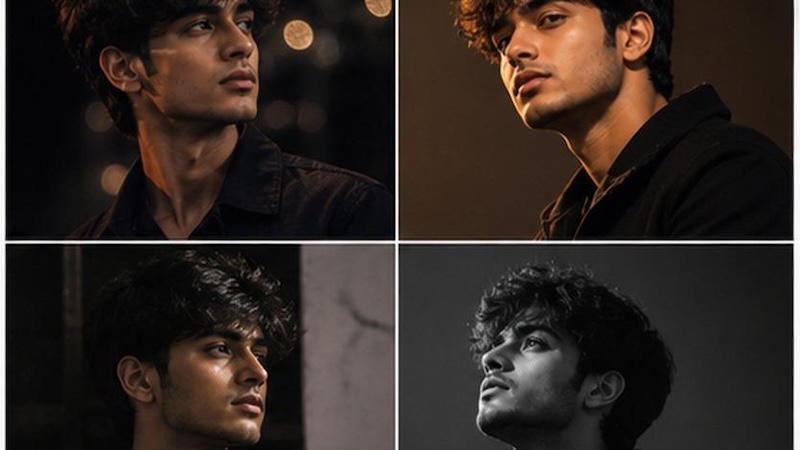
2X2 collage photos have become a popular way to showcase different moods, poses, outfits, and moments in a single creative frame. With the help of AI photo editing prompts, you can easily transform one uploaded image into a stylish four-panel collage without needing advanced editing skills. In this guide, we will mention the top 2X2 grid collage AI photo editing prompts that will help you create eye-catching and professional-looking visuals in seconds. Whether you want a cinematic collage, fashion-inspired layout, travel theme, romantic design, or social media aesthetic, these prompts can help you achieve impressive results. Ensure to read this guide till the end.
Part 1: Why Create a 2X2 Grid Collage AI Photo?
2X2 Grid collage photos are becoming one of the biggest Instagram trends in 2026. They allow users to present multiple expressions, outfits, poses, or scenes in one visually appealing image. Here are some key reasons to create them:
- Show Multiple Styles: With the help of a 2X2 collage, you can show four different looks, moods, poses, or backgrounds in a single photo.
- Create Eye-Catching Content: The grid layout makes photos more organized, creative, and attractive for social media audiences.
- Follow Viral Trends: These types of collages are popular on social media platforms, such as Instagram, Facebook, TikTok, and Pinterest.
- Easy-to-Create: 2X2 grid collages are very easy and simple to create, even for users with no professional editing experience.
Part 2: 2X2 Grid Collage AI Photo Editing Prompts: Top 10 Ideas
A strong 2X2 grid prompt should clearly describe the subject, poses, outfits, background, lighting, and overall visual style for all four panels. Below are the top 10 Gemini 2X2 grid collage prompt ideas for generating social-media-ready 2X2 grid photos.
1 Joyful Sunshine Collage

“Use the uploaded image and transform it into a stylish 2X2 grid collage with four bright and cheerful panels. Preserve the subject’s facial features and identity. Show different happy expressions in each frame, including a soft smile, open laughter, playful grin, and candid joyful look. Add sunny outdoor backgrounds, warm golden lighting, pastel tones, and casual, fashionable outfits. Make the collage look clean, vibrant, Instagram-worthy, and balanced, with each panel offering a fresh and lively summer vibe.”
2 Dreamy Aesthetic Collage
“Turn the uploaded image and turn it into a 2X2 collage with a dreamy aesthetic look. Preserve the subject’s identity while showing soft and gentle expressions such as a peaceful smile, closed-eye relaxed pose, thoughtful look, and calm, dreamy gaze. Add pastel backgrounds, soft clouds, floral elements, diffused lighting, and elegant outfits. Each panel should feel delicate, artistic, and romantic, with a soothing color palette. Make the collage visually cohesive, polished, and ideal for Instagram, Pinterest, or a creative profile photo.”
3 Rainy Mood Collage
“Transform the uploaded image and generate a 2X2 grid collage with a moody rainy-day theme. Keep the subject’s face natural and consistent across all four frames. Show emotional and reflective expressions, including a thoughtful gaze, soft, melancholic smile, distant look, and calm, introspective pose. Add rain-soaked windows, umbrella scenes, wet streets, and cinematic blue-gray lighting. Include layered outfits like coats or sweaters for extra mood. Make the collage feel emotional, atmospheric, and visually rich, with each panel telling a different rainy-day story.”
4 Playful Pop Collage
“Use the uploaded image and create a colorful 2X2 grid collage with a fun pop-art inspired vibe. Maintain the subject’s facial details and identity. Show playful expressions in each panel, including a wink, cheeky smile, surprised face, and tongue-out fun pose. Add bright color backgrounds, funky props, energetic lighting, and trendy casual outfits. Each frame should feel youthful, expressive, and lively while still fitting together as one collage. The final image should look viral, eye-catching, creative, and perfect for Gen Z social media content.”
5 Cinematic Golden-Hour Collage
“Turn the uploaded image to create a cinematic 2X2 grid collage in a horizontal 16:9 aspect ratio. Preserve the subject’s exact facial identity, skin tone, hairstyle, and body proportions. Show four unique expressions: a hopeful upward gaze, a peaceful closed-eye pose, a gentle side smile, and an amazed sunset reaction. Place the subject in golden fields, beside a lake, on a hilltop, and near a countryside road. Add warm sunlight, lens flare, realistic shadows, detailed clothing, and professional movie-style color grading.”
6 Luxury Hotel Lifestyle Collage
“Transform the uploaded image into an elegant 2X2 grid collage formatted in a wide 16:9 aspect ratio. Keep the person’s face recognizable and consistent across every panel. Feature four different expressions: a sophisticated neutral look, a welcoming smile, a curious glance toward the window, and a proud, confident pose. Show the subject in a luxury hotel lobby, stylish bedroom, rooftop restaurant, and marble hallway. Add premium outfits, soft interior lighting, reflective surfaces, realistic textures, balanced framing, and a polished lifestyle-magazine appearance.”
7 Winter Snow Adventure Collage
“Use the uploaded photo as a reference and generate a winter-themed 2X2 grid collage in 16:9 widescreen format. Maintain the original facial structure and natural appearance. Give every panel a distinct expression: delighted surprise while seeing snow, a cozy contented smile, a determined mountain-climber look, and a playful expression while catching snowflakes. Include snowy forests, a wooden cabin, frozen mountains, and a winter town. Add fashionable coats, scarves, natural snowfall, cool lighting, realistic breath mist, and highly detailed cinematic scenery.”
8 Cozy Coffee-Shop Collage
“Turn the uploaded image to produce a warm 2X2 grid collage in a wide 16:9 aspect ratio. Keep the face, hairstyle, and natural features consistent in all four panels. Show different expressions: focused while reading a book, pleasantly surprised by a drink, quietly amused while looking outside, and relaxed with a warm, satisfied smile. Set the scenes inside a rustic café, beside a rainy window, near a bookshelf, and at an outdoor coffee table. Add cozy sweaters, warm lighting, coffee steam, realistic details, and soft cinematic depth.”
9 Fitness Motivation Collage
“Convert the uploaded photo into an energetic fitness-themed 2X2 grid collage in 16:9 landscape format. Preserve the subject’s facial identity and realistic body proportions. Create four different expressions: intense concentration during exercise, exhausted determination after training, proud satisfaction after completing a workout, and an energetic motivational shout. Show the subject lifting weights, running on a treadmill, stretching near a window, and standing confidently in a modern gym. Add athletic clothing, dramatic lighting, subtle sweat, dynamic movement, sharp details, and inspirational commercial-style photography.”
10 Beach Vacation Collage
“Transform the uploaded image into a vibrant beach-themed 2X2 grid collage in a 16:9 widescreen ratio. Preserve the subject’s facial features and create four noticeably different expressions: astonishment at the ocean view, carefree laughter while walking, a peaceful expression during sunrise, and an adventurous look while exploring rocks. Use tropical beaches, a seaside café, a wooden pier, and a cliffside viewpoint. Add stylish vacation outfits, ocean reflections, palm trees, natural sunlight, gentle wind movement, colorful scenery, and high-quality travel photography with balanced composition.”
Part 3: Best AI Tool for Creating a 2X2 Grid Collage Using Simple Prompts
If you want to create a high-quality 2X2 grid collage using simple ChatGPT 2X2 grid collage prompts, we recommend using Edimakor AI. It is one of the best AI tools available on the internet that enables users to create high-quality visuals using a simple text prompt or reference images. You can upload your photo, enter a detailed 2X2 collage prompt, and let the AI transform it into four creative panels featuring different poses, expressions, outfits, backgrounds, or lighting styles. The platform is easy to use, making it suitable for beginners who have no professional editing experience.
Create NowKey Features of Edimakor AI
- Reference to Image: One of the standout features of Edimakor AI is that it enables users to transform simple images into various styles, including 2X2 grid collage, anime, cartoon, cyberpunk, and more.
- Multiple AI Models: The program includes a wide range of AI models, allowing users to test multiple styles. It offers popular AI models, such as Nano Banana Pro, Flux, Midjourney, and Stable Diffusion.
- Text-to-Image Generation: With the Text-to-Image feature, users can create high-quality visuals using only a written description. Simply enter a detailed 2X2 grid collage prompt, select the preferred AI model, and let the tool generate the image.
- Beginner-Friendly Interface: The platform offers a clean and intuitive interface, making it suitable for beginners with no professional editing experience. Most AI features require only a few simple steps.
How to Create a 2X2 Grid Collage With Edimakor AI?
With Edimakor AI, users can create a 2X2 grid collage quickly and easily without needing advanced editing skills. Here is how to do it:
Step 1: Upload your photo(s) and enter a prompt describing the collage style (e.g., 2×2 grid layout, aesthetic theme, consistent color tone).
Step 2: Set parameters like layout style, spacing, and image quality, then click Generate.
Step 3: Review the generated collage and download the final image.
Tips:
Want to create split-screen videos or animated multi-grid layouts for social media? Instead of still images, combine your video clips into a side-by-side or 4-way grid using Edimakor’s video collage maker.
Final Thoughts
In this guide, we have mentioned the top 10 2X2 grid collage AI photo editing prompts that can help you transform ordinary images into social-media-ready visuals. Plus, we have also introduced one of the best AI tools named Edimakor AI. With this tool, users can transform images using a simple text prompt with ease.
Leave a Comment
Create your review for HitPaw articles