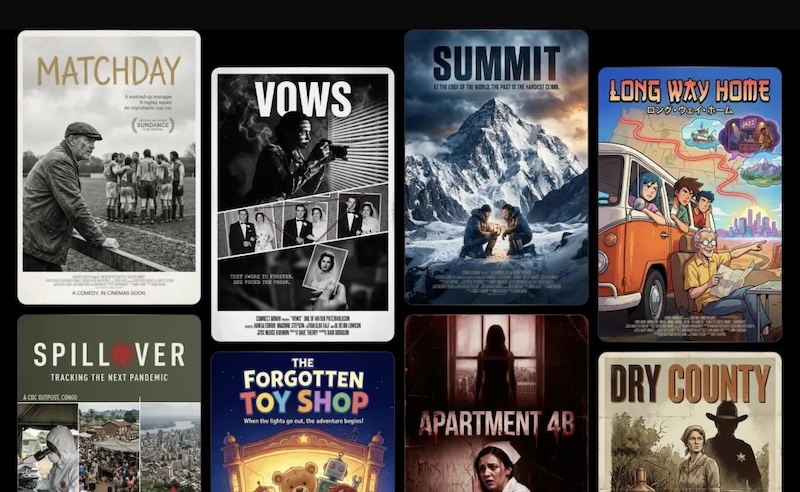
Creating eye-catching posters is now easy with an AI movie poster generator, especially for indie filmmakers, content creators, students, and small production teams. These tools can transform simple text prompts into cinematic poster designs within minutes. If you’re looking for the best Movie Poster Generators in 2026, you are in the right place. In this guide, we’ve mentioned the top 7 movie poster generators available in 2026. Whether you want to create an action, horror, romance, or science fiction poster, these platforms offer powerful features that will help you create high-quality posters without requiring advanced design skills.
Part 1: 7 Best Movie Poster Generators in 2026
After hours of research, we managed to find the seven best film poster generators available in 2026. Each tool mentioned below offers unique features and capabilities, including AI-powered image generation, customizable templates, and more.
1. Edimakor AI
The first and most advanced AI Image Generator on our list is Edimakor AI. It is an all-in-one AI tool that enables users to generate movie posters with a simple text prompt — no editing experience or professional help required. Users only need to describe the movie genre, characters, background, lighting, color scheme, and overall visual style, and the AI will transform those instructions into a cinematic poster within minutes. Edimakor AI supports various poster styles, including action, horror, romance, comedy, fantasy, thriller, and science fiction.
Create NowKey Features of Edimakor AI
- Text to Image: With Edimakor AI, users can generate professional-looking movie posters with a simple text prompt. Simply, enter the movie poster prompt, choose the AI model, and click on the “Generate” button to begin the creation process.
- Image to Image: HitPaw also offers image-to-image capabilities, allowing users to create movie posters using reference images. Plus, it supports a wide range of image styles, such as cyberpunk, sci-fi, cartoon, anime, watercolor, oil painting, and 3D art.
- Multiple AI Models: The program supports a wide range of AI models, each with unique features and capabilities. Available AI models on this program are Nano Banana, Nano Banana Pro, Seedream, Flux, Midjourney, Stable Diffusion, and more.
- Customization Options: HitPaw provides advanced customization features, allowing users to design movie posters according to their requirements. Users can adjust elements, such as colors, lighting, background details, visual effects, and composition.
- User-Friendly Interface: One of the best parts of Edimakor AI is that it offers an intuitive and simple interface, allowing users to navigate through settings and operate the program without any help. Edimakor AI is ideal for non-tech and beginner users.
2. CapCut

CapCut is a smart tool for designing movie posters, especially for short films, YouTube projects, or student films. It helps creators quickly turn ideas into visually appealing posters with minimal effort. The platform offers an easy-to-use interface, customizable templates, text tools, filters, effects, and background removal. The best part of this tool is that it includes a free version, meaning users can create engaging movie posters without spending a single penny.
Pros
- Multiple styles for different genres, such as horror, thriller, romance, action, and more.
- High-resolution output for digital promotion and poster printing.
- Provides an easy-to-use interface, which is ideal for non-tech and beginner users.
- Enables users to download movie posters in multiple formats, such as JPG and PNG.
Cons
- Web-based tool, meaning a stable internet connection is required.
- Some advanced templates, effects, and AI features may require a paid subscription.
3. DeepAI
The next movie poster generator on our list is DeepAI. It is a free AI movie poster generator that doesn’t require registration. Users simply need to enter a detailed text prompt describing the movie genre, main characters, and artistic style. DeepAI can generate posters for action, horror, romance, thriller, fantasy, science fiction, and animated films within seconds. Its simple interface makes it suitable for beginners, students, filmmakers, and content creators.
Pros
- Enables users to create high-quality movie posters within seconds.
- No account or registration is required.
- Creates movie posters in action, romance, thriller, horror, and sci-fi styles.
- Free to use.
Cons
- Results may require manual adjustments to improve faces.
- Offers limited customization options as compared to other AI movie poster generators.
4. Fotor
Fotor combines photo editing with poster templates for efficient movie poster creation. With this tool, users can easily create high-quality movie posters in multiple genres, such as action, thriller, and more. The best part of this tool is that it enables users to download movie posters in multiple formats, such as JPG, PNG, JPEG, and WEBP. Once the movie poster is downloaded, users can easily upload it to their YouTube channel, Instagram, TikTok, and more.
Pros
- Fotor provides a wide range of customizable movie poster templates.
- Allows users to customize fonts, colors, layouts, images, and titles.
- Support popular export formats, including JPG, JPEG, PNG, and WEBP.
- Enables users to resize posters for YouTube, Instagram, TikTok, and other platforms.
Cons
- Free version of Fotor offers limited features as compared to the paid version.
- Can be overwhelming for non-tech and beginner users.
5. Midjourney
AI image generation has taken the creative world by storm. One of the most talked-about tools in this space is MidJourney. It is a powerful AI image generator that runs through Discord and allows users to create cinematic movie posters using detailed text prompts. One of the best parts of this tool is that it is free to use and works without software downloading. However, beginners may need some time to understand its prompting commands and Discord-based workflow.
Pros
- Midjourney enables users to generate high-quality movie posters with a simple text prompt.
- Strong community on the Midjourney Discord server.
- The program can easily handle complex prompts better than any other tool.
- Support a wide range of movie poster styles, such as horror, fantasy, sci-fi, and thriller.
Cons
- Run through Discord, which can be confusing for beginners and non-tech users.
- Requires detailed prompts to get accurate results.
6. Canva
Canva remains one of the most popular design platforms. The platform offers a wide range of AI tools that enable users to perform multiple tasks, including AI movie poster generation. Its Magic Design tool lets you enter a text prompt and generates poster designs based on Canva’s massive template library. Users can then customize the design by changing images, fonts, colors, backgrounds, cast names, release dates, and more.
Pros
- Canva’s resizing tool enables users to adjust movie poster dimensions with a single click.
- Create movie posters for printing, YouTube, Instagram, TikTok, and more.
- Enables users to download movie posters in multiple formats, such as JPG, PNG, and JPEG.
- Web-based tool, works seamlessly with multiple devices, including Android and iOS.
Cons
- Advanced features like resizing and Magic Design are only available on Canva Pro.
- Requires a stable and active internet connection.
7. Adobe Express
The last AI movie poster generator on our list is Adobe Express. It is a powerful design platform that enables users to create professional-looking movie posters with easy-to-use editing tools. Users can start with a text prompt or choose a ready-made poster template and customize it according to their requirements. Its drag-and-drop interface makes it suitable for beginners and non-tech users, such as content creators, filmmakers, marketers, students, and more.
Pros
- Offers advanced customization features, such as background removal and much more.
- Provides a large library of pre-designed movie poster templates for different genres.
- Intuitive interface, which is ideal for non-tech and beginner users.
- Compatible with multiple devices, including Windows and macOS.
Cons
- Customization requires editing skills.
- No free version of Adobe Express is available.
Part 2: How to Create Movie Posters With Edimakor AI?
Edimakor AI makes the movie poster generation process simple. Here is how to create engaging movie posters with Edimakor AI:
Step 1: Enter a prompt describing your movie concept, including genre, characters, setting, and title (e.g., cinematic sci-fi poster, dramatic lighting, bold title text).
Step 2: Adjust image settings such as style, aspect ratio, and resolution, then click Generate.
Step 3: Review the generated posters and download your favorite version.
Final Thoughts
If you have the right tool, then you can easily create engaging movie posters. In this guide, we have mentioned the top 7 movie poster generators available in 2026. With the help of these tools, users can easily create eye-catching posters within seconds. Among them, Edimakor AI is the best option.
Leave a Comment
Create your review for HitPaw articles