If you've been scrolling through Instagram Reels or TikTok lately, chances are you've seen those adorable big-headed cartoon portraits dominating every feed. That's the chibi AI Photo trend, and is one of the most engaging photo styles in 2026.
Would you like to join the trend and turn your photos into chibi art? This guide walks you through the exact process and gives you 15+ copy-paste chibi AI prompts that deliver viral results.
Part 1: What Is a Chibi AI Photo?
The word "chibi" (ちび) comes from Japanese slang meaning "small." It refers to a specific art style where characters are drawn with oversized heads, big expressive eyes, and tiny bodies.
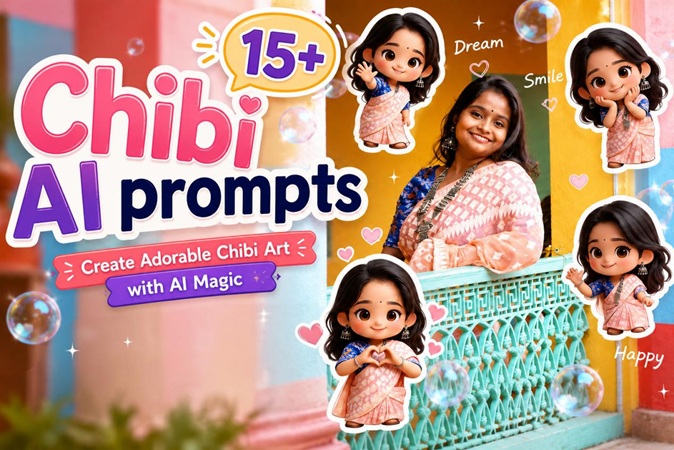
A chibi AI photo is an AI-generated illustration that transforms a real person's photo into this cute, cartoonish style. The viral chibi AI photo collage versions often combine multiple miniature 3D chibi characters of the same person, which is cute and expressive at the same time.
Part 2: Why Chibi AI Photos Are Trending in 2026
The chibi AI Photo trend exploded for a few reasons:
- Personalization: Unlike generic cartoon filters, AI mini chibi generators capture your face, your style and your personality. The result is genuinely personal and shareable.
- Ease of Use: You no longer need design skills to create high-quality chibi images. Free AI image generators have made high-quality chibi photo generation available to anyone.
- Versatility: From profile pictures and couple portraits to pet avatars, chibi AI images fit almost any social context.
- Viral Potential: Their cute style and eye-catching colors act as "scroll-stoppers," making them highly effective for social media.
Part 3: 15+ Best Chibi AI Photo Edit Prompts (Copy & Paste Ready)
These prompts are designed to work across major AI image generators. Copy them directly into Edimakor or any AI mini chibi generator.
Basic Viral Chibi Collage Prompts

Transform the uploaded real photo into a viral chibi cartoon style AI photo collage. Keep the main person realistic and highly recognizable in the center. Add 4-6 cute mini 3D chibi versions around them with big heads, tiny bodies, playful poses, smiling expressions, soft sticker edges, glowing bubbles, hearts, sparkles, and handwritten doodles like ‘Dream’, ‘Smile’, ‘Happy’. Bright cheerful colors, warm lighting, Instagram aesthetic, high detail, 4K.
Transform this photo into a chibi cartoon portrait collage. Keep the main person realistic and surrounded by three to four smaller versions, each in a different cute pose. Large expressive eyes, oversized head, tiny body. High detail on face and hair. 2D illustration, digital art style.Photo to chibi AI free style: Main realistic face, multiple tiny glossy 3D chibi versions dancing around, big expressive eyes, kawaii aesthetic, sparkles and hearts everywhere, soft bokeh background.Cute Korean-Style & Aesthetic Chibi Prompts
Transform the uploaded photo into a Korean webtoon manhwa-style chibi collage. Keep the main portrait realistic. Surround with four small chibi versions in playful poses — oversized heads, tiny bodies, large sparkling eyes with multi-layer highlights. Add cute floating elements like pastel speech bubbles, sparkle clusters, and small hangul doodles like '귀여워♡'. Soft white and pastel pink background, crisp line weight, high detail, 4K.Generate a dynamic K-pop idol Chibi AI photo collage. Keep the main central portrait highly realistic with the original person's face, accurate features, and natural skin texture in a sparkly stage outfit. Arrange five small energetic mini chibi versions of the idol around the main portrait in dynamic poses. Background with stage spotlight beams. Add holographic confetti and star bursts floating throughout. Ultra detailed, 4K.Create a soft spring-themed Korean school uniform Chibi AI photo collage. Keep the main central portrait highly realistic with the original girl's face, natural features, and accurate skin texture wearing a school uniform. Surround her with multiple small cute mini chibi versions in different poses. Big innocent eyes and rosy cheeks on chibi figures. Cherry blossom petals drifting across the image. Soft pink and white color palette, gentle spring lighting, clean anime illustration style mixed with realistic main portrait, high detail.Fun & Playful Chibi Prompts
Create a Halloween-themed Chibi AI photo collage from the uploaded reference photo. Keep the main central portrait highly realistic with the original person's face. Surround the main portrait with four to five small cute mini chibi versions of the person wearing Halloween costumes. Add glowing orange pumpkins, bats, and candy elements around them. Moonlit sky with scattered stars in the background. Spooky but adorable atmosphere with warm orange and purple tones, soft lighting, high detail, 4K quality.Create a Chibi gamer collage from the uploaded reference photo. Keep the main central portrait highly realistic with the original person's face, natural skin texture, and accurate facial features. Surround the main portrait with multiple small cute mini chibi versions of the gamer. Add floating game controllers, energy drink cans, keyboards, and neon effects around them. Neon blue and green accent lighting, dark room with LED glow strips in the background. Energetic gamer aesthetic, high detail, 4K.Create a cute Chibi barista/chef collage from the uploaded reference photo. Keep the main central portrait highly realistic. Surround the main portrait with several small adorable mini chibi versions wearing white aprons and tilted chef's hats, holding steaming coffee cups or pastries. Cafe background with pastel shelves, coffee beans, and green plants. Soft warm lighting, kawaii elements like hearts and sparkles, cozy atmosphere, high detail, 4K quality.Create a Chibi adventure traveler collage from the uploaded reference photo. Keep the main central portrait highly realistic. Surround the main portrait with multiple small cute mini chibi versions wearing tiny backpacks, travel hats, cargo pants, and adventure shoes, holding maps or cameras. Adventurous yet adorable atmosphere, warm golden lighting, high detail, 4K.Multi-Person Chibi Prompts
Create a romantic Chibi couple collage using the two uploaded reference photos. Keep both main central portraits highly realistic with original faces, natural skin texture, accurate facial features, and real expressions. The couple is embracing or holding hands. Surround them with six small cute mini chibi versions of the couple in different romantic poses. Add floating hearts, sparkles, soft flowers, and love elements between the figures. Warm dreamy lighting, pastel color palette, high detail, 4K quality.Create an adorable owner and pet Chibi collage from the uploaded photos. Keep the main central portraits highly realistic — the person's face and the pet's face with natural fur texture and accurate features. Surround them with five small cute mini chibi versions: mini versions of the owner and pet playing together. Add floating paw prints, hearts, bones or yarn balls, and sparkles. Warm and heartwarming atmosphere, soft lighting, high detail, 4K quality.Create a heartwarming family Chibi collage from the uploaded family photo. Keep all main central portraits highly realistic with original faces, natural skin texture, and accurate facial features for parents and children. Surround the main family with multiple small cute mini chibi versions of each family member in different happy poses, all wearing coordinated casual family outfits.Soft warm lighting, gentle color palette, cozy and loving atmosphere, high detail, 4K.Create a joyful girls gathering Chibi collage using the uploaded reference photos. Keep all main central portraits highly realistic with original faces, natural skin texture, and accurate facial features. Surround them with multiple small cute mini chibi versions of the girls in fun poses, wearing matching or coordinated cute outfits. Add decorative text like 'Squad' or 'Forever'. Bright, aesthetic, and cheerful vibe, soft pastel tones, high detail, 4K quality. You may also like:
Adavanced Animated Chibi Prompts
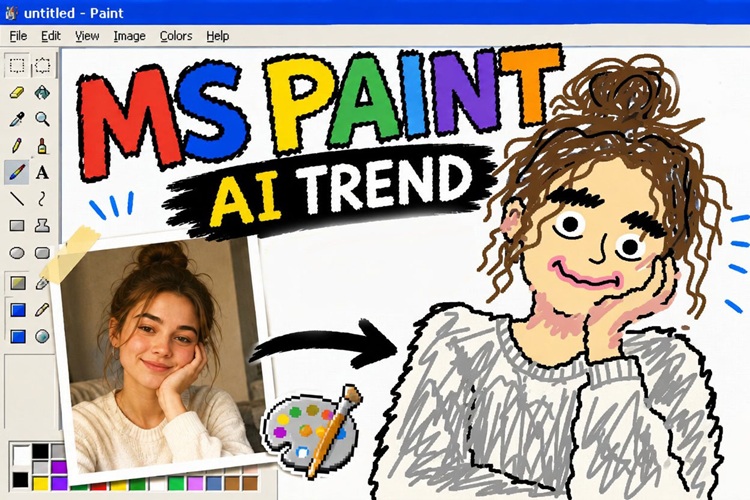
Animate the Chibi collage with gentle bouncing and floating movements. Make the small mini chibi figures bounce softly, and wave their hands while floating hearts and sparkles continuously appear and fade around them. Keep the main realistic central portrait mostly still with only subtle breathing motion. Warm dreamy lighting, smooth animation, high detail, 4K.Create a smooth before-and-after transformation video. Start with the original realistic photo on the left, then slowly morph and transition into the final Chibi collage version on the right. Show the small chibi figures popping into existence one by one with sparkles. Text overlay: 'Original' and 'Chibi Magic'. Clean transition, satisfying animation, high resolution.Not all viral AI photo trends are about looking cute, though. If you've seen the ChatGPT MS Paint trend taking over social media, you already know that intentionally terrible drawings can go just as viral.
Part 4: How to Make a Chibi AI Photo for Free (Step-by-Step Guide)
Now that you understand the trend, here’s exactly how to create your own chibi AI image. HitPaw Edimakor makes the process simple with its Image Effects and AI Image Generator. You can turn a photo into chibi instantly. If you want to ombine multiple videos into one creative collage, try Video Collage Maker.
Step 1: Prepare Your Photo for Best Results
Choose a clear, well-lit selfie or portrait. Front-facing works best with good lighting and a neutral or clean background.
Step 2: Open Edimakor and Choose Your Chibi Style
Download and install HitPaw Edimakor (available for Windows and Mac). Once open, navigate to the AI Image section.


Select Image Effects. You can pick ready chibi templates for faster starts.
Select Image Generator. Here, you can choose your preferred AI model.
Step 3: Upload Your Photo and Generate
Upload your prepared photo. Paste prompts in Part 3 (if needed), then adjust your output settings like resolution, aspect ratio, and output quantity. Hit Generate. Most results appear in 30 seconds. (Share to social media to earn bonus AI credits.)
Step 4: Animate Your Chibi (Optional)
Once you're happy with your static chibi image, take it further with Edimakor's Image to Video feature. Add subtle movements like bouncing chibi figures, sparkling effects, or head turns. You can also make before-and-after transformation videos , which tend to perform well on Instagram Reels and TikTok.
FAQs
A1: Yes. Many AI image generators offer free chibi AI photo generation. However, free tiers typically allow a set number of generations per day.
A2: Yes. Simply upload a group photo and use prompts that include terms like "couple," "friends," or "multiple people." You can also use the ready-made multi-person prompts in Part 4 of this guide.
A3: Yes. All photos are processed locally on your device and never uploaded to external servers. Edimakor does not store, share, or use your images beyond the current session, so your personal photos stay completely private.
Conclusion
Creating viral chibi AI photos has never been easier. With HitPaw Edimakor’s powerful AI chibi image generator and these AI prompts for chibi photo, you can produce stunning chibi-style portraits.
Download HitPaw Edimakor today, upload your favorite selfie, and try the first prompt right now. Your new profile picture or Reels content is ready to share.
Leave a Comment
Create your review for HitPaw articles