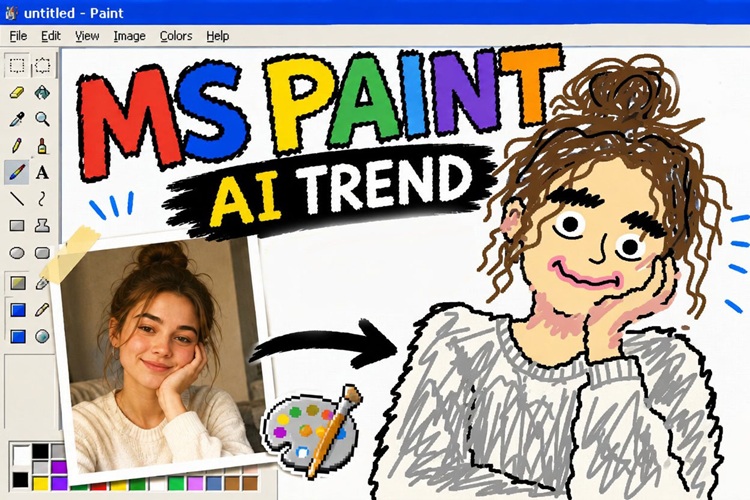
Something funny is taking over social media right now. People are asking AI to draw intentionally terrible images for them. That’s the ChatGPT MS Paint trend popular on X, Reddit and Instagram, with thousands of users sharing hilariously bad AI-generated doodles.
This guide breaks down where the trend came from, what makes it so fun, and how you can jump in using the best prompts without an OpenAI account.
The MS Paint AI Trend Explained
1 What is the MS Paint Trend?
The ChatGPT MS Paint trend is simple: people ask AI image tools to generate drawings that look like they were made with Microsoft Paint, the classic Windows program.
MS Paint style means wobbly lines, flat colors with no shading, pixelated edges, and that unmistakable "I drew this with a mouse in two minutes" look.
Instead of asking AI for beautiful, realistic images, users flip the script and intentionally ask for clumsy drawings. The results feel funny, childish, and weirdly nostalgic all at once.
2 Why the Trend Became So Popular
A big part of the appeal is nostalgia. Almost everyone who grew up with a Windows computer spent at least a few minutes messing around in MS Paint. Seeing AI recreate that aesthetic brings back a real feeling of childhood silliness.
There is also humor at play in watching a powerful AI system produce something that looks genuinely terrible. The image generation of GPT Image 2 is amazing. In this case, having it generate bad drawings can show its imperfection and approachability.
3 Best Types of Photos for the MS Paint Trend
Not every photo turns into a great crude doodle. Picking the right type of image makes a big difference in how funny and shareable the result is. Here are the four types that consistently deliver the best reactions.
- Animal photos: Your pet photos are perfect for this trend because animals already have funny, expressive faces. When AI renders a dog or cat in MS Paint pixel art style, the result is almost always adorable and hilarious. The chunky shapes work especially well for fluffy animals.
- Couple Photos: There is something comedy gold about taking a romantic couple photo and turning it into a pair of wobbly stick-adjacent figures. The contrast between the sweet moment and the terrible drawing always gets laughs. These also do really well when shared as memes.
- Group Selfies: The more people in the photo, the more chaotic the doodle. Group selfies become a jumble of uneven faces and lopsided bodies, and the challenge of identifying who is who adds to the fun. Great for friend groups to share together.
- Reaction Faces: Exaggerated expressions wide eyes, open mouths, dramatic frowns translate beautifully into easy drawing doodles. The simpler the emotion, the more it pops in crude art style. Think surprise, shock, or pure joy.
Funny MS Paint Doodles Prompts (Copy & Paste)

Classic MS Paint Prompts
These two prompts give you that pure, old-school Microsoft Paint pixel art look:
Redraw the attached image in the most clumsy, scribbly, and utterly pathetic way possible. Make it look like it was drawn in old MS Paint with a mouse by a child. Bad proportions, wobbly lines, messy coloring, low quality, pixelated feel.Recreate this photo as a crude AI crude doodle using classic MS Paint style. Use only flat colors, hard edges, and make the proportions slightly off. No gradients or artistic skill allowed. Make it deliberately terrible and funny.Advanced Prompts for Different Styles
Draw this like a kindergartener drew it with crayons uneven shapes, the sun in the corner, people with circle heads and stick arms, bright random colors.Turn this into a chaotic scribble drawing overlapping lines, wild hatching, messy and frantic like someone drew it while panicking. Very clumsy drawing energy.Convert this image into a stick figure scene. Circles for heads, lines for bodies and limbs. Keep the background minimal and add a squiggly sun. Classic stick figure style, no detail at all.Prompts for Portraits, Pets, and Memes
Redraw this portrait in bad drawing style: lopsided face, uneven eyes, wobbly outline, MS Paint flat colors. Make it look like a 7-year-old drew it for a school project.How to Turn Photos into Crude Doodles in 3 Steps
If you're looking to make your own MS Paint-style doodles, HitPaw Edimakor is a fantastic tool to try. It has a built-in AI Image Generator that lets you use custom prompts to transform any photo into a crude doodle within seconds.


Step 1: Open HitPaw Edimakor, and navigate to AI Toolbox > Image. Choose Reference Image feature.
Step 2: Select GPT Image 2 as the model. Copy and paste one of the prompts above or create your own. You can also use the Prompt Generator . Finish other settings. Click on Generate and let the tool work its magic.
Step 3: The results are auto-saved to My Creations. They are ready to share instantly on social media.
Pro Tips for Better MS Paint AI Results
1 Making It Look More Pathetic and Clumsy
- Add the phrase "drawn by a child" or "drawn by someone who has never held a pencil" to any prompt. It pushes the AI toward far cruder results.
- Use words like "wobbly," "lopsided," "uneven proportions," and "wrong colors" these signal to the AI that imperfection is the goal.
- Specify "no shading, no gradients, no texture" to strip away any accidental artistic quality.
- Ask for "MS Paint bucket fill only" this tells the AI to use the flat, block-color fill that defines the Microsoft Paint pixel art look.
2 Common Mistakes to Avoid
- Using vague prompts like "make it look bad." Be specific about the style instead. "MS Paint, flat color, wobbly lines" gives the AI much clearer direction.
- Uploading very dark or blurry photos. The AI needs to see what is in the image to doodle it properly.
- Expecting perfect results on the first try. ChatGPT bad drawings and similar AI tools sometimes need two or three attempts to nail the clumsy look you want.
- Forgetting to remove the background first if your subject is cluttered. A cleaner input image produces a funnier, more readable doodle (especially for portraits).
FAQs
A1: Yes, it can. If you give it a clear prompt asking for crude, clumsy, or MS Paint-style images, it will follow the instruction.
A2: AI models are trained to produce high-quality images by default. You need to push back on that with strong language in your prompt. Add words like "intentionally terrible," "no skill," "wobbly and wrong," and "crude child drawing" to override the quality defaults.
A3: Yes. HitPaw Edimakor's AI Image Generator works independently and does not require a ChatGPT account. You can create your easy drawing doodles directly through Edimakor.
A4: Generally, purely AI-generated images without human creative input are not eligible for copyright protection, but always check the terms of the tool you use.
Conclusion
The ChatGPT MS Paint trend is one of the most fun things to hit social media in a while. Whether you are turning a pet photo into a lumpy blob or making a group selfie look like a kindergarten class project, the results are always worth sharing.
If you want the easiest way to get started, try HitPaw Edimakor. Its AI image generator handles the whole process quickly and lets you fine-tune your prompts until you get that perfectly imperfect doodle. Give it a go your friends will thank you for it.
Leave a Comment
Create your review for HitPaw articles