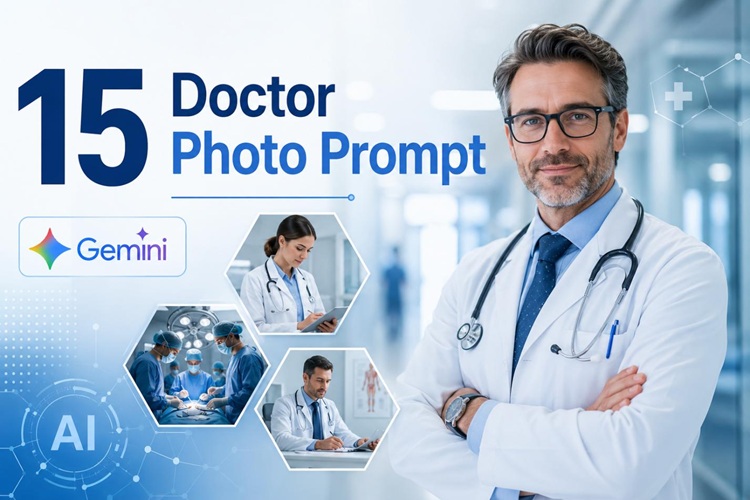
Going to a photographer every single time adds up fast in time and money. That's where Gemini AI generates realistic doctor photos from a description. You don't require a camera, a studio, or a model. Just write the right prompt, and you get a professional medical image.
This guide covers the 15 best Gemini AI doctor photo prompts, how to use them, and tips to get better results every time.
Common Uses for AI Doctor Photo Prompts
Healthcare brands : Your website, ads, and social media all need photos. Going back to a photographer every time adds up fast in time and money.
Individual professionals : Health coaches and medical professionals building their own audiences need to look trustworthy. A sharp, professional photo is one of the first things people notice.
Online platforms : Telemedicine apps and health directories need profile photos for every doctor on their platform. You cannot always get a real photo from everyone. AI fills that gap without the hassle.
15 Best Gemini AI Doctor Photo Prompts
We picked 15 prompts that actually work. Input any prompt in Gemini to get the output. Here are 4 groups; select the one that fits.
1 Professional Portraits
Want a professional photo taken at a studio? These three are for you. They work great for the doctor's LinkedIn AI photo
LinkedIn profiles, hospital staff pages, and anywhere you need an AI doctor portrait generator to look polished and put-together.

A headshot of a female doctor aged 40+ in a white blue hospital dress code and a stethoscope hanging over the neck. Light gray studio background. Soft, even studio lighting. Sharp focus. Photorealistic, 4K quality.A male surgeon aged around 50s in surgical scrubs and cap. Looking at the camera. Calm, composed expression. Clean white background. Professional studio lighting. Photorealistic and ultra-detailed.A young female dentist in her 30s. White dental coat and blue latex gloves. Holding a dental mirror. Bright, clean clinic background. Warm professional lighting. Realistic photo quality.2 Doctor in Hospital Scenes
A plain white background is fine for headshots. These AI hospital portrait prompts show doctors performing duties, walking through a corridor, and talking to junior professionals.
A male doctor in hospital attire looking at a patient's radiograph on a lightbox. clean hospital lobby, Natural light glazing through windows, editorial photography style.
Female doctor in a rushed hospital lobby with a stethoscope around her neck. ID badge visible. Staff blurred in the background. Depth of field effect. Natural hospital lighting. DSLR quality.
3 Senior doctors wearing white coats standing by a nursing station, discussing a report card. Modern hospital environment. Overhead clinical lighting. Photorealistic team photograph.
3 Patient Care Scenes
Some clicks should feel just natural, not clinical. These prompts depict moments like a doctor taking MRI scans, advising patients, and diagnosing someone. It works well if you are dealing with health, trust, and care.
A female physician sitting near an elderly male patient in a hospital bed holding his hand. Ambient lighting, emotional documentary style, Photorealistic.
A doctor examining a child on the exam bed, parents standing nearby. Bright, friendly medical setting. Natural light. Ultra-realistic photo.
A male doctor briefing a female patient about the diagnosis. Medical room with clinical posters on the wall, sitting on the desk, an open laptop. professional lighting.
4 Modern Healthcare
Many brands have moved from traditional to modern services. These healthcare AI photography prompts can be used for telemedicine, health apps, and other online health consultation brands.
A female consultant holding a tablet sitting at a desk, wearing a casual suit. A window glazing natural light, Photorealistic.
A surgeon working with a 3D hologram of the human heart. Operating room, blue lighting, Cinematic.
4 medical professionals looking at a digital healthcare console, in a conference room. realistic, professional group photograph.
An emergency physician in blue scrubs with gloves. A stethoscope hanging around his neck, standing in a brightly lit emergency department room showing medical instruments in the background.
How to Create a Professional AI Doctor Photo
You can create realistic doctor AI images using Gemini AI or simplify the process with HitPaw Edimakor’s ready-to-use templates and AI prompt generator. Here is how to do both.
1 Using Google Gemini
- Go to Gemini and sign in with your Google account.
- Paste the prompt into the input area.
- Click the image generation button to submit.
- Review the result. If it doesn't look right, add more detail to your prompt.
- Download the image using the button below the output.
Tip:
Gemini responds better when your prompt is specific. Include the clothing, background, and light effects. A detailed prompt gives a more realistic result.
2 Using Edimakor AI Image Generator
HitPaw Edimakor is a good option if you want more control. It combines AI image generation with a full video editor. Here is how to use it.
Step 1: Download and install HitPaw Edimakor. Open the software.


Step 2: From the main dashboard, navigate to AI Tools and choose the Text to Image Generator.
Step 3: Select Nano Banana as your AI model, the same model available in Gemini. GPT Image 2 is also available in Edimakor. Then use the Prompt Generator to generate an optimized prompt. It will be automatically added to the text field.
Step 4: Click Generate. The AI will produce your image in a few seconds. You can find it in My Creations.
Bonus step: Go to AI Image > Image Effects. With ready-to-use templates, you can transform your photo into a professional doctor portrait in minutes while keeping your facial features consistent.
Tips for Realistic Doctor Photos with AI
Specify Medical Specialty
Don't just write "doctor." Gemini does better with specific roles. Use the roles "cardiologist", "emergency physician", or "assistant nurse". This helps AI generate exact visuals more accurately.
Describe the Clinical Environment
The background matters as much as the subject. Tell Gemini where the scene is set. A hospital corridor, a private office, and an operating room each create a different feel. Add lighting details too. "Soft studio lighting" and "overhead clinical fluorescents" produce very different results.
Include Professional Details
Small details make images look real. Mention the stethoscope, the ID badge, the glove color, or whether the doctor is seated or standing. Add photo-style cues like "shallow depth of field" or "DSLR quality" to further enhance realism.
FAQs
A1: Yes. With a detailed prompt, Gemini can produce photographic-quality doctor portraits and medical scenes that are suitable for medical professional AI photos use.
A2: Include the gender, professional roles, attire, background setting, and lighting effect. The more detailed and to the point, the more accurate the result.
A3: Yes. Gemini can generate headshots, hospital scenes, patient care images, and futuristic healthcare visuals. The 15 prompts in this guide cover all four types.
A4: Yes, for marketing and content, it is acceptable. Make sure to check your platform's guidelines on whether AI-generated images are allowed before posting.
Conclusion
Now you can create professional doctor photos with these doctor prompts for Gemini, covering different styles and use cases. For faster results, try HitPaw Edimakor. Its AI image generator and prompt generator let you create professional medical photos without writing prompts. Start creating your doctor photo today.
Leave a Comment
Create your review for HitPaw articles