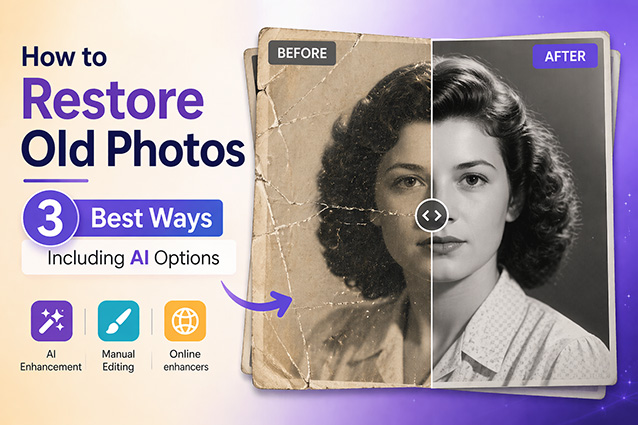
Do you have old photos holding precious memories — family moments, childhood snapshots, or pieces of history that can never be replaced? Over time, these images fade, get scratched, or lose their clarity. If you’ve been wondering how to restore old photos, you’re in the right place.
In this guide, you’ll discover three proven ways to fix old photos, from free online tools to advanced AI photo restoration tools that don’t just repair old photos — they bring old photos back to life.
Part 1. Top 3 Ways to Restore Old Photos
How to restore old photos depends on your needs, skills, and how damaged the image is. Here’s how each method stacks up.
1AI Old Photo Restoration — Fastest & Best Overall
For those who want more than just a repaired image, AI-powered creative tools offer the most complete solution. With just a few clicks, AI can automatically fix common issues like fading and scratches in just seconds, while giving you the tools to take your photos even further.
A powerful AI creative tool like HitPaw Edimakor can handle a wide range of restoration needs.Beyond its one-click repair features, it offers customizable tools for more precise control. Furthermore, by leveraging advanced AI models such as Seedance 2.0, Kling 3.0, and Google Veo 3.1, Edimakor can even animate old photos, turning a still moment into a living, breathing memory.

2Free Online Photo Enhancers — Best for Quick Web Fixes
Free online AI photo enhancers are another convenient option, particularly for users who prefer not to install software and only need a quick repair. Platforms like Evoto and PhotoBooth Online allow you to upload images and apply basic photo enhancement directly in your browser.
These tools are ideal for quick photo fixes, such as simple color correction or minor retouching. However, the free versions usually have a limited number of uses and restricted functionality. To access more features and unlimited usage, you will need to subscribe to the paid version.
3Professional Software — Best for Advanced Editing
For professionals who require total precision, tools like Adobe Photoshop offer the highest level of control over the photo restoration process. Skilled users can manually repair scratches, rebuild missing parts, and fine-tune every detail to achieve a perfect result.
That said, this method requires significant time, technical expertise, and a costly subscription. For users without a background in photo editing, the steep learning curve can be overwhelming. If you want to fix old photos without spending hours on manual labor, the automated AI solutions are often a more efficient choice.
4Compare 3 Old Photo Restoration Methods (Speed, Quality & Price)
Compare all three methods by speed, quality, price and more to find your perfect fit in seconds. A quick look at the table below is all you need to make your decision.
| Method | AI Creative Tool | Online Enhancer | Professional Software |
|---|---|---|---|
| Speed | |||
| Quality | |||
| Ease of use | |||
| Prize | Paid / Freemium | Free (limited) | Subscription |
| Unique Feature | Animate old photos | No download needed | Full manual control |
| Best for | Everyone | Light damage, quick fixes | Professional / advanced users |
As the comparison shows, while professional software offers maximum control and online tools provide quick fixes, AI creative tools like Edimakor stand out as the most efficient and cost-effective solution—combining high-quality results with effortless operation. Here is how you can achieve professional restoration results in just a few simple steps.
Part 2. How to Restore Old Photos with Edimakor (Step by Step Guide)
Restoring old photos with Edimakor is simple and requires no editing experience. Follow these steps to bring your photos back to life in minutes.
Before you start: To get the most out of AI restoration, you first need to digitalize your old photos. Whether you use a high-quality scanner or a mobile scanning app, ensure your digital file is clear and free of glare for the best results in Edimakor.
Step 1 Download and install Edimakor on your computer, then launch the software to get started.


Step 2 Create a new Project. Navigate to the Media panel, locate Image Enhancement and click on Scenes to access the specialized old photo repair feature.
Step 3 Now you can upload the old photo you want to restore. With a single click, Edimakor will automatically improve clarity, fix damage, and enhance overall image quality.
Tip:
For even better results, explore the Customize panel to access advanced editing features and fine-tune your photo’s specific details.
Step 4 Once the restoration is complete, preview the result and export the image. Your restored photo will be saved in high quality and ready to share or print.
Step 5 Use the "Image to Video" tool under the AI Video tab. Upload your image, select an AI model, and enter a motion description to create a dynamic video.
FAQs About Old Photo Restoration
A1. Absolutely. Edimakor features specialized AI scenes that can analyze grayscale images and apply realistic, natural colors. This feature is part of the one-click restoration process, making it simple for any user.
A2. Yes! One of Edimakor’s unique features is the Image to Video tool. After fixing your photo, you can use advanced AI models (like Seedance 2.0) to describe motions — such as a gentle smile or a head tilt — and turn your static memory into a dynamic video.
A3. For the best AI restoration results, we recommend scanning your physical photos at a resolution of at least 300 DPI. Ensure the photo is flat and the lighting is even to avoid extra glare that might interfere with the AI’s repair process.
Conclusion
Restoring old photos is now faster and easier than ever with AI. While manual and free tools still have their place, AI creative tools offer the best balance of quality and simplicity. With HitPaw Edimakor, you can restore, enhance, and even animate old photos in just a few clicks — no editing skills needed. Try it today and bring your memories back to life.
Leave a Comment
Create your review for HitPaw articles