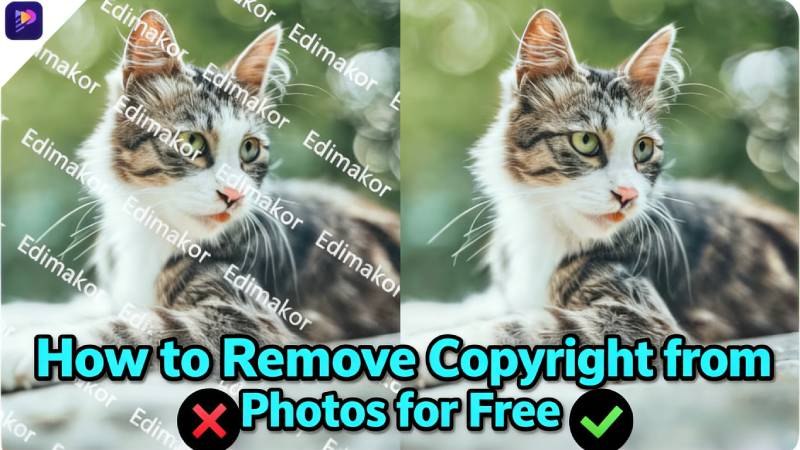
A lot of people look for ways to remove copyright from photos so they can use the images in their projects, social media, or presentations. Sometimes these marks cover important parts of a picture. In this guide, we will share free tools you can try, explain how AI software can help, and answer common questions like whether it is legal and safe to remove copyright from images.
Part 1: Is There a Way to Remove Copyright from Photos?
Yes, we can use AI tools such as Hitpaw Edimakor , WatermarkRemover.io, or Adobe Photoshop to remove watermarks and logos from photos. However, it is important to note that doing so without the permission of the copyright holder is illegal. Deleting these marks to bypass copyright is considered an infringement and may lead to legal consequences.
Common Tools for Editing Watermarks (Use Responsibly):
Editing Software: Hitpaw Edimakor or Clone Stamp tool is used for more precise manual removal.
Online Editors:PokeCut or Magic Eraser allow for manual brushing over unwanted Objects.
Part 2: How to Remove Watermarks with Software
If you are looking for an easy and reliable way to remove copyright watermarks from images for free. HitPaw Edimakor is a great choice.The tool uses AI to find and erase watermarks without any complicated editing. You don’t need any design skills, just follow these simple steps and check the results before saving.
Step 1: Download HitPaw Edimakor and open Watermark Remover


Go to the official HitPaw Edimakor website and install the program on your computer. Once you open it, choose the Watermark Remover option from the main menu.

Step 2: Upload an image and start removing the watermark
Add the photo you want to fix. Use the brush or selection tool to carefully mark the watermark area. The AI will then analyze that part to prepare for removal. This helps the tool erase the watermark accurately.
Step 3: Reiew the Result
Click the remove button and wait a few seconds while the software works. Look at the image to make sure the watermark is gone and the picture looks good. If you are happy with it, save the cleaned image in the format you want.
This way, removing copyright from pictures is quick, easy, and great for beginners.
Part 3: How to Remove Copyright from Photo Online Free
These tools make it easy to remove watermarks online. Each has its strengths and weaknesses. So, pick the one that fits your needs best.
1. PokeCut
PokeCut is an easy-to-use AI tool that works right in your browser to quickly remove watermarks from images. It is great for simple edits when you want fast results without downloading any software.
Pros
- The tool works completely online. There is no need to install anything.
- AI automatically finds watermarks which makes editing faster for new users.
- Drag-and-drop feature lets you upload and start editing in seconds.
Cons
- The free version limits how many images you can save. It might not be enough for regular use.
- Removing big or complicated watermarks can sometimes blur the image.
- Processing high-res images can take longer, and ads appear on the free plan, which may interrupt your work.
PokeCut is a quick and handy tool for removing watermarks. However, it may struggle with complicated backgrounds.
2. Magic Eraser
Magic Eraser is a popular copyright eraser that helps to get rid of copyright on pictures. However, the exact results depend on the image.
Pros:
- No need to create an account, you can start right away.
- It works well on small watermarks. This is especially on plain backgrounds.
- Simple and clean interface which is perfect for beginners.
Cons:
- You might have trouble removing large or detailed watermarks especially on textured backgrounds.
- Some edits might leave visible spots or uneven patches.
- Free version exports images in lower quality and doesn’t support editing multiple pictures at once.
3. Pixelbin.io
Pixelbin.io is a good option to remove copyright from photos. However, the free use has limits.
Pros:
- AI removes different types of watermarks including text and logos.
- Supports many image formats and works well on clear and simple pictures.
- Organized layout gives you more control when editing.
Cons:
- Free credits are limited. So, if you use it a lot, you might have to pay.
- Processing big files can be slow on the free plan.
- Doesn’t include tools to improve image quality after removing watermarks.
Part 4: What You Need to Know About Copyright?
Is Removing a Watermark Illegal?
Removing a watermark from an image you do not own or have permission to use is usually copyright infringement.
Instagram Watermark Rules
You may edit your own Instagram content, but removing someone else’s watermark without permission can cause legal issues.
Stay Safe
Only edit your own images, use licensed stock photos, or get written permission to avoid copyright problems.
Conclusion
There are different ways to remove copyright watermarks from photos using AI tools and online services. Browser-based tools are great for quick fixes but usually have limits on image quality and how much you can use them. HitPaw Edimakor is a top choice because it lets you upload many images at once, keeps your photos looking sharp, and offers extra editing options. Just remember to always follow copyright rules before removing any watermarks from images.
Leave a Comment
Create your review for HitPaw articles