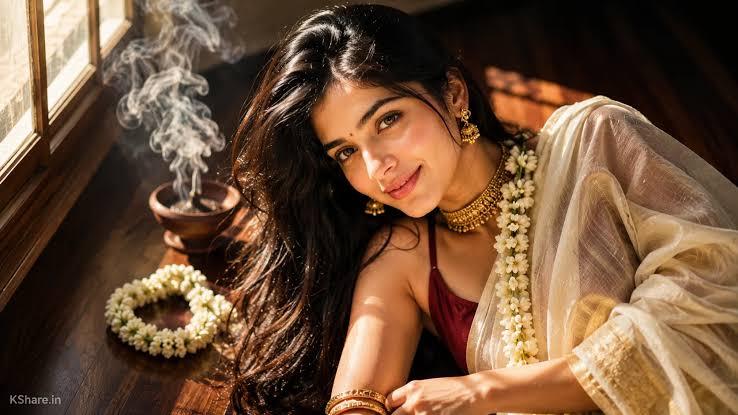
Indian dresses are known for their elegant design, vibrant colors, and deep cultural significance. Among them, the traditional Kerala saree stands out for its simple, while or cream fabric, beautiful golden border, and timeless appearance. If you want to create traditional Kerala saree photos, you’re in the right place. In this guide, we will mention the top Kerala-style saree prompts that can help you generate stunning and realistic portraits. These prompts are perfect for creating festive looks, bridal portraits, Onam-inspired photos, and elegant traditional edits with ease. Ensure to read this guide till the end.
Part 1: Tips to Write an Engaging Kerala Saree AI Prompt
How to write an engaging Kerala-style prompt? Here are some tips that you can use to write an engaging Kerala saree AI prompt in 2026:
- Describe the Saree Clearly: When writing a Kerala saree AI prompt, make sure to mention every detail about the saree, such as color, border style, and fabric texture.
- Add Traditional Jewelry: Always include accessories such as a gold necklace, jhumka earrings, bangles, waist chain, temple jewelry, or jasmine flowers.
- Choose an Authentic Background: If you want to make your photo stand out, choosing the right background is essential. Select a setting that complements the traditional Kerala saree.
- Add Camera Details: Terms such as close-up portrait, full-body shot, shallow depth of field, DSLR quality, or high-resolution photography can improve the output.
Part 2: Top 5 Kerala Style Saree Prompts in 2026
With the right AI prompts, you can easily create a beautiful Kasavu saree portrait featuring authentic jewelry, elegant hairstyles, festive backgrounds, and realistic lighting. Below are the top 5 Kerala-style saree prompts to try in 2026.
1 Onam Courtyard Elegance

“Create a graceful portrait of a young woman wearing a traditional white and gold Kerala Kasavu saree, standing in a beautifully decorated courtyard during Onam. Add a floral pookalam on the ground, brass lamps, jasmine flowers in her hair, gold jhumkas, bangles, and a soft smile. Use warm natural lighting, realistic fabric texture, and a festive atmosphere. Keep the pose elegant and calm, with a slightly blurred background for a professional portrait look.”
2 Temple Festival Kerala Look
“Generate a stunning Kerala-style portrait of a woman in a cream Kasavu saree with a rich golden border, posing near a traditional temple entrance. Include hanging oil lamps, stone steps, temple pillars, and soft golden evening light. Add classic Kerala jewelry, a neat bun decorated with jasmine, and a peaceful expression. Focus on realistic skin texture, detailed saree pleats, and a spiritual traditional vibe. Make the portrait elegant, sharp, and visually rich with cultural authenticity.”
3 Kerala Village Heritage Scene
“Create a charming portrait of a woman wearing a traditional Kerala saree in front of a heritage-style wooden house. Include carved wooden doors, green plants, banana leaves, and a peaceful village atmosphere. Style her with a simple gold necklace, earrings, and a braid decorated with jasmine. Use bright daylight and realistic textures to make the saree stand out beautifully. The mood should feel authentic, calm, and rooted in culture, with a naturally elegant pose and refined portrait quality.”
4 Monsoon Kerala Saree Portrait
“Design a dreamy portrait of a woman in a Kerala Kasavu saree standing on a veranda during light monsoon rain. Show soft rain in the background, lush greenery, wet stone flooring, and a cozy traditional house setting. Add simple gold jewelry, a loose braid, and a gentle smile. Use moody lighting with soft highlights on the saree’s golden border. Keep the portrait realistic, emotional, and elegant, capturing the refreshing beauty of Kerala during the rainy season.”
5 Modern Kerala Editorial Portrait
“Generate a modern editorial-style portrait of a woman wearing a Kerala Kasavu saree with a fashionable yet traditional look. Keep the saree authentic, but add polished makeup, elegant posing, and a clean, luxurious background with subtle Kerala-inspired decor. Include statement gold jewelry, sleek hair styling, and soft studio lighting. Focus on sharp details, balanced composition, and premium portrait quality. The final image should feel like a magazine cover that celebrates Kerala culture with a stylish contemporary touch.”
Part 3: How to Convert Prompts into High-Quality Kerala Saree Visuals
When it comes to converting prompts into high-quality Kerala saree visuals, the first tool that comes to mind is HitPaw Edimakor. It is an amazing AI tool that enables users to create high-quality visuals with a simple text prompt or by uploading static images. The program offers an easy-to-use interface, making it one of the top choices for beginners who want to create stunning traditional portraits without professional editing skills. Whether you want festive Onam portraits, elegant bridal edits, or Kerala saree photos, this tool helps turn your ideas into realistic visuals in just a few steps. HitPaw also supports image-to-image editing, allowing users to upload their own photos and restyle them into traditional Kerala sare portraits.
Key Features of HitPaw Edimakor
- Text-to-Image: HitPaw Edimakor enables users to create high-quality visuals with a simple text prompt — no editing experience or professional-help required. Enter your Kerala-style saree prompt and watch AI transform it.
- Multiple AI Models: One of the standout features of HitPaw is that it support wide range of AI models, including Nano Banana, Nano Banana Pro, Midjourney, Stable Diffusion, and Seadream.
- Customization Features: The program provides various customization options that allow users to control the appearance of their Kerala saree visuals. You can modify the saree color, golden border design, jewelry, hairstyle, pose, and background.
- Compatibility: HitPaw Edimakor works seamlessly with multiple devices, including Windows, and macOS. Plus, it enables users to download images in desired formats, such as JPG, PNG, JPEG, and WEBP.
- Intuitive Interface: This tool offers an intuitive interface, allowing non-tech and beginner users to create high-quality visuals without editing experience or professional assistance.
Step-by-Step Guide
With HitPaw, users can create Kerala saree photos with simple prompts. Follow the instructions below to learn how to do it:
Step 1: Choose Text to Image Option
Download, install, and launch HitPaw Edimakor on your PC. Choose the “Toolbox” option available on the left panel and select the “Text to Image” option.
Step 2: Select AI Model
Next, click on the “AI Model” option and choose the desired option. HitPaw provides a wide range of AI models, such as Nano Banana Pro, Nano Banana, Stable Diffusion, Flux, and more.
Step 3: Enter Kerala Style Saree Prompt
Once you have selected the AI model, scroll down and enter the Kerala-style saree prompt in the prompt box. Ensure to check the prompt before clicking on the “Generate” button.
Step 4: Generate and Download
Now, adjust the image settings, such as resolution, aspect ratio, and output number. Finally, click on the “Generate” button to begin the image creation process. Within seconds, your image will be ready. Preview and download it in the desired format, such as JPG.
Final Thoughts
The Kerala saree outfit is trending on social media platforms, and many users want to join the elegant trend. Thanks to Kerala-style saree prompts and tools like HitPaw Edimakor, anyone can create beautiful Kasavu portraits without professional photography or editing experience. Simple, enter the detailed prompt, adjust the image settings, and click on the “Generate” button to create a stunning traditional look within minutes.


Leave a Comment
Create your review for HitPaw articles