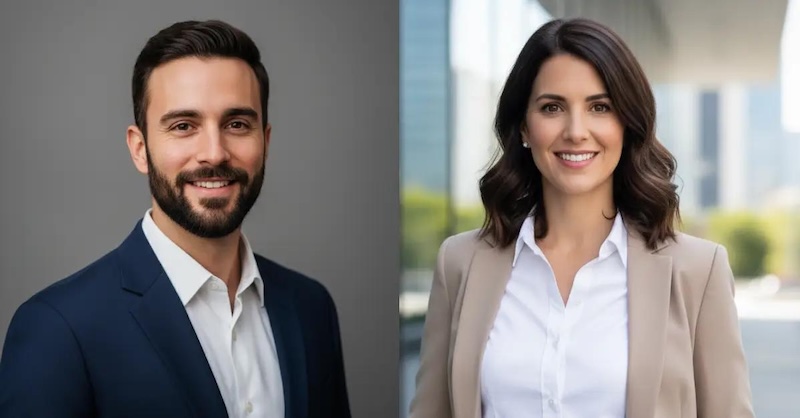
A professional LinkedIn profile picture is your digital handshake. It’s often the first thing recruiters and potential clients see. However, not everyone has the budget or equipment to create professional headshots. That is where LinkedIn photo prompts come in. With the help of AI-powered image generators and carefully written prompts, you can transform an ordinary selfie into a polished, business-ready headshot within minutes. In this guide, we will share the best LinkedIn photo prompts for men and women, helping you create realistic profile pictures that reflect confidence and professionalism.
Part 1: 7 LinkedIn Profile Photo Prompts for Men
LinkedIn profile photos are essential for creating a strong and professional first impression. A well-designed headshot can help male professionals appear confident and trustworthy. Below are 7 LinkedIn profile photo prompts for men.
1. Confident Corporate Executive

“Use the uploaded image and transform it into a professional LinkedIn headshot of a confident corporate executive. Keep the facial identity realistic and polished. Dress him in a navy blue suit, white dress shirt, and elegant tie. Add a soft, confident smile, direct eye contact, and a slightly angled shoulder pose. Use soft studio lighting with a clean gray background. Enhance grooming, skin tone, and sharpness while maintaining a natural look. Make the final image polished, trustworthy, and ideal for a senior business professional.”
2. Friendly Startup Founder
“Transform the uploaded image and turn it into a modern LinkedIn headshot of a friendly startup founder. Preserve the person’s facial features while giving the portrait a polished, realistic finish. Dress him in a smart casual blazer over a black crew-neck shirt. Add a natural warm smile and a relaxed seated pose with shoulders slightly turned. Use bright daylight and a softly blurred office or coworking background. Make the image feel approachable, innovative, and professional, perfect for entrepreneurs, founders, and business owners building a strong LinkedIn presence.”
3. Smart Casual Tech Professional
“Turn the uploaded image and transform it into a professional LinkedIn headshot of a smart casual tech professional. Keep the face realistic and identity accurate. Dress him in a light gray blazer over a navy polo shirt. Add a friendly smile, slight head tilt, and relaxed standing pose. Use cool, soft indoor lighting with a clean blurred office background. Improve grooming, facial detail, and overall sharpness. Make the headshot feel modern, intelligent, approachable, and polished, perfect for software engineers, product managers, IT specialists, or tech consultants.”
4. Senior Lawyer Portrait
“Use the uploaded image and convert it into a premium LinkedIn headshot of a senior lawyer. Maintain the subject’s identity while giving the portrait a formal and polished appearance. Dress him in a dark tailored suit, crisp white shirt, and elegant tie. Add a serious yet welcoming expression with a slight controlled smile. Use a straight posture and strong eye contact. Apply classic studio lighting with a dark neutral background. Make the final image realistic, authoritative, trustworthy, and sophisticated, ideal for a lawyer, legal consultant, or senior advisor.”
5. Approachable Sales Consultant
“Convert the uploaded image and transform it into a professional LinkedIn headshot of an approachable sales consultant. Keep the face natural and realistic while enhancing overall quality. Dress him in a beige blazer and light blue shirt without a tie. Add a broad friendly smile, open shoulder posture, and slightly forward-leaning pose. Use warm lighting and a softly blurred office or city-view background. Improve grooming and clarity while keeping the image authentic. Make the portrait look energetic, persuasive, confident, and perfect for sales or client-facing business roles.”
6. Healthcare Administrator Portrait
“Turn the uploaded image and transform it into a professional LinkedIn headshot of a healthcare administrator. Keep the subject’s face recognizable and realistic. Dress him in a dark blazer with a pale blue shirt and no tie for a clean, approachable look. Add a gentle smile, upright posture, and calm expression. Use soft studio lighting and a bright clean background with a subtle medical-office feel. Enhance skin tone, clarity, and grooming. Make the final image trustworthy, organized, compassionate, and suitable for healthcare management or administrative roles.”
7. Modern Remote Professional
“Use the uploaded image and convert it into a modern LinkedIn headshot of a remote professional. Preserve the face and keep the portrait realistic. Dress him in a crisp white shirt paired with a dark blazer. Add a natural smile, slightly angled seated pose, and relaxed but confident body language. Use soft window lighting and a clean home-office background with subtle blur. Improve grooming, sharpness, and facial detail while maintaining authenticity. Make the final image look polished, credible, productive, and ideal for freelancers or remote business professionals.”
Part 2: 3 LinkedIn Profile Photo Prompts for Women
If you’re a working woman who wants to enhance her LinkedIn profile, a professional headshot can help you create a confident and memorable first impression. Here are the top 3 LinkedIn headshot prompts for women in 2026.
1 Professional Marketing Specialist
“Use the uploaded photo to create a polished LinkedIn headshot of a female marketing specialist. Preserve her identity and natural appearance while enhancing facial detail and image quality. Dress her in a stylish pastel blazer with an open-collar white shirt. Position her slightly sideways with a cheerful smile and confident expression. Use warm natural lighting and a softly blurred creative office background. The final portrait should feel modern, engaging, professional, and expressive, making it ideal for marketing, branding, advertising, public relations, or social media roles.”
2 Elegant Legal Professional
“Convert the uploaded image into a sophisticated LinkedIn headshot of a female lawyer or legal consultant. Keep her face recognizable, realistic, and naturally detailed. Dress her in a structured charcoal blazer over a crisp cream blouse. Add strong eye contact, straight posture, and a composed expression with a slight welcoming smile. Use balanced studio lighting and a muted dark-gray background. Refine the hairstyle and overall grooming without changing her identity. Make the portrait authoritative, trustworthy, elegant, and suitable for legal or advisory positions.”
3 Smart Technology Professional
“Transform the uploaded selfie into a modern LinkedIn headshot of a female technology professional. Maintain her facial identity, skin texture, and natural proportions. Dress her in a light-gray blazer over a dark crew-neck top. Give her a relaxed posture, slight head tilt, and friendly closed-mouth smile. Use cool, balanced lighting with a softly blurred contemporary office background. Keep the styling polished but not overly formal. Make the portrait intelligent, confident, approachable, and suitable for software engineering, product management, data analysis, or IT consulting.”
Part 3: How to Turn Ordinary Selfies into Professional LinkedIn Profile Photos
Once you have the right LinkedIn photo prompt, the next step is to transform that prompt into a professional headshot. For this job, we recommend using Edimakor AI. It is a web-based AI-powered editing tool that allows users to create polished LinkedIn profile photos from ordinary selfies without downloading or installing software. The best part of this program is that it support mulitple AI models such as Nano Banana, Flux, Midjourney, Nano Banana Pro, Seadream, and Stable Diffusion. Apart from reference image generation, HitPaw also includes powerful AI tools, such as Text-to-Image, AI Swap, Online Video Editor, High Quality Downloads, and more. Its intuitive interface makes the process suitable for beginners, freelancers, and business owners without professional photography or editing experience.
Create NowKey Features of Edimakor AI
- Image-to-Image: Edimakor AI turns your ordinary selfies into a professional headshot, which is best for LinkedIn profile photos. Simply, upload your selfie, enter the LinkedIn photo prompt, choose the AI model, and click on the “Generate” button.
- Multiple AI Models: The program includes a wide range of AI models, allowing users to create high-quality headshots effortlessly. It offers AI models, such as Nano Banana, Nano Banana Pro, Stable Diffusion, Flux, and Midjourney.
- Customization Options: One of the standout features of this program is that it includes advanced customization features, allowing users to adjust headshots according to their requirements. Users can adjust the outfit, hairstyle, facial features, and more.
- Web-Based Tool: The program works entirely on a web browser, meaning you don’t have to download or install any software. It is compatible with Windows, macOS, Linux, and even mobile devices, allowing you to access the tool from anywhere with an internet connection.
- Intuitive Interface: Edimakor AI offers an easy-to-use interface, which is ideal for non-tech users. Its simple layout allows users to upload a selfie, enter a LinkedIn photo prompt, and generate a professional headshot without any editing experience.
Step-by-Step Guide:
Follow the instructions below to learn how to create a professional headshot for LinkedIn with a simple text prompt:
Step 1: Open your web browser and go to Edimakor AI's official site. Log in with your free account and select the “Image-to-Image” feature from the main interface. Upload the photo you want to convert into a LinkedIn profile and select the “AI Model.”
Step 2: Next, enter the LinkedIn photo prompt in the prompt box. Now, choose the image settings, such as aspect ratio, output quantity, and more. Finally, click on the “Generate” button.
Step 3: Edimakor AI will analyze your input and generate an image within seconds. Preview the results and go to “My Creation” and choose the image you want to download. Hit “Download.”
Final Thoughts
After reading this guide, you don’t have to worry about your LinkedIn profile photo. With the help of LinkedIn photo prompts, you can transform ordinary selfies into polished and professional headshots within minutes. Plus, tools like Edimakor AI make the process even easier, helping freelancers and businesses create realistic profile pictures without an expensive studio photoshoot.


Leave a Comment
Create your review for HitPaw articles