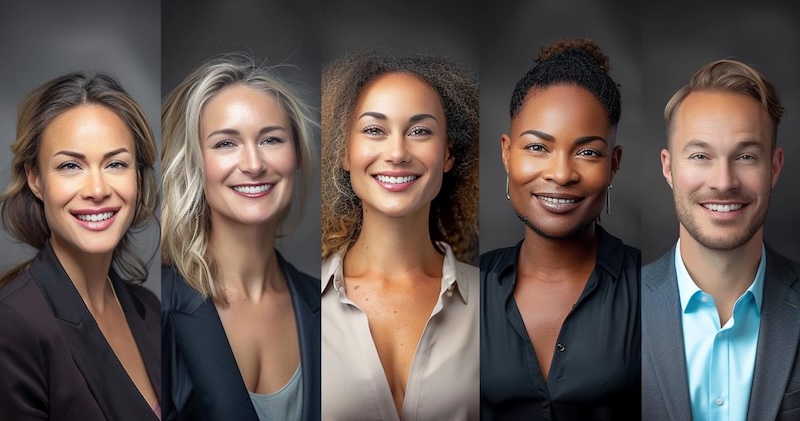
A professional headshot used to cost $150 - 400 and half a day of your time. However, in 2026, AI-powered LinkedIn headshot generators have made the process faster, more affordable, and accessible to everyone. These tools can transform simple selfies into professional portraits featuring professional outfits, clean backgrounds, natural lighting, and studio-quality details. Whether you are a job seeker, freelancer, entrepreneur, or corporate professional, the right headshot can strengthen your personal brand and create a positive first impression. In this guide, we will mention the top 5 LinkedIn headshot generators that can help you create professional profile photos within minutes.
Part 1: Why Use an AI Headshot Generator for LinkedIn?
A LinkedIn headshot generator free is a quick and affordable way to create professional profile photos without hiring a photographer. It can easily transform ordinary selfies into polished portraits suitable for LinkedIn and other business platforms:
- Cost: As we all know, a professional photoshoot can easily cost $300 - $800. However, with the help of the LinkedIn headshot generator, you can create professional portraits for free.
- Convenience: No scheduling, travel, buying clothes, or awkward posing. This tool generates high-quality headshots within minutes from the comfort of your home.
- Customization Options: One of the best parts of these tools is that it offers advanced customization features, allowing users to adjust the headshots according to their requirements.
- Easy to Use: Most tools available online offer an intuitive interface, allowing users to create high-quality and professional headshots without editing experience.
Part 2: Quick Comparison of the Top LinkedIn Headshot Generators
Each AI headshot generator offers different styles, customization options, and output quality. The table below provides a quick comparison of the top five LinkedIn profile headshot generators to help you choose the right option for your professional profile.
| LinkedIn Headshot Generator | Best For | Key Features | Ease of Use |
|---|---|---|---|
| Edimakor AI | Beginners and content creators | Image to Image, Text to Image, Multiple AI Models, High Quality Output, and more | Very Easy |
| BetterPic | Business portraits | Advanced customization options, professional styles, and AI-powered | Medium |
| Headshot By AI | Corporate teams | Studio-quality results, image-to-image, free version | Beginner-Friendly |
| ProPhotos | Job seekers | Batch processing, multiple formats supported, and customization options | Easy-to-use |
| PortraitPal | Quick headshots | Wide range of styles, high-quality results, free to use | Intuitive Interface |
Part 3: 5 Best AI LinkedIn Headshot Generators to Try in 2026
If you want to create high-quality LinkedIn headshots, you must require AI LinkedIn headshot generator. Below, we have mentioned the best LinkedIn headshot generators available in 2026:
1. Edimakor AI
If you are looking for the best professional headshot generator, look no further. We have just the right tool for you: Edimakor AI. It is an all-in-one online AI-powered platform that enables users to transform ordinary selfies into professional LinkedIn headshots within seconds. Simply upload a clear image, enter a detailed prompt, adjust the image settings, and click on the “Generate” button.
The best part of this tool is that it supports multiple AI models, each with unique features and capabilities. Available AI models on this program are Stable Diffusion, Midjourney, Nano Banana, Nano Banana Pro, and Flux. Plus, Edimakor AI offers advanced customization features, allowing users to adjust the image according to their needs. Users can change the outfit, hairstyle, background, and much more.
Key Features of Edimakor AI
- Image to Image: Edimakor AI enables users to turn ordinary selfies into professional headshots with a single click — no professional help or editing experience required, making the results suitable for LinkedIn profiles, and more.
- Multiple AI Models: The program supports multiple AI models, allowing users to experiment with different headshot styles, lighting effects, and backgrounds. It offers AI models, such as Nano Banana, Nano Banana Pro, Midjourney, Flux, and Stable Diffusion.
- Customization Features: HitPaw offers advanced personalization options, enabling users to adjust their headshots according to their specific requirements. Users can change the image background, add effects and filters, change the image style, and more.
- Web-Based Tool: The program offers a web-based tool, which users can access without downloading or installing software. It works seamlessly with the latest web browsers, such as Google Chrome, Firefox, Opera, Microsoft Edge, and more.
- Intuitive Interface: The program provides an easy-to-use interface, which is ideal for non-tech and beginner users. It's clean and straightforward controls allow users to upload an image, enter a prompt, and generate a professional headshot without complicated menus.
Step-by-Step Guide:
Follow the instructions below to learn how to create professional headshots for LinkedIn using Edimakor AI:
Step 1: Go to Edimkaor's official site and log in with your account. Select the “Image-to-Image” feature from the left panel. Click on the “Upload” button and import the reference image.

Step 2: Choose the AI Model and enter the LinkedIn headshot prompt. Navigate down and select the image settings, such as aspect ratio and output quantity.
Step 3: Click on the “Generate” button to begin the image creation process. Within seconds, your LinkedIn headshot will be ready and available for download. Go to the “My Creation” section and select the image you want to download.
2. BetterPic
The next free AI headshot generator on our list is BetterPic. It is one of the best AI Headshot Generators available in 2026, allowing users to generate images in up to 4K quality. The platform transforms everyday selfies into polished, studio-style headshots suitable for LinkedIn, resumes, company websites, portfolios, and other professional platforms. One of the standout features of BetterPic is that it offers an intuitive interface, allowing non-tech and beginner users to convert ordinary selfies into engaging, professional-looking headshots with minimal effort.
Pros
- Offers an intuitive interface, which is best for non-tech and beginner users.
- Enables users to download images in multiple formats, such as JPG, PNG, JPEG, and more.
- Support a wide range of image styles, such as professional headshots, cyberpunk, and anime.
- Allows users to generate and download headshots in up to 4K quality.
Cons
- Free version of BetterPic offers limited features as compared to the paid version.
- Users have less control over detailed facial corrections compared with professional-editing software.
3. Headshot By AI
Next up is Headshots By AI — another AI headshot generator that turns your everyday camera roll photos into polished, professional-looking images. Users can upload a selection of clear selfies and let the platform create multiple headshot variations featuring business-appropriate outfits, clean backgrounds, balanced lighting, and natural facial details. The tool is ideal for job seekers, freelancers, entrepreneurs, professional employees, and more. The standout feature of Headshot by AI is that it offers an easy-to-use interface, best suited for non-tech and beginner users.
Pros
- Support the Batch Processing feature, enabling users to create multiple headshots at the same time.
- Offers powerful AI tools, such as Text-to-Image, Image-to-Image, AI Image Enhancer, and more.
- Multiple pricing plans are designed to meet different users and budgets.
- Users can download images without a watermark and in multiple formats, such as PNG and JPG.
Cons
- No free version of Headshot By AI is available. Requires paid subscription.
- Headshot by AI may provide fewer advanced editing options compared to other tools.
4. ProPhotos
ProPhotos AI is an amazing tool that makes it easy to get professional headshots. Using AI technology, it creates realistic headshots that show off your personality and style. It’s fast and cheap, unlike traditional photoshoots, making it a convenient option for improving your professional image. Instead of booking an expensive studio session, users can upload a few clear photos and receive business-ready portraits within a short time.
Pros
- ProPhoto is cheaper than hiring a photographer. Enables users to create images within minutes.
- Users only need to upload selfies, making the process simple even for beginners.
- Generated images are suitable for LinkedIn, resumes, portfolios, and company websites.
- Ideal for freelancers, remote workers, and job seekers who need a quick profile upgrade.
Cons
- Some generated images change facial features, hairstyle, and skin tone.
- Require a stable and active internet connection.
5. PortraitPal
PortraitPal is an AI headshot generator that takes your selfies and turns them into professional, vintage-style AI headshots. The platform offers a variety of visual styles, including classic, vintage-inspired, corporate, and modern business headshots. Users simply upload a selfie, and the AI analyzes facial features, expressions, and appearance to generate realistic profile images.
Pros
- Web-based tool, meaning no software downloading or installation is required to use the program.
- Includes a wide range of image styles, such as classic, corporate, modern business headshots, and more.
- Users can download high-quality headshots in multiple formats, such as JPG, PNG, and JPEG.
- Headshots include professional clothing, a clean background, and natural facial details.
Cons
- Interface can be overwhelming for non-tech and beginner users.
- Limited features are available in the free version.
Final Thoughts
In this guide, we have mentioned the top 5 LinkedIn headshot generators, allowing users to create high-quality headshots without hiring a professional photographer. If you want our recommendation, then we will suggest that you use Edimakor AI. It is one of the most advanced AI headshot generators available in 2026.


Leave a Comment
Create your review for HitPaw articles