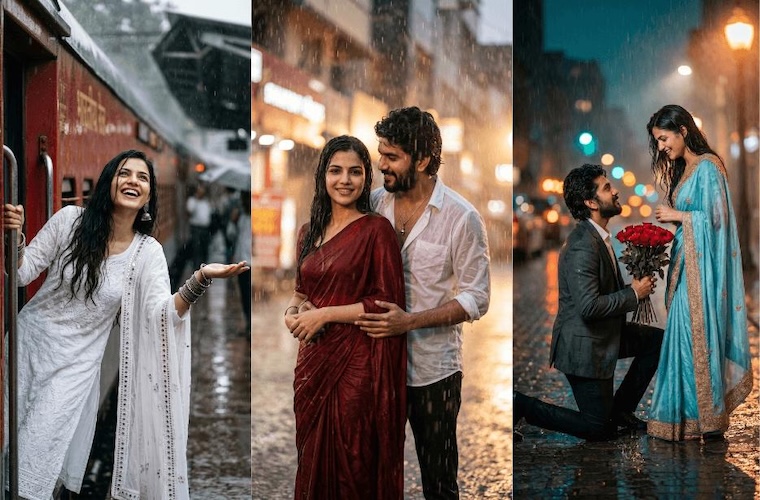
Rain has always been the moodiest backdrop in photography. It adds emotion, depth, softness, and a cinematic feel to even the simplest image. From glowing street lights and wet roads to romantic umbrella shots and cozy window-side portraits, monsoon scenes can instantly make a photo look more dramatic and eye-catching. However, not every rainy photo turns out perfect with a normal camera shot. That is where monsoon rain photo prompts become useful. With the help of the right prompt, you can turn simple images into stunning monsoon edits. In this guide, we’ll share the best monsoon prompts for 2026 to help you create eye-catching visuals perfect for social media.
Part 1: What is Monsoon Prompt?

A Monsoon Season AI Photo Editing Prompt is a detailed instruction for AI image generators or photo editing tools that tells them how to create a rainy, or romantic monsoon-style image. A monsoon prompt includes details such as rain effect, wet streets, cloudy skies, umbrellas, background, facial expressions, and overall mood. Instead of manually editing the image, users can use a monsoon prompt to create realistic visuals that are perfect for social media platforms like Instagram, Facebook, TikTok, and more.
Part 2: Top 10 Monsoon Season AI Photo Editing Prompts in 2026
Monsoon image edits require a well-written and detailed AI prompt. To get the best results, your prompt should clearly describe the background, lighting, mood, outfit, camera angle, and more. Below, we’ve mentioned the top 10 monsoon rain photo prompt copy-paste:
1. Dreamy City Rain Girl
“Use the uploaded image to create a dreamy monsoon portrait of a girl standing under a transparent umbrella on a quiet city street. Add soft rain, glowing streetlights, wet road reflections, loose hair strands, and a pastel blue outfit. Keep her face natural and expressive with a gentle smile. Enhance the background with misty air, blurred traffic lights, and cinematic depth. Make the lighting soft, romantic, and slightly golden, giving the image a magical rainy evening mood for her portrait.”
2. Urban Monsoon Boy Look
“Transform the uploaded image into a stylish monsoon portrait of a boy leaning against a motorcycle in a rain-soaked street. Add a black denim jacket, messy wet hair, dramatic raindrops, and puddles reflecting neon shop signs. Keep his expression confident and calm. Create a moody urban background with light fog, dim headlights, and cool blue tones. Add cinematic contrast, realistic rain streaks, and sharp facial details, making the final image look bold, modern, intense, and visually striking for social media.”
3. Romantic Park Couple in Rain
“Use the uploaded image to create a romantic monsoon couple portrait in a green park during gentle rainfall. Show the couple walking closely under one umbrella, smiling naturally, and sharing a warm emotional moment. Add soft raindrops, misty trees, wet grass, and small puddles around them. Dress them in elegant casual outfits with subtle pastel tones. Use diffused daylight, dreamy background blur, and soft reflections to create a sweet, cinematic, and heartwarming rainy-season atmosphere full of romance for this edit.”
4. Heritage Rain Dance Girl
“Transform the uploaded image to create an elegant monsoon portrait of a girl twirling in the rain near an old heritage building. Add a flowing yellow dress, silver earrings, wet hair, and a joyful expression. Surround her with soft rain, stone pathways, scattered puddles, and lush green plants. Keep her face clear and beautiful while adding movement to the dress. Use bright yet soft lighting, rich colors, and gentle background blur to create a graceful, vibrant, and festive rainy-day scene portrait.”
5. Action Monsoon Sports Boy
“Use the uploaded image to create an energetic monsoon portrait of a boy playing football in a rain-drenched field. Add a sporty jersey, wet hair, mud splashes, and intense focus on his face. Show raindrops frozen in motion, dramatic clouds above, and a blurred goalpost in the background. Enhance the ground with puddles and splashes for action. Use high contrast, cool tones, and dynamic lighting to make the image feel powerful, adventurous, realistic, and full of motion and passion for impact.”
6. Monsoon Train Station Girl
“Transform the uploaded image to create a cinematic monsoon portrait of a girl waiting at an old train station during rainfall. Add a light blue salwar kameez, a small umbrella, wet platform tiles, and soft rain falling in the background. Keep her expression calm and slightly emotional. Add blurred train lights, misty air, and puddle reflections for depth. Use soft cool tones, natural skin details, and realistic lighting to create a nostalgic, story-rich rainy scene with elegance and quiet monsoon beauty.
7. College Couple in Light Drizzle
“Turn the uploaded image to create a sweet monsoon portrait of a young couple on a college campus during light drizzle. Show them sharing one umbrella, smiling naturally, and walking beside wet pathways lined with trees. Add backpacks, simple casual outfits, soft raindrops, and blurred campus buildings in the background. Keep the expressions warm and youthful. Use bright yet soft lighting, green monsoon tones, and gentle reflections to create a fresh, cheerful, and romantic rainy-day moment full of innocence and charm.”
8. Rustic Tea Stall Boy Scene
“Use the uploaded image to create a realistic monsoon portrait of a boy standing beside a roadside tea stall in the rain. Add a casual shirt, rolled-up sleeves, slightly wet hair, and a relaxed expression. Include steaming tea cups, a tin roof with dripping rainwater, wet benches, and muddy roadside puddles. Keep the face detailed and natural. Use earthy colors, soft gray skies, and cinematic lighting to create a cozy, local, and authentic rainy atmosphere full of warmth and monsoon street-life character.”
9. Lakeside Umbrella Couple
“Transform the uploaded image into a romantic monsoon couple portrait near a calm lakeside during soft rainfall. Show the couple standing close under a large umbrella, with gentle smiles and natural body language. Add ripples in the water, cloudy skies, wet wooden railings, and subtle mist over the lake. Dress them in coordinated soft-toned outfits. Use diffused light, delicate reflections, and a peaceful color palette to create a dreamy, intimate, and emotionally rich rainy scene that feels calm, elegant, and timeless.”
10. Monsoon Bike Boy Adventure
“Turn the uploaded image into an adventurous monsoon portrait of a boy sitting on a bike in the middle of a forest road after rain. Add a rugged jacket, damp hair, and a focused expression. Show raindrops on the bike, fog rising between trees, wet leaves, and puddles reflecting the cloudy sky. Keep the subject realistic and sharp. Use cool green tones, cinematic depth, and natural light to create a thrilling, outdoorsy, and bold rainy-season portrait with a strong travel and freedom vibe.”
Bonus Tip: Turn Ordinary Photos into Romantic Monsoon Moments
Turning ordinary photos into romantic monsoon moments does not only require the right AI prompt; it also needs the right AI-powered tool that can understand your prompt and transform your image into a high-quality rainy-day edit. That is where tools like Edimakor AI come in. With its AI-powered editing features, users can turn simple images into beautiful monsoon-style visuals within a few clicks. Edimakor AI is an all-in-one AI tool that enables users to turn images into stunning visuals with a simple text prompt — no editing experience or professional help required. Simply, upload the reference image, enter the monsoon photo prompts for girls and boys, adjust the image settings, and click on the “Generate” button. HitPaw will analyze the prompt and apply the requested rain effects, background style, lighting, mood, and overall monsoon atmosphere to the image.
Create NowKey Features of Edimakor AI
-

Image-to-Image: One of the standout features of Edimakor AI is that it enables users to transform ordinary images into romantic monsoon moments with a simple text prompt. It saves time, simplifies the editing process, and helps users create eye-catching images with minimal effort.
-

Multiple AI Tools: Edimakor AI is not limited to image generation only. The program offers a wide range of AI tools, each with unique features and capabilities, such as AI Singing Photo, AI Dance Generator, Keyframing Animation, AI Talking Photo, AI Kiss Generator, and more.
-

Powerful Image Editor: It also functions as a powerful image editor, enabling users to enhance and customize their photos easily. With this tool, users can change the image background, add effects or filters, and insert text — all without needing advanced design skills or professional editing experience.
-

User-Friendly Interface: The program offers an easy-to-use interface, allowing users to create high-quality monsoon edits with ease. Its clean layout and simple controls make the editing process smooth for beginners and experienced users.
-

Compatibility: Edimakor AI works seamlessly with multiple devices, including Windows and macOS. The program also offers a web-based version, allowing users to create high-quality images without downloading or installing software.
Step-by-Step Guide:
Want to create a monsoon rain photo for boys and girls? Follow the instructions below to learn how to do it:
Step 1: Upload your photo and enter a prompt describing the monsoon effect (e.g., heavy rain, dark clouds, wet streets, cinematic atmosphere).
Step 2: Adjust image settings such as style, intensity, and resolution, then click Generate.
Step 3: Preview the generated rainy version and download your preferred image.
Final Thoughts
Monsoon prompts are a simple and creative way to turn simple images into stunning rainy-day edits. With the right prompt, users can add realistic rain effects, cloudy skies, wet streets, soft reflections, and romantic cinematic vibes to their photos without advanced editing skills. Tools like Edimakor AI make the process easier by allowing users to convert ordinary images into romantic monsoon visuals with a simple text prompt.
Leave a Comment
Create your review for HitPaw articles