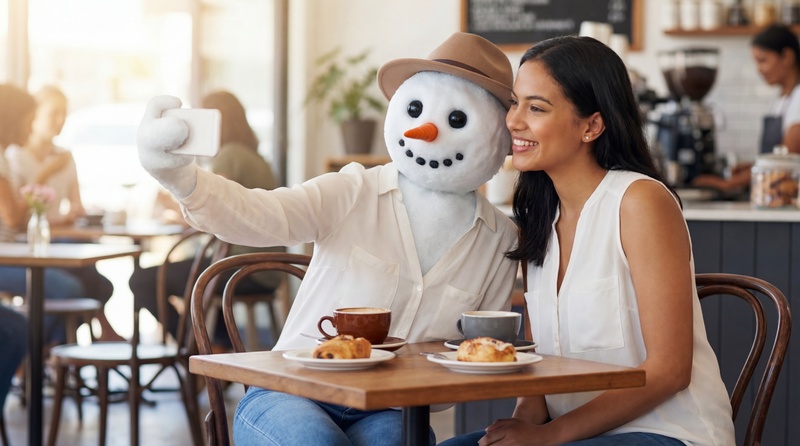
When we discuss AI snowman and the generators that create them, we are looking at a fusion of traditional winter nostalgia and modern generative technology. In 2025, this has evolved beyond just making pictures. We aim in this article to show you how to transform photos with AI snowman filters.
Part 1: What Is AI Snowman Filter
An AI snowman filter (often referred to as the "AI Snow Trend" or "AI Winter Filter") is a viral social media effect that uses generative artificial intelligence to transform a standard photo or video into a cinematic winter scene. While many traditional filters just overlay static "flakes" on top of your photo, the AI version actually re-renders the environment to make it look like you are physically in a winter storm.
1 How the Filter Works
- Scene Analysis: The AI identifies objects in your photo (your face, your clothes, trees, or buildings).
- Environmental Transformation: It changes the lighting to "cold" tones, adds frost to surfaces, and often places a realistic AI Snowman next to you.
- Physical Interaction: High-end AI filters (like those in Meitu or Remini) make the snow appear to land on your eyelashes, hair, and shoulders, rather than just floating in front of the camera.
- Character Generation: Some "Snowman Generators" take your facial features and create a "Snowman version" of you—a 3D character that mimics your expressions.
2 Popular Apps to Get the Filter (2025)
- Edimakor AI: Currently one of the most popular computer softwares for creating the viral "Icy AI" look.
- Meitu: The most common source for the "Icy You" or "Snowy Moments" cinematic look.
- TikTok/Instagram: Search for filters named "AI Snow," "Winter Wonderland AI," or "Snowman Face."
- Snow AI (Glow App): A dedicated app for creating aesthetic, high-quality winter portraits.
- Media.io: A popular web-based generator used for the "Snowman Friend" style, where a cute AI snowman is added to your portrait.
Part 2: How to Make Yourself into a Snowman with AI in a Video
Making yourself into a snowman in a video is one of the more advanced uses of generative AI, moving beyond simple image filters into AI Video-to-Video (Vid2Vid) synthesis. In late 2024 and 2025, tools like Edimakor AI, Runway Gen-2, and Luma Dream Machine have made this process much more accessible. Here's how to make yourself into a snowman using the Edimakor AI Image to video:
AI Snowman Video Prompt:
Transform the person in the photo into a friendly AI snowman while keeping the exact same outfit, hat, and background from the original image. The snowman's body should have a realistic crunchy snow texture. The original clothing should drape naturally over the snowman's round body. Subtle head tilt and blinking coal eyes, 4k, cinematic lighting.
Step 1: Launch the Edimakor AI software on your computer, go to the toolbox and select “ Image to Video ”.

Step 2: Hit the upload an image button to import your photo and edit your image by selecting aspect ratio and hitting the “Ok” button.
Step 3: Scroll down to enter prompt, select video duration and resolution before the “Generate” button.
Step 4: Drag and drop your result to the timeline to preview it and hit the “Export” button to save and share.
Part 3: How to Make Yourself into a Snowman with AI Photo Filter
Turning yourself into a snowman using AI photo filters is a mix of facial recognition and generative art. Unlike old-school stickers, modern AI "re-renders" your features so you actually appear to be made of snow while maintaining your distinct look. Here's how to make yourself into a snowman using Edimakor AI image generator:
AI Snowman Photo Filter Prompt:
Convert the person into a cute 3D snowman while maintaining the original setting and wardrobe. The snowman is wearing the same clothes as the person in the reference photo. The snowman smiles and waves a twig arm. High fidelity, retain original lighting and environment, professional VFX.
Step 1: On the Edimakor AI software home screen, go to the toolbox, click on “Image” and select “Reference Image”.


Step 2: Describe your image in the prompt interface.
Step 3: Scroll down to select image resolution, aspect ratio and output quality before hitting the “Generate” button.
Step 4: Click the result to preview and hover to hit the location icon to get the ai snowman image in your computer.
Part 4: How to Use AI Snowman Effect in Tiktok
The AI Snowman Effect on TikTok is currently part of a massive winter transformation trend. Here is how you can use these effects using TikTok's built-in tools:
- Open the TikTok camera, tap Effects, and search for "AI Snow," "Snowman," or "Winter Wonderland."
-
Many users use the "AI Manga" or "AI Style" filters while standing in the snow to see if the AI turns them into a 3D snowman character.
Pros: It's free and instant.
Cons: The AI isn't as powerful as dedicated editors, so the "snowman" look might look more like a cartoon than a realistic 3D model.
Part 5: How to Create Cute AI Snowman
Creating a Cute AI snowman is all about focusing on specific proportions and textures that trigger an emotional "aww" response. Here's how to create a cute AI snowman image using Edimakor AI image generator:
Step 1: On the Edimakor AI interface, scroll down to “AI Image Effects > Christmas” and browse the library to find “Cute Snowman.” Hover on it and hit the button.
Step 2: Edit the prompt and adjust the settings for a custom AI snowman.
Step 3: Drag and drop your image to the timeline to preview it. You can hit the camera icon to save and share.
FAQs on AI Snowman
A1: "Frosty the Snowman AI Voice" refers to the use of AI Voice Cloning and Text-to-Speech (TTS) technology to recreate the iconic voices associated with the classic holiday character.
A2: The voice of Olaf, the lovable snowman from Disney's Frozen franchise, is provided by American actor and comedian Josh Gad.
A3: To get high-quality HD snowman wallpapers for your devices, you can browse dedicated wallpaper platforms or use AI generators (like the Edimakor AI) to create a custom one.
Conclusion
AI allows us to simulate and interact with snow in ways that aren't possible in real life, the benefits range from accessibility to advanced engineering. With the Edimakor AI , small businesses can generate high-quality holiday mascots and marketing materials without hiring a professional illustrator.
Leave a Comment
Create your review for HitPaw articles