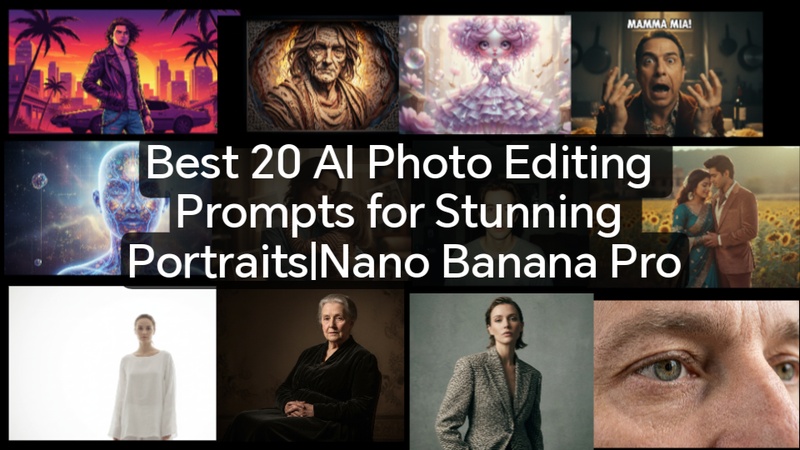
AI picture editing has fundamentally altered the process of creating portraits, enabling anyone to obtain studio-caliber outcomes with straightforward instructions. The top 20 Gemini AI prompts for 4K portraits with Nano Banana Pro are shared in this guide.
Part 1: Best 20 Gemini AI Prompts For 4K Photos To Portrait
Beautiful 4K photos and images in a variety of styles, from nostalgic and hyper-realistic to cinematic, editorial, and fantasy, can be unlocked with these 20 Gemini AI prompts, including the best Gemini prompts for images. You may easily generate polished, visually appealing results with each request.
1. Commercial Editorial
Best for:
High-end magazine-style portraits, fashion shoots, and lifestyle campaigns with polished lighting and crisp details using Gemini portrait prompts.
Prompt:
High-end editorial portrait, professional lighting, crisp detail, fashion-forward clothing, studio backdrop, 4K resolution, cinematic composition, magazine-quality, realistic textures, modern style photography. Use this Gemini prompt for professional photo results.

2. Golden Hour Cinematic
Best for:
Warm, atmospheric portraits with soft sunlight, long shadows, and a dramatic, story-driven cinematic vibe.
Prompt:
Portrait at golden hour, soft warm sunlight, long shadows, cinematic composition, natural glow on skin, dreamy atmosphere, shallow depth of field, 4K ultra-detailed image.
3. Neo-Noir Night
Best for:
Moody urban scenes with deep shadows, neon lights, and stylish nighttime cinematic aesthetics.
Prompt:
Urban night portrait, neon reflections, deep shadows, moody cinematic style, rain-soaked streets, high contrast lighting, 4K resolution, futuristic noir aesthetic.
4. Macro Detail Close-Up
Best for:
Extreme close-ups capturing textures, skin, or product details with ultra-sharp 4K precision.
Prompt:
Extreme close-up portrait, ultra-sharp 4K, detailed skin texture, realistic eyes, high-resolution macro photography, fine detail, crisp focus on facial features
5. Vintage Hollywood Glamour
Best for:
Classic 1940s–50s portrait aesthetics with soft focus, dramatic lighting, and elegant retro style.
Prompt:
Classic Hollywood glamour portrait, soft focus, dramatic studio lighting, elegant retro style, vintage 1940s aesthetics, 4K high-resolution, sophisticated mood.
6. Cyberpunk Street Style
Best for:
Futuristic, neon-lit urban environments with edgy, high-fashion street portraits.
Prompt:
Futuristic street portrait, neon-lit urban background, edgy fashion, cyberpunk aesthetic, glowing signs, reflective surfaces, 4K cinematic detail, high-tech vibe.
7. Ethereal Fantasy Art
Best for:
Dreamy, otherworldly portraits with magical lighting, soft glows, and whimsical fantasy elements.
Prompt:
Dreamy fantasy portrait, soft glowing light, ethereal atmosphere, whimsical magical elements, flowing hair, mystical colors, 4K ultra-detailed fantasy illustration.
8. Rugged National Geographic
Best for:
Outdoor adventure portraits emphasizing natural landscapes, harsh textures, and authentic environmental storytelling.
Prompt:
Outdoor adventure portrait, rugged natural landscape, authentic textures, harsh sunlight, dramatic environment, storytelling composition, 4K realistic nature photography.
9. Rembrandt Studio Classic
Best for:
Timeless studio portraits with dramatic Rembrandt lighting, rich shadows, and classical composition.
Prompt:
Classic studio portrait, Rembrandt lighting, deep shadows and highlights, timeless composition, elegant pose, 4K high-resolution, realistic skin tones.
10. Sports Action Freeze
Best for:
Dynamic sports shots capturing movement, energy, and precise, frozen-in-time action moments.
Prompt:
Dynamic sports portrait, action frozen in motion, high-speed capture, dramatic lighting, detailed textures, 4K ultra-clear sports photography, energetic composition.
11. Cloud Dancer
Best for:
Minimalist, airy, high-key white portraits focused on calm, clarity, and soft atmospheric light.
Prompt:
Minimalist portrait, airy high-key white background, soft atmospheric lighting, calm and serene mood, subtle shadows, 4K ultra-detailed image, clean aesthetic.
12. 90s Retro Bollywood
Best for:
Nostalgic saree or suit portraits with golden-hour backlighting, soft film grain, and romantic dreamy moods.
Prompt:
Nostalgic Bollywood portrait, saree or suit, golden-hour backlighting, soft film grain, dreamy romantic mood, 90s retro colors, 4K high-resolution cinematic photo.
13. 3D Claymation Figurine
Best for:
Stop-motion style portraits with plasticine textures, fingerprint details, and tilt-shift effects.
Prompt:
Stop-motion style 3D claymation portrait, plasticine textures, fingerprints, tilt-shift photography, whimsical miniature look, 4K ultra-detailed illustration.
14. Hugging My Past Self
Best for:
Modern 4K portraits blended with faded Polaroids to capture the viral inner child nostalgic trend.
Prompt:
4K portrait blending modern and nostalgic elements, adult hugging younger self, faded Polaroid overlay, soft lighting, emotional storytelling, and realistic facial expressions.
15. 1995 Disposable Camera
Best for:
Raw, unpolished candid shots with harsh flash, red-eye, and authentic imperfection effects.
Prompt:
Retro disposable camera style portrait, harsh flash, red-eye effect, candid unpolished look, soft film grain, authentic 90s imperfection, 4K high-resolution image.
16. GTA Loading Screen Art
Best for:
Bold vector illustration portraits with high contrast, black outlines, and saturated sunset tones.
Prompt:
High-contrast vector portrait, bold black outlines, saturated sunset colors, stylized illustration, GTA video game aesthetic, 4K ultra-detailed digital art.
17. Papercut Lightbox
Best for:
Layered paper portraits with LED backlighting create 3D relief shadows and artistic depth.
Prompt:
Layered paper portrait, internal LED backlighting, deep 3D relief shadows, intricate papercut design, dramatic depth, 4K ultra-detailed artistic illustration.
18. Blythe Doll Realism
Best for:
Whimsical hyper-stylized portraits with oversized eyes, porcelain skin, and doll-like proportions.
Prompt:
Hyper-stylized portrait, oversized glossy eyes, porcelain skin, whimsical high-fashion doll proportions, soft lighting, 4K ultra-detailed illustration, playful and surreal aesthetic.
19. Italian Hand Gesture
Best for:
Expressive, dramatic portraits emphasizing cinematic hand gestures and exaggerated reactions.
Prompt:
Expressive cinematic portrait, exaggerated Italian hand gestures, dramatic reaction, high-resolution 4K, vibrant colors, detailed facial expressions, meme-core humor style.
20. Bioluminescent X-Ray
Best for:
Scientific poetic portraits showing glowing veins or floral patterns beneath translucent skin.
Prompt:
Translucent skin portrait, glowing veins and floral patterns beneath the surface, ethereal lighting, scientific poetry aesthetic, mystical X-ray look, 4K ultra-detailed illustration.
If you’re looking for a 4K prompt for Gemini to enhance images you already have, you can try our latest Gemini 4K Prompts to improve image quality & clarity.
Part 2: How to Create AI Portraits with Gemini Using Photo Editing Prompts
By using AI prompts, you can convert ordinary photos into professional, artistic, or cinematic portraits within minutes. These Gemini prompts for image editing help create different portrait styles. Let us explore two effective methods for turning photos into portraits:
- Firstly, visit the official Gemini AI platform and sign in using your Google account.
- Next, upload the photo you want to convert into a stylish portrait, or describe the person clearly if image upload is supported.
- Then, enter a detailed prompt describing the portrait style, lighting, background, and mood.
- After that, click Generate and allow Gemini to process your request.
Part 3: How to Turn Photos into Stylish Portraits without AI Prompts
HitPaw Ediamkor is an outstanding AI tool that combines AI image generation, image editing and video generation. You can either use the prompt generator or create portraits using existing templates, without needing Gemini prompts for image editing.

Step 1: Firstly, download, install, and open Edimakor on your device. Next, open the Toolbox, go to the Image section, and select the Reference Image option.
Step 2: Secondly, choose Nano Banana as the AI model. Now, upload the photo that you want to transform into a portrait. GPT Image 2 is also avaliable in Edimakor.
Step 3: Then, write your own portrait prompt or use Edimakor’s Prompt Generator to automatically create a detailed AI prompt.
Step 4: Next, customize your output by adjusting resolution for image clarity, aspect ratio for social media or professional use, and output quantity if you want multiple portrait variations. Hit Generate.
Step 5: Finally, click Export to save your stylish AI portrait in high quality. Want higher resolution? Try Edimakor's AI image enhancer.
Bonus Step Go to Image Effects, and pick the one you like. So you can get a stunning potrait in minutes without prompts.
FAQs About Gemini AI Photo Editing
A1: True 4K image creation is supported by Gemini AI. It employs sophisticated algorithms to preserve sharpness and great detail, guaranteeing outputs that are appropriate for digital displays, big printing, and professional use without appreciable quality loss.
A2: The appearance of false AI is decreased by using natural, targeted, and context-rich keywords. Incorporate human flaws, realistic textures, lighting references, and environmental clues. Steer clear of extremely generic or stereotyped expressions, as they may have unexpected outcomes.
A3: Absolutely. Post-generation adjustments are possible with Gemini AI, enabling you to add background objects, modify colors, change lighting, and enhance facial features. This guarantees that the finished portrait reflects your vision without having to start from zero.
A4: Diffused, soft, and directed lighting adds a sense of depth and elegance. Gently draw attention to the rim light, highlights, and shadows. To give photos an upscale, polished appearance, steer clear of flat lighting and use warm tones that resemble studio sets.
A5: Indeed, Gemini AI is capable of turning doodles into intricate 4K portraits. Just import the sketch and specify the resolution, lighting, and style. The AI adds textures, hues, and realistic depth while maintaining the original lines.
Key Takeaways
With Nano Banana Pro and Gemini AI, these 20 Gemini AI prompts for image generation and stunning portraits assist you in producing images that seem professional. The HitPaw Edimakor (Video Editor) adds AI upscaling, color correction, and seamless integration for the last polish, preparing portraits for branding, social media, and imaginative storytelling.
Leave a Comment
Create your review for HitPaw articles