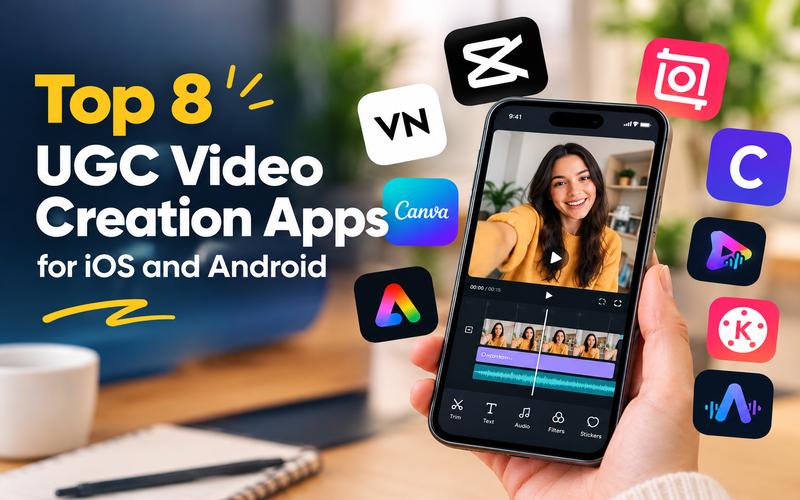
Content creation has changed forever. Today, audiences crave authenticity over high budget productions. This shift makes user generated content (UGC) the most powerful tool for brands and influencers alike. To keep up, you need the right tools on your smartphone. Whether you are a beginner or a pro, finding the best UGC video creation apps for iOS and Android is essential to staying competitive. This article explores the best UGC video creation apps for iOS and Android to help you create viral content quickly.
How We Compare Mobile UGC Video Editing Apps
We compare mobile UGC video editing apps across several key dimensions to help you find the right tool. Our evaluation focuses on how these tools serve the specific needs of UGC creators who often work alone and need to produce high volumes of content quickly.
- Mobile workflow: How easily can you record, import, edit, and share videos on a phone?
- Editing controls: Does the app offer trimming, transitions, speed changes, and layered editing?
- Captions and text: Can you add subtitles, product details, hooks, and calls to action?
- UGC specific workflows: Does it support talking head videos, product demos, voiceovers, and social media ads?
- Export quality: Can you export clear videos in formats suitable for TikTok, Instagram Reels, and YouTube Shorts?
- Free tier value: Which useful features are available without a paid subscription? Many top UGC video creation apps offer free tiers, letting users create without a massive initial investment.
- Ease of use: Can beginners create polished videos without a steep learning curve?
Best UGC Video Creation Apps for iOS and Android at a Glance
The following table provides a quick summary of our reviews of ugc video makers with mobile support.
| App | Mobile Platforms | Core Editing Focus | UGC Workflow to Highlight | Free Plan |
|---|---|---|---|---|
| CapCut | iOS, Android, Web | Viral AI Templates | One-tap social trends | Free tier available; no watermark on web/certain exports. |
| InShot | iOS, Android | Simple Social Edits | Speed curves & stickers | Comprehensive free features; watermark removal via ads/pro. |
| VN Editor | iOS, Android, Mac | Pro Precision | Watermark-free 4K | 100% free core features with no watermarks. |
| Canva | iOS, Android, Web | Brand Management | Creator Portfolios | Free no-watermark editor; Pro for brand kits and premium assets. |
| Adobe Express | iOS, Android, Web | Marketing Speed | Content Scheduling | Free plan with thousands of templates; syncs across devices. |
| Captions | iOS, Android, Web | Talking Heads | AI Eye Contact | Free sign-up; subscription required for full capabilities. |
| PowerDirector | iOS, Android | High Production | AI Motion Swap | "Essential" version is free; advanced AI requires subscription. |
| KineMaster | iOS, Android | Desktop like Power | 75k+ Asset Store | Free version available; subscription for no watermarks and full store. |
Top UGC Video Editing Apps for Content Creators
The following apps are some of the best UGC video editing tools for content creators in 2026. Each app offers different features to help you create engaging videos, edit product reviews, and make social media content.
1. CapCut — Best for Trending Social Content & AI Tools

CapCut is the global leader for creators who want to tap into viral trends instantly. It offers a massive library of user-generated templates and AI tools. The app simplifies complex edits like background removal and text-to-speech. You can automatically create professional designs and layouts for social media marketing. Its stable performance ensures the editor never crashes mid-project.
UGC Capabilities:
- Expansive library of trending UGC creator templates
- AI Video Studio that builds videos from text prompts and chat instructions.
- Auto caption generator that supports multiple languages with one click.
- One-click background removal for professional product showcases.
- Trending music library synced directly with current social media hits.
Limitations:
- Many advanced AI effects and high-resolution exports are locked behind the Pro subscription.
- Privacy concerns occasionally arise due to its data collection policies.
Pricing: Free version available; CapCut Pro starts at approximately $9.99/month, offering expanded cloud storage and premium AI tools.
2. InShot — Best for Simple, All-in-One Editing
InShot provides a streamlined, all-in-one editor that is exceptionally easy for new creators to navigate. It balances professional features like keyframe animation with a simple interface. The app is perfect for quick social posts and photo-to-video transitions. Its materials library offers extensive intro and outro options. The UI is friendlier than desktop tools. It remains a reliable staple for consistent mobile content creation.
UGC Capabilities:
- Advanced auto-captions with high accuracy for accessibility.
- Exclusive AI effects like line art and dizzying transitions for dynamic content.
- Comprehensive music and sound effect library with royalty-free tracks.
- Picture-in-Picture (PIP) feature for reacting to products or overlays.
- Sticker and text libraries that are updated frequently with seasonal assets.
Limitations:
- The free version may include advertisements during the workflow.
- Exporting extremely long projects can be slower on basic devices.
Pricing: Free to use; InShot Pro is available for roughly $3.99/month or a lifetime purchase, removing ads and watermarks.
3. VN Video Editor — Best for No Watermark Pro Tools
VN Video Editor stands out by offering professional features without the intrusive watermarks typical of free apps. It provides a full non-linear editing (NLE) experience on mobile, including a multi-track timeline that allows complex layering of video, audio, and stickers. The app includes high-end tools like speed curves and frame-precise trimming. The interface is clean and works effectively on mobile.
UGC Capabilities:
- Professional multi-track timeline for complex layering.
- Advanced AI cutout and background removal tools.
- Built-in “BeatsClips” for auto-syncing edits to music.
- No watermark exports even in the standard free version.
- Professional color grading tools with LUT support to give your UGC a cinematic look.
- Over 150 free templates for instant high-quality starts.
Limitations:
- The interface may feel slightly complex for absolute novices.
- Requires manual learning of keyframe controls for best results.
Pricing: Completely free version available; Pro features and templates can be accessed through a subscription or one time payment
4. Canva — Best for Design First Video Assets
Canva is not just a design tool. Its video editor is a powerhouse for creators who need to maintain brand consistency. It offers specialized UGC creator templates for portfolios, brand boards, and “hook” videos. This helps creators pitch to brands and produce polished advertisements. You can resize videos instantly to share everywhere on any feed. It is ideal for creators managing multiple social channels.
UGC Capabilities:
- AI powered “Highlights” to instantly find the best footage.
- Magic Video tool to generate social clips from prompts.
- One click background removal for professional, isolated product shots.
- Massive collection of UGC creator portfolios and brand boards
- Collaboration tools that allow brands and creators to edit the same project.
- Easy social media resizing for multi platform campaigns.
Limitations:
- Precision timeline editing is less granular than dedicated video apps.
- Many high end stock assets require a Canva Pro subscription.
Pricing: Free version available; Canva Pro is approximately $12.99/month, providing unlimited access to premium assets and brand kits.
5. Adobe Express — Best for Branding and Social Scheduling
Adobe Express offers a powerful drag and drop editor that simplifies creating branded content. It integrates high quality stock media and professional design assets into a mobile friendly interface. The unique content scheduler allows creators to plan and publish directly from the app. It supports quick actions like video to GIF conversion and trimming. It is a robust solution for maintaining a professional online presence.
UGC Capabilities:
- Intelligent resizing for Instagram Reels, Stories, and TikTok.
- Integrated content scheduler for automated social publishing.
- Access to high quality stock music and graphics templates.
- Quick conversion tools for trimming and cropping on the go.
- Use generative AI tools for creating unique text effects and images to enhance videos.
Limitations:
- Deep technical color grading tools are limited in the mobile app.
- Requires an Adobe account for full project synchronization.
Pricing: Free to use for basic video creation and MP4 export; the Premium plan is roughly $9.99/month, offering advanced editing and more storage
6. Captions — Best for AI Powered Subtitles and Avatars
Captions is a specialized tool that uses AI to revolutionize post-production for “talking head” videos. It is essential for creators who do educational UGC or face-to-camera testimonials. It offers features that fix common filming mistakes like poor eye contact or awkward pauses. It supports translation into 100+ languages with incredible accuracy. You can generate entirely new footage without recording yourself.
UGC Capabilities:
- Studio-quality automatic captions with stylized font options.
- AI Avatar and Digital Twin creation for consistent branding.
- Automatic eye-contact correction for more engaging delivery.
- AI-driven translation and subtitling in 100+ languages.
- One-tap removal of background noise and filler words.
Limitations:
- AI-generated content may require minor manual review for accuracy.
- Most advanced AI editing tools require a paid subscription to export videos.
Pricing: Free to sign up and explore; subscription required for professional quality exports.
7. PowerDirector — Best for Professional Multi-Track AI Editing
PowerDirector is an award-winning editor that brings professional NLE capabilities to mobile devices. It supports high-resolution exports up to 4K for scroll-stopping results. You can easily trim, cut, and crop clips in minutes. It stands out for its cutting-edge AI features, such as “AI Video Edit by Chat,” which lets creators direct edits using natural language. This makes it a top contender among mobile UGC video editing apps.
UGC Capabilities:
- AI Text-to-Video and Image to Video cinematic generation.
- Professional multi-track timeline for precise layering.
- Advanced AI video enhancer for upscaling blurry footage.
- Smart background removal and green screen (chroma key).
- High resolution export support up to 4K at various bitrates.
Limitations:
- The free version includes advertisements and a watermark.
- The interface is feature-dense, which can create a steeper learning curve for new users.
Pricing: Free to download with ads; Premium subscription removes ads and adds Getty stock assets.
8. KineMaster — Best for High Resolution Mobile Production
KineMaster offers a full landscape editing experience that mirrors professional desktop workflows. It supports AI tracking and automatic captions in 36 languages. It is perfect for creators who need pixel perfect control over every layer, sticker, and effect in their UGC. This makes it one of the top ugc video editing apps for content creators who demand precision
UGC Capabilities:
- Professional 4K export at 60 FPS for high end results.
- “Magic Remover” uses AI to cut out figures and remove backgrounds accurately in one tap.
- Access thousands of stickers, fonts, and transitions.
- Use AI tracking to make text and images follow moving objects.
- Edit audio by adjusting pitch, adding echo, and changing voice effects.
Limitations:
- Full screen timeline can take time to master for new users.
- The vast number of assets can be overwhelming to navigate.
Pricing: The app is free to download, while the Premium plan removes watermarks and unlocks all premium assets.
Bonus: Best Desktop Software for UGC Video Editing
While mobile apps are excellent for speed, a desktop workflow often offers more power for long form or high production UGC projects. If you need more than your phone can offer, we recommend switching to HitPaw Edimakor.
HitPaw Edimakor is an AI-driven video editor that specializes in rapid AI UGC creation. It bridges the gap between raw ideas and professional social media ads with hyper realistic AI actors and advanced automation.
Key Features for AI UGC Video Creation
- Realistic AI Actors: Generate UGC style videos with AI avatars that speak with natural voices and accurate lip-syncing.
- UGC Preset Templates: Choose from pre-made layouts designed for beauty, electronics, fashion, and more to save hours of production time.
- AI Dubbing and Subtitles: Quickly translate and localize your video content for global markets while maintaining the original tone.
- Direct Social Export: Optimized export settings for vertical platforms like TikTok and YouTube Shorts.
How to Create a UGC Video with HitPaw Edimakor:
Step 1: Select Your Mode: Launch Hitpaw Edimakor and open the “AI Ads” tool. Choose the “Product Character” option to start your UGC style project.


Step 2: Add Your Assets: Upload your product images and choose a realistic AI actor that fits your brand. Enter your script, select an AI voice or upload your own voiceover, and choose the video aspect ratio for your target platform.
Step 3: Generate and Export : Describe any specific camera movements or background details in the prompt box, then click “Generate.” Once finished, you can export the video directly to social media in vertical or square formats.
FAQs About Mobile UGC Video Creation Apps
A1: The best app depends entirely on your specific workflow and goals. CapCut is the most popular for viral trends and social media templates, while Captions is the leader for automated talking head content. If you need professional manual control for free, VN Video Editor is an excellent choice.
A2: Yes, VN Video Editor is one of the best options because its free tier lets you export high quality videos without a watermark. CapCut also offers watermark free 1080p exports on its basic plan, although some specific AI tools or templates may include one.
A3: Both CapCut and Captions offer industry leading AI auto captioning features that are highly accurate. KineMaster is also a strong contender, supporting AI captions in 36 languages for a global audience.
A4: Yes, tools like HitPaw Edimakor let you use hyper realistic AI avatars to deliver your script, so you can create authentic looking UGC without showing your face. This is best for brands or creators who want to stay anonymous or cut production costs.
Conclusion
Choosing the right tool from the best UGC video creation apps for iOS and Android is the first step toward social media success. There is an option for every workflow, whether you prefer the simplicity of InShot or the AI power of Captions. We highly recommend trying HitPaw Edimakor for those looking to take their content to the next level on a computer. Its AI driven features make professional UGC creation faster than ever. Download HitPaw Edimakor today and start creating!
Leave a Comment
Create your review for HitPaw articles